2005 CHEVROLET ASTRO maintenance schedule
[x] Cancel search: maintenance schedulePage 1 of 376

Seats and Restraint Systems........................... 1-1
Front Seats
............................................... 1-3
Rear Seats
............................................... 1-7
Safety Belts
.............................................1-18
Child Restraints
.......................................1-38
Airbag System
.........................................1-63
Restraint System Check
............................1-70
Features and Controls..................................... 2-1
Keys
........................................................ 2-2
Doors and Locks
....................................... 2-6
Windows
.................................................2-14
Theft-Deterrent Systems
............................2-16
Starting and Operating Your Vehicle
...........2-16
Mirrors
....................................................2-28
HomeLink
®Transmitter
.............................2-29
Storage Areas
.........................................2-33
Instrument Panel............................................. 3-1
Instrument Panel Overview
.......................... 3-4
Climate Controls
......................................3-19
Warning Lights, Gages, and Indicators
........3-23
Driver Information Center (DIC)
..................3-37
Audio System(s)
.......................................3-39Driving Your Vehicle....................................... 4-1
Your Driving, the Road, and Your Vehicle
..... 4-2
Towing
...................................................4-33
Service and Appearance Care.......................... 5-1
Service
..................................................... 5-3
Fuel
......................................................... 5-5
Checking Things Under the Hood
...............5-10
All-Wheel Drive
........................................5-47
Rear Axle
...............................................5-48
Front Axle
...............................................5-49
Bulb Replacement
....................................5-50
Windshield Wiper Blade Replacement
.........5-57
Tires
......................................................5-58
Appearance Care
.....................................5-84
Vehicle Identication
.................................5-93
Electrical System
......................................5-94
Capacities and Specications
...................5-101
Normal Maintenance Replacement Parts
....5-102
Maintenance Schedule..................................... 6-1
Maintenance Schedule
................................ 6-2
Customer Assistance and Information.............. 7-1
Customer Assistance and Information
........... 7-2
Reporting Safety Defects
...........................7-11
Index................................................................ 1
2005 Chevrolet Astro Owner ManualM
Page 149 of 376

Oil Pressure Gage
The oil pressure gage
shows the engine oil
pressure in psi (pounds
per square inch) when the
engine is running.
Canadian vehicles indicate pressure in kPa (kilopascals).
Oil pressure may vary with engine speed, outside
temperature and oil viscosity, but readings above the low
pressure zone indicate the normal operating range.
A reading in the low pressure zone may be caused by
a dangerously low oil level or other problems causing
low oil pressure.{CAUTION:
Do not keep driving if the oil pressure is low.
If you do, your engine can become so hot that
it catches re. You or others could be burned.
Check your oil as soon as possible and have
your vehicle serviced.
Notice:Lack of proper engine oil maintenance
may damage the engine. The repairs would not be
covered by your warranty. Always follow the
maintenance schedule in this manual for changing
engine oil.
3-33
Page 210 of 376

When You Are Ready to Leave After
Parking on a Hill
1. Apply your regular brakes and hold the pedal down
while you:
start your engine,
shift into a gear, and
release the parking brake.
2. Let up on the brake pedal.
3. Drive slowly until the trailer is clear of the chocks.
4. Stop and have someone pick up and store the
chocks.
Maintenance When Trailer Towing
Your vehicle will need service more often when you’re
pulling a trailer. See the Maintenance Schedule for
more on this. Things that are especially important in
trailer operation are automatic transmission uid
(don’t overll), engine oil, axle lubricant, belt, cooling
system and brake system. Each of these is covered in
this manual, and the Index will help you nd them
quickly. If you’re trailering, it’s a good idea to review
these sections before you start your trip.
Check periodically to see that all hitch nuts and bolts
are tight.
4-44
Page 228 of 376

When to Change Engine Oil
If any one of these are true for you, use the short
trip/city maintenance schedule:
Most trips are less than 5 miles (8 km). This is
particularly important when outside temperatures
are below freezing.
Most trips include extensive idling, such as frequent
driving in stop-and-go traffic.
You frequently tow a trailer or use a carrier on top
of your vehicle.
The vehicle is used for delivery service, police, taxi,
or other commercial application.
Driving under these conditions causes engine oil to
break down sooner. If any one of these is true for your
vehicle, then you need to change your oil and lter
every 3,000 miles (5 000 km) or 3 months — whichever
occurs rst.
If none of them is true, use the long trip/highway
maintenance schedule. Change the oil and lter every
7,500 miles (12 500 km) or 12 months — whichever
occurs rst. Driving a vehicle with a fully warmed engine
under highway conditions will cause engine oil to
break down slower.
What to Do with Used Oil
Used engine oil contains certain elements that may be
unhealthy for your skin and could even cause cancer.
Do not let used oil stay on your skin for very long. Clean
your skin and nails with soap and water, or a good
hand cleaner. Wash or properly dispose of clothing or
rags containing used engine oil. See the manufacturer’s
warnings about the use and disposal of oil products.
Used oil can be a threat to the environment. If you
change your own oil, be sure to drain all the oil from the
lter before disposal. Never dispose of oil by putting it in
the trash, pouring it on the ground, into sewers, or into
streams or bodies of water. Instead, recycle it by taking it
to a place that collects used oil. If you have a problem
properly disposing of your used oil, ask your dealer, a
service station or a local recycling center for help.
5-16
Page 235 of 376

Automatic Transmission Fluid
When to Check and Change
A good time to check your automatic transmission uid
level is when the engine oil is changed.
Change both the uid and lter every 15,000 miles
(25,000 km) if the vehicle is mainly driven under one
or more of these conditions:
In heavy city traffic where the outside temperature
regularly reaches 90°F (32°C) or higher.
In hilly or mountainous terrain.
When doing frequent trailer towing.
Uses such as found in taxi, police or delivery
service.
If you do not use your vehicle under any of
these conditions, change the uid and lter every
50,000 miles (83 000 km).
SeePart A: Scheduled Maintenance Services on
page 6-4.
How to Check
Because this operation can be a little difficult, you may
choose to have this done at the dealership service
department.
If you do it yourself, be sure to follow all the instructions
here, or you could get a false reading on the dipstick.
Notice:Too much or too little uid can damage
your transmission. Too much can mean that some
of the uid could come out and fall on hot engine
part or exhaust system parts, starting a re.
Too little uid could cause the transmission to
overheat. Be sure to get an accurate reading if you
check your transmission uid.
Wait at least 30 minutes before checking the
transmission uid level if you have been driving:
When outside temperatures are above 90°F (32°C).
At high speed for quite a while.
In heavy traffic — especially in hot weather.
While pulling a trailer.
To get the right reading, the uid should be at
normal operating temperature, which is 180°F to 200°F
(82°C to 93°C).
5-23
Page 237 of 376
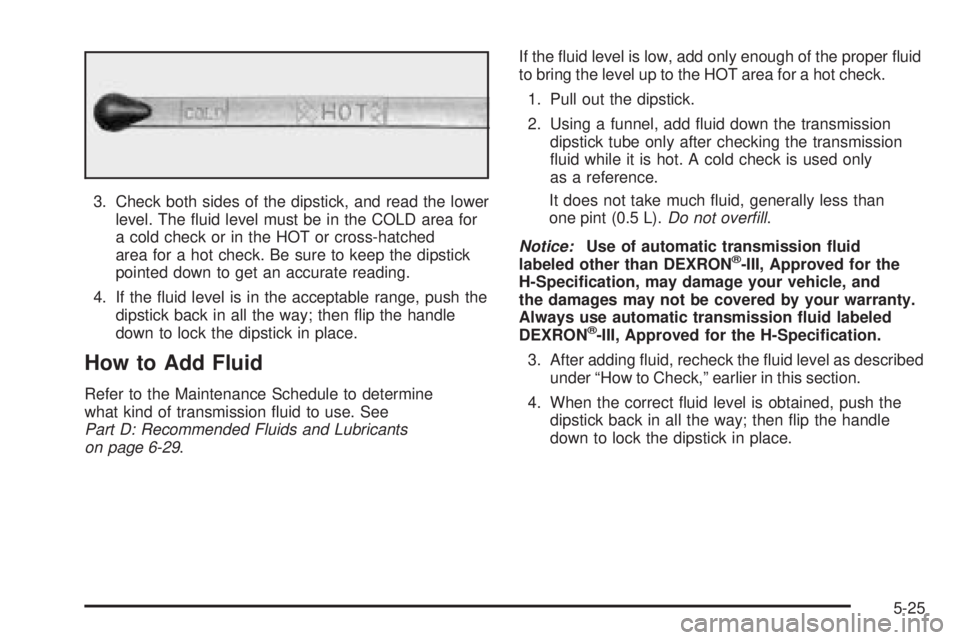
3. Check both sides of the dipstick, and read the lower
level. The uid level must be in the COLD area for
a cold check or in the HOT or cross-hatched
area for a hot check. Be sure to keep the dipstick
pointed down to get an accurate reading.
4. If the uid level is in the acceptable range, push the
dipstick back in all the way; then ip the handle
down to lock the dipstick in place.
How to Add Fluid
Refer to the Maintenance Schedule to determine
what kind of transmission uid to use. See
Part D: Recommended Fluids and Lubricants
on page 6-29.If the uid level is low, add only enough of the proper uid
to bring the level up to the HOT area for a hot check.
1. Pull out the dipstick.
2. Using a funnel, add uid down the transmission
dipstick tube only after checking the transmission
uid while it is hot. A cold check is used only
as a reference.
It does not take much uid, generally less than
one pint (0.5 L).Do not overll.
Notice:Use of automatic transmission uid
labeled other than DEXRON
®-III, Approved for the
H-Specication, may damage your vehicle, and
the damages may not be covered by your warranty.
Always use automatic transmission uid labeled
DEXRON
®-III, Approved for the H-Specication.
3. After adding uid, recheck the uid level as described
under “How to Check,” earlier in this section.
4. When the correct uid level is obtained, push the
dipstick back in all the way; then ip the handle
down to lock the dipstick in place.
5-25
Page 250 of 376

Brakes
Brake Fluid
Your brake master cylinder
reservoir is lled with
DOT-3 brake uid. See
Engine Compartment
Overview on page 5-12
for the location of the
reservoir.
There are only two reasons why the brake uid level
in the reservoir might go down. The rst is that the brake
uid goes down to an acceptable level during normal
brake lining wear. When new linings are put in, the
uid level goes back up. The other reason is that uid is
leaking out of the brake system. If it is, you should
have your brake system xed, since a leak means that
sooner or later your brakes will not work well, or will
not work at all.So, it is not a good idea to top off your brake uid.
Adding brake uid will not correct a leak. If you add uid
when your linings are worn, then you will have too
much uid when you get new brake linings. You should
add or remove brake uid, as necessary, only when
work is done on the brake hydraulic system.
{CAUTION:
If you have too much brake uid, it can spill on
the engine. The uid will burn if the engine is
hot enough. You or others could be burned,
and your vehicle could be damaged. Add brake
uid only when work is done on the brake
hydraulic system. See “Checking Brake Fluid”
in this section.
Refer to the Maintenance Schedule to determine
when to check your brake uid. SeePart C: Periodic
Maintenance Inspections on page 6-28.
5-38
Page 259 of 376
To disconnect the jumper cables from both vehicles,
do the following:
1. Disconnect the black negative (−) cable from the
vehicle that had the dead battery.
2. Disconnect the black negative (−) cable from the
vehicle with the good battery.
3. Disconnect the red positive (+) cable from the
vehicle with the good battery.
4. Disconnect the red positive (+) cable from the
other vehicle.
All-Wheel Drive
Lubricant checks in this section also apply to these
vehicles. However, there are two additional systems
that need lubrication.
Transfer Case
When to Check Lubricant
Refer to the Maintenance Schedule to determine how
often to check the lubricant. SeePart C: Periodic
Maintenance Inspections on page 6-28.
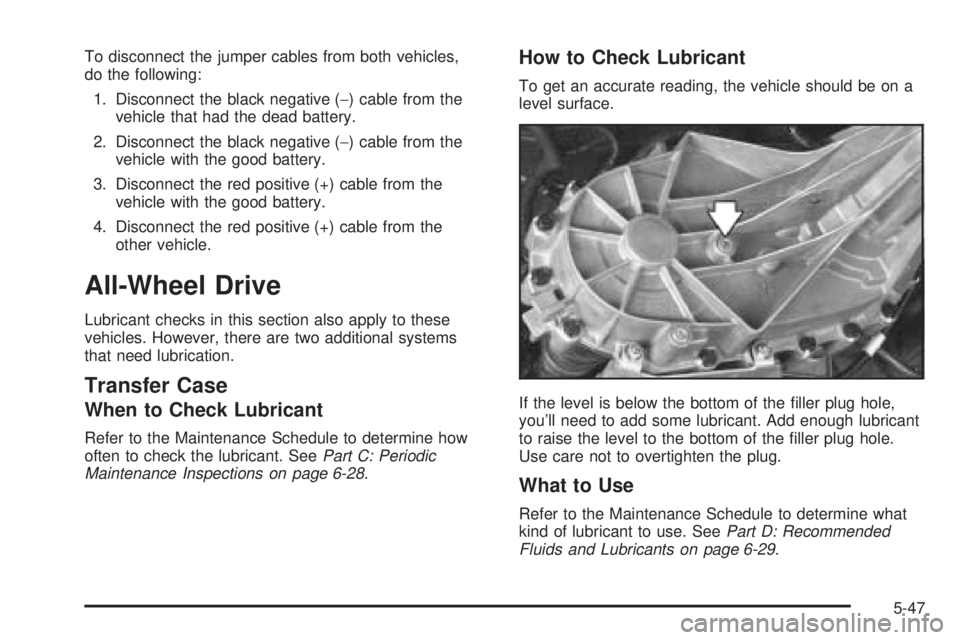
How to Check Lubricant
To get an accurate reading, the vehicle should be on a
level surface.
If the level is below the bottom of the ller plug hole,
you’ll need to add some lubricant. Add enough lubricant
to raise the level to the bottom of the ller plug hole.
Use care not to overtighten the plug.
What to Use
Refer to the Maintenance Schedule to determine what
kind of lubricant to use. SeePart D: Recommended
Fluids and Lubricants on page 6-29.
5-47