Page 216 of 376
Doing Your Own Service Work
If you want to do some of your own service work, you
will want to use the proper service manual. It tells
you much more about how to service your vehicle than
this manual can. To order the proper service manual,
seeService Publications Ordering Information on
page 7-12.
Your vehicle has an airbag system. Before attempting
to do your own service work, seeServicing Your
Airbag-Equipped Vehicle on page 1-69.
You should keep a record with all parts receipts and list
the mileage and the date of any service work you
perform. SeePart E: Maintenance Record on page 6-31.{CAUTION:
You can be injured and your vehicle could be
damaged if you try to do service work on a
vehicle without knowing enough about it.
Be sure you have sufficient knowledge,
experience, the proper replacement parts
and tools before you attempt any vehicle
maintenance task.
Be sure to use the proper nuts, bolts and
other fasteners. English and metric
fasteners can be easily confused. If you
use the wrong fasteners, parts can later
break or fall off. You could be hurt.
5-4
Page 217 of 376

Adding Equipment to the Outside
of Your Vehicle
Things you might add to the outside of your vehicle
can affect the airow around it. This may cause
wind noise and affect windshield washer performance.
Check with your dealer before adding equipment to
the outside of your vehicle.
Fuel
Use of the recommended fuel is an important part of
the proper maintenance of your vehicle.
Gasoline Octane
Use regular unleaded gasoline with a posted octane
of 87 or higher. If the octane is less than 87, you may get
a heavy knocking noise when you drive. If this occurs,
use a gasoline rated at 87 octane or higher as soon as
possible. Otherwise, you might damage your engine. A
little pinging noise when you accelerate or drive uphill is
considered normal. This does not indicate a problem
exists or that a higher-octane fuel is necessary. If you are
using 87 octane or higher-octane fuel and hear heavy
knocking, your engine needs service.
Gasoline Specications
It is recommended that gasoline meet specications
which were developed by automobile manufacturers
around the world and contained in the World-Wide Fuel
Charter which is available from the Alliance of Automobile
Manufacturers at www.autoalliance.org/fuel_charter.htm.
Gasoline meeting these specications could provide
improved driveability and emission control system
performance compared to other gasoline.
5-5
Page 228 of 376

When to Change Engine Oil
If any one of these are true for you, use the short
trip/city maintenance schedule:
Most trips are less than 5 miles (8 km). This is
particularly important when outside temperatures
are below freezing.
Most trips include extensive idling, such as frequent
driving in stop-and-go traffic.
You frequently tow a trailer or use a carrier on top
of your vehicle.
The vehicle is used for delivery service, police, taxi,
or other commercial application.
Driving under these conditions causes engine oil to
break down sooner. If any one of these is true for your
vehicle, then you need to change your oil and lter
every 3,000 miles (5 000 km) or 3 months — whichever
occurs rst.
If none of them is true, use the long trip/highway
maintenance schedule. Change the oil and lter every
7,500 miles (12 500 km) or 12 months — whichever
occurs rst. Driving a vehicle with a fully warmed engine
under highway conditions will cause engine oil to
break down slower.
What to Do with Used Oil
Used engine oil contains certain elements that may be
unhealthy for your skin and could even cause cancer.
Do not let used oil stay on your skin for very long. Clean
your skin and nails with soap and water, or a good
hand cleaner. Wash or properly dispose of clothing or
rags containing used engine oil. See the manufacturer’s
warnings about the use and disposal of oil products.
Used oil can be a threat to the environment. If you
change your own oil, be sure to drain all the oil from the
lter before disposal. Never dispose of oil by putting it in
the trash, pouring it on the ground, into sewers, or into
streams or bodies of water. Instead, recycle it by taking it
to a place that collects used oil. If you have a problem
properly disposing of your used oil, ask your dealer, a
service station or a local recycling center for help.
5-16
Page 235 of 376

Automatic Transmission Fluid
When to Check and Change
A good time to check your automatic transmission uid
level is when the engine oil is changed.
Change both the uid and lter every 15,000 miles
(25,000 km) if the vehicle is mainly driven under one
or more of these conditions:
In heavy city traffic where the outside temperature
regularly reaches 90°F (32°C) or higher.
In hilly or mountainous terrain.
When doing frequent trailer towing.
Uses such as found in taxi, police or delivery
service.
If you do not use your vehicle under any of
these conditions, change the uid and lter every
50,000 miles (83 000 km).
SeePart A: Scheduled Maintenance Services on
page 6-4.
How to Check
Because this operation can be a little difficult, you may
choose to have this done at the dealership service
department.
If you do it yourself, be sure to follow all the instructions
here, or you could get a false reading on the dipstick.
Notice:Too much or too little uid can damage
your transmission. Too much can mean that some
of the uid could come out and fall on hot engine
part or exhaust system parts, starting a re.
Too little uid could cause the transmission to
overheat. Be sure to get an accurate reading if you
check your transmission uid.
Wait at least 30 minutes before checking the
transmission uid level if you have been driving:
When outside temperatures are above 90°F (32°C).
At high speed for quite a while.
In heavy traffic — especially in hot weather.
While pulling a trailer.
To get the right reading, the uid should be at
normal operating temperature, which is 180°F to 200°F
(82°C to 93°C).
5-23
Page 237 of 376
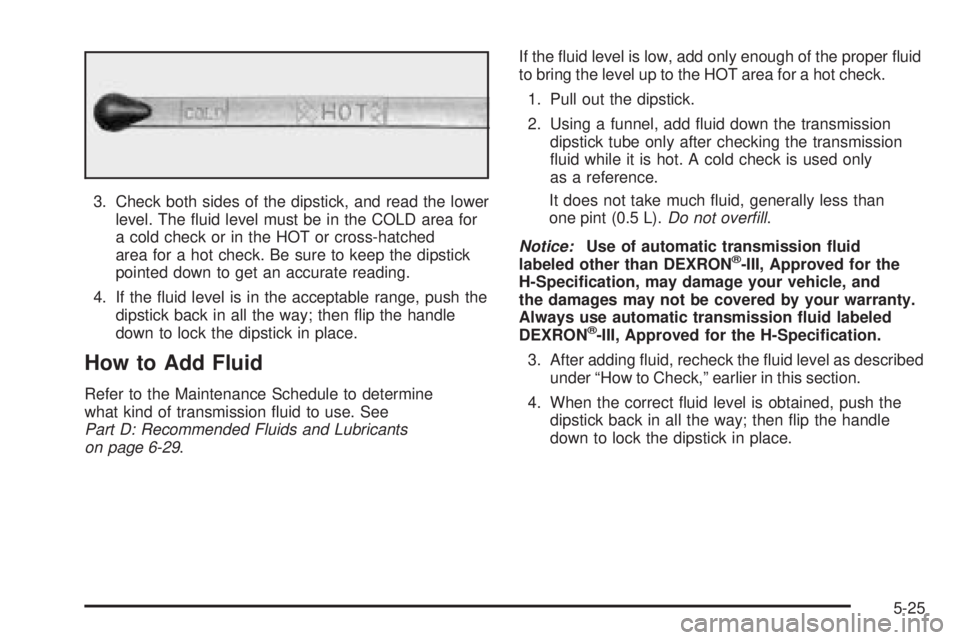
3. Check both sides of the dipstick, and read the lower
level. The uid level must be in the COLD area for
a cold check or in the HOT or cross-hatched
area for a hot check. Be sure to keep the dipstick
pointed down to get an accurate reading.
4. If the uid level is in the acceptable range, push the
dipstick back in all the way; then ip the handle
down to lock the dipstick in place.
How to Add Fluid
Refer to the Maintenance Schedule to determine
what kind of transmission uid to use. See
Part D: Recommended Fluids and Lubricants
on page 6-29.If the uid level is low, add only enough of the proper uid
to bring the level up to the HOT area for a hot check.
1. Pull out the dipstick.
2. Using a funnel, add uid down the transmission
dipstick tube only after checking the transmission
uid while it is hot. A cold check is used only
as a reference.
It does not take much uid, generally less than
one pint (0.5 L).Do not overll.
Notice:Use of automatic transmission uid
labeled other than DEXRON
®-III, Approved for the
H-Specication, may damage your vehicle, and
the damages may not be covered by your warranty.
Always use automatic transmission uid labeled
DEXRON
®-III, Approved for the H-Specication.
3. After adding uid, recheck the uid level as described
under “How to Check,” earlier in this section.
4. When the correct uid level is obtained, push the
dipstick back in all the way; then ip the handle
down to lock the dipstick in place.
5-25
Page 250 of 376

Brakes
Brake Fluid
Your brake master cylinder
reservoir is lled with
DOT-3 brake uid. See
Engine Compartment
Overview on page 5-12
for the location of the
reservoir.
There are only two reasons why the brake uid level
in the reservoir might go down. The rst is that the brake
uid goes down to an acceptable level during normal
brake lining wear. When new linings are put in, the
uid level goes back up. The other reason is that uid is
leaking out of the brake system. If it is, you should
have your brake system xed, since a leak means that
sooner or later your brakes will not work well, or will
not work at all.So, it is not a good idea to top off your brake uid.
Adding brake uid will not correct a leak. If you add uid
when your linings are worn, then you will have too
much uid when you get new brake linings. You should
add or remove brake uid, as necessary, only when
work is done on the brake hydraulic system.
{CAUTION:
If you have too much brake uid, it can spill on
the engine. The uid will burn if the engine is
hot enough. You or others could be burned,
and your vehicle could be damaged. Add brake
uid only when work is done on the brake
hydraulic system. See “Checking Brake Fluid”
in this section.
Refer to the Maintenance Schedule to determine
when to check your brake uid. SeePart C: Periodic
Maintenance Inspections on page 6-28.
5-38
Page 254 of 376
Battery
Your vehicle has a maintenance free battery. When it is
time for a new battery, get one that has the replacement
number shown on the original battery’s label. We
recommend an ACDelco
®replacement battery. See
Engine Compartment Overview on page 5-12for battery
location.
Warning:Battery posts, terminals and related
accessories contain lead and lead compounds,
chemicals known to the State of California to cause
cancer and reproductive harm. Wash hands after
handling.
Vehicle Storage
If you are not going to drive your vehicle for 25 days
or more, remove the black, negative (−) cable from
the battery. This will help keep your battery from
running down.
{CAUTION:
Batteries have acid that can burn you and gas
that can explode. You can be badly hurt if you
are not careful. SeeJump Starting on page 5-42
for tips on working around a battery without
getting hurt.
Also, for your audio system, seeTheft-Deterrent
Feature on page 3-48.
Jump Starting
If your vehicle’s battery has run down, you may want to
use another vehicle and some jumper cables to start
your vehicle. Be sure to use the following steps to do
it safely.
5-42
Page 259 of 376
To disconnect the jumper cables from both vehicles,
do the following:
1. Disconnect the black negative (−) cable from the
vehicle that had the dead battery.
2. Disconnect the black negative (−) cable from the
vehicle with the good battery.
3. Disconnect the red positive (+) cable from the
vehicle with the good battery.
4. Disconnect the red positive (+) cable from the
other vehicle.
All-Wheel Drive
Lubricant checks in this section also apply to these
vehicles. However, there are two additional systems
that need lubrication.
Transfer Case
When to Check Lubricant
Refer to the Maintenance Schedule to determine how
often to check the lubricant. SeePart C: Periodic
Maintenance Inspections on page 6-28.
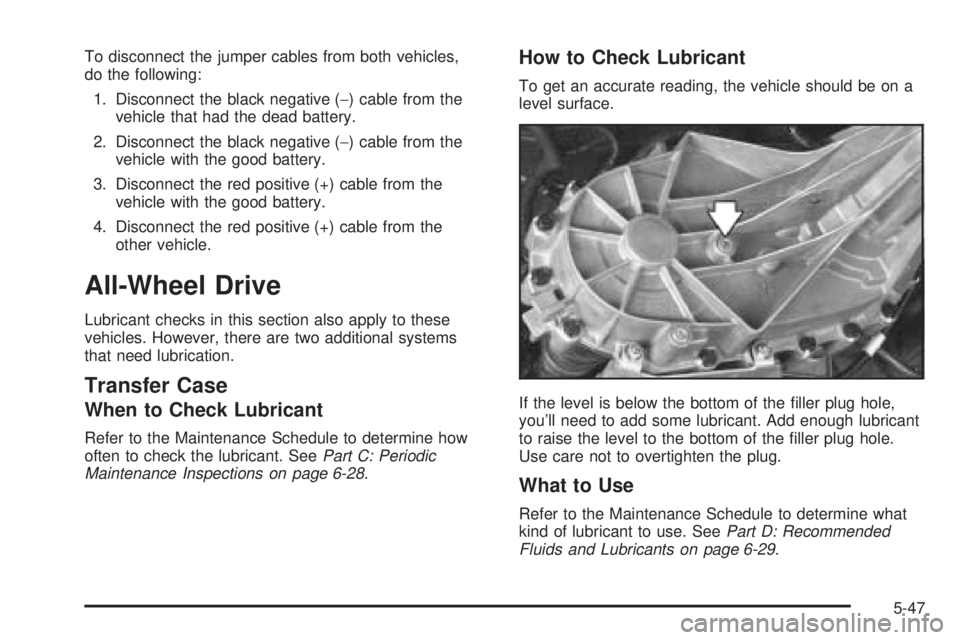
How to Check Lubricant
To get an accurate reading, the vehicle should be on a
level surface.
If the level is below the bottom of the ller plug hole,
you’ll need to add some lubricant. Add enough lubricant
to raise the level to the bottom of the ller plug hole.
Use care not to overtighten the plug.
What to Use
Refer to the Maintenance Schedule to determine what
kind of lubricant to use. SeePart D: Recommended
Fluids and Lubricants on page 6-29.
5-47