2005 CHEVROLET ASTRO brake light
[x] Cancel search: brake lightPage 145 of 376

Anti-Lock Brake System
Warning Light
With the anti-lock brake
system, this light will come
on when you start your
engine and may stay on for
several seconds. That’s
normal.
If the light stays on, or comes on when you’re driving,
your vehicle needs service. If the regular brake system
warning light isn’t on, you still have brakes, but you
don’t have anti-lock brakes. If the regular brake system
warning light is also on, you don’t have anti-lock brakes
and there’s a problem with your regular brakes. See
“Brake System Warning Light” earlier in this section.
The anti-lock brake system warning light should
come on briey when you turn the ignition key to RUN.
If the light doesn’t come on then, have it xed so it
will be ready to warn you if there is a problem.
Engine Coolant Temperature Gage
This gage shows the
engine coolant
temperature. If the
gage pointer moves
to the red area, your
engine is too hot!
It means that your engine coolant has overheated.
If you have been operating your vehicle under normal
driving conditions, you should pull off the road, stop your
vehicle and turn off the engine as soon as possible.
SeeEngine Overheating on page 5-28.
3-29
Page 173 of 376

Anti-Lock Brake System (ABS)
Your vehicle has anti-lock brakes. ABS is an advanced
electronic braking system that will help prevent a
braking skid.
When you start your engine and begin to drive away,
your anti-lock brake system will check itself. You
may hear a momentary motor or clicking noise while
this test is going on. This is normal.
If there is a problem with
the anti-lock brake system,
this warning light will
stay on. SeeAnti-Lock
Brake System Warning
Light on page 3-29.
Let us say the road is wet and you are driving safely.
Suddenly, an animal jumps out in front of you. You
slam on the brakes and continue braking. Here is what
happens with ABS:
A computer senses that wheels are slowing down.
If one of the wheels is about to stop rolling, the computer
will separately work the brakes at each front wheel
and at both rear wheels.
4-7
Page 182 of 376
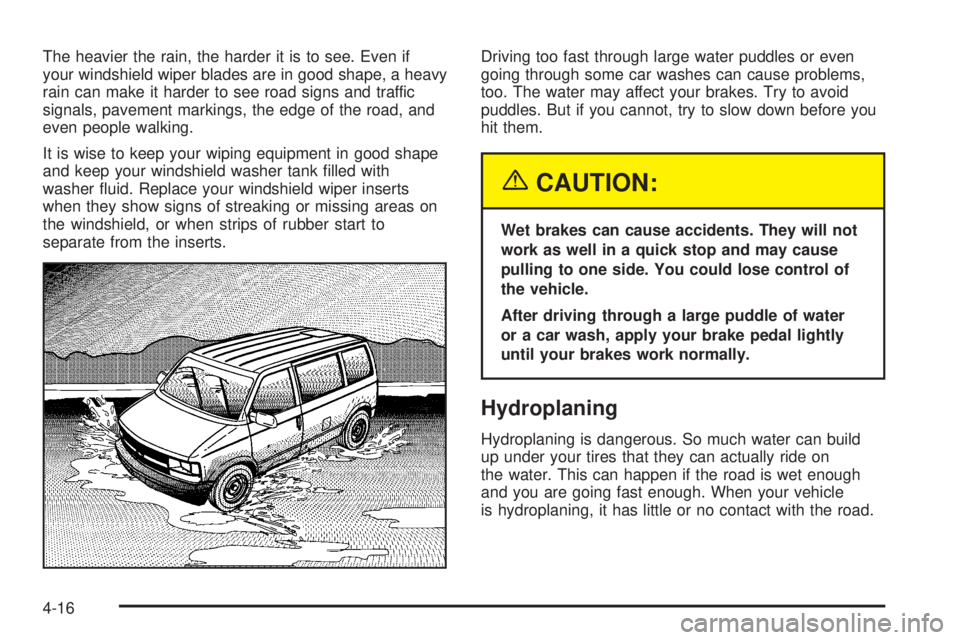
The heavier the rain, the harder it is to see. Even if
your windshield wiper blades are in good shape, a heavy
rain can make it harder to see road signs and traffic
signals, pavement markings, the edge of the road, and
even people walking.
It is wise to keep your wiping equipment in good shape
and keep your windshield washer tank lled with
washer uid. Replace your windshield wiper inserts
when they show signs of streaking or missing areas on
the windshield, or when strips of rubber start to
separate from the inserts.Driving too fast through large water puddles or even
going through some car washes can cause problems,
too. The water may affect your brakes. Try to avoid
puddles. But if you cannot, try to slow down before you
hit them.
{CAUTION:
Wet brakes can cause accidents. They will not
work as well in a quick stop and may cause
pulling to one side. You could lose control of
the vehicle.
After driving through a large puddle of water
or a car wash, apply your brake pedal lightly
until your brakes work normally.
Hydroplaning
Hydroplaning is dangerous. So much water can build
up under your tires that they can actually ride on
the water. This can happen if the road is wet enough
and you are going fast enough. When your vehicle
is hydroplaning, it has little or no contact with the road.
4-16
Page 253 of 376
{CAUTION:
The brake wear warning sound means that
soon your brakes will not work well. That
could lead to an accident. When you hear the
brake wear warning sound, have your vehicle
serviced.
Notice:Continuing to drive with worn-out brake
pads could result in costly brake repair.
Some driving conditions or climates may cause a brake
squeal when the brakes are rst applied or lightly
applied. This does not mean something is wrong with
your brakes.
Properly torqued wheel nuts are necessary to help
prevent brake pulsation. When tires are rotated, inspect
brake pads for wear and evenly tighten wheel nuts in
the proper sequence to GM torque specications.
Brake linings should always be replaced as complete
axle sets.
SeeBrake System Inspection on page 6-29.
Brake Pedal Travel
See your dealer if the brake pedal does not return to
normal height, or if there is a rapid increase in
pedal travel. This could be a sign of brake trouble.
Brake Adjustment
Every time you make a brake stop, your disc brakes
adjust for wear.
Replacing Brake System Parts
The braking system on a vehicle is complex. Its many
parts have to be of top quality and work well together if
the vehicle is to have really good braking. Your
vehicle was designed and tested with top-quality GM
brake parts. When you replace parts of your braking
system — for example, when your brake linings
wear down and you need new ones put in — be sure
you get new approved GM replacement parts. If you do
not, your brakes may no longer work properly. For
example, if someone puts in brake linings that are wrong
for your vehicle, the balance between your front and
rear brakes can change — for the worse. The braking
performance you have come to expect can change
in many other ways if someone puts in the wrong
replacement brake parts.
5-41
Page 309 of 376

Fuse/Circuit
BreakerUsage
3Courtesy Lamps, Glove Box Lamp,
Dome Reading Lamps, Vanity Mirror
Lamps, Courtesy Lamps
4Daytime Running Lamps Relay,
Instrument Panel Cluster
5 Rear Defogger
6Cruise Module, Truck Body Control
Module, Instrument Panel Cluster,
Cruise Control Switch,
Electrochromic Mirror
7 Power Outlets, Subwoofer Amplier
8Crank Circuit Fuse, Park/Neutral
Switch, Starter Enabler Relay
9License Plate Lamp, Tailamps,
Parking Lamps, Ashtray Lamp,
Panel Lights, Trailer Taillamps,
Front and Rear Sidemarker Lamps,
Door Switch Illumination, Headlamp
Switch Illumination, Rear Seat
Audio Illumination, Truck Body
Control Module
10 Air Bag SystemFuse/Circuit
BreakerUsage
11 Not Used
12Blower Motor, Rear Air Conditioning
Relay Coil, Front Cont. Temp.
Door Motor, HI Blower Relay,
Defogger Timer Coil
13Cigarette Lighter, Door Lock
Switches, Dutch Door Release
Module
14Cluster Illumination, Climate
Controls, Chime Module, Radio
Illumination, Rear Heat Switch
Illumination, Rear Wiper/Washer
Switch Illumination, Rear Liftgate
Switch Illumination, Remote
Cassette Illumination, Overhead
Console, Truck Body Control
Illumination
15Truck Body Module,
Headlamp Relay
16Front Turn Signals, Rear Turn
Signals, Trailer Turn Signals,
Back-Up Lamps, Brake
Transmission Shift Interlock
Solenoid
5-97
Page 312 of 376

Fuse/Circuit
BreakerUsage
BLANK Not Used
BLANK Not Used
DIODE-1 Air Conditioning
BLANK Not Used
BLANK Not Used
BLANK Not Used
LIGHTINGCourtesy Fuse, Power Adjust
Mirrors Fuse, Truck Body Control
Battery Fuse
BATTPower Accessory Circuit Breaker,
Stop/Hazard Fuse, Auxiliary Power
Fuse, Cigarette Lighter Fuse,
Radio Battery Fuse
IGN A Starter Relay, Ignition Switch
IGN B Ignition Switch
ABSElectronic Brake
Control Module
BLANK Not Used
RAP Radio Accessory, Power Windows
HTD MIR/RR
DEFOGRear Window Defogger,
Climate Control HeadRelays Usage
A/C RELAY Rear/Heat and Air Conditioning
UPFITTER-
ACCY RELAYUptter Accessory
STARTER
ENABLE
RELAYStarter
A/C ENABLE
RELAYAir Conditioning
HEAD LAMPS
RELAYHeadlamps
FUEL PUMP
RELAYFuel Pump
Feed Usage
AUX B Uptter Battery Feed
AUX A Uptter Accessory Feed
5-100
Page 363 of 376

A
Accessory Power Outlets.................................3-17
Adding Equipment to Your Airbag-Equipped
Vehicle.......................................................1-70
Additives, Fuel................................................. 5-6
Add-On Electrical Equipment............................5-94
Air Cleaner/Filter, Engine.................................5-21
Air Conditioning..............................................3-19
Airbag
Readiness Light..........................................3-26
Airbag Sensing and Diagnostic Module (SDM)....7-10
Airbag System................................................1-63
Adding Equipment to Your Airbag-Equipped
Vehicle...................................................1-70
How Does an Airbag Restrain?......................1-68
Servicing Your Airbag-Equipped Vehicle..........1-69
What Makes an Airbag Inate?......................1-67
What Will You See After an Airbag Inates?....1-68
When Should an Airbag Inate?....................1-66
Where Are the Airbags?...............................1-65
All-Wheel Drive...............................................5-47
All-Wheel Drive (AWD) System.........................2-23
All-Wheel-Drive Service Light............................3-34
AM-FM Radio.................................................3-40
Antenna, Fixed Mast.......................................3-50
Anti-Lock Brake System (ABS)........................... 4-7
Anti-Lock Brake, System Warning Light..............3-29Appearance Care............................................5-84
Aluminum Wheels........................................5-90
Care of Safety Belts....................................5-87
Chemical Paint Spotting...............................5-91
Cleaning Exterior Lamps/Lenses....................5-88
Fabric/Carpet..............................................5-85
Finish Care.................................................5-88
Finish Damage............................................5-91
Glass Surfaces............................................5-87
Instrument Panel.........................................5-87
Interior Plastic Components...........................5-87
Leather......................................................5-87
Sheet Metal Damage...................................5-91
Tires..........................................................5-90
Underbody Maintenance...............................5-91
Vehicle Care/Appearance Materials................5-92
Vinyl..........................................................5-86
Washing Your Vehicle...................................5-88
Weatherstrips..............................................5-88
Windshield and Wiper Blades........................5-89
Ashtrays........................................................3-18
Audio System(s).............................................3-39
AM-FM Radio.............................................3-40
Care of Your CD Player...............................3-50
Care of Your CDs........................................3-50
Fixed Mast Antenna.....................................3-50
Radio with CD............................................3-42
Rear Seat Audio (RSA)................................3-46
1
Page 364 of 376

Audio System(s) (cont.)
Setting the Time for Radios with
HR and MN Buttons.................................3-40
Setting the Time for Radios with the
Set Button..............................................3-40
Theft-Deterrent Feature................................3-48
Understanding Radio Reception.....................3-50
Automatic Headlamp System............................3-16
Automatic Transmission
Fluid..........................................................5-23
Operation...................................................2-20
B
Battery..........................................................5-42
Run-Down Protection...................................3-17
Before Leaving on a Long Trip.........................4-20
Bench Seat....................................................1-11
Brake
Anti-Lock Brake System (ABS)........................ 4-7
Emergencies................................................ 4-8
Parking......................................................2-23
System Inspection.......................................6-29
System Warning Light..................................3-28
Brakes..........................................................5-38
Braking........................................................... 4-6
Braking in Emergencies..................................... 4-8
Break-In, New Vehicle.....................................2-16
Bucket Seats, Rear.........................................1-17Bulb Replacement...........................................5-50
Front Turn Signal and Parking Lamps.............5-54
Halogen Bulbs............................................5-50
Replacement Bulbs......................................5-56
Taillamps, Turn Signal, Stoplamps and
Back-up Lamps........................................5-55
Buying New Tires...........................................5-67
C
California Fuel.................................................. 5-6
Canadian Owners................................................ ii
Capacities and Specications..........................5-101
Carbon Monoxide...........................2-26, 4-23, 4-34
Care of
Safety Belts................................................5-87
Your CD Player...........................................3-50
Your CDs ...................................................3-50
Center Rear Passenger Position, Safety Belts.....1-34
Chains, Tire...................................................5-71
Charging System Light....................................3-27
Check
Engine Light...............................................3-30
Gages Warning Light...................................3-35
Checking Things Under the Hood......................5-10
Chemical Paint Spotting...................................5-91
Child Restraints
Child Restraint Systems...............................1-46
Infants and Young Children...........................1-40
2