2005 CADILLAC XLR light
[x] Cancel search: lightPage 180 of 438
NO FOB, OFF OR RUN?:This message is displayed
when you turn off the engine, but the vehicle does
not detect a keyless access transmitter in the vehicle.
The vehicle will remain in accessory mode until the
engine has been turned off or started, or ve minutes
has expired. If you select OFF, the vehicle cannot
be started again without a remote access transmitter in
the vehicle.
OVER SPEED WARNING:This message is displayed
when the vehicle speed exceeds a certain limit as
required by some export countries. A chime will sound
when this message is displayed.
PRESS BRAKE TO START:The brake pedal must be
applied to start the vehicle. Make sure you are
pressing the brake pedal all the way down.
REDUCED ENGINE POWER:This message informs
you that the vehicle is reducing engine power because
the transmission is being placed in gear under
conditions that may cause damage to the vehicle’s
engine, transmission or ability to accelerate.
RIGHT DOOR AJAR:The passenger’s door is open or
ajar when this message appears. The vehicle must
be running and the transmission not in PARK (P) for this
message to display. A chime will sound if the vehicle’s
speed is greater than 3 mph (5 km/h).SERVICE A/C:This message appears when the
electronic sensors that control the air conditioning and
heating systems are no longer working. Have the climate
control system serviced by your GM dealer if you
notice a drop in heating and air conditioning efficiency.
SERVICE ABS:If the SERVICE ABS message is
displayed when you are driving, stop as soon as
possible and turn the ignition off. Then start the engine
again to reset the system. If the message stays on,
or comes back on again while you are driving,
your vehicle is in need of service. See your GM dealer.
If the SERVICE ABS message is being displayed, your
Traction Control System and StabiliTrak
®System will
also be disabled. The Driver Information Center will scroll
three messages: SERVICE ABS, SERVICE TRACTION
SYS and SERVICE STABILITRAK, and the anti-lock
brake system and traction control warning lights on the
instrument panel cluster will be illuminated. SeeAnti-Lock
Brake System Warning Light on page 3-53andTraction
Control System (TCS) Warning Light on page 3-53. The
driver can acknowledge these messages by pressing the
RESET button three times. When the service message is
displayed the computer controlled systems will not assist
the driver and you should have the system repaired by
your GM dealer as soon as possible. Adjust your driving
accordingly.
3-68
Page 182 of 438

STABILITRAK ACTIVE:You may see the
STABILITRAK ACTIVE message on the Driver
Information Center. It means that an advanced,
computer-controlled system has come on to help your
vehicle continue to go in the direction in which you
are steering. This stability enhancement system
activates when the computer senses that your vehicle is
just starting to spin, as it might if you hit a patch of
ice or other slippery spot on the road. When the system
is on, you may hear a noise or feel a vibration in the
brake pedal. This is normal.
When the STABILITRAK ACTIVE message is on, you
should continue to steer in the direction you want to go.
The system is designed to help you in bad weather
or other difficult driving situations by making the
most of whatever road conditions will permit. If the
STABILITRAK ACTIVE message comes on, you will
know that something has caused your vehicle to start to
spin, so you should consider slowing down. A single
chime will also sound when this message is displayed.
STABILITRAK READY:If you receive this message
and hear a chime, the system has completed the
functional check of the StabiliTrak
®System.STABILITRAK WARMING:When you rst start your
vehicle and drive away, especially during cold winter
weather, the STABILITRAK WARMING message may
be displayed in the DIC along with a chime and the
traction control warning light. This is normal. You can
acknowledge this message by pressing the RESET
button. The StabiliTrak
®performance is affected until the
STABILITRAK READY message is displayed in the
DIC, which can take up to 15 minutes.
SVC TIRE MONITOR:If this message comes on, a
part on the Tire Pressure Monitor (TPM) is not working
properly. If you drive your vehicle while any of the
four sensors are missing or inoperable, the warning will
come on in approximately 10 minutes. If all four
sensors are missing, the warning will come on in
approximately 15 to 20 minutes. (All the sensors would
be missing, for example, if you put different wheels
on your vehicle without transferring the sensors.) If the
warning comes on and stays on, there may be a
problem with the TPM. See your GM dealer.
TOO COLD TO MOVE TOP:This message will display
when the retractable hardtop button is pressed and the
hardtop pump motor temperature is below−4°F (−20°C).
Wait for the hardtop pump motor to warm up before using
the retractable hardtop.
3-70
Page 186 of 438

Auto Recall
This feature allows the steering column, outside mirrors
and the driver’s seat to automatically move to the current
driver’s set position when the engine starts. The DIC will
display AUTO RECALL OFF or AUTO RECALL ON.
Press the OPTIONS button to change the setting.
Auto Exit Recall
This feature allows the steering column and driver’s
seat to automatically move to the current driver’s
exit position when one of the following occurs:
The vehicle is turned off or in RAP or accessory
mode and the driver’s door is opened.
The vehicle is turned off or in RAP and the unlock
button on the keyless access transmitter is
pressed.
The DIC will display AUTO EXIT RECALL OFF or
AUTO EXIT RECALL ON. Press the OPTIONS button
to change the setting.
Approach Lights
This feature activates the parking lamps, front fog lamps
and back-up lamps during low light periods when the
unlock button on the keyless access transmitter is
pressed, both doors are closed and the vehicle is off or
in RAP. The lamps remain on for 20 seconds or until
a door is opened, the lock button on the keyless access
transmitter is pressed or the vehicle is no longer off
or in RAP.
The DIC will display APPROACH LIGHTS OFF or
APPROACH LIGHTS ON. Press the OPTIONS button
to change the setting.
Exit Lights
This feature activates the parking lamps and front fog
lamps for 15, 30 or 90 seconds. This will occur when the
vehicle is off or in RAP and the headlamps are on
due to the automatic headlamp system. The parking
lamps and front fog lamps will remain on until the driver
selected time period expires, the exterior lamp control
is activated or the vehicle is no longer off or in RAP.
The DIC will display EXIT LIGHTS OFF, EXIT
LIGHTS - 15 SEC, EXIT LIGHTS - 30 SEC or EXIT
LIGHTS - 90 SEC. Press the OPTIONS button to
change the setting.
3-74
Page 192 of 438

Radio Reception
AM
The range for most AM stations is greater than for FM,
especially at night. The longer range can cause
station frequencies to interfere with each other. Static
can occur on AM stations caused by things like
storms and power lines. Try reducing the treble to
reduce this noise.
FM Stereo
FM stereo will give the best sound, but FM signals will
reach only about 10 to 40 miles (16 to 65 km). Tall
buildings or hills can interfere with FM signals, causing
the sound to fade in and out.
XM™ Satellite Radio Service
XM™ Satellite Radio Service gives digital radio
reception from coast to coast. Just as with FM, tall
buildings or hills can interfere with satellite radio signals,
causing the sound to fade in and out. The radio may
display NO XM SIGNAL to indicate interference.
Cellular Phone Usage
Cellular phone usage may cause interference with your
vehicle’s radio. This interference may occur when
making or receiving phone calls, charging the phone’s
battery, or simply having the phone on. This interference
is an increased level of static while listening to the
radio. If static is received while listening to the radio,
unplug the cellular phone and turn it off.
Care of Your CDs
Handle CDs carefully. Store them in their original cases
or other protective cases and away from direct
sunlight and dust. If the surface of a CD is soiled,
dampen a clean, soft cloth in a mild, neutral detergent
solution and clean it, wiping from the center to the edge.
Be sure never to touch the side without writing when
handling CDs. Pick up CDs by grasping the outer edges
or the edge of the hole and the outer edge.
Care of Your CD Player
The use of CD lens cleaners for CD players is not
advised, due to the risk of contaminating the lens of the
CD optics with lubricants internal to the CD mechanism.
3-80
Page 200 of 438
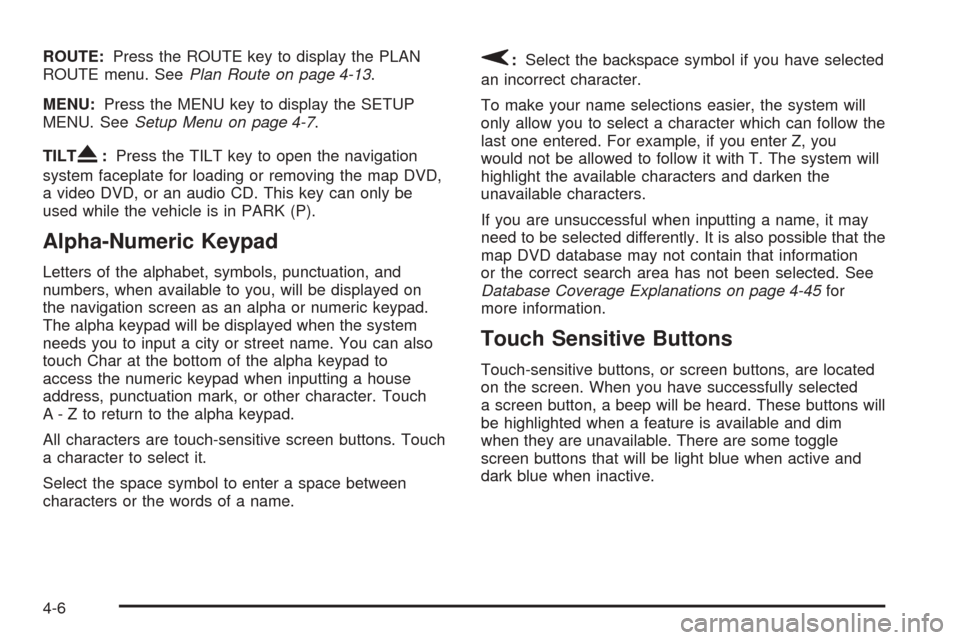
ROUTE:Press the ROUTE key to display the PLAN
ROUTE menu. SeePlan Route on page 4-13.
MENU:Press the MENU key to display the SETUP
MENU. SeeSetup Menu on page 4-7.
TILT
X:Press the TILT key to open the navigation
system faceplate for loading or removing the map DVD,
a video DVD, or an audio CD. This key can only be
used while the vehicle is in PARK (P).
Alpha-Numeric Keypad
Letters of the alphabet, symbols, punctuation, and
numbers, when available to you, will be displayed on
the navigation screen as an alpha or numeric keypad.
The alpha keypad will be displayed when the system
needs you to input a city or street name. You can also
touch Char at the bottom of the alpha keypad to
access the numeric keypad when inputting a house
address, punctuation mark, or other character. Touch
A - Z to return to the alpha keypad.
All characters are touch-sensitive screen buttons. Touch
a character to select it.
Select the space symbol to enter a space between
characters or the words of a name.
V:Select the backspace symbol if you have selected
an incorrect character.
To make your name selections easier, the system will
only allow you to select a character which can follow the
last one entered. For example, if you enter Z, you
would not be allowed to follow it with T. The system will
highlight the available characters and darken the
unavailable characters.
If you are unsuccessful when inputting a name, it may
need to be selected differently. It is also possible that the
map DVD database may not contain that information
or the correct search area has not been selected. See
Database Coverage Explanations on page 4-45for
more information.
Touch Sensitive Buttons
Touch-sensitive buttons, or screen buttons, are located
on the screen. When you have successfully selected
a screen button, a beep will be heard. These buttons will
be highlighted when a feature is available and dim
when they are unavailable. There are some toggle
screen buttons that will be light blue when active and
dark blue when inactive.
4-6
Page 205 of 438
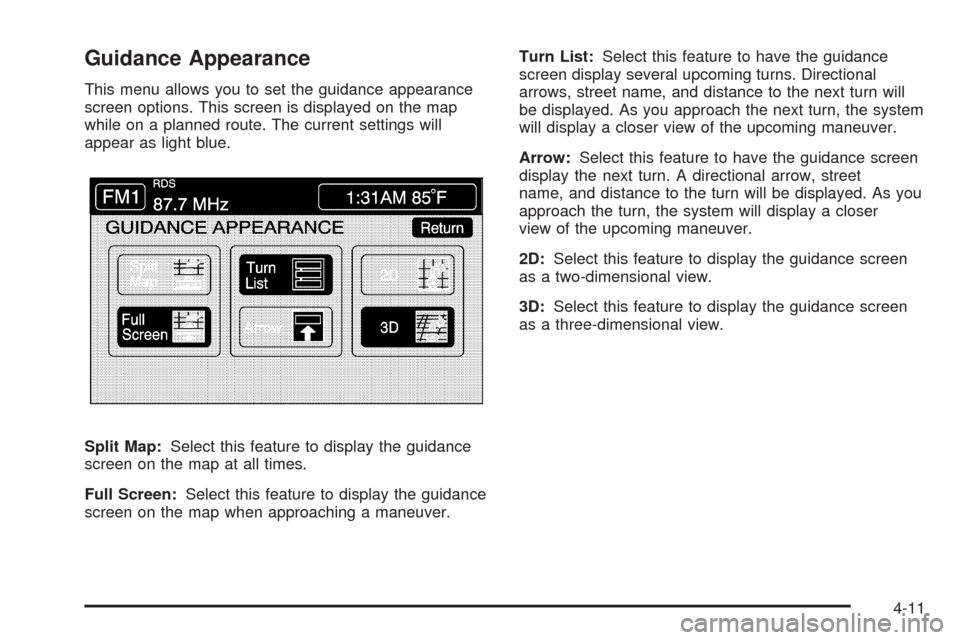
Guidance Appearance
This menu allows you to set the guidance appearance
screen options. This screen is displayed on the map
while on a planned route. The current settings will
appear as light blue.
Split Map:Select this feature to display the guidance
screen on the map at all times.
Full Screen:Select this feature to display the guidance
screen on the map when approaching a maneuver.Turn List:Select this feature to have the guidance
screen display several upcoming turns. Directional
arrows, street name, and distance to the next turn will
be displayed. As you approach the next turn, the system
will display a closer view of the upcoming maneuver.
Arrow:Select this feature to have the guidance screen
display the next turn. A directional arrow, street
name, and distance to the turn will be displayed. As you
approach the turn, the system will display a closer
view of the upcoming maneuver.
2D:Select this feature to display the guidance screen
as a two-dimensional view.
3D:Select this feature to display the guidance screen
as a three-dimensional view.
4-11
Page 206 of 438
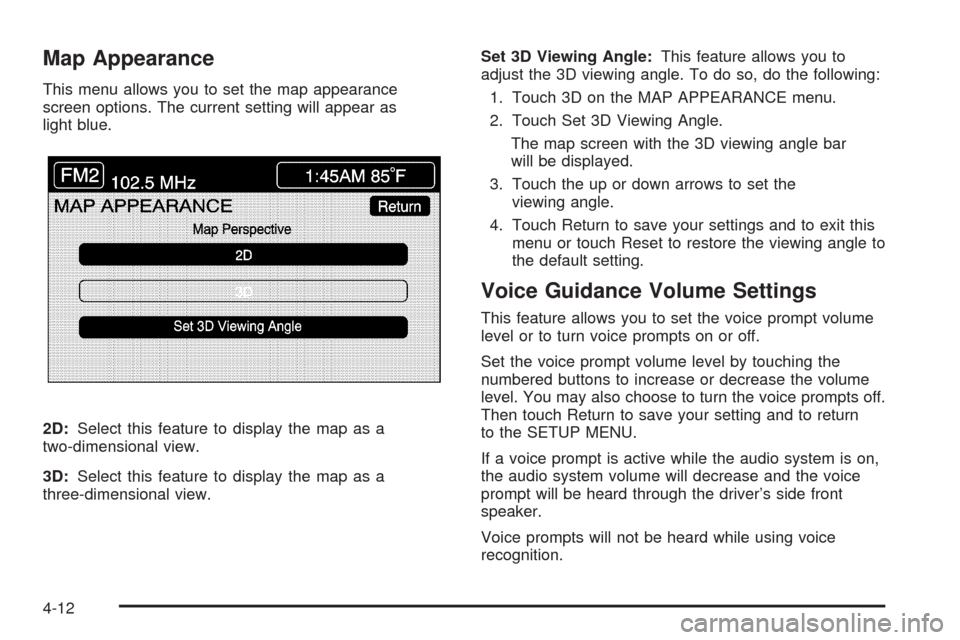
Map Appearance
This menu allows you to set the map appearance
screen options. The current setting will appear as
light blue.
2D:Select this feature to display the map as a
two-dimensional view.
3D:Select this feature to display the map as a
three-dimensional view.Set 3D Viewing Angle:This feature allows you to
adjust the 3D viewing angle. To do so, do the following:
1. Touch 3D on the MAP APPEARANCE menu.
2. Touch Set 3D Viewing Angle.
The map screen with the 3D viewing angle bar
will be displayed.
3. Touch the up or down arrows to set the
viewing angle.
4. Touch Return to save your settings and to exit this
menu or touch Reset to restore the viewing angle to
the default setting.
Voice Guidance Volume Settings
This feature allows you to set the voice prompt volume
level or to turn voice prompts on or off.
Set the voice prompt volume level by touching the
numbered buttons to increase or decrease the volume
level. You may also choose to turn the voice prompts off.
Then touch Return to save your setting and to return
to the SETUP MENU.
If a voice prompt is active while the audio system is on,
the audio system volume will decrease and the voice
prompt will be heard through the driver’s side front
speaker.
Voice prompts will not be heard while using voice
recognition.
4-12
Page 209 of 438
Name Editing of a Memory Point
To modify the name of a stored memory point, do the
following:
1. Select the category of the memory point.
2. Select the item you want to edit.
3. Touch the NAME screen button and use the alpha
keypad to edit the name. Names may contain up to
15 alpha and/or numeric characters.
4. Touch Return to go to the previous screen.
Moving Memory Points
To move a memory point from one category to another,
do the following:
1. Select the category of the memory point.
2. Select the memory point you want to edit.
3. Touch CATEGORY. A list of categories will appear.
The current category for the item will be highlighted
and cannot be selected.
4. Touch the screen button for the category you want
the memory point placed in. A pop-up window will
appear displaying the change in category.
5. Touch Return to go back to the previous screen.
Adjusting a Memory Point
To relocate a memory point’s location, do the following:
1. Select the category of the memory point.
2. Select the memory point you want to edit.
3. Touch POSITION. A map screen with the position
of this memory point will appear.
4. Touch anywhere on the screen to activate the scroll
feature and relocate the memory point. SeeMaps
on page 4-33.
5. Touch Enter to save the memory point’s new
location.
6. Touch Return to go back to the previous screen.
Changing the Phone Number of a
Memory Point
To edit or add the phone number of a memory point, do
the following:
1. Select the category of the memory point.
2. Select the memory point you want to edit.
3. Touch PHONE and use the numeric keypad to edit
or add the number.
4. Touch the RETURN button to take you back to the
previous screen when you have nished.
4-15