Page 75 of 438

Theft-Deterrent Systems
Vehicle theft is big business, especially in some cities.
Although your vehicle has a number of theft-deterrent
features, we know that nothing we put on it can make it
impossible to steal.
Theft-Deterrent System
Your vehicle is equipped with a theft-deterrent alarm
system.
With this system, the
security light will ash
when the door is open
and locked with the
power door lock switch.
If this light is on continuously while the engine is
running, your vehicle needs service.
Arming the System
Use one of the three following items listed here to arm
the system:
Press the lock button on the keyless access
transmitter.
Open the door. Lock the door with the power door
lock switch. The security light should ash. Remove
the keyless access transmitter from the interior of the
vehicle and close the door. The security light will stop
ashing and stay on. After 30 seconds, the light
should turn off.
The vehicle can be programmed to automatically
lock the doors and arm the system when you exit
the vehicle. SeeDIC Vehicle Personalization on
page 3-73.
Now, if a door or the trunk lid is opened without the
keyless access transmitter, the alarm will go off.
Your horn will sound for two minutes, then it will go off
to save battery power. And, your vehicle will not
start without a keyless transmitter present.
2-19
Page 77 of 438

Valet Lockout Switch
The valet lockout switch
is located inside the
glove box.
Press the switch to ON to disable the use of the trunk
and convertible top. The trunk cannot be opened except
by using the key if the valet lockout is on.
Press the switch to OFF to enable the use of the trunk
and convertible top.
Locking the glove box with your key will also help to
secure your vehicle.
Starting and Operating
Your Vehicle
New Vehicle Break-In
Notice:Your vehicle does not need an elaborate
break-in. But it will perform better in the long run if
you follow these guidelines:
Keep your speed at 55 mph (88 km/h) or less
for the rst 500 miles (805 km).
Do not drive at any one speed — fast or
slow — for the rst 500 miles (805 km).
Do not make full-throttle starts.
Avoid making hard stops for the rst 200 miles
(322 km) or so. During this time your new brake
linings are not yet broken in. Hard stops with
new linings can mean premature wear and
earlier replacement. Follow this breaking-in
guideline every time you get new brake linings.
2-21
Page 92 of 438

Outside Convex Mirror
{CAUTION:
A convex mirror can make things (like other
vehicles) look farther away than they really are.
If you cut too sharply into the right lane, you
could hit a vehicle on your right. Check your
inside mirror or glance over your shoulder
before changing lanes.
The passenger’s side mirror is convex. A convex
mirror’s surface is curved so more can be seen from the
driver’s seat. It also makes things look farther away
than they really are.
OnStar®System
OnStar®uses global positioning system (GPS) satellite
technology, wireless communications, and call centers
to provide you with a wide range of safety, security,
information, and convenience services.
A complete OnStar
®user’s guide and the terms and
conditions of the OnStar®Subscription Service
Agreement are included in the vehicle’s glove box
literature. For more information, visit www.onstar.com
or www.onstarcanada.com. Contact OnStar
®at
1-888-4-ONSTAR (1-888-466-7827), or press the
OnStar
®button to speak to an OnStar®advisor
24 hours a day, 7 days a week.
Terms and conditions of the Subscription Service
Agreement can be found at www.onstar.com.
2-36
Page 94 of 438

HomeLink®Transmitter
If your vehicle has this feature, the control buttons are
located on the driver’s sun visor.
HomeLink
®, a combined universal transmitter and
receiver, provides a way to replace up to three hand−held
transmitters used to activate devices such as gate
operators, garage door openers, entry door locks,
security systems and home lighting. Additional
Homelink
®information can be found on the internet at
www.homelink.com or by calling 1-800-355-3515.If your vehicle is equipped with the HomeLink
®
Transmitter, it complies with Part 15 of the FCC Rules.
Operation is subject to the following two conditions:
(1) this device may not cause harmful interference, and
(2) this device must accept any interference received,
including interference that may cause undesired
operation.
This device complies with RSS-210 of Industry Canada.
Operation is subject to the following two conditions:
(1) this device may not cause interference, and
(2) this device must accept any interference, including
interference that may cause undesired operation of
the device.
Changes and modications to this system by other than
an authorized service facility could void authorization
to use this equipment.
2-38
Page 95 of 438

Programming the HomeLink®
Transmitter
Do not use the HomeLink®Transmitter with any garage
door opener that does not have the “stop and reverse”
feature. This includes any garage door opener model
manufactured before April 1, 1982. If you have a newer
garage door opener with rolling codes, please be
sure to follow Steps 6 through 8 to complete the
programming of your HomeLink
®Transmitter.
Read the instructions completely before attempting to
program the HomeLink
®Transmitter. Because of
the steps involved, it may be helpful to have another
person available to assist you in programming the
transmitter.
Keep the original transmitter for use in other vehicles as
well as for future HomeLink
®programming. It is also
recommended that upon the sale of the vehicle,
the programmed HomeLink
®buttons should be erased
for security purposes. Refer to “Erasing HomeLink®
Buttons” or, for assistance, contact HomeLink®on
the internet at: www.homelink.com or by calling
1-800-355-3515.Be sure that people and objects are clear of the
garage door or gate operator you are programming.
When programming a garage door, it is advised to
park outside of the garage.
It is recommended that a new battery be installed in
your hand-held transmitter for quicker and more
accurate transmission of the radio frequency.
Programming HomeLink®
Your vehicle’s engine should be turned off while
programming the transmitter. Follow these steps to
program up to three channels:
1. Press and hold down the two outside buttons,
releasing only when the indicator light begins to
ash, after 20 seconds. Do not hold down the
buttons for longer than 30 seconds and do not
repeat this step to program a second and/or third
transmitter to the remaining two HomeLink
®buttons.
2. Position the end of your hand-held transmitter about
1 to 3 inches (3 to 8 cm) away from the HomeLink
®
buttons while keeping the indicator light in view.
2-39
Page 100 of 438
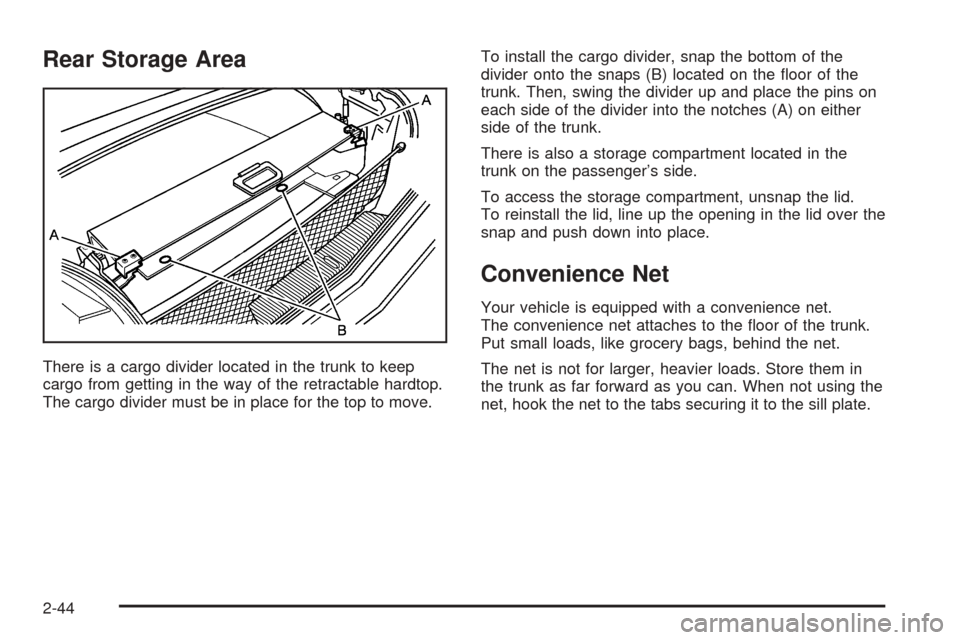
Rear Storage Area
There is a cargo divider located in the trunk to keep
cargo from getting in the way of the retractable hardtop.
The cargo divider must be in place for the top to move.To install the cargo divider, snap the bottom of the
divider onto the snaps (B) located on the oor of the
trunk. Then, swing the divider up and place the pins on
each side of the divider into the notches (A) on either
side of the trunk.
There is also a storage compartment located in the
trunk on the passenger’s side.
To access the storage compartment, unsnap the lid.
To reinstall the lid, line up the opening in the lid over the
snap and push down into place.
Convenience Net
Your vehicle is equipped with a convenience net.
The convenience net attaches to the oor of the trunk.
Put small loads, like grocery bags, behind the net.
The net is not for larger, heavier loads. Store them in
the trunk as far forward as you can. When not using the
net, hook the net to the tabs securing it to the sill plate.
2-44
Page 114 of 438

Security Light...............................................3-59
Fog Lamp Light............................................3-59
Lights On Reminder......................................3-59
Highbeam On Light.......................................3-59
Fuel Gage...................................................3-60
Driver Information Center (DIC).......................3-61
DIC Controls and Displays.............................3-61
DIC Warnings and Messages.........................3-64
Other Messages...........................................3-72
DIC Vehicle Personalization............................3-73Trip Computer................................................3-77
Oil Life Indicator...........................................3-77
Audio System(s).............................................3-78
Theft-Deterrent Feature..................................3-78
Audio Steering Wheel Controls.......................3-79
Radio Reception...........................................3-80
Care of Your CDs.........................................3-80
Care of Your CD Player................................3-80
Diversity Antenna System..............................3-81
XM™ Satellite Radio Antenna System.............3-81
Section 3 Instrument Panel
3-2
Page 117 of 438

The main components of the instrument panel are the following:
A. Head-Up Display (HUD) Controls/Instrument Panel
Brightness Controls. SeeHead-Up Display (HUD) on
page 3-34orInstrument Panel Brightness on
page 3-32.
B. Turn Signal/Multifunction Lever. SeeTurn
Signal/Multifunction Lever on page 3-7.
C. Instrument Panel Cluster. SeeInstrument Panel
Cluster on page 3-46.
D. Windshield Wiper/Washer Lever. See “Windshield
Wipers” underTurn Signal/Multifunction Lever
on page 3-7.
E. Driver Information Center (DIC) Controls/Interior
Lamps. SeeDIC Controls and Displays on
page 3-61.
F. Air Outlets. SeeOutlet Adjustment on page 3-45.
G. Hazard Warning Flasher Button. SeeHazard
Warning Flashers on page 3-6.
H. Voice Commands/Audio Controls. SeeOnStar
®
System on page 2-36orAudio Steering Wheel
Controls on page 3-79.
I. Adaptive Cruise Controls. See “Adaptive Cruise
Control (ACC)” underTurn Signal/Multifunction Lever
on page 3-7.J. Horn. SeeHorn on page 3-6.
K. Audio Steering Wheel Controls. SeeAudio Steering
Wheel Controls on page 3-79.
L. Ignition Switch. SeeIgnition Positions on page 2-22.
M. Shift Lever. SeeAutomatic Transmission Operation
on page 2-25.
N. Traction Control Button. SeeTraction Control
System (TCS) on page 5-8.
O. Passenger Airbag Off Indicator. SeeAirbag Off Light
on page 3-50.
P. Retractable Hardtop Button. SeeRetractable
Hardtop on page 2-45.
Q. Cupholders. SeeCupholder(s) on page 2-42.
R. Cigarette Lighter. SeeAshtrays and Cigarette Lighter
on page 3-39.
S. Climate Controls. SeeDual Climate Control System
on page 3-40.
T. Audio/Navigation System. SeeNavigation System
Overview on page 4-2.
U. Glove Box. SeeGlove Box on page 2-42.
3-5