2005 CADILLAC ESCALADE Tire
[x] Cancel search: TirePage 1 of 470

Seats and Restraint Systems........................... 1-1
Front Seats
............................................... 1-3
Rear Seats
............................................... 1-8
Safety Belts
.............................................1-26
Child Restraints
.......................................1-47
Airbag System
.........................................1-70
Restraint System Check
............................1-85
Features and Controls..................................... 2-1
Keys
........................................................ 2-3
Doors and Locks
....................................... 2-8
Windows
.................................................2-14
Theft-Deterrent Systems
............................2-16
Starting and Operating Your Vehicle
...........2-18
Mirrors
....................................................2-29
OnStar
®System
......................................2-35
HomeLink®Wireless Control System
...........2-36
Storage Areas
.........................................2-40
Sunroof
..................................................2-44
Vehicle Personalization
.............................2-45
Instrument Panel............................................. 3-1
Instrument Panel Overview
.......................... 3-4
Climate Controls
......................................3-22
Warning Lights, Gages, and Indicators
........3-31
Driver Information Center (DIC)
..................3-49
Audio System(s)
.......................................3-69Driving Your Vehicle....................................... 4-1
Your Driving, the Road, and Your Vehicle
..... 4-2
Towing
...................................................4-49
Service and Appearance Care.......................... 5-1
Service
..................................................... 5-3
Fuel
......................................................... 5-5
Checking Things Under the Hood
...............5-10
All-Wheel Drive
........................................5-45
Rear Axle
...............................................5-45
Front Axle
...............................................5-46
Headlamp Aiming
.....................................5-48
Bulb Replacement
....................................5-51
Windshield Wiper Blade Replacement
.........5-58
Tires
......................................................5-59
Appearance Care
.....................................5-97
Vehicle Identication
...............................5-105
Electrical System
....................................5-106
Capacities and Specications
...................5-117
Maintenance Schedule..................................... 6-1
Maintenance Schedule
................................ 6-2
Customer Assistance and Information.............. 7-1
Customer Assistance and Information
........... 7-2
Reporting Safety Defects
...........................7-10
Index................................................................ 1
2005 Cadillac Escalade/Escalade ESV Owner ManualM
Page 9 of 470
Front Seats
Power Seats
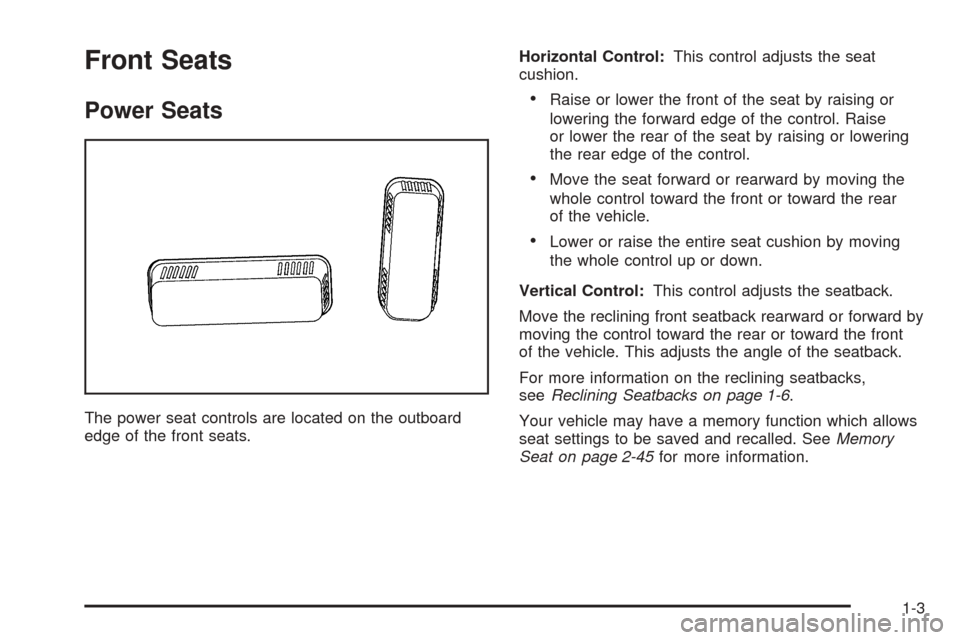
The power seat controls are located on the outboard
edge of the front seats.Horizontal Control:This control adjusts the seat
cushion.
Raise or lower the front of the seat by raising or
lowering the forward edge of the control. Raise
or lower the rear of the seat by raising or lowering
the rear edge of the control.
Move the seat forward or rearward by moving the
whole control toward the front or toward the rear
of the vehicle.
Lower or raise the entire seat cushion by moving
the whole control up or down.
Vertical Control:This control adjusts the seatback.
Move the reclining front seatback rearward or forward by
moving the control toward the rear or toward the front
of the vehicle. This adjusts the angle of the seatback.
For more information on the reclining seatbacks,
seeReclining Seatbacks on page 1-6.
Your vehicle may have a memory function which allows
seat settings to be saved and recalled. SeeMemory
Seat on page 2-45for more information.
1-3
Page 10 of 470

Power Lumbar
Your vehicle’s seats may be equipped with power
lumbar.
You can increase or
decrease lumbar support
in an area of the lower
seatback with this control,
located on the outboard
sides of the front seat(s).
To increase support, press and hold the front of the
control. To decrease support, press and hold the rear of
the control. Let go of the control when the lower
seatback reaches the desired level of support.
You can also reshape the side wing area of the lower
seatback for more lateral support.
To increase support, press and hold the top of the
control. To decrease support, press and hold the bottom
of the control. Let go of the control when the lower
seatback reaches the desired level of support.Your vehicle may have a memory function which allows
seat settings to be saved and recalled. SeeMemory
Seat on page 2-45for more information.
Heated Seats
The buttons used to
control this feature are
located on the front doors.
The engine must be
running for the heated
seat feature to work.
To heat the entire seat, press the horizontal button with
the heated seat symbol. Press the button to cycle
through the temperature settings of high, medium and
low and to turn the heated seat off. Indicator lights
will glow to designate the level of heat selected,
three for high, two for medium, and one for low.
The low setting warms the seatback and cushion until
the seat temperature is near body temperature. The
medium and high settings heat the seatback and seat
cushion to a slightly higher temperature. You will be able
to feel heat in about two minutes.
1-4
Page 11 of 470
To heat only the seatback, press the vertical button with
the heated seatback symbol. An indicator light on the
seatback button will glow to designate that only the
seatback is being heated. Additional presses of
the seatback button will cycle through the heat levels for
the seatback only. Press the horizontal button again
to heat the whole seat.
The heated front seats will shut off automatically when
the ignition is turned off.
Your vehicle also has heated rear seats. SeeHeated
Seats on page 1-9.
Heated and Cooled Seats
Your vehicle may be equipped with this feature. The
buttons used to control this feature are located on
the instrument panel, under the radio.With the heated and cooled seats you can choose high,
medium or low heat or cool settings. The seats will
only operate either in the heat or cool mode; for
example, you cannot cool the seat cushion while heating
the seatback. An amber light will ash when a setting
cannot be selected.
To operate the heated and cooled seats, do the
following:
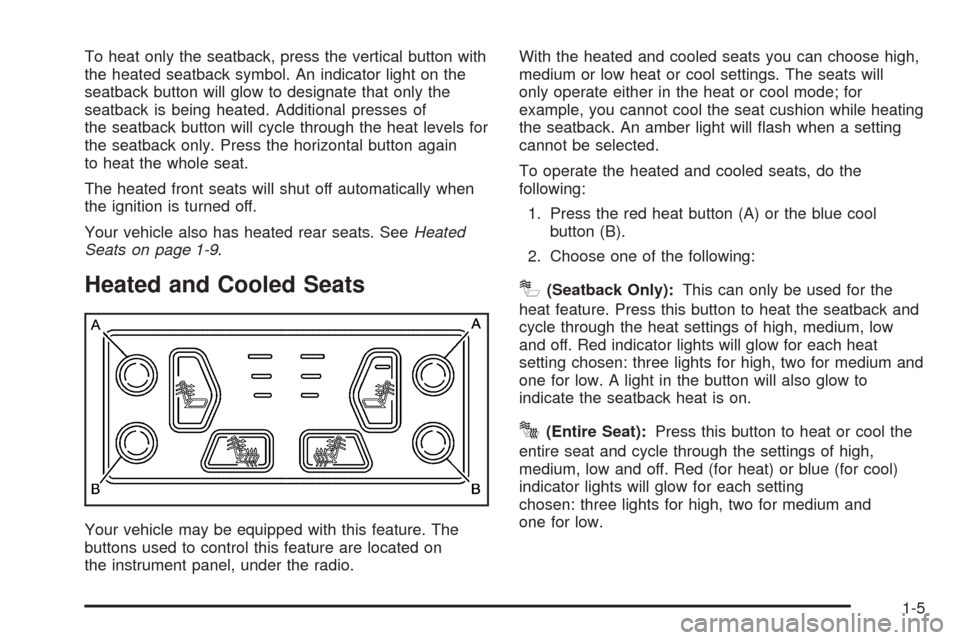
1. Press the red heat button (A) or the blue cool
button (B).
2. Choose one of the following:
I(Seatback Only):This can only be used for the
heat feature. Press this button to heat the seatback and
cycle through the heat settings of high, medium, low
and off. Red indicator lights will glow for each heat
setting chosen: three lights for high, two for medium and
one for low. A light in the button will also glow to
indicate the seatback heat is on.
J(Entire Seat):Press this button to heat or cool the
entire seat and cycle through the settings of high,
medium, low and off. Red (for heat) or blue (for cool)
indicator lights will glow for each setting
chosen: three lights for high, two for medium and
one for low.
1-5
Page 16 of 470
Heated and Cooled Seats
Your vehicle may be
equipped with this feature.
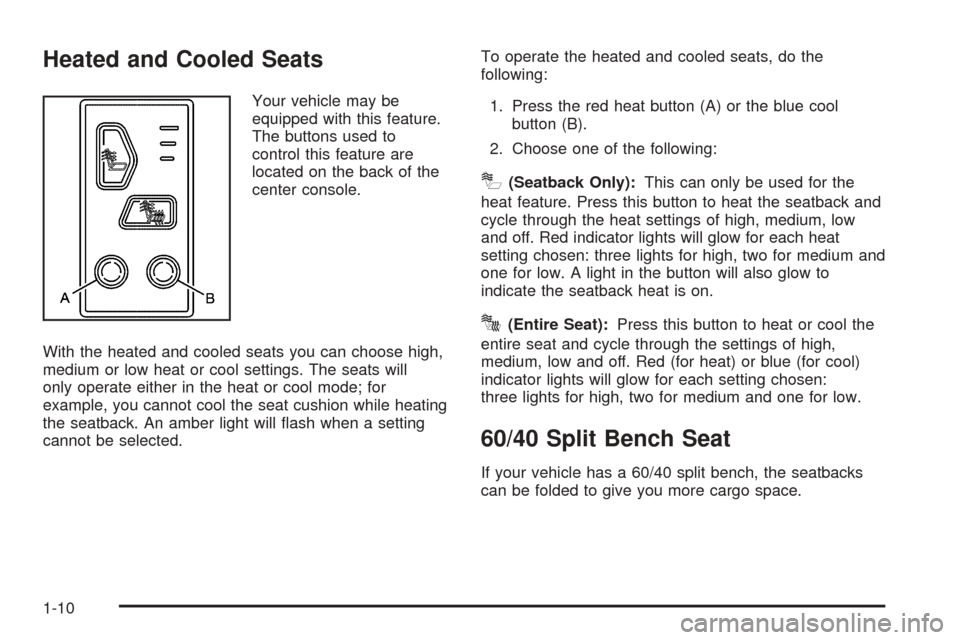
The buttons used to
control this feature are
located on the back of the
center console.
With the heated and cooled seats you can choose high,
medium or low heat or cool settings. The seats will
only operate either in the heat or cool mode; for
example, you cannot cool the seat cushion while heating
the seatback. An amber light will ash when a setting
cannot be selected.To operate the heated and cooled seats, do the
following:
1. Press the red heat button (A) or the blue cool
button (B).
2. Choose one of the following:
I(Seatback Only):This can only be used for the
heat feature. Press this button to heat the seatback and
cycle through the heat settings of high, medium, low
and off. Red indicator lights will glow for each heat
setting chosen: three lights for high, two for medium and
one for low. A light in the button will also glow to
indicate the seatback heat is on.
J(Entire Seat):Press this button to heat or cool the
entire seat and cycle through the settings of high,
medium, low and off. Red (for heat) or blue (for cool)
indicator lights will glow for each setting chosen:
three lights for high, two for medium and one for low.
60/40 Split Bench Seat
If your vehicle has a 60/40 split bench, the seatbacks
can be folded to give you more cargo space.
1-10
Page 19 of 470
To return the seat to the upright position, do the
following:
1. On Escalade ESV models, lift the load oor panels
and latch them into the seatback.
2. Lift the seatback up and push it rearward all
the way.
3. Lower the seat cushion until it latches into position.
4. Pull forward on the seatback and up on the
seat cushion to make sure the seat is securely
in place.
5. On Escalade models, return the head restraints to
the upright position.
6. Check to see that the safety belt buckles on the
driver’s side seat are accessible to the outboard
and center occupants and are not under the
seat cushions.50/50 Split Bench Seat
If your vehicle has a 50/50 split bench, the seatback(s)
can be folded and the entire seat(s) tilted or removed
from the vehicle.
Folding the Seatbacks
To fold the seatbacks, do the following:
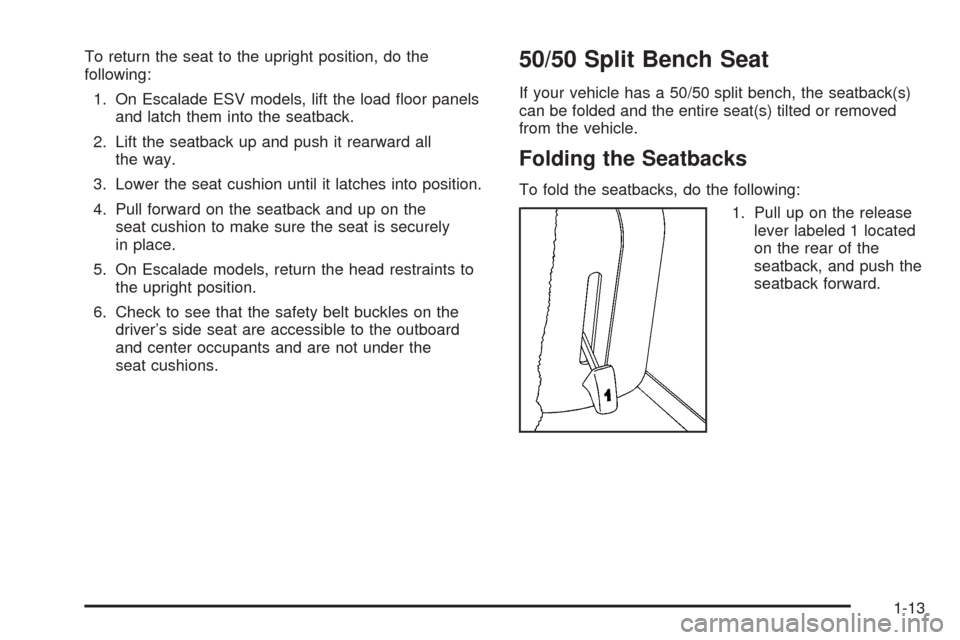
1. Pull up on the release
lever labeled 1 located
on the rear of the
seatback, and push the
seatback forward.
1-13
Page 105 of 470

Liftgate/Liftglass
{CAUTION:
It can be dangerous to drive with the liftgate or
liftglass open because carbon monoxide (CO)
gas can come into your vehicle. You cannot
see or smell CO. It can cause
unconsciousness and even death. If you must
drive with the liftgate open or if electrical
wiring or other cable connections must pass
through the seal between the body and the
liftgate or liftglass:
Make sure all other windows are shut.
Turn the fan on your heating or cooling
system to its highest speed and select the
control setting that will force outside air
into your vehicle. See “Climate Control
System” in the Index.
If you have air outlets on or under the
instrument panel, open them all the way.
SeeEngine Exhaust on page 2-28.To unlock the liftgate and liftgate glass from the outside
use either the power door locks or the remote keyless
entry system.
The liftgate glass can be opened using the pushbutton
on the liftgate after the doors have been unlocked.
To open the entire liftgate, lift the handle located in the
center of the door.
To lock the liftgate and liftgate glass from the outside
use the remote keyless entry system or the power
door locks.
2-13
Page 116 of 470

SECOND (2):This position gives you more power but
lower fuel economy. You can use SECOND (2) on
hills. It can help control your speed as you go down
steep mountain roads, but then you would also want to
use your brakes off and on.
If you manually select SECOND (2), the transmission
will drive in second gear. You may use this feature
for reducing the speed of the rear wheels when you
are trying to start your vehicle from a stop on slippery
road surfaces. Once the vehicle is moving, shift
into DRIVE (D).
FIRST (1):This position gives you even more power,
but lower fuel economy than SECOND (2). You can use
it on very steep hills, or in deep snow or mud. If the
shift lever is put in FIRST (1) while the vehicle is moving
forward, the vehicle will not shift into rst gear until
the vehicle is going slowly enough.
Notice:Spinning the tires or holding the vehicle in
one place on a hill using only the accelerator
pedal may damage the transmission. If you are
stuck, do not spin the tires. When stopping on a hill,
use the brakes to hold the vehicle in place.
On cold days, approximately 32°F (0°C) or colder, your
transmission is designed to shift differently until the
engine reaches normal operating temperature. This is
intended to improve heater performance.Tow/Haul Mode
Your vehicle is equipped
with a tow/haul mode. The
button for this feature is
located on the end of
the column shift lever.
You can use this feature to assist when towing or
hauling a heavy load. See “Tow/Haul Mode” under
Towing a Trailer on page 4-50for more information.
The tow/haul mode also interacts with the Road Sensing
Suspension (RSS) feature to enhance the ride when
trailering or with a loaded vehicle. SeeRoad Sensing
Suspension on page 4-8.
All-Wheel Drive
With this feature, engine power is sent to all four wheels
when extra traction is needed.
This is like four-wheel drive, but there is no separate
lever or switch to engage or disengage the front axle. It
is fully automatic, and adjusts itself as needed for
road conditions.
2-24