2005 CADILLAC DEVILLE door lock
[x] Cancel search: door lockPage 195 of 420

3. To turn on the feature, press the ON/OFF button
until ON appears on the DIC display. To turn it off,
press the ON/OFF button until OFF appears on
the display.
The mode you selected is now set. You can either exit
the programming mode by following the instructions
later in this section or program the next feature available
on your vehicle.
Driver Unlock in PARK (P)
This feature allows the driver’s door to automatically
unlock when the vehicle is shifted into PARK (P).
All other doors will remain locked until the unlock button
on either front door armrest or on the remote keyless
entry transmitter is pressed.
Programmable Modes
Mode 1:ON
Mode 2:OFF
Before your vehicle was shipped from the factory, it was
programmed to Mode 2. The mode to which the
vehicle was programmed may have been changed since
it left the factory.To determine the mode to which the vehicle is
programmed or to program the vehicle to a different
mode, do the following:
1. Enter FEATURE PROGRAMMING following the
instructions listed previously.
2. Press the down arrow on the INFO button until
DRIVER UNLOCK IN PARK appears on the DIC
display.
3. To turn on the feature, press the ON/OFF button
until ON appears on the DIC display. To turn it off,
press the ON/OFF button until OFF appears on
the display.
The mode you selected is now set. You can either exit
the programming mode by following the instructions
later in this section or program the next feature available
on your vehicle.
3-75
Page 196 of 420

Driver Unlock Key Off
This feature allows the driver’s door to automatically
unlock when the ignition key is turned to OFF. All other
doors will remain locked until the unlock button on
either front door armrest or on the remote keyless entry
transmitter is pressed.
Programmable Modes
Mode 1:ON
Mode 2:OFF
Before your vehicle was shipped from the factory, it was
programmed to Mode 2. The mode to which the
vehicle was programmed may have been changed since
it left the factory. To determine the mode to which the
vehicle is programmed or to program the vehicle to
a different mode, do the following:
1. Enter FEATURE PROGRAMMING following the
instructions listed previously.
2. Press the down arrow on the INFO button until
DRIVER UNLOCK KEY OFF appears on the
DIC display.
3. To turn on the feature, press the ON/OFF button
until ON appears on the DIC display. To turn it off,
press the ON/OFF button until OFF appears on
the display.The mode you selected is now set. You can either exit
the programming mode by following the instructions
later in this section or program the next feature available
on your vehicle.
Doors Unlock in PARK (P)
This feature will automatically unlock all doors when the
vehicle is shifted in to PARK (P).
Programmable Modes
Mode 1:ON
Mode 2:OFF
Before your vehicle was shipped from the factory, it was
programmed to Mode 1. The mode to which the
vehicle was programmed may have been changed since
it left the factory. To determine the mode to which the
vehicle is programmed or to program the vehicle to
a different mode, do the following:
1. Enter FEATURE PROGRAMMING following the
instructions listed previously.
2. Press the down arrow on the INFO button until
DOORS UNLOCK IN PARK appears on the DIC
display.
3. To turn on the feature, press the ON/OFF button
until ON appears on the DIC display. To turn it off,
press the ON/OFF button until OFF appears on
the display.
3-76
Page 197 of 420

The mode you selected is now set. You can either exit
the programming mode by following the instructions
later in this section or program the next feature available
on your vehicle.
Doors Unlock Key Off
This feature will automatically unlock all doors when the
ignition key is turned to OFF.
Programmable Modes
Mode 1:ON
Mode 2:OFF
Before your vehicle was shipped from the factory, it was
programmed to Mode 2. The mode to which the
vehicle was programmed may have been changed since
it left the factory. To determine the mode to which the
vehicle is programmed or to program the vehicle to
a different mode, do the following:
1. Enter FEATURE PROGRAMMING following the
instructions listed previously.
2. Press the down arrow on the INFO button until
DRIVER UNLOCK KEY OFF appears on the
DIC display.
3. To turn on the feature, press the ON/OFF button
until ON appears on the DIC display. To turn it off,
press the ON/OFF button until OFF appears on
the display.The mode you selected is now set. You can either exit
the programming mode by following the instructions
later in this section or program the next feature available
on your vehicle.
Mirror to Curb In Reverse
If your vehicle has the optional memory package, you
will have this feature. This feature will move the
passenger’s outside rearview mirror to a curb view
position when the shift lever is placed in REVERSE (R),
and it will return the mirror to the last known driving
position when the shift lever is moved out of
REVERSE (R). SeeOutside Curb View Assist Mirror on
page 2-41for more information.
Programmable Modes
Mode 1:ON
Mode 2:OFF
Before your vehicle was shipped from the factory, it was
programmed to Mode 2. The mode to which the
vehicle was programmed may have been changed since
it left the factory.
3-77
Page 199 of 420

Driver’s Name Set/Recall
If your vehicle has the optional memory package, you
will have this feature. This feature allows individual
driver’s names to be displayed in the DIC when
the ignition is turned to ON. This feature only works
when the remote keyless entry transmitter is used
to unlock the vehicle or when buttons 1 or 2 on the
driver’s door are pressed. See your dealer for assistance
in programming this feature.
Exiting Feature Programming
To exit FEATURE PROGRAMMING, press the INFO
RESET or INFO button.
Trip Computer
Oil Life Indicator
This feature lets you know when to change the engine
oil. It is based on the engine oil temperatures and
your driving patterns.
To see the display, press the INFO button several times
until ENGINE OIL LIFE appears. If you see 99%
ENGINE OIL LIFE, 99 percent of your current oil life
remains.
The DIC may display a CHANGE ENGINE OIL
message. If you see CHANGE ENGINE OIL, it means
the oil life is gone. For more information, seeScheduled
Maintenance on page 6-4andEngine Oil on page 5-14.
When the oil is changed, you will need to reset the
system. SeeEngine Oil Life System on page 5-17.
Always keep a written record of the mileage and date
when you changed your oil.
3-79
Page 223 of 420

Radio Personalization with Home
and Away Feature
If your vehicle has this feature, DRIVER 1 (HOME or
AWAY) PRESETS or DRIVER 2 (HOME or AWAY)
PRESETS will appear on the display when the radio is
rst turned on.
This feature allows the driver to return to the last used
audio source: radio, cassette, or CD, using the
remote keyless entry transmitter. This feature can also
store and recall AM and FM presets, volume, tone,
and the last selected radio station. The number on the
back of each transmitter, 1 or 2, corresponds to
driver 1 or 2. If transmitter 1 is used to enter the vehicle,
the last used audio source and/or settings set by
driver 1 will be recalled. If transmitter 2 is used to enter
the vehicle, the last used audio source and/or settings
set by driver 2 will be recalled. The settings can also be
recalled by pressing the memory seat buttons 1 or 2
located on the driver’s door.
Your radio can store home and away presets. Home
and away presets allow you to use one set of preset
radio settings in the area where you live, and another set
when you go out of town. You will not need to
reprogram the presets every time you travel.With the radio off and the time displayed, use fast
forward and reverse to select home or away presets.
To select the away presets, press and hold FF for
ve seconds until you hear a beep. The next time the
radio comes on, the away presets will be active.
To select the home presets, press and hold RW for
ve seconds until you hear a beep. The next time the
radio comes on, the home presets will be active.
When battery power is removed and later applied, you
will not have to reset the home radio presets because
the radio remembers them. However, you will have
to reset the away radio presets.
Theft-Deterrent Feature
THEFTLOCK®is designed to discourage theft of your
vehicle’s radio. The feature works automatically by
learning a portion of the Vehicle Identication Number
(VIN). If the radio is moved to a different vehicle, it
will not operate. If the radio is removed from your
vehicle, the original VIN in the radio can be used to
trace the radio back to your vehicle.
With THEFTLOCK
®activated, the radio will not operate
if stolen.
3-103
Page 259 of 420

Tire and Loading Information Label
A vehicle specic Tire and Loading Information label is
attached to the vehicle’s center pillar (B-pillar). With
the driver’s door open, you will nd the label attached
below the door lock post (striker). The tire and
loading information label shows the number of occupant
seating positions (A), and the maximum vehicle
capacity weight (B) in kilograms and pounds.The Tire and Loading Information label also shows the
tire size of the original equipment tires (C) and the
recommended cold tire ination pressures (D). For more
information on tires and ination seeTires on page 5-57
andInation - Tire Pressure on page 5-65.
There is also important loading information on the
Certication label. It tells you the Gross Vehicle Weight
Rating (GVWR) and the Gross Axle Weight Rating
(GAWR) for the front and rear axle; see “Certication
Label” later in this section.
If you have a Professional Vehicle, a Tire and Loading
Information label specic to your vehicle will be
provided and installed by the nal body manufacturer.
The Tire and Loading Information label, should be
attached to the B-pillar of your vehicle. See the nal
stage manufacturer’s manual or contact them directly.
The label shows the original tires installed on your
professional vehicle and the recommended cold
tire ination pressures for those tires. The label also
tells you the professional vehicle’s capacity weight. Label Example
4-31
Page 280 of 420

The fuel door release
button is located to the left
of the steering wheel
next to the exterior lamp
control. The button
only works when the
vehicle is in PARK (P) or
NEUTRAL (N), the
key is in the ignition and
the VALET lockout
button is in OFF.
An alternate fuel door
release is located inside of
the trunk on the driver’s
side of the vehicle.
Pull it to release the
fuel door.To remove the fuel cap, turn it slowly to the left
(counterclockwise). The fuel cap has a spring in it; if the
cap is released too soon, it will spring back to the right.
While refueling, hang the tethered fuel cap from the
hook on the fuel door.
{CAUTION:
If you spill fuel and then something ignites it,
you could be badly burned. Fuel can spray out
on you if you open the fuel cap too quickly.
This spray can happen if your tank is nearly
full, and is more likely in hot weather. Open
the fuel cap slowly and wait for any hiss noise
to stop. Then unscrew the cap all the way.
5-8
Page 375 of 420
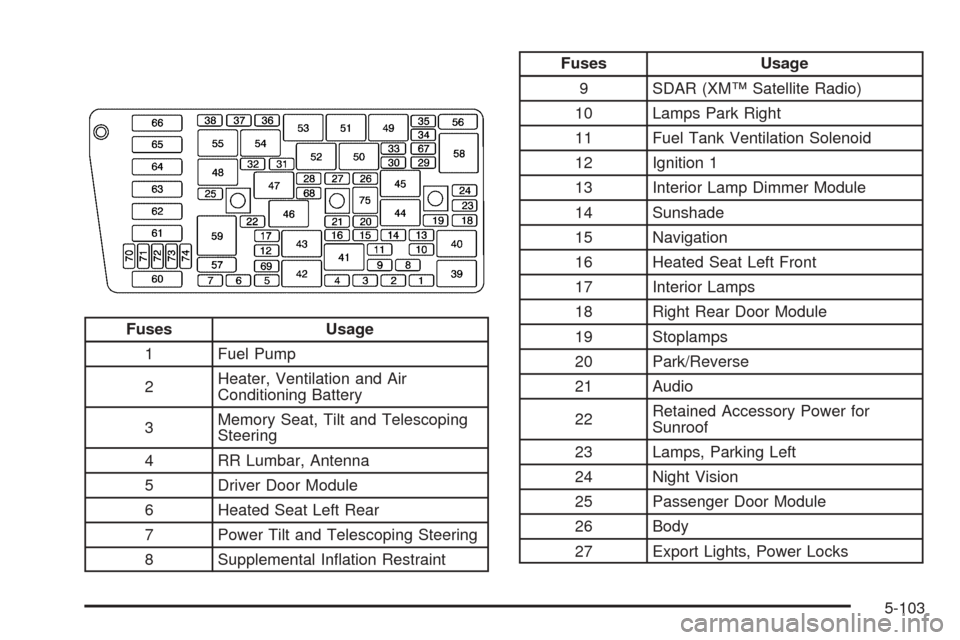
Fuses Usage
1 Fuel Pump
2Heater, Ventilation and Air
Conditioning Battery
3Memory Seat, Tilt and Telescoping
Steering
4 RR Lumbar, Antenna
5 Driver Door Module
6 Heated Seat Left Rear
7 Power Tilt and Telescoping Steering
8 Supplemental Ination Restraint
Fuses Usage
9 SDAR (XM™ Satellite Radio)
10 Lamps Park Right
11 Fuel Tank Ventilation Solenoid
12 Ignition 1
13 Interior Lamp Dimmer Module
14 Sunshade
15 Navigation
16 Heated Seat Left Front
17 Interior Lamps
18 Right Rear Door Module
19 Stoplamps
20 Park/Reverse
21 Audio
22Retained Accessory Power for
Sunroof
23 Lamps, Parking Left
24 Night Vision
25 Passenger Door Module
26 Body
27 Export Lights, Power Locks
5-103