2005 CADILLAC CTS ABS
[x] Cancel search: ABSPage 280 of 432

3. When the chocks are in place, release the regular
brakes until the chocks absorb the load.
4. Reapply the regular brakes. Then apply your
parking brake and shift into PARK (P) for an
automatic transmission or REVERSE (R) for a
manual transmission.
5. Release the regular brakes.
When You Are Ready to Leave After
Parking on a Hill
1. Apply your regular brakes and hold the pedal down
while you:
start your engine,
shift into a gear, and
release the parking brake.
2. Let up on the brake pedal.
3. Drive slowly until the trailer is clear of the chocks.
4. Stop and have someone pick up and store the
chocks.
Maintenance When Trailer Towing
Your vehicle will need service more often when you’re
pulling a trailer. SeeScheduled Maintenance on
page 6-4for more information. Things that are especially
important in trailer operation are automatic transmission
uid (don’t overll), engine oil, axle lubricant, drive
belt, cooling system and brake system. Each of these is
covered in this manual, and the Index will help you
nd them quickly. If you’re trailering, it’s a good idea to
review this information before you start your trip.
Check periodically to see that all hitch nuts and bolts
are tight.
Engine Cooling When Trailer Towing
Your cooling system may temporarily overheat during
severe operating conditions. SeeEngine Overheating on
page 5-28.
4-46
Page 377 of 432
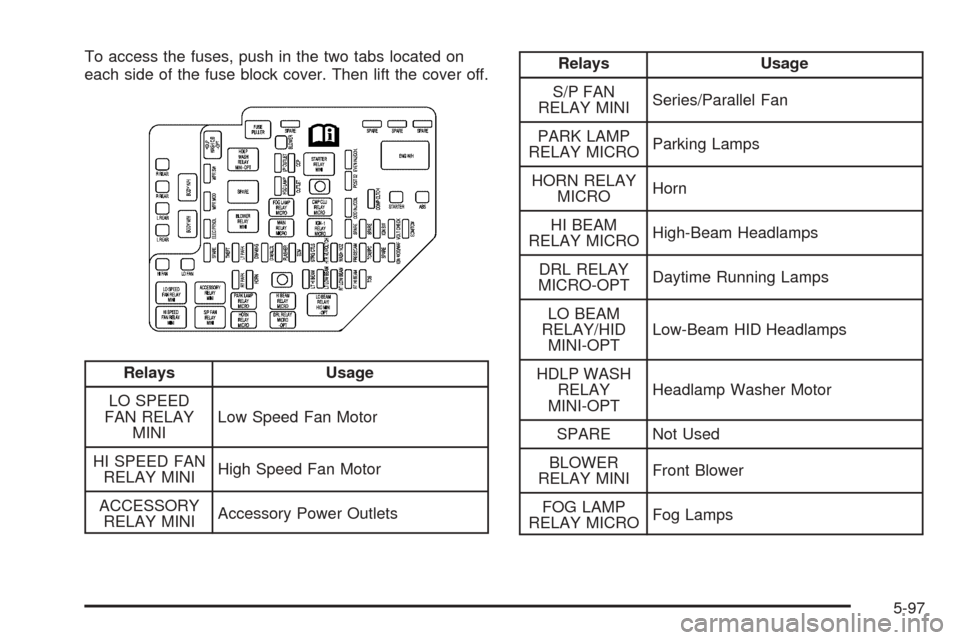
To access the fuses, push in the two tabs located on
each side of the fuse block cover. Then lift the cover off.
Relays Usage
LO SPEED
FAN RELAY
MINILow Speed Fan Motor
HI SPEED FAN
RELAY MINIHigh Speed Fan Motor
ACCESSORY
RELAY MINIAccessory Power Outlets
Relays Usage
S/P FAN
RELAY MINISeries/Parallel Fan
PARK LAMP
RELAY MICROParking Lamps
HORN RELAY
MICROHorn
HI BEAM
RELAY MICROHigh-Beam Headlamps
DRL RELAY
MICRO-OPTDaytime Running Lamps
LO BEAM
RELAY/HID
MINI-OPTLow-Beam HID Headlamps
HDLP WASH
RELAY
MINI-OPTHeadlamp Washer Motor
SPARE Not Used
BLOWER
RELAY MINIFront Blower
FOG LAMP
RELAY MICROFog Lamps
5-97
Page 378 of 432

Relays Usage
MAIN RELAY
MICROPowertrain/ECM
STARTER
RELAY MINIStarter Solenoid
CMP CLU
RELAY MICROCompressor Clutch
IGN-1 RELAY
MICROIgnition Switch (ON)
Wiring
HarnessesUsage
BODY W/H Wiring Harness Connection
I/P W/H Wiring Harness Connection
ENG W/H Engine Wiring Harness Connection
FORWARD
LAMPForward Lamp Wiring Harness
Connection
J Cases Usage
R REARRRPDB (Passenger’s Side Rear
Power Distribution Box)
R REARRRPDB (Passenger’s Side Rear
Power Distribution Box)
L REARLRPDB (Driver’s Side Rear Power
Distribution Box)
L REARLRPDB (Driver’s Side Rear Power
Distribution Box)
HI FAN High Cooling Fan Motor
LO FAN Low Cooling Fan Motor
BLOWER PWM Fan Motor Assembly
STARTER Starter Solenoid
ABS Anti-Lock Brake System
5-98
Page 383 of 432

4. Push and pull on the seat cushion to make sure it
is locked into place.
5. Check to make sure the safety belts are properly
routed and that no portion of any safety belt is
trapped under the seat cushion.
Rear Underseat Fuse Block
(Driver’s Side)
The driver’s side rear fuse block is located under
the rear seat on the driver’s side of the vehicle. The
rear seat cushion must be removed to access the rear
fuse block. See “Removing the Rear Seat Cushion”
listed previously.To access the fuse block, push in the two tabs located at
each end of the fuse block cover. Then lift the cover off.
Fuses Usage
SPARE Not Used
SPARE Not Used
AUDIO Radio, OnStar Module
SPARE Not Used
REAR DR MOD Rear Door Modules
SPARE Not Used
DRIVER
DR MODDriver’s Door Module
BASTaillamps, Center High-Mounted
Stoplamp, Flasher Module,
ABS Module, Trailer Lamps
HDLP
LEVELINGHeadlamp Leveling System Chassis
Sensors (Export Only)
5-103
Page 385 of 432

Circuit
BreakersUsage
SEAT C/BPower Seat Switches, Memory
Seat Module
Misc. Usage
JOINT
CONNECTORJoint Connector
Rear Underseat Fuse Block
(Passenger’s Side)
The passenger’s side rear fuse block is located under
the rear seat on the passenger’s side of the vehicle.
The rear seat cushion must be removed to access
the rear fuse block. See “Removing the Rear Seat
Cushion” listed previously.To access the fuse block, push in the two tabs located at
each end of the fuse block cover. Then lift the cover off.
Fuses Usage
TRUNK DIODE Trunk Lamp
POWER
SOUNDERPower Sounder, Inclination Sensor
SPARE Not Used
CANISTER
VENTCanister Vent Solenoid
FUEL
PUMP MTRFuel Pump Motor
SPARE Not Used
R FRT HTD
SEAT MODPassenger’s Side Heated
Seat Module
SPARE Not Used
AIR BAG SDM (Sensing Diagnostic Module)
RIMISRVM (Inside Rearview Mirror),
Power Sounder, RIM
5-105
Page 386 of 432

Fuses Usage
ABS Anti-Lock Brake System
SPARE Not Used
SPARE Not Used
SPARE Not Used
FUSE PULLER Fuse Puller
INTERIOR
LAMPHush Panel Lamps, Puddle Lamps,
Overhead Courtesy Lamp Assembly
PSGR DR MOD Right Front Passenger Door Module
RIM/IGN SWRIM (Rear Integration Module),
Ignition Switch, Key Lock Cylinder
REAR FOG
LAMPRear Fog Lamps (Export Only)
SPARE Not Used
TV/VICSTV Tuner Assembly (Export Only),
VICS (Vehicle Information
Communication System) Module
J Cases Usage
REAR DEFOG Rear Window Defogger Element
SUNROOF MODPower Sunroof Module
Relays Usage
SPARE Not Used
REAR DEFOG
RELAY MINIRear Window Defogger
SPARE Not Used
REAR FOG
LAMP
RLY MICRORear Fog Lamps (Export Only)
FUEL PUMP
MOTOR
RLY MICROFuel Pump Motor
INT LAMP
RELAY MICROHush Panel Lamps, Puddle Lamps,
Overhead Courtesy Lamp Assembly
IGN 1 RELAY
MICROIgnition Switch
Circuit
BreakersUsage
DR MOD
PWR C/BDoor Modules
Misc. Usage
JOINT
CONNECTORJoint Connector
5-106
Page 419 of 432

A
Accessory Power Outlets.................................3-25
Adding Equipment to Your Airbag-Equipped
Vehicle.......................................................1-64
Additives, Fuel................................................. 5-6
Add-On Electrical Equipment............................5-95
Air Cleaner/Filter, Engine.................................5-21
Air Conditioning..............................................3-27
Airbag
Passenger Status Indicator...........................3-39
Readiness Light..........................................3-38
Airbag Sensing and Diagnostic Module (SDM)...... 7-9
Airbag System................................................1-50
Adding Equipment to Your Airbag-Equipped
Vehicle...................................................1-64
How Does an Airbag Restrain?......................1-58
Passenger Sensing System...........................1-60
Servicing Your Airbag-Equipped Vehicle..........1-64
What Makes an Airbag Inate?......................1-58
What Will You See After an Airbag Inates?....1-58
When Should an Airbag Inate?....................1-56
Where Are the Airbags?...............................1-52
Antenna, Diversity Antenna System..................3-108
Antenna, XM™ Satellite Radio Antenna
System.....................................................3-108
Anti-Lock Brake System (ABS)........................... 4-6
Anti-Lock Brake, System Warning Light..............3-42Appearance Care............................................5-86
Aluminum or Chrome-Plated Wheels..............5-91
Care of Safety Belts....................................5-89
Chemical Paint Spotting...............................5-93
Cleaning Exterior Lamps/Lenses....................5-90
Fabric/Carpet..............................................5-86
Finish Care.................................................5-90
Finish Damage............................................5-92
Glass Surfaces............................................5-89
Instrument Panel.........................................5-88
Interior Plastic Components...........................5-88
Leather......................................................5-88
Sheet Metal Damage...................................5-92
Speaker Covers..........................................5-89
Tires..........................................................5-92
Underbody Maintenance...............................5-93
Vehicle Care/Appearance Materials................5-93
Vinyl..........................................................5-88
Washing Your Vehicle...................................5-90
Weatherstrips..............................................5-89
Windshield and Wiper Blades........................5-91
Wood Panels..............................................5-89
Ashtrays........................................................3-26
Audio System(s).............................................3-88
Audio Steering Wheel Controls....................3-105
Care of Your CD Player..............................3-107
Care of Your CDs......................................3-107
Diversity Antenna System............................3-108
1
Page 420 of 432

Audio System(s) (cont.)
Navigation/Radio System, see Navigation
Manual.................................................3-105
Radio with CD............................................3-89
Setting the Time..........................................3-88
Theft-Deterrent Feature...............................3-105
Understanding Radio Reception...................3-106
XM™ Satellite Radio Antenna System...........3-108
Automatic Transmission
Fluid..........................................................5-22
Operation...................................................2-26
B
Battery..........................................................5-41
Exterior Lighting Battery Saver......................3-23
Before Leaving on a Long Trip.........................4-24
Brake
Anti-Lock Brake System (ABS)........................ 4-6
Emergencies................................................ 4-8
Panic Assist................................................4-12
Parking......................................................2-33
System Warning Light..................................3-41
Brakes..........................................................5-38
Braking........................................................... 4-5
Braking in Emergencies..................................... 4-8
Break-In, New Vehicle.....................................2-21Bulb Replacement...........................................5-49
Back-Up and License Plate Lamps.................5-51
Front Turn Signal and Fog Lamps..................5-50
Halogen Bulbs............................................5-49
High Intensity Discharge (HID) Lighting...........5-49
Replacement Bulbs......................................5-52
Taillamps, Turn Signal, Stoplamps and
Sidemarker Lamps...................................5-50
Buying New Tires...........................................5-69
C
California Fuel.................................................. 5-6
Canadian Owners................................................ ii
Capacities and Specications..........................5-107
Carbon Monoxide...................2-11, 2-38, 4-28, 4-40
Care of
Safety Belts................................................5-89
Your CD Player.........................................3-107
Your CDs .................................................3-107
Center Console Storage Area...........................2-50
Chains, Tire...................................................5-74
Charging System Light....................................3-41
Check
Engine Light...............................................3-45
Engine Oil Pressure Message.......................3-56
Checking Things Under the Hood......................5-10
2