2005 BUICK LACROSSE instrument cluster
[x] Cancel search: instrument clusterPage 145 of 410
Instrument Panel Cluster
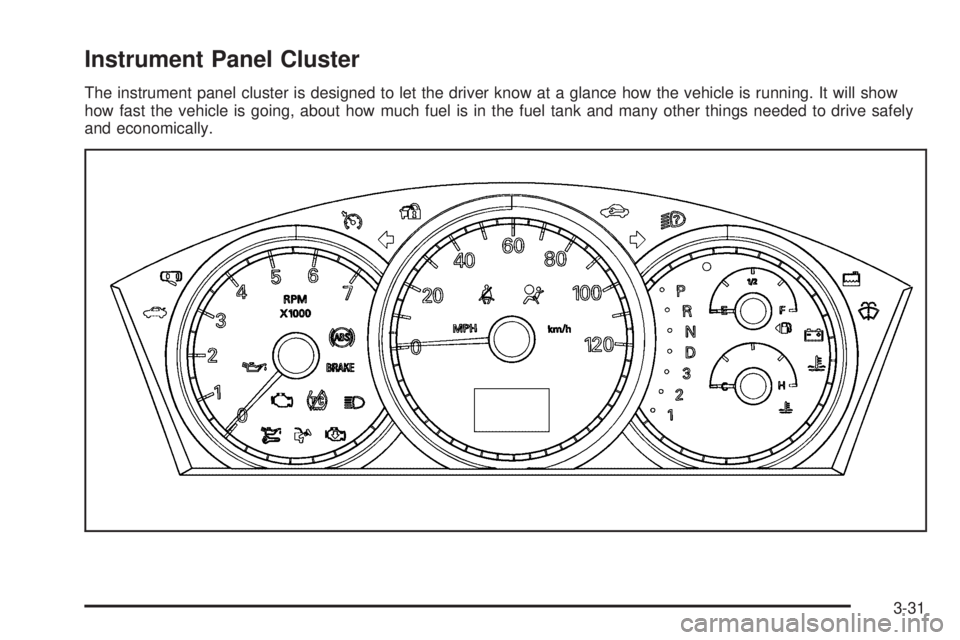
The instrument panel cluster is designed to let the driver know at a glance how the vehicle is running. It will show
how fast the vehicle is going, about how much fuel is in the fuel tank and many other things needed to drive safely
and economically.
3-31
Page 146 of 410

Speedometer and Odometer
Your speedometer lets you see your speed in both
miles per hour (mph) and kilometers per hour (km/h).
Your vehicle’s odometer works together with the
driver information center. You can set a Trip A and
Trip B odometer. See “Trip Information” underDIC
Operation and Displays on page 3-47.
The odometer mileage can be checked without the
vehicle running. Simply press the odometer/trip switch
on the instrument panel cluster.
If your vehicle ever needs a new odometer installed, the
new one will be set to the correct mileage total of the
old odometer.
Tachometer
The tachometer displays
the engine speed in
thousands of revolutions
per minute (rpm).
Safety Belt Reminder Light
When the ignition key is turned to RUN or START or
the vehicle is started remotely, a chime will come on for
several seconds to remind occupants to fasten their
safety belts.
The safety belt light will
also come on and stay on
for several seconds,
then it will ash for
several more.
If the driver’s belt is already buckled, neither the chime
nor the light will come on.
3-32
Page 161 of 410

Driver Information Center (DIC)
Your vehicle may have a Driver Information
Center (DIC).
All messages will appear in the DIC display located in
the instrument panel cluster, below the speedometer.
The DIC buttons are located on the center of the
instrument panel, below the center outlets.
The DIC comes on when the ignition is on. After a short
delay, the DIC on the uplevel vehicle will display the
WELCOME DRIVER (1 or 2) if a personalized key 1 or 2
is used, and then the information that was last
displayed before the engine was turned off.
The DIC on the base level vehicle displays the odometer
and trip odometers only.
The DIC on the uplevel vehicle displays the odometer,
trip odometers, fuel economy, trip computer, vehicle
system, and compass display information. It also
displays warning messages if a system problem is
detected. In addition, the DIC on the uplevel vehicle
displays phone numbers that are called using the
OnStar
®system, if equipped. SeeOnStar®System on
page 2-34.The outside air temperature automatically appears in
the bottom right corner of the uplevel DIC display when
viewing the trip/odometer screens, fuel screens and
some of the gages screens. If the outside air
temperature is at or below 37°F (3°C), the temperature
reading will toggle between displaying the outside
temperature and the word ICE for two minutes. If there
is a problem with the system that controls the
temperature display, the letters OC (open circuit) or SC
(short circuit) will appear on the display. If this occurs,
have the vehicle serviced by your GM dealer.
The DIC on the uplevel vehicle also allows some
features to be customized or personalized. SeeDIC
Vehicle Personalization on page 3-71for more
information.
DIC Operation and Displays
The DIC has different modes which can be accessed by
pressing the DIC buttons located on the center of the
instrument panel. Depending on whether your vehicle
has the base level or uplevel DIC, the buttons and
modes available will differ.
The buttons on the base level vehicle are the
trip/odometer and English/Metric buttons.
The buttons on the uplevel vehicle are the trip/odometer,
set/reset, gages, fuel, and option buttons.
The button functions are detailed in the following pages.
3-47
Page 171 of 410
ENGINE COOLANT HOT
Notice:If you drive your vehicle while the engine is
overheating, severe engine damage may occur. If
an overheat warning appears on the instrument
panel cluster and/or DIC, stop the vehicle as soon
as possible. Do not increase the engine speed above
normal idling speed. SeeEngine Overheating on
page 5-24for more information.
This message will display when the engine coolant
temperature is too hot. The engine coolant temperature
warning light will also appear on the instrument panel
cluster. SeeEngine Coolant Temperature Warning Light
on page 3-38andEngine Coolant Temperature Gage
on page 3-38for more information.
To avoid added strain on the engine, turn off the air
conditioner if it is on. When the coolant temperature
returns to normal, the air conditioner can be turned
back on.
This message will display only when the ignition is in
RUN. A chime will sound continuously when this
message is displayed. Press any of the DIC buttons
to acknowledge this message and to clear it from
the screen.This message will continue to display for two seconds if
it has not been acknowledged when the engine is
turned off. It will also re-display for two seconds if the
message has been acknowledged, but the condition still
exists when the engine is turned off.
If the condition still exists, the message will re-appear
when the engine is turned on.
HEADLAMPS SUGGESTED
This message will display when the amount of available
light outside of the vehicle is low, or the windshield
wipers have been on for approximately 30 seconds, and
the exterior lamps control is off or in the park lamps
position. This message informs the driver that turning on
the exterior lamps is recommended. SeeExterior
Lamps on page 3-13for more information.
This message will display while the ignition is in RUN.
Press any of the DIC buttons to acknowledge this
message and to clear it from the screen.
This message will continue to display for two seconds if
it has not been acknowledged when the engine is
turned off. It will also re-display for two seconds if the
message has been acknowledged, but the condition still
exists when the engine is turned off.
If the condition still exists, the message will re-appear
when the engine is turned on.
3-57
Page 174 of 410
The brake system warning light will also appear on the
instrument panel cluster when this message appears
on the DIC. SeeBrake System Warning Light on
page 3-36.
This message will display and a chime will sound only
while the ignition is in RUN. Press any of the DIC
buttons to acknowledge this message and to clear it
from the screen.
This message will continue to display for two seconds if
it has not been acknowledged when the engine is
turned off. It will also re-display for two seconds if the
message has been acknowledged, but the condition still
exists when the engine is turned off.
If the condition still exists, the message will re-appear
when the engine is turned on.
LOW FUEL
This message will display when your vehicle is low on
fuel. You should rell the tank as soon as possible. See
Fuel Gage on page 3-46andFilling the Tank on
page 5-8for more information.
The message will display and a chime will sound while
the ignition is in RUN. Press any of the DIC buttons
to acknowledge this message and to clear it from
the screen.
If the condition still exists, the message will re-appear
when the engine is turned on.
LOW OIL LEVEL
This message will display when the vehicle’s engine oil
is low. Fill the oil to the proper level as soon as
possible. SeeEngine Compartment Overview on
page 5-12for the engine oil ll location. Also, see
Engine Oil on page 5-15for information on the kind of
oil to use and the proper oil level.
The message will display and a chime will sound while
the ignition is in RUN. Press any of the DIC buttons
to acknowledge this message and to clear it from
the screen.
This message will continue to display for two seconds if
it has not been acknowledged when the engine is
turned off. It will also re-display for two seconds if the
message has been acknowledged, but the condition still
exists when the engine is turned off.
If the condition still exists, the message will re-appear
when the engine is turned on.
3-60
Page 175 of 410
LOW OIL PRESSURE
Notice:If the LOW OIL PRESSURE warning
message appears on the DIC display, stop the
vehicle immediately. Do not drive the vehicle until
the cause of the low oil pressure is corrected.
Severe engine damage can result from driving a
vehicle with low oil pressure. SeeEngine Oil
on page 5-15for more information.
This message will display when the vehicle’s engine oil
pressure is low. The oil pressure light will also appear
on the instrument panel cluster. SeeOil Pressure Light
on page 3-42.
Stop the vehicle immediately, as engine damage can
result from driving a vehicle with low oil pressure. Have
the vehicle serviced by your GM dealer as soon as
possible when this message is displayed.
This message will display only when the ignition is in
RUN. A chime will sound continuously when this
message is displayed.
This message cannot be acknowledged and cleared
from the screen. This message will re-display for a few
seconds if the condition still exists when the engine
is turned off.
If the condition still exists, the message will re-appear
when the engine is turned on.
LOW WASHER FLUID
This message will display when the windshield washer
uid is low. Fill the windshield washer reservoir as
soon as possible. SeeEngine Compartment Overview
on page 5-12for the location of the windshield
washer reservoir. Also, seeWindshield Washer Fluid on
page 5-34for more information.
This message will display and a chime will sound only
when the ignition is in RUN. Press any of the DIC
buttons to acknowledge this message and to clear it
from the screen.
This message will continue to display for two seconds if
it has not been acknowledged when the engine is
turned off. It will also re-display for two seconds if the
message has been acknowledged, but the condition still
exists when the engine is turned off.
If the condition still exists, the message will re-appear
when the engine is turned on.
3-61
Page 176 of 410
PARKING BRAKE ON
This message will display to alert the driver when the
vehicle’s parking brake is on, the ignition is in RUN, and
the vehicle speed is greater than 5 mph (8 km/h).
Release the parking brake before driving. SeeParking
Brake on page 2-27for more information.
The brake light will also appear on the instrument panel
cluster when this message appears on the DIC. See
Brake System Warning Light on page 3-36.
A chime will sound continuously while this message is
displayed if driving above 5 mph (8 km/h). Press
any of the DIC buttons to acknowledge this message
and to clear it from the screen.
This message will continue to display for two seconds if
it has not been acknowledged when the engine is
turned off. It will also re-display for two seconds if the
message has been acknowledged, but the condition still
exists when the engine is turned off.
If the condition still exists, the message will re-appear
when the engine is turned on.
PARK LAMPS ON
This message will display to alert the driver when the
headlamps or parking lamps are on while the ignition is
off and the driver’s door is opened. SeeExterior
Lamps on page 3-13for more information.
A chime will sound continuously while this message is
displayed. Press any of the DIC buttons to acknowledge
this message and to clear it from the screen.
PASSENGER’S DOOR AJAR
This message will display when the front passenger’s
door is not closed properly. When this message
appears, you should make sure that the front
passenger’s door is closed completely.
This message will display while the ignition is in RUN. A
chime will sound when the ignition is shifted out of
PARK (P). Press any of the DIC buttons to acknowledge
this message and to clear it from the screen.
This message will continue to display for two seconds if
it has not been acknowledged when the engine is
turned off. It will also re-display for two seconds if the
message has been acknowledged, but the condition still
exists when the engine is turned off.
If the condition still exists, the message will re-appear
when the engine is turned on.
3-62
Page 179 of 410
RIGHT FRONT TURN LAMP OUT
This message will display when the right front turn
signal bulb needs to be replaced. SeeFront Turn Signal
and Parking Lamps on page 5-47.
This message will display while the ignition is in RUN.
Press any of the DIC buttons to acknowledge this
message and to clear it from the screen.
This message will continue to display for two seconds if
it has not been acknowledged when the engine is
turned off. It will also re-display for two seconds if the
message has been acknowledged, but the condition still
exists when the engine is turned off.
If the condition still exists, the message will re-appear
when the engine is turned on.
RIGHT REAR TURN LAMP OUT
This message will display when the right rear turn signal
bulb needs to be replaced. SeeTaillamps, Turn
Signal, Sidemarker, Stoplamps and Back-up Lamps on
page 5-48.
This message will display while the ignition is in RUN.
Press any of the DIC buttons to acknowledge this
message and to clear it from the screen.This message will continue to display for two seconds if
it has not been acknowledged when the engine is
turned off. It will also re-display for two seconds if the
message has been acknowledged, but the condition still
exists when the engine is turned off.
If the condition still exists, the message will re-appear
when the engine is turned on.
SERVICE ABS SYSTEM
If the vehicle has the Anti-Lock Brake System (ABS),
this message will display when the system is not
functioning properly. Have the brake system serviced by
your GM dealer as soon as possible.
The anti-lock brake system warning light will also
appear on the instrument panel cluster when this
message appears on the DIC. SeeAnti-Lock Brake
System Warning Light on page 3-37.
This message will only display while the ignition is in
RUN. Press any of the DIC buttons to acknowledge this
message and to clear it from the screen.
This message will continue to display for two seconds if
it has not been acknowledged when the engine is
turned off. It will also re-display for two seconds if the
message has been acknowledged, but the condition still
exists when the engine is turned off.
If the condition still exists, the message will re-appear
when the engine is turned on.
3-65