2005 BUICK LACROSSE 3-71
[x] Cancel search: 3-71Page 132 of 410
Perimeter Lighting
Perimeter lighting provides a period of exterior vehicle
lighting. Perimeter lighting activates when the key
is removed from the ignition or the vehicle is unlocked
using the remote keyless entry transmitter. The
amount of time the exterior lamps will remain on can be
programmed using the Driver Information Center
(DIC). See “EXIT LIGHT DELAY” underDIC Vehicle
Personalization on page 3-71for additional information.
Overhead Console Reading
Lamps
Your vehicle may have reading lamps located on the
overhead console. Press the lens to turn them on
and off.
Rear Assist Handle Reading Lamps
Your vehicle may have reading lamps located near
the rear assist handles. Press the lens to turn them on
and off.
Battery Run-Down Protection
This helps prevent the vehicle’s battery from draining in
case the interior courtesy lamps, reading lamps,
trunk lamp, underhood lamp, glove box lamps, or sun
visor vanity lamps, if equipped, are accidently left on. If
any of these lamps are left on while the ignition is
off, they will automatically turn off after 10 minutes. The
lamps will not come back on again until one of the
following occurs:
The ignition is turned on.
The interior lamps control is turned off, then to
door or on.
Ultrasonic Rear Parking
Assist (URPA)
Your vehicle may be equipped with Ultrasonic Rear
Parking Assist (URPA). URPA is designed to help you
park while in REVERSE (R) and operates only at speeds
less than 3 mph (5 km/h). URPA can help you avoid
colliding with objects such as parked vehicles. The
system can detect objects 5 feet (1.5 m) behind your
vehicle and tell you how close those objects are to your
rear bumper.
3-18
Page 161 of 410

Driver Information Center (DIC)
Your vehicle may have a Driver Information
Center (DIC).
All messages will appear in the DIC display located in
the instrument panel cluster, below the speedometer.
The DIC buttons are located on the center of the
instrument panel, below the center outlets.
The DIC comes on when the ignition is on. After a short
delay, the DIC on the uplevel vehicle will display the
WELCOME DRIVER (1 or 2) if a personalized key 1 or 2
is used, and then the information that was last
displayed before the engine was turned off.
The DIC on the base level vehicle displays the odometer
and trip odometers only.
The DIC on the uplevel vehicle displays the odometer,
trip odometers, fuel economy, trip computer, vehicle
system, and compass display information. It also
displays warning messages if a system problem is
detected. In addition, the DIC on the uplevel vehicle
displays phone numbers that are called using the
OnStar
®system, if equipped. SeeOnStar®System on
page 2-34.The outside air temperature automatically appears in
the bottom right corner of the uplevel DIC display when
viewing the trip/odometer screens, fuel screens and
some of the gages screens. If the outside air
temperature is at or below 37°F (3°C), the temperature
reading will toggle between displaying the outside
temperature and the word ICE for two minutes. If there
is a problem with the system that controls the
temperature display, the letters OC (open circuit) or SC
(short circuit) will appear on the display. If this occurs,
have the vehicle serviced by your GM dealer.
The DIC on the uplevel vehicle also allows some
features to be customized or personalized. SeeDIC
Vehicle Personalization on page 3-71for more
information.
DIC Operation and Displays
The DIC has different modes which can be accessed by
pressing the DIC buttons located on the center of the
instrument panel. Depending on whether your vehicle
has the base level or uplevel DIC, the buttons and
modes available will differ.
The buttons on the base level vehicle are the
trip/odometer and English/Metric buttons.
The buttons on the uplevel vehicle are the trip/odometer,
set/reset, gages, fuel, and option buttons.
The button functions are detailed in the following pages.
3-47
Page 162 of 410

DIC Buttons
TRIP/ODO (Trip/Odometer):Press this button on
the base level vehicle to display the odometer and
trip distance.
Press this button on the uplevel vehicle to display
the odometer, trip distance, time elapsed, and
average speed.
E/M (English/Metric)**:Press this button on the base
level vehicle to select between English or Metric units.
To select between English or Metric units on the uplevel
vehicle, see “Units” later in this section.
.(Fuel)*:Press this button to display the fuel range,
average fuel economy, and instantaneous fuel economy.
2(Gages)*:Press this button to display the battery
voltage and oil life.
r(Set/Reset)*:Press this button to set or reset
certain functions and to turn off or acknowledge
messages on the DIC.
4(Option)*:Press this button to display the units,
language, personalization, compass zone, and compass
calibration. SeeDIC Vehicle Personalization on
page 3-71for more information.
t(Traction Control)*:If your vehicle has the traction
control system, press this button to turn traction
control on or off. SeeTraction Control System (TCS) on
page 4-8for more information.
|(Hazard):Press this button to turn the hazard
warning ashers on and off. SeeHazard Warning
Flashers on page 3-6for more information.
*These buttons are available on uplevel vehicles only.
**This button is available on base level vehicles only. Uplevel shown
3-48
Page 166 of 410
Personalization
Press the option button until PERSONAL PROGRAM
displays. Your vehicle may have personalization
capabilities that allow you to program certain features to
a preferred setting for up to two drivers.
Your vehicle may also have customization
capabilities that allow you to program certain features to
one preferred setting. Customization features can
only be programmed to one setting on the vehicle and
cannot be programmed to a preferred setting for up
to two drivers. SeeDIC Vehicle Personalization
on page 3-71for additional information on personal
programming.
Compass Zone
Under certain circumstances, such as during a long
distance cross-country trip, it will be necessary to
compensate for compass variance and reset the zone
through the DIC.
Compass variance is the difference between the earth’s
magnetic north and true geographic north. If not
adjusted to account for compass variance, the compass
in the vehicle could give false readings.
In order to do this, the compass must be set or
calibrated to the variance zone in which the vehicle
is travelling.To adjust for compass variance, use the following
procedure:
Compass Variance Procedure
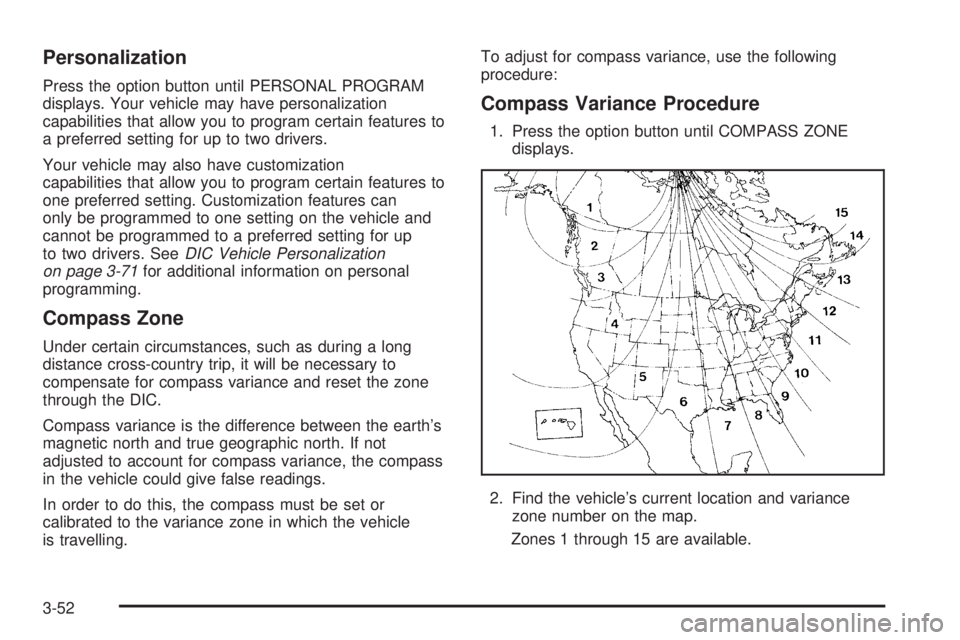
1. Press the option button until COMPASS ZONE
displays.
2. Find the vehicle’s current location and variance
zone number on the map.
Zones 1 through 15 are available.
3-52
Page 170 of 410
DELAYED LOCKING
This message will display to inform the driver that even
though a door lock switch has been pressed, that
actual locking of the doors is being delayed because
the delayed locking feature has been activated in
the DIC. See “DELAYED LOCKING” underDIC Vehicle
Personalization on page 3-71for more information.
This message will appear and a chime will sound when
the ignition is off.
This message cannot be acknowledged.
DRIVER’S DOOR AJAR
This message will display when the driver’s door is not
closed properly. When this message appears, you
should make sure that the driver’s door is closed
completely.
This message will display while the ignition is in RUN. A
chime will sound when the ignition is shifted out of
PARK (P). Press any of the DIC buttons to acknowledge
this message and to clear it from the screen.This message will continue to display for two seconds if
it has not been acknowledged when the engine is
turned off. It will also re-display for two seconds if the
message has been acknowledged, but the condition still
exists when the engine is turned off.
If the condition still exists, the message will re-appear
when the engine is turned on.
DRIVER’S REAR DOOR AJAR
This message will display when the driver’s side rear
door is not closed properly. When this message
appears, you should make sure that the passenger’s
door is closed completely.
This message will display while the ignition is in RUN. A
chime will sound when the ignition is shifted out of
PARK (P). Press any of the DIC buttons to acknowledge
this message and to clear it from the screen.
This message will continue to display for two seconds if
it has not been acknowledged when the engine is
turned off. It will also re-display for two seconds if the
message has been acknowledged, but the condition still
exists when the engine is turned off.
If the condition still exists, the message will re-appear
when the engine is turned on.
3-56
Page 178 of 410
REDUCED POWER STOP WHEN SAFE
This message will display when your vehicle is in an
overheated engine operating mode. This operating mode
allows your vehicle to be driven to a safe place in an
emergency. In this mode, you will notice a signicant
loss in power and engine performance. SeeOverheated
Engine Protection Operating Mode on page 5-26for
more information. Anytime this message is on, the
vehicle should be taken to your GM dealer for service
as soon as possible.
This message will display and a chime will sound only
when the ignition is in RUN. Press any of the DIC
buttons to acknowledge this message and to clear it
from the screen.
This message will continue to display for two seconds if
it has not been acknowledged when the engine is
turned off. It will also re-display for two seconds if the
message has been acknowledged, but the condition still
exists when the engine is turned off.
If the condition still exists, the message will re-appear
when the engine is turned on.
REMOTE START DISABLED
This warning message will come on if a remote start
attempt is unsuccessful. This may be caused if any of
the following conditions are true when a remote
start attempt is made:
The remote start system is disabled through
the DIC.
The key is in the ignition.
The hood or the doors are not closed.
There is an emission control system malfunction.
The engine coolant temperature is too high.
The oil pressure is low.
The hazard warning ashers are turned on.
The maximum number of remote starts or
remote start attempts between ignition cycles
has been reached.
The content theft-deterrent alarm is on while
attempting to remote start the vehicle.
See “REMOTE START” underDIC Vehicle
Personalization on page 3-71and “Remote Vehicle
Start” underRemote Keyless Entry System Operation
on page 2-4for more information.
3-64
Page 185 of 410
DIC Vehicle Personalization
Your vehicle may have customization capabilities that
allow you to program certain features to one preferred
setting. Customization features can only be programmed
to one setting on the vehicle and cannot be programmed
to a preferred setting for two different drivers. The
customization features include the following:
Exterior lighting delay
Interior lighting delay
Delayed locking
Content theft
Remote keyless entry feedback
Remote start
Your vehicle may also have personalization capabilities
that allow you to program certain features to a
preferred setting for up to two drivers. The rst
personalized key corresponds to driver 1 and the second
personalized key corresponds to driver 2. The
personalization features include the following:
Radio station presets
Auto door lock preferences
Auto door unlock preferences
Remote keyless entry unlock preferencesAll of the customization and personalization options may
not be available on your vehicle. Only the options
available will be displayed on your DIC.
The default settings for the customization and
personalization features were set when your vehicle left
the factory, but may have been changed from their
default state since then.
The customization preferences are automatically
recalled.
The driver’s personalization preferences are recalled by
using the key programmed for driver 1 or 2.
To change customization and personalization
preferences, use the following procedure.
Entering the Personal Program Menu
1. Turn the ignition on and place the vehicle in
PARK (P).
2. Press the option button until PERSONAL
PROGRAM displays.
If the vehicle is not in PARK (P), PERSONAL
PROGRAM ONLY IN PARK will display.
If the vehicle is not able to enter the personal
program menu, PERSONAL PROGRAM NOT
AVAILABLE will display.
3-71
Page 400 of 410

Cruise Control Lever.......................................3-10
Cruise Control Light........................................3-43
Cupholder(s)..................................................2-40
Customer Assistance Information
Courtesy Transportation.................................. 7-7
Customer Assistance for Text
Telephone (TTY) Users............................... 7-4
Customer Assistance Offices........................... 7-4
Customer Satisfaction Procedure..................... 7-2
GM Mobility Reimbursement Program............... 7-5
Reporting Safety Defects to General Motors....7-11
Reporting Safety Defects to the Canadian
Government............................................7-11
Reporting Safety Defects to the United States
Government............................................7-10
Roadside Assistance Program......................... 7-6
Service Publications Ordering Information........7-11
D
Daytime Running Lamps/Automatic
Headlamp System.......................................3-14
Defensive Driving............................................. 4-2
Delayed Entry Lighting.....................................3-17
Delayed Exit Lighting.......................................3-17
Delayed Locking.............................................2-11
Doing Your Own Service Work........................... 5-4
Door
Ajar Light...................................................3-45Door (cont.)
Delayed Locking..........................................2-11
Locks........................................................2-10
Power Door Locks.......................................2-11
Driver
Position, Safety Belt.....................................1-15
Driver Information Center (DIC).........................3-47
DIC Operation and Displays..........................3-47
DIC Vehicle Personalization..........................3-71
DIC Warnings and Messages........................3-53
Driving
At Night.....................................................4-15
City...........................................................4-19
Defensive..................................................... 4-2
Drunken....................................................... 4-2
Freeway.....................................................4-20
Hill and Mountain Roads..............................4-22
In Rain and on Wet Roads...........................4-16
Rocking Your Vehicle to Get it Out.................4-28
Winter........................................................4-24
Dual Automatic Climate Control System.............3-24
E
Electrical System
Add-On Equipment......................................5-87
Fuses and Circuit Breakers...........................5-88
Headlamp Wiring.........................................5-87
Instrument Panel Fuse Block.........................5-88
4