2005 BUICK LACROSSE display
[x] Cancel search: displayPage 228 of 410
\(Fast Forward):Press this button to fast forward
within the current track.
N(Repeat):With repeat, one track or an entire CD
can be repeated.
To use repeat, do the following:
To repeat the track you are listening to, press
and release the repeat button. RPT # will appear
on the display. Press this button again to turn off
repeat play.
To repeat the CD you are listening to, press and hold
the repeat button for two seconds. REPEAT CD # will
appear on the display. Press this button again to turn
off repeat play.
RDM (Random):With random, you can listen to the
tracks in random, rather than sequential, order, on
one CD or on all of the CDs. To use random, do one of
the following:
To play the tracks on the CD you are listening to in
random order, press and release the random
button. RANDOM ONE will appear on the display.
Press this button again to turn off random play.
To play the tracks on all of the CDs that are loaded
in random order, press and hold this button for
more than two seconds. You will hear a beep and
RANDOM ALL will appear on the display. Press this
button again to turn off random play.
oSEEKp:Press the left arrow to go to the start of
the current track, if more than ten seconds have
played. Press the right arrow to go to the next track. If
either arrow is held or pressed more than once, the
player will continue moving backward or forward through
the CD.
To scan one CD, press and hold either SEEK arrow for
more than two seconds until TRACK SCAN appears
on the display and you hear a beep. The radio will go to
the next track, play for 10 seconds, then go on to the
next track. Press either SEEK arrow again, to stop
scanning.
To scan all loaded CDs, press and hold either SEEK
arrow for more than four seconds until ALL CD
SCAN appears on the display and you hear a beep.
Use this feature to listen to 10 seconds of the rst track
of each loaded CD. Press either SEEK arrow again,
to stop scanning.
DISP (Display):Press this knob to see how long the
current track has been playing. The elapsed time of the
track will appear on the display. To change the
default on the display, track or elapsed time, press this
knob until you see the display you want, then hold
the knob for two seconds. The radio will produce
one beep and the selected display will now be the
default.
3-114
Page 229 of 410
BAND:Press this button to listen to the radio when a
CD is playing. The inactive CD(s) will remain safely
inside the radio for future listening.
CD:Press this button to play a CD when listening to
the radio. The CD symbol will appear on the display
when a CD is loaded.
EQ (Equalization):Press EQ to select an equalization
setting while playing a CD. The equalization will be
set whenever a CD is played. See “EQ” listed previously
for more information. If you select an EQ setting for
your CD, it will be activated each time you play a CD.
Using List Mode
The six-disc CD changer has a feature called song list.
This feature is capable of saving 20 track selections.
To save tracks into the song list feature, perform
the following steps:
1. Turn the CD player on and load it with at least
one CD. See “LOAD” listed previously in this
section for more information.
2. Check to see that the CD changer is not in song list
mode. LIST should not appear on the display. If
LIST is present, press the LIST button to turn it off.3. Select the desired CD by pressing the numbered
pushbutton and then use the SEEK right arrow to
locate the track to be saved. The track will begin
to play.
4. Press and hold the LIST button to save the track
into memory. When LIST is pressed, one beep will
be heard immediately. After two seconds of
continuously pressing the LIST button, TRACK
ADD will appear on the display and two beeps will
sound to conrm the track has been saved.
5. Repeat Steps 3 and 4 for saving other selections.
S-LIST FULL will appear on the display if you try to save
more than 20 selections.
To play the song list, press the LIST button. One beep
will be heard and S-LIST will appear on the display.
The recorded tracks will begin to play in the order they
were saved.
Seek through the song list by using the SEEK arrows.
Seeking past the last saved track will return to the
rst saved track.
3-115
Page 230 of 410
To delete tracks from the song list, perform the
following steps:
1. Turn the CD player on.
2. Press the LIST button to turn song list on. LIST will
appear on the display.
3. Press either SEEK arrow to select the desired track
to be deleted.
4. Press and hold the LIST button for two seconds.
When LIST is pressed, one beep will be heard
immediately. After two seconds of continuously
pressing the LIST button, TRACK DELETE
will appear on the display and two beeps will be
heard to conrm that the track has been deleted.
After a track has been deleted, the remaining tracks are
moved up the list. When another track is added to
the song list, the track will be added to the end of
the list.To delete the entire song list, perform the
following steps:
1. Turn the CD player on.
2. Press the LIST button to turn song list on. LIST will
appear on the display.
3. Press and hold the LIST button for more than
four seconds. One beep will be heard, followed by
two beeps after two seconds, and a nal beep
will be heard after four seconds. LIST EMPTY will
appear on the display indicating the song list
has been deleted.
If a CD is ejected, and the song list contains saved
tracks from that CD, those tracks are automatically
deleted from the song list. Any tracks saved to the song
list again are added to the bottom of the list.
To end song list mode, press the LIST button.
One beep will be heard and LIST will be removed from
the display.
3-116
Page 231 of 410
CD Messages
CHECK CD:If this message appears on the display
and/or the CD comes out, it could be for one of the
following reasons:
It is very hot. When the temperature returns to
normal, the CD should play.
You are driving on a very rough road. When the
road becomes smoother, the CD should play.
The CD is dirty, scratched, wet, or upside down.
The air is very humid. If so, wait about an hour and
try again.
There may have been a problem while burning
the CD.
The label may be caught in the CD player.
If the CD is not playing correctly, for any other reason,
try a known good CD.
If any error occurs repeatedly or if an error cannot be
corrected, contact your GM dealer. If the radio displays
an error message, write it down and provide it to
your GM dealer when reporting the problem.
Theft-Deterrent Feature
THEFTLOCK®is designed to discourage theft of your
vehicle’s radio. The feature works automatically by
learning a portion of the Vehicle Identication Number
(VIN). If the radio is moved to a different vehicle, it
will not operate and LOC or LOCKED will appear on
the display.
With THEFTLOCK
®activated, the radio will not operate
if stolen.
3-117
Page 232 of 410
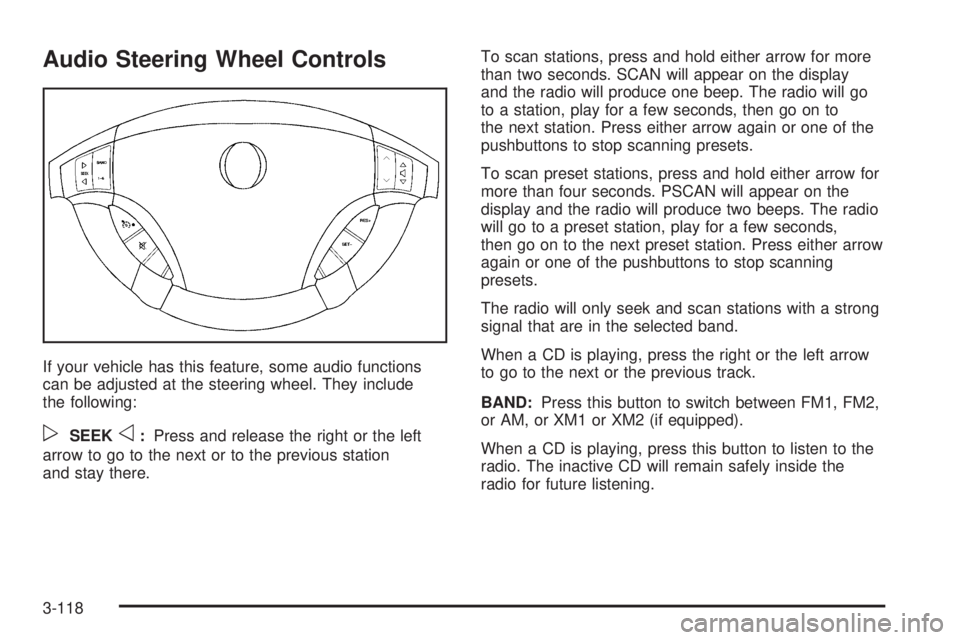
Audio Steering Wheel Controls
If your vehicle has this feature, some audio functions
can be adjusted at the steering wheel. They include
the following:
pSEEKo:Press and release the right or the left
arrow to go to the next or to the previous station
and stay there.To scan stations, press and hold either arrow for more
than two seconds. SCAN will appear on the display
and the radio will produce one beep. The radio will go
to a station, play for a few seconds, then go on to
the next station. Press either arrow again or one of the
pushbuttons to stop scanning presets.
To scan preset stations, press and hold either arrow for
more than four seconds. PSCAN will appear on the
display and the radio will produce two beeps. The radio
will go to a preset station, play for a few seconds,
then go on to the next preset station. Press either arrow
again or one of the pushbuttons to stop scanning
presets.
The radio will only seek and scan stations with a strong
signal that are in the selected band.
When a CD is playing, press the right or the left arrow
to go to the next or the previous track.
BAND:Press this button to switch between FM1, FM2,
or AM, or XM1 or XM2 (if equipped).
When a CD is playing, press this button to listen to the
radio. The inactive CD will remain safely inside the
radio for future listening.
3-118
Page 234 of 410
Backglass Antenna
The AM-FM antenna is integrated with the rear window
defogger, located in the rear window. Be sure that the
inside surface of the rear window is not scratched and
that the lines on the glass are not damaged. If the inside
surface is damaged, it could interfere with radio
reception. Also, for proper radio reception, the antenna
connector at the top-center of the rear window needs to
be properly attached to the post on the glass.
Notice:Using a razor blade or sharp object to clear
the inside rear window may damage the rear window
antenna and/or the rear window defogger. Repairs
would not be covered by your warranty. Do not clear
the inside rear window with sharp objects.
Notice:Do not apply aftermarket glass tinting with
metallic lm. The metallic lm in some tinting
materials will interfere with or distort the incoming
radio reception. Any damage caused to your
backglass antenna due to metallic tinting materials
will not be covered by your warranty.
Because this antenna is built into your rear window,
there is a reduced risk of damage caused by car washes
and vandals.If you choose to add a cellular telephone to your
vehicle, and the antenna needs to be attached to the
glass, be sure that you do not damage the grid lines for
the AM-FM antenna. There is enough space between
the lines to attach a cellular telephone antenna
without interfering with radio reception.
Do not apply aftermarket glass tinting to the back glass.
The metallic lm in some tinting materials will interfere
with or distort the incoming radio reception. Care
must be taken when cleaning the rear window because
it breaks in the resistive material heating element
and will adversely affect radio and defogger
performance. See your dealer for details.
Chime Level Adjustment
The radio is the vehicle’s chime producer. To change
the volume level, press and hold pushbutton 6 with
the ignition on and the radio power off. The chime
volume level will change from the normal level to loud,
and LOUD will appear on the radio display. To
change back to the default or normal setting, press and
hold pushbutton 6 again. The chime level will change
from the loud level to normal, and NORMAL will appear
on the radio display. Removing the radio and not
replacing it with a factory radio or chime will disable
vehicle chimes.
3-120
Page 243 of 410
You may feel or hear the system working, but this is
normal.
If the vehicle is in cruise control when the TCS begins
to limit wheel spin, the cruise control will automatically
disengage. When road conditions allow safe use of
the cruise control, it can be used again. SeeCruise
Control on page 3-10.
The TCS operates in all transaxle shift lever positions.
But the system can upshift the transaxle only as high as
the shift lever position that was chosen, so use the
lower gears only when necessary. SeeAutomatic
Transaxle Operation on page 2-24.
To limit wheel spin, especially in slippery road
conditions, you should always leave the TCS on. But
you can turn the system off if you ever need to. The TCS
should be turned off if the vehicle ever gets stuck in
sand, mud or snow and rocking the vehicle is required.
SeeRocking Your Vehicle to Get It Out on page 4-28
andIf Your Vehicle is Stuck in Sand, Mud, Ice or Snow
on page 4-28.
To turn the TCS on or off, press the TCS button located
directly behind the gear shift lever. If your vehicle has
a DIC, the TCS button is located above the radio.
When the TCS is turned off, the TCS warning light will
come on. It will disappear when the TCS is turned
back on. If the TCS is limiting wheel spin when the TCS
button is pressed, the TCS warning light will come on
and the TCS will turn off right away.StabiliTrak®System
Your vehicle may be equipped with a vehicle stability
enhancement system called StabiliTrak®.Itisan
advanced computer controlled system that assists you
with directional control of the vehicle in difficult
driving conditions.
StabiliTrak
®activates when the computer senses a
discrepancy between your intended path and the
direction the vehicle is actually traveling. StabiliTrak
®
selectively applies braking pressure at any one of
the vehicle’s brakes to help steer the vehicle in the
direction which you are steering.
When the system activates, a STABILITY CONTROL
ACTIVE message will be displayed on the Driver
Information Center (DIC). SeeDIC Warnings and
Messages on page 3-53. You may also hear a noise or
feel vibration in the brake pedal. This is normal. Continue
to steer the vehicle in the direction you want it to go.
If there is a problem detected with StabiliTrak
®,a
SERVICE STABILITY SYSTEM message will be
displayed on the Driver Information Center (DIC). See
DIC Warnings and Messages on page 3-53. When
this message is displayed, the system is not operational.
Driving should be adjusted accordingly.
If your vehicle is in cruise control when the StabiliTrak
®
activates, the cruise control will automatically
disengage. When road conditions allow you to safely
use it again, you may reengage the cruise control. See
Cruise Control on page 3-10for more information.
4-9
Page 285 of 410
{CAUTION:
If you spill fuel and then something ignites it,
you could be badly burned. Fuel can spray out
on you if you open the fuel cap too quickly.
This spray can happen if your tank is nearly
full, and is more likely in hot weather. Open
the fuel cap slowly and wait for any hiss noise
to stop. Then unscrew the cap all the way.
Be careful not to spill fuel. Do not top off or overll the
tank and wait a few seconds after you have nished
pumping before removing the nozzle. Clean fuel
from painted surfaces as soon as possible. See
Washing Your Vehicle on page 5-81.
When replacing the fuel cap, turn it to the right
(clockwise) until it clicks. Make sure the cap is fully
installed. The diagnostic system can determine if the fuel
cap has been left off or improperly installed. This
would allow fuel to evaporate into the atmosphere. See
Malfunction Indicator Lamp on page 3-39.Your vehicle may also be equipped with a check gas
cap warning light, which will be displayed on the
instrument panel cluster if the fuel cap is not properly
installed. SeeCheck Gas Cap Light on page 3-46
for more information.
If your vehicle has a Driver Information Center (DIC),
the CHECK GAS CAP message will be displayed if the
fuel cap is not properly installed. SeeDIC Warnings
and Messages on page 3-53for more information.
{CAUTION:
If a re starts while you are refueling, do not
remove the nozzle. Shut off the ow of fuel by
shutting off the pump or by notifying the
station attendant. Leave the area immediately.
Notice:If you need a new fuel cap, be sure to get
the right type. Your dealer can get one for you.
If you get the wrong type, it may not t properly.
This may cause your malfunction indicator lamp to
light and may damage your fuel tank and emissions
system. SeeMalfunction Indicator Lamp on
page 3-39.
5-9