2005 BMW Z4 2.5I door lock
[x] Cancel search: door lockPage 28 of 120

Opening and closing
26
Stopping the alarm
>Unlock the vehicle with the remote control,
refer to page16
>or turn the ignition key to position 1, refer to
page36.
Indicator lamp displays
>The indicator lamp beneath the interior mir-
ror flashes continuously:
The system is armed
>The indicator lamp flashes immediately
after the vehicle is locked:
Doors or luggage compartment lid are not
completely closed. Even if you do not close
the area causing the alert, the remaining
areas are secured and the indicator lamp
flashes continuously after 10 seconds.
However, the interior motion sensor is not
activated
>If the indicator lamp goes out immediately
after the vehicle is unlocked:
No manipulation or attempted intrusions
have been detected in the period since the
system was armed
>If the indicator lamp flashes for 10 seconds
immediately after the vehicle is unlocked:
An attempted entry has been detected in
the period since the system was armed.
After an alarm has been triggered, the indicator
lamp will flash continuously.
Tilt alarm sensor and interior motion
sensor
Tilt alarm sensor
The inclination of the vehicle is monitored. The
alarm system reacts, e.g. to attempts to steal
the wheels or tow the vehicle.
Interior motion sensor*
The system monitors the footwells and the
seating areas of the driver and passenger. Even
when the convertible top is open, the alarm sys-
tem including the interior motion sensor is
armed. Objects falling into the vehicle, e.g.
leaves, can trigger unintentional alarms, refer to
Avoiding unintentional alarms.
Avoiding unintentional alarms
The tilt alarm sensor and interior motion sensor
can be deactivated at the same time. In this way
you can avoid unintentional alarms, e.g. in the
following situations:
>In duplex garages
>When the vehicle is being transported on a
car-carrying train
>If animals are to be left in the vehicle.
To deactivate the tilt alarm and interior
motion sensors
Press the button on the remote control
a second time immediately after locking.
The indicator lamp lights up briefly and then
flashes continuously. The tilt alarm sensor and
the interior motion sensor are deactivated until
the vehicle is again unlocked and locked.
Page 31 of 120
Reference
At a glance
Controls
Driving tips
Mobility
29
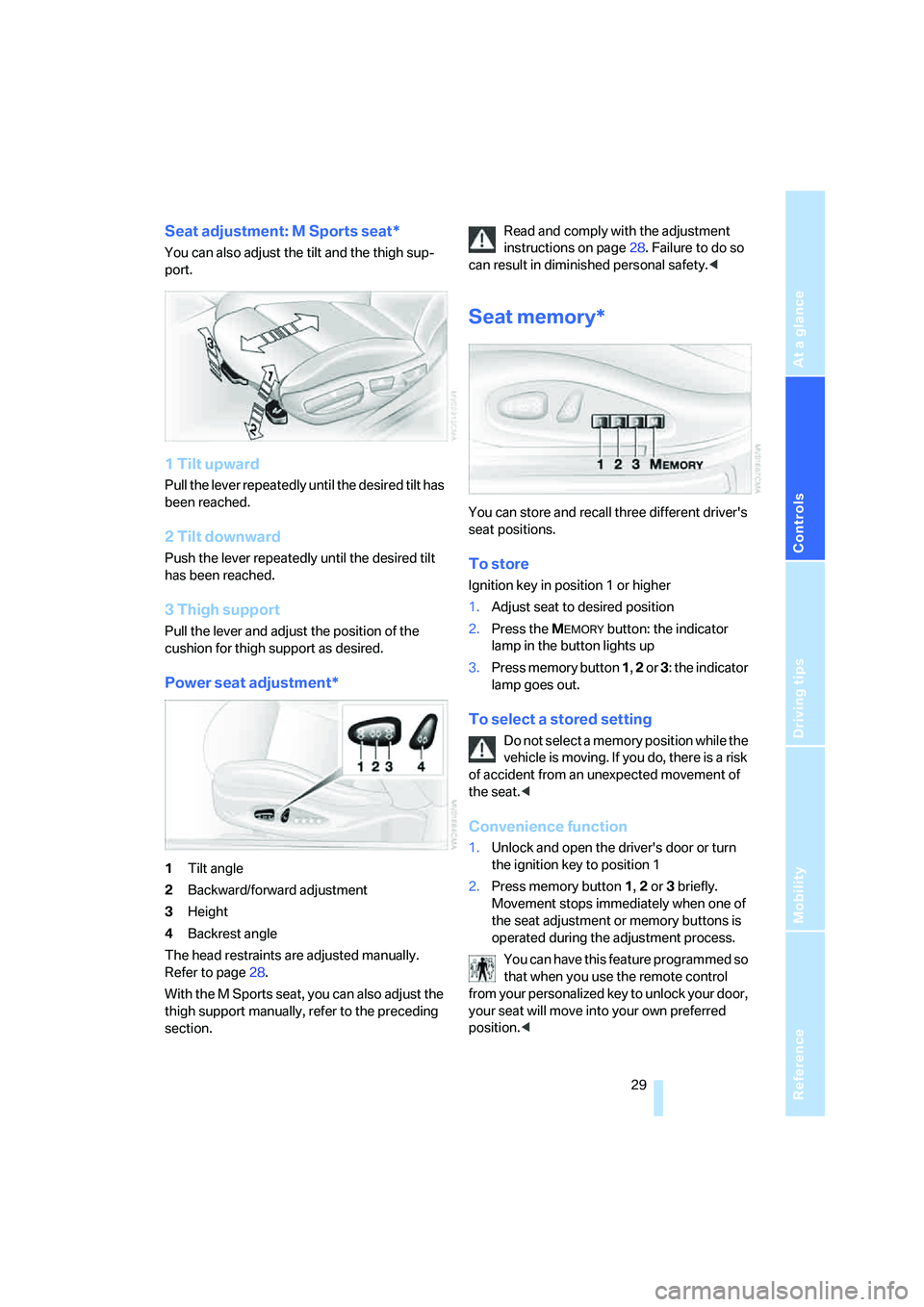
Seat adjustment: M Sports seat*
You can also adjust the tilt and the thigh sup-
port.
1 Tilt upward
Pull the lever repeatedly until the desired tilt has
been reached.
2 Tilt downward
Push the lever repeatedly until the desired tilt
has been reached.
3 Thigh support
Pull the lever and adjust the position of the
cushion for thigh support as desired.
Power seat adjustment*
1Tilt angle
2Backward/forward adjustment
3Height
4Backrest angle
The head restraints are adjusted manually.
Refer to page28.
With the M Sports seat, you can also adjust the
thigh support manually, refer to the preceding
section.Read and comply with the adjustment
instructions on page28. Failure to do so
can result in diminished personal safety.<
Seat memory*
You can store and recall three different driver's
seat positions.
To store
Ignition key in position 1 or higher
1.Adjust seat to desired position
2.Press the M
EMORY button: the indicator
lamp in the button lights up
3.Press memory button 1, 2 or 3: the indicator
lamp goes out.
To select a stored setting
Do not select a memory position while the
vehicle is moving. If you do, there is a risk
of accident from an unexpected movement of
the seat.<
Convenience function
1.Unlock and open the driver's door or turn
the ignition key to position 1
2.Press memory button 1, 2 or 3 briefly.
Movement stops immediately when one of
the seat adjustment or memory buttons is
operated during the adjustment process.
You can have this feature programmed so
that when you use the remote control
from your personalized key to unlock your door,
your seat will move into your own preferred
position.<
Page 32 of 120
Adjustments
30
Safety function
1.Close the driver's door and turn the ignition
key to position 0 or 2
2.Press and hold the desired memory button
1, 2 or 3 until the adjustment process is
completed.
If you press the M
EMORY button accidentally:
Press the button again; the indicator lamp goes
out.
Before activating the programmed
adjustment feature, ensure that the space
behind the driver's seat is empty and unob-
structed. If you fail to do so, objects behind the
seat could be damaged, should the seat move
backward.<
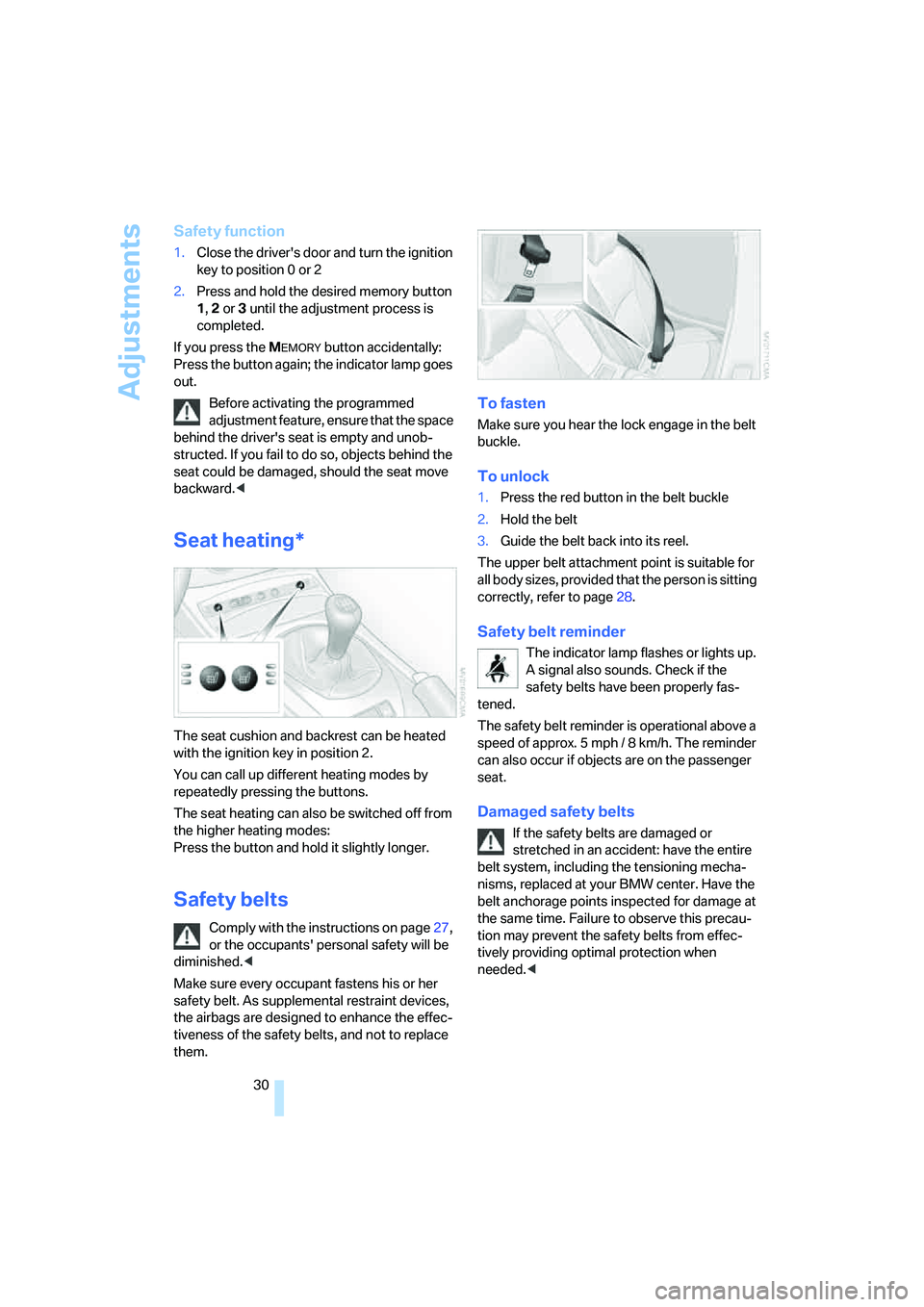
Seat heating*
The seat cushion and backrest can be heated
with the ignition key in position 2.
You can call up different heating modes by
repeatedly pressing the buttons.
The seat heating can also be switched off from
the higher heating modes:
Press the button and hold it slightly longer.
Safety belts
Comply with the instructions on page27,
or the occupants' personal safety will be
diminished.<
Make sure every occupant fastens his or her
safety belt. As supplemental restraint devices,
the airbags are designed to enhance the effec-
tiveness of the safety belts, and not to replace
them.
To fasten
Make sure you hear the lock engage in the belt
buckle.
To unlock
1.Press the red button in the belt buckle
2.Hold the belt
3.Guide the belt back into its reel.
The upper belt attachment point is suitable for
all body sizes, provided that the person is sitting
correctly, refer to page28.
Safety belt reminder
The indicator lamp flashes or lights up.
A signal also sounds. Check if the
safety belts have been properly fas-
tened.
The safety belt reminder is operational above a
speed of approx. 5 mph / 8 km/h. The reminder
can also occur if objects are on the passenger
seat.
Damaged safety belts
If the safety belts are damaged or
stretched in an accident: have the entire
belt system, including the tensioning mecha-
nisms, replaced at your BMW center. Have the
belt anchorage points inspected for damage at
the same time. Failure to observe this precau-
tion may prevent the safety belts from effec-
tively providing optimal protection when
needed.<
Page 34 of 120

Adjustments
32 user by means of a data exchange with the key,
and makes adjustments accordingly.
Colored decals were provided with the keys to
help you distinguish between the different per-
sonal remote control keys.
What the system can do
You can learn about the entire array of features
that Vehicle Memory and Key Memory offer you
at your BMW center. A few examples follow
below:
Examples for Vehicle Memory:
>Various signals as acknowledgement when
locking or unlocking your vehicle: refer to
page17
>Windows are opened automatically, refer to
page20
>Reminder that the key is still in the ignition
switch after the driver's door has been
opened, refer to page37
>Activation/deactivation of the Follow-me-
home function: refer to page56
>Activation/deactivation of daytime driving
lamps: refer to page56
>Sets the units of measure for displaying
time, outside temperature, distance trav-
eled and fuel consumption in the instru-
ment cluster, refer to page48.
Examples for Key Memory:
>Locking of the vehicle when you start off:
refer to page18
>Automatically adjusts the driver's seat to
the personal programmed settings when
the vehicle is unlocked, refer to page29.
You will see this symbol throughout the
Owner's Manual. It is to remind you at
appropriate places of the settings that are avail-
able to you.<
Depending on how the memory functions
are configured, the vehicle may be oper-
ated differently from what is described in the
Owner's Manual. Should you decide to sell your
BMW one day, please remember to have the
memory functions returned to their original fac-
tory settings.<
Page 38 of 120
Driving
36
Driving
Ignition lock
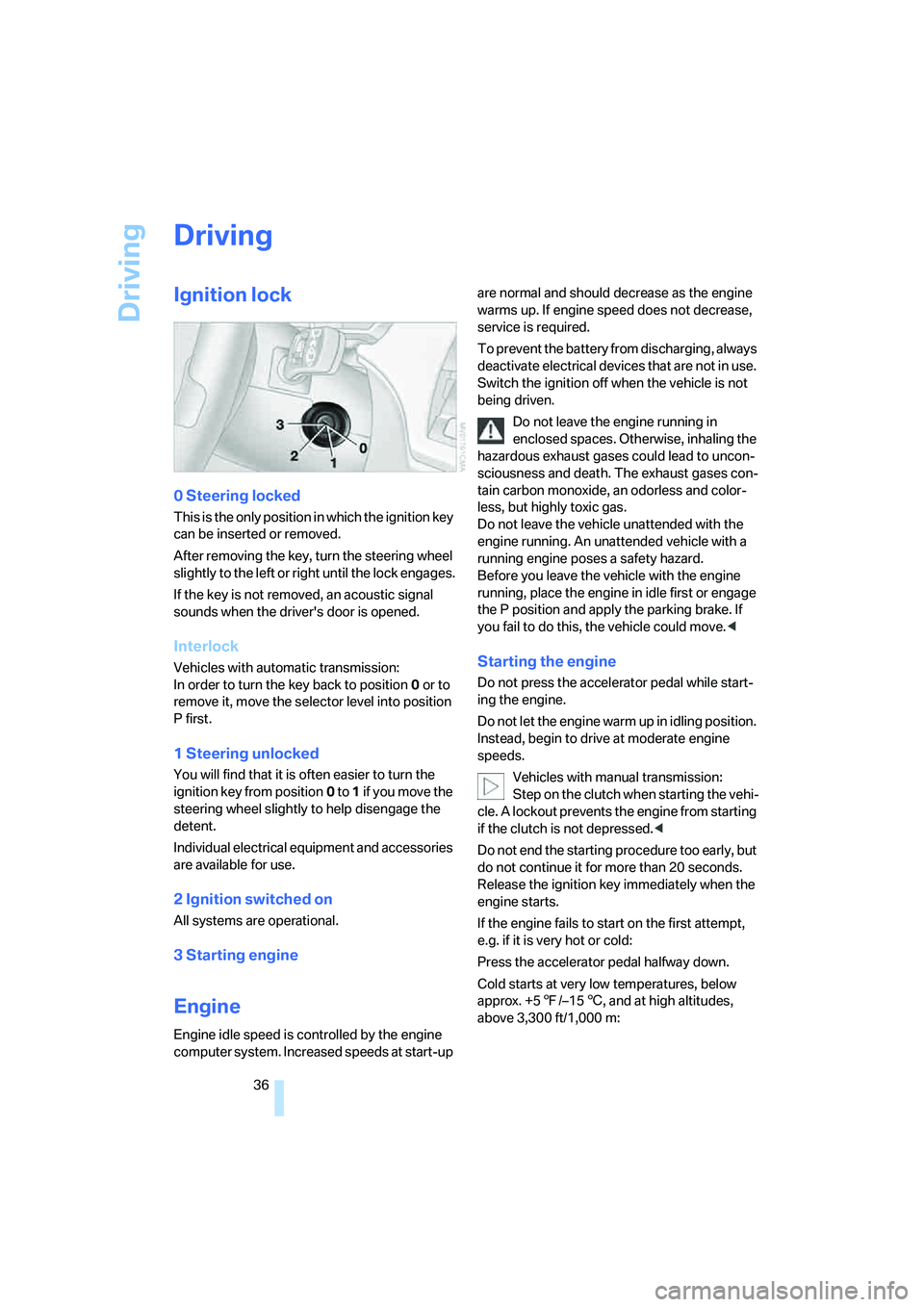
0 Steering locked
This is the only position in which the ignition key
can be inserted or removed.
After removing the key, turn the steering wheel
slightly to the left or right until the lock engages.
If the key is not removed, an acoustic signal
sounds when the driver's door is opened.
Interlock
Vehicles with automatic transmission:
In order to turn the key back to position0 or to
remove it, move the selector level into position
P first.
1 Steering unlocked
You will find that it is often easier to turn the
ignition key from position0 to 1 if you move the
steering wheel slightly to help disengage the
detent.
Individual electrical equipment and accessories
are available for use.
2 Ignition switched on
All systems are operational.
3 Starting engine
Engine
Engine idle speed is controlled by the engine
computer system. Increased speeds at start-up are normal and should decrease as the engine
warms up. If engine speed does not decrease,
service is required.
To prevent the battery from discharging, always
deactivate electrical devices that are not in use.
Switch the ignition off when the vehicle is not
being driven.
Do not leave the engine running in
enclosed spaces. Otherwise, inhaling the
hazardous exhaust gases could lead to uncon-
sciousness and death. The exhaust gases con-
tain carbon monoxide, an odorless and color-
less, but highly toxic gas.
Do not leave the vehicle unattended with the
engine running. An unattended vehicle with a
running engine poses a safety hazard.
Before you leave the vehicle with the engine
running, place the engine in idle first or engage
the P position and apply the parking brake. If
you fail to do this, the vehicle could move.<
Starting the engine
Do not press the accelerator pedal while start-
ing the engine.
Do not let the engine warm up in idling position.
Instead, begin to drive at moderate engine
speeds.
Vehicles with manual transmission:
Step on the clutch when starting the vehi-
cle. A lockout prevents the engine from starting
if the clutch is not depressed.<
Do not end the starting procedure too early, but
do not continue it for more than 20 seconds.
Release the ignition key immediately when the
engine starts.
If the engine fails to start on the first attempt,
e.g. if it is very hot or cold:
Press the accelerator pedal halfway down.
Cold starts at very low temperatures, below
approx. +57/–156, and at high altitudes,
above 3,300 ft/1,000 m:
Page 39 of 120

Reference
At a glance
Controls
Driving tips
Mobility
37
>On the first attempt, engage the starter for
approx. 10 seconds
>Press the accelerator pedal halfway down.
Avoid frequent starting attempts in short
succession or repeated starting attempts
during which the engine does not start. Other-
wise, uncombusted or incompletely combusted
fuel will pose a risk of the catalytic converter
overheating and being damaged.<
Manual transmission
1.Engage the parking brake
2.Gearshift lever in idling position
3.Depress the clutch pedal.
If the clutch pedal is not depressed, the
engine cannot be started
4.Start the engine.
Automatic transmission
1.Depress footbrake
2.Place selector lever in position P or N
3.Start the engine.
Sequential manual gearbox SMG
1.Depress footbrake
2.Move selector lever to neutral position N
3.Start the engine.
If the engine does not start, re-engage the
position last selected, refer to the display
in the instrument cluster, and then engage posi-
tion N again.<
Switching off the engine
Do not remove the ignition key while the
vehicle is still moving. If you did so, the
steering lock would engage when the steering
wheel is turned.
When you leave the vehicle, always remove the
ignition key and engage the steering lock.
Apply the parking brake when parking on steep
gradients, as the vehicle could otherwise start
to roll.<
You can have an acoustic signal set as a
reminder that the ignition key is still in the ignition switch after the driver's door has been
opened.<
Manual transmission
1.Turn the ignition key to position 1 or 0
2.Engage first gear or reverse gear.
Automatic transmission
1.Place the selector lever in position P
2.Turn the ignition key to position 1 or 0.
Sequential manual gearbox SMG
1.Engage a drive position
2.Turn the ignition key to position 1 or 0. An
acoustic signal sounds if the engine is
switched off while position N is engaged.
Parking brake
The parking brake is designed primarily to pre-
vent the vehicle from rolling when parked. It
operates against the rear wheels.
The indicator lamp lights up. As the
vehicle drives off, an acoustic signal
also sounds. The parking brake has
been applied.
Indicator lamp for Canadian models.
To engage
The detent engages automatically and the indi-
cator lamp in the instrument cluster comes on
when the ignition key is in position 2.
Page 42 of 120
Driving
40
Sequential manual gearbox
SMG*
The concept
The sequential manual gearbox SMG is an
automated manual gearbox with which clutch-
ing and shifting is assumed by an electro-
hydraulic system.
The SMG is operated via two shift paddles on
the steering wheel and the selector lever in the
center console.
It offers the following functions:
>Optionally manual or automatic operation:
sequential mode or drive mode
>Ability to choose between two different
driving programs: standard or Sport, refer to
page41
>Protection against misshifting, and auto-
matic downshifting at minimum engine rpm
even in sequential mode
>Kickdown function in the drive mode
>Acceleration assistant, refer to page42.
The SMG is ready for operation when the igni-
tion key is in position 2.
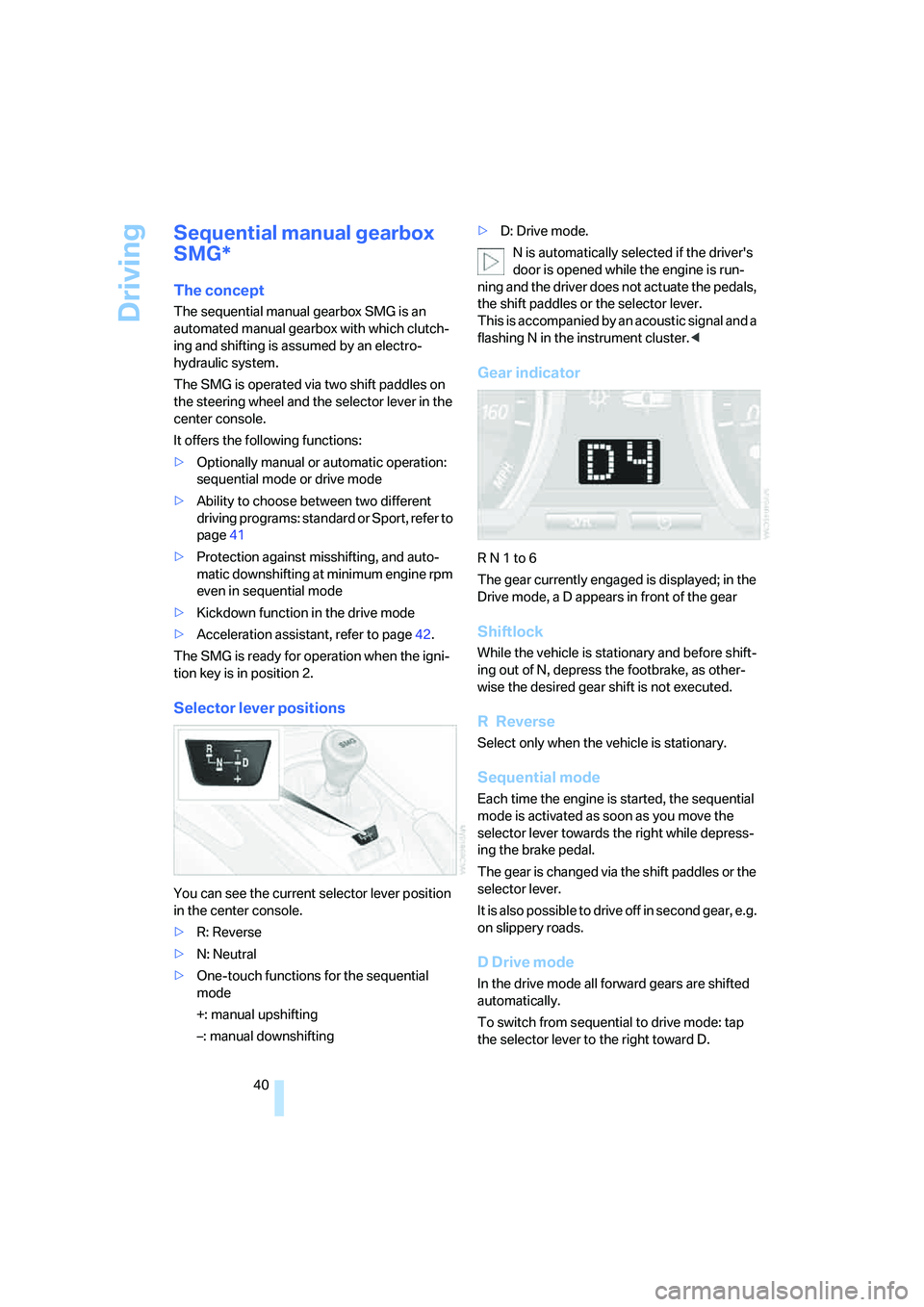
Selector lever positions
You can see the current selector lever position
in the center console.
>R: Reverse
>N: Neutral
>One-touch functions for the sequential
mode
+: manual upshifting
–: manual downshifting>D: Drive mode.
N is automatically selected if the driver's
door is opened while the engine is run-
ning and the driver does not actuate the pedals,
the shift paddles or the selector lever.
This is accompanied by an acoustic signal and a
flashing N in the instrument cluster.<
Gear indicator
R N 1 to 6
The gear currently engaged is displayed; in the
Drive mode, a D appears in front of the gear
Shiftlock
While the vehicle is stationary and before shift-
ing out of N, depress the footbrake, as other-
wise the desired gear shift is not executed.
R Reverse
Select only when the vehicle is stationary.
Sequential mode
Each time the engine is started, the sequential
mode is activated as soon as you move the
selector lever towards the right while depress-
ing the brake pedal.
The gear is changed via the shift paddles or the
selector lever.
It is also possible to drive off in second gear, e.g.
on slippery roads.
D Drive mode
In the drive mode all forward gears are shifted
automatically.
To switch from sequential to drive mode: tap
the selector lever to the right toward D.
Page 66 of 120
Interior conveniences
64
Interior conveniences
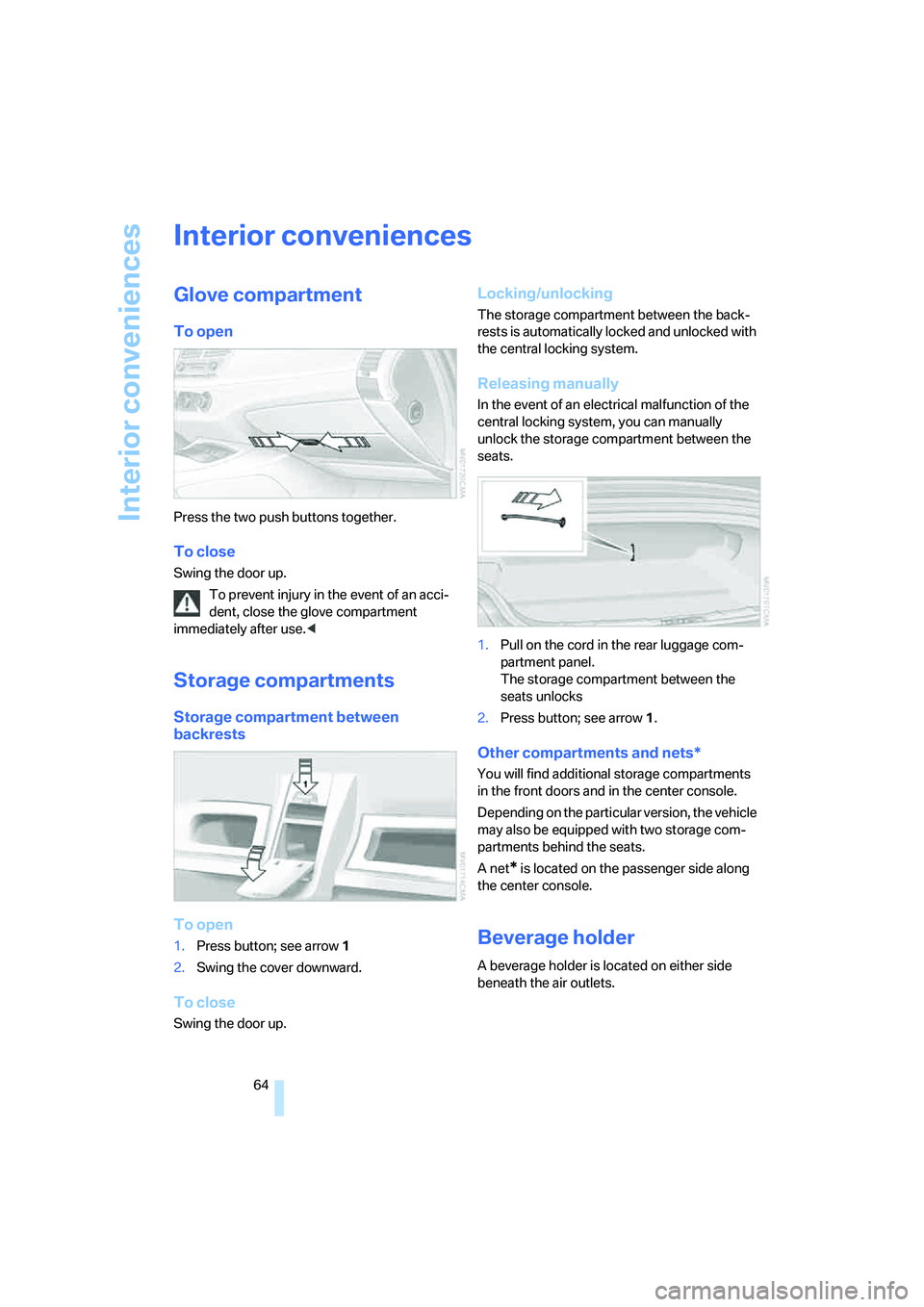
Glove compartment
To open
Press the two push buttons together.
To close
Swing the door up.
To prevent injury in the event of an acci-
dent, close the glove compartment
immediately after use.<
Storage compartments
Storage compartment between
backrests
To open
1.Press button; see arrow1
2.Swing the cover downward.
To close
Swing the door up.
Locking/unlocking
The storage compartment between the back-
rests is automatically locked and unlocked with
the central locking system.
Releasing manually
In the event of an electrical malfunction of the
central locking system, you can manually
unlock the storage compartment between the
seats.
1.Pull on the cord in the rear luggage com-
partment panel.
The storage compartment between the
seats unlocks
2.Press button; see arrow1.
Other compartments and nets*
You will find additional storage compartments
in the front doors and in the center console.
Depending on the particular version, the vehicle
may also be equipped with two storage com-
partments behind the seats.
A net
* is located on the passenger side along
the center console.
Beverage holder
A beverage holder is located on either side
beneath the air outlets.