2005 BMW 745i hand
[x] Cancel search: handPage 43 of 239

Controls
41Reference
At a glance
Driving tips
Communications
Navigation
Entertainment
Mobility
Automatic luggage compartment lid
operation*
Opening
The luggage compartment lid opens all the
way, when you
>press the button next to the steering
column
>press the button on the outside of the
luggage compartment lid, refer to
page39
>press button3on the remote
control, refer to page36.
During opening, the luggage com-
partment lid pivots upward and to the
rear. Ensure that adequate clearance is
available before opening.<
Closing
The luggage compartment lid closes auto-
matically when you
>press the button or
>press the button on the outside of the
luggage compartment lid, refer to
page39.
The luggage compartment lid imme-
diately stops opening or closing if you
hold it in place by hand.<
To avoid injuries, be sure that the
travel path of the luggage compart-
ment lid is clear when it is closed, as with
all closing procedures.
Operate the vehicle only when the luggage
compartment lid is completely closed.
Otherwise, exhaust fumes could penetrate
the interior of the vehicle. If special circum-
stances should make it absolutely neces-sary to operate the vehicle with the luggage
compartment lid open:
>Close all windows and the glass roof
>Adjust the automatic climate control's
blower to supply a high rate of airflow,
refer to page105.<
Automatic closing of the luggage
compartment lid is not activated in
your vehicle. If you desire, you can have
this function set.<
Comfort Access*
If a remote control is detected in the
luggage compartment after the lug-
gage compartment lid has been closed, the
luggage compartment lid opens automati-
cally.
During opening the luggage compartment
lid pivots upward and to the rear. Ensure
that adequate clearance is available before
opening.<
Manual operation
In the case of an electrical defect, you can
unlock the luggage compartment lid with
the key, refer to page39, and slowly open
and close it without sudden movements.
Emergency release
This lever releases the luggage compart-
ment lid from inside the luggage compart-
ment.
Page 48 of 239

Adjustments
46
Adjustments
Sitting safely
The ideal sitting position can make a vital
contribution to relaxed driving that is as
fatigue-free as possible. The sitting posi-
tion plays an important role together with
the safety belts and airbags in an accident.
To ensure that the safety systems operate
with optimized efficiency, we strongly urge
you to observe the instructions contained
in the following section.
For additional information on transporting
children safely, refer to page58.
Sitting safely with airbags
Always maintain an adequate dis-
tance between yourself and the air-
bags. Always hold the steering wheel by its
rim with hands at the 9 o'clock and
3 o'clock positions, to minimize the risk of
injuries to your hands and arms in the event
of airbag deployment.
No one and nothing is to come between the
airbags and the seat occupant.
Do not use the cover of the front airbag on
the front passenger side as a storage area.
Make sure that the front passenger is cor-
rectly seated and does not rest feet or legs
on the instrument panel, otherwise leg inju-
ries can occur if the knee and front airbag
are triggered.
Never let an occupant's head rest near or
on a side airbag because the inflating air-
bag could cause a serious or fatal injury.<
Even if you adhere to all the instructions,
injuries resulting from contact with airbags
cannot be fully excluded, depending on the
circumstances. The ignition and inflation
noise may provoke a mild – usually tempo-
rary – hearing loss in extremely sensitive
individuals.
For airbag locations and additional infor-
mation on airbags, refer to page98.
Sitting safely with safety belts
Even though there is an airbag, wear a
safety belt every time you get in the vehicle.
Although airbags enhance safety by pro-
viding added protection, they are not a
substitute for safety belts.
Your vehicle has five seats that are all
equipped with a safety belt.
At all times, occupants should sit
upright and be properly restrained,
infants and small children in appropriate
child-restraint systems; larger children and
adults using the safety belts.
Expectant mothers should always wear
their safety belts, taking care to position the
lap belt against the lower hips, where it will
not exert pressure against the abdominal
area.
Never allow more than one person to wear
a single safety belt. Never allow infants or
small children to ride in a passenger's lap.
Do not route the belt across your neck, or
run it across sharp edges. Be sure that the
belt does not become caught or jammed.
Avoid twisting the belt while routing it firmly
across the hips and shoulder. Do not allow
the belt to rest against hard or fragile
objects. Otherwise, in the event of a frontal
impact, a loose lap belt could slide over
your hips, leading to abdominal injury.
Avoid wearing clothing that prevents the
belt from fitting properly and pull the lap
belt periodically to readjust the tension
across your shoulder in order to avoid a
reduction in the retention effect of the
safety belt.<
For instructions on operating safety belts,
refer to page51.
Page 55 of 239

Controls
53Reference
At a glance
Driving tips
Communications
Navigation
Entertainment
Mobility
Rear
The operating concept is the same as for
the front seat ventilation.
Active seat for driver*
Active adjustment of the seat cushion's
contours reduces muscular tension and
fatigue to help prevent lower back pain.
To activate: press the button, the indicator
lamp comes on.
Mirrors
Adjusting exterior mirrors
14-way adjustment
2Selecting mirror for adjustment To prevent the exterior mirrors on this
vehicle from being damaged, always
fold them in by hand before entering an
automatic car wash.<
You can also adjust the mirrors manually by
pressing against the outer edges of their
lenses.
Storing the mirror positions, refer to Seat,
mirror and steering wheel memory on
page55.
The mirror on the passenger's side
features a lens with a more convex
surface than the mirror installed on the
driver's side. When estimating the distance
between yourself and other traffic, bear in
mind that the objects reflected in the mirror
are closer than they appear. This means
that estimations of the distance to following
traffic should not be regarded as precise.<
Self-defrosting mirrors
The mirrors are automatically heated when-
ever the ignition is switched on.
Interior and exterior mirrors,
automatic dimming feature*
These mirrors dim steplessly during for-
ward driving when struck by light. There are
two photocells located in the interior rear-
view mirror for this purpose. One is inte-
grated within the mirror's lens, refer to
arrow, while the other is located at an offset
position on the rear of the mirror housing.
For trouble-free operation, keep the photo-
cells clean and do not cover the area
between the interior rearview mirror and
the windshield. Do not attach any kind of
stickers on the windshield in front of the
mirror, either.
Page 64 of 239

Driving
62
Driving
Ignition lock
Insert the remote control all the way into
the ignition lock. This also activates the
radio mode.
When the remote control is in the igni-
tion lock you can start the engine
without first switching on the ignition.<
Comfort Access*
Carry the remote control on your person
if you want to use the Comfort Access.
With Comfort Access, you do not need to
insert the remote control in the ignition
lock. You can switch the ignition on and off,
see below, or start the engine, page 63,
when a remote control is detected in the
vehicle interior.
When you switch off the engine, the
transmission moves automatically to
position P: interlock.<
Switching ignition on and off
Continue to briefly press the start/stop but-
ton to switch the radio mode on and off or
switch the ignition on and off. Do not press the brake pedal until you
are ready to start the engine. If you
briefly press the start/stop button while the
brake pedal is pressed the engine will start
immediately.<
Radio mode
Several systems, such as the Control Cen-
ter, independent ventilation, etc., are avail-
able for use. The time and outside temper-
ature appear in the Info Display.
The radio mode is automatically
deactivated:
>After approx. 16 minutes, when a door
is closed and the system does not reg-
ister the presence of any individuals in
the vehicle
>Immediately if the remote control is
removed from the ignition lock
>With Comfort Access, by pressing the
door handle.<
Ignition switched on
All vehicle systems are ready for operation.
Ignition off
The indicator lamps in the Info Display go
out. Only the automatic transmission's
range display remains visible for a brief
period.
Removing remote control from
ignition lock
Press the remote control in briefly; it is
ejected and now protrudes slightly from the
lock. This procedure will also switch off the
ignition if it is on.
Switch off the engine before removing
the remote control from the ignition
lock.
The transmission automatically shifts to
position P: interlock.<
If the remote control is still in the ignition
lock when the driver's door is opened, a
Page 69 of 239

Controls
67Reference
At a glance
Driving tips
Communications
Navigation
Entertainment
Mobility
What you will need
1Screwdriver handle
2Emergency-release tool
310 mm open-end wrench
You will find the required tools in the
onboard tool kit mounted on the inside of
the luggage compartment lid, refer to
page201.
Insert the emergency-release tool in the
screwdriver handle as shown in the illustra-
tion.
Releasing
1.Remove the floor mat and the cover on
the spare tire
2.Guide the emergency-release tool with
the screwdriver handle into the open-
ing, arrow1
3.Apply the open-end wrench to the
hexagon on the emergency-release
tool.
Press against the resistance from the
spring to guide the emergency-release
tool all the way in, then hold it in place.
Turn the emergency-release tool in the
direction indicated by arrow2, continu-
ing until you hear the mechanism snap
into place and feel resistance; maintain
pressure on the tool after the mecha-
nism engages
4.Use the open-end wrench to turn the
emergency-release tool against the
drive unit's mechanical resistance, con-
tinuing to rotate it in arrow direction2
until you feel a substantial increase in
turning effortTo prevent possible damage to the
rear brakes, always make sure that
the parking brake is completely released
before driving the vehicle.<
5.Return the tools to their places
6.Return the spare tire cover and the floor
mat to their original locations.
Have any defects repaired at the
nearest BMW center. The technicians
can also return the parking brake to normal
operational status after it has been
released manually in response to malfunc-
tion.<
Following manual release, the actual
status of the parking brake may vary
from that displayed by the indicator lamp.<
Operation after interruptions in
power supply
The parking brake may only be used
again, if it was released manually after
an interruption in power supply, i.e. as a
r esu lt o f a dis ch ar ged or d isc on ne cte d bat -
tery. If this is not done, the parking brake
may fail to operate correctly. Even with the
parking brake engaged, there would be a
danger of the vehicle rolling on steep
hills.<
Once the electrical power supply has been
restored you can again use the parking
brake:
With the ignition on and the
vehicle stationary, briefly press
the button three times at inter-
vals of approx. 5 seconds. This
initializes the system as follows:
>Initializing the disengaged setting
Page 98 of 239
Technology for comfort, convenience and safety
96 The check of the tire inflation pressure is
based on monitoring the relative speeds of
the wheels. A flat tire is detected and
reported on the basis of a deviation in cer-
tain speed ratios.
Functional requirements
So that the Flat Tire Monitor can learn the
correct inflation pressure, please perform
the following:
1.Check the inflation pressures in all tires
2.Compare with the inflation pressure
table on page189 and correct if neces-
sary
3.Initialize the system.
System limits
The Flat Tire Monitor cannot indicate
sudden severe tire damage caused by
outside factors and does not detect a natu-
ral, even pressure drop in all four tires.<
In the following situations, on the other
hand, there can be delays in detecting tire
pressure losses, and even system failure:
>When you are driving on snow-covered
or slippery road surfaces
>In the case of performance-oriented
driving: slip on the drive wheels, high
lateral acceleration
>False alarms and undetected loss of
pressure may occur when you are driv-
ing with snow chains fitted.
Initializing system
Perform the initialization immediately
after correcting the inflation pressure,
changing a tire or changing a wheel or all
wheels. A drive is necessary for this pur-
pose.<
1.Start the engine, but do not drive off
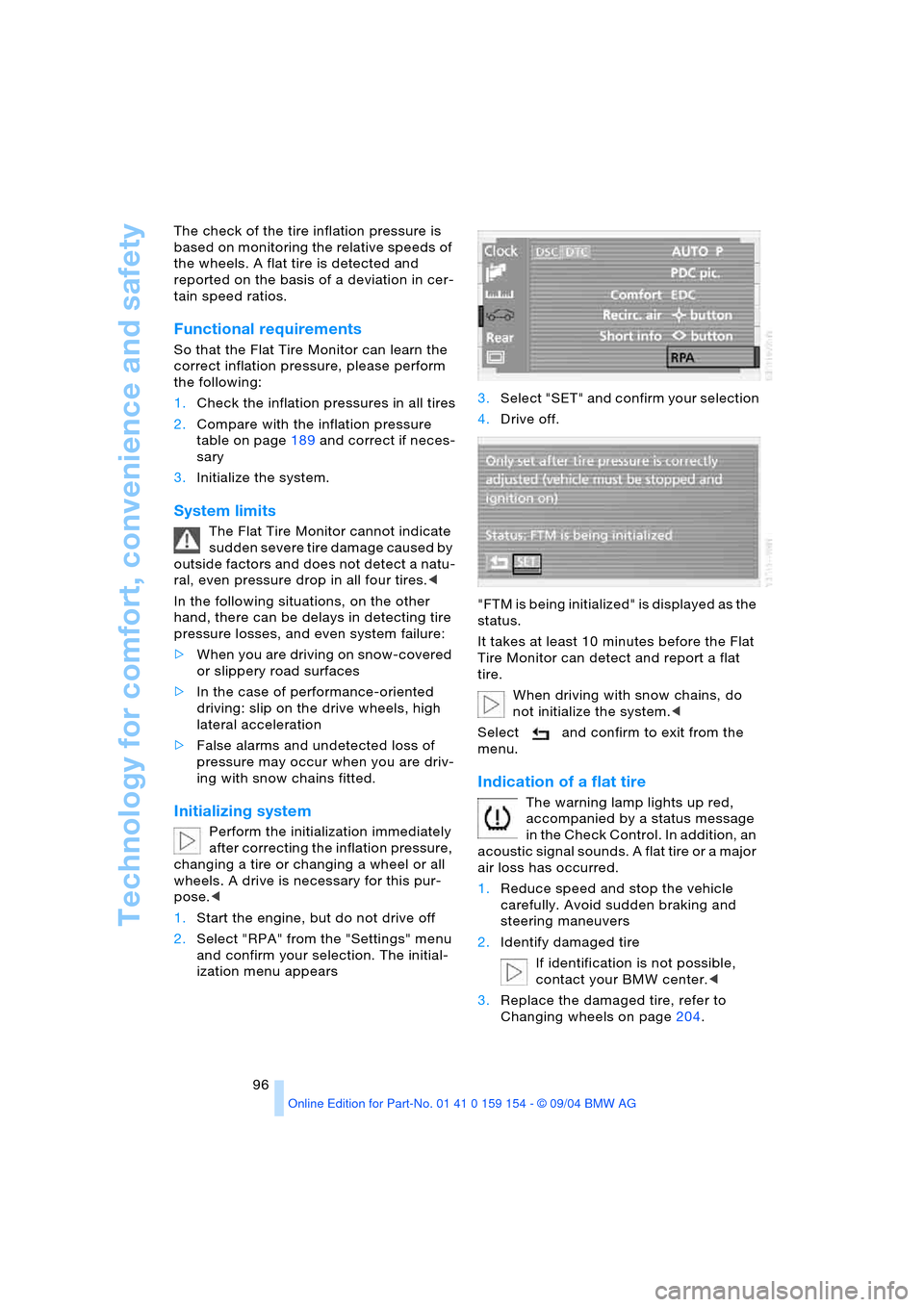
2.Select "RPA" from the "Settings" menu
and confirm your selection. The initial-
ization menu appears 3.Select "SET" and confirm your selection
4.Drive off.
"FTM is being initialized" is displayed as the
status.
It takes at least 10 minutes before the Flat
Tire Monitor can detect and report a flat
tire.
When driving with snow chains, do
not initialize the system.<
Select and confirm to exit from the
menu.
Indication of a flat tire
The warning lamp lights up red,
accompanied by a status message
in the Check Control. In addition, an
acoustic signal sounds. A flat tire or a major
air loss has occurred.
1.Reduce speed and stop the vehicle
carefully. Avoid sudden braking and
steering maneuvers
2.Identify damaged tire
If identification is not possible,
contact your BMW center.<
3.Replace the damaged tire, refer to
Changing wheels on page204.
Page 102 of 239

Lamps
100
Lamps
Parking lamps/low beams
Parking lamps
With the switch in this position, the
front, rear and side vehicle lighting
is switched on. You can use the
parking lamps for parking. For lighting on
one side for parking as an additional fea-
ture, refer to page101.
Low beams
When you switch off the ignition
with the headlamps on, the head-
lamps go out, and only the parking
lamps remain on.
Pathway lighting
After parking the vehicle and switch-
ing off the headlamps, you can use
the headlamp flasher control to activate
the low beams for a period of roughly
40 seconds. Pressing the button 4 on the
remote control, refer to page 36, also
switches on the low beams for approx.
40 seconds. In addition, the door handle
and interior lamps are switched on for
approx. 10 seconds.
You can have the lighting up of the low
beams extended or the function deacti-
vated.<
Lights on warning
If you switch off the ignition while the head-
lamps are on, when you subsequently open
the driver's door a gong will sound for sev-
eral seconds, while the Check Control will
provide you with a message
.
Daytime driving lamps*
If you wish, you can leave the light switch in
the low-beam position.
Always observe all applicable laws govern-
ing the use of daytime driving lamps.
You can switch on the parking lamps when
needed using the standard procedure
described under Parking lamps.
You can have the daytime driving
lamps on your vehicle programmed
to operate as desired.<
Automatic headlamp control
When you set the switch to this
position, the system activates and
switches on and off the low beams
in response to changes in ambient light
conditions, for instance, in tunnels, at dawn
and dusk, and in rain and snow. The green
indicator lamp next to the symbol is illumi-
nated when the low beams are on.
The low beams remain switched on
regardless of the ambient light when
you switch on the front fog lamps.<
The automatic headlamp control can-
not serve as a substitute for your per-
sonal judgment in determining when the
lamps should be switched on in response
to ambient lighting conditions. For exam-
ple, the system cannot detect fog. To avoid
safety risks, you should always switch on
the lamps manually under these condi-
tions.<
You can have the sensitivity of the
headlamp control system adjusted on
your vehicle.<
Page 114 of 239

Practical interior accessories
112
Practical interior accessories
Integrated universal remote
control*
The concept
The integrated universal remote control can
replace as many as three hand-held trans-
mitters for various remote-controlled
accessories, such as door openers and
house alarm systems. The integrated uni-
versal remote control registers and stores
signals from the original hand-held trans-
mitters.
The signal of an original hand-held trans-
mitter can be programmed on one of the
three memory keys1. Following that, each
of the devices can be actuated with the
appropriately-programmed memory key1.
The indicator lamp 2 flashes to confirm
transmission of the signal.
Should you sell your vehicle one day, be
sure to delete the stored programs before-
hand for your safety, refer to page113.
To prevent possible damage or injury,
before programming or using the inte-
grated universal remote control, always
inspect the immediate area to make certain
that no people, animals or objects are
within the swiveling and movement range
of the device. Also, comply with the safety
precautions of the original hand-held trans-
mitter.<
Checking compatibility
If you see this symbol on the pack-
aging or in the manual supplied with
the original hand-held transmitter, it
is safe to assume that it is compatible with
the integrated universal remote control.
If you have additional questions,
please consult your BMW center or
call 1-800-355-3515.
You can also visit these websites:
www.bmwusa.com or
www.homelink.com. HomeLink is a registered trademark owned
by Johnson Controls, Inc.<
Programming
1Memory keys
2Indicator lamp
Fixed-code hand-held transmitter
1.Switch on the ignition
2.When using for the first time: press both
outer keys1 for approx. 20 seconds,
maintaining pressure until the indicator
lamp2 starts to flash. The three mem-
ory keys1 are cleared
3.Hold the original hand-held transmitter
at a distance of approx. 2 in/5 cm to
8 in/20 cm from the memory keys1
The required distance between
the hand-held transmitter and
memory keys1 depends on the relevant
system of the original hand-held trans-
mitter used.<
4.Simultaneously press the transmit key
on the original hand-held transmitter
and the desired memory key1 of the
integrated universal remote control.
Initially, the indicator lamp2 flashes
slowly. Release both keys as soon as
the indicator 2 lamp flashes rapidly. If
the indicator lamp2 does not flash rap-
idly after approx. 15 seconds, change
the distance
5.To program other original hand-held
transmitters, repeat steps 3 and 4.