2005 BMW 645I CONVERTIBLE battery
[x] Cancel search: batteryPage 99 of 217
A congenial climate
98
Independent ventilation
The independent ventilation blows air into the
passenger compartment to lower interior tem-
peratures.
The independent ventilation is controlled using
the Control Center. You can set two different
times for the system to start.
The independent ventilation remains on for
30 minutes. It can also be switched on and off
directly. Since the system uses a substantial
amount of electrical current, you should refrain
from activating it twice in succession without
allowing the battery to be recharged in normal
operation between use.
The independent ventilation is ready for use at
any outside temperature up to ignition key
position 1.
The air emerges through the upper body region
vent outlets in the instrument panel. These vent
outlets must be open for the system to operate.
Switching on and off directly
Ignition key in position 2:
Control Center, for principle details, refer to
page16.
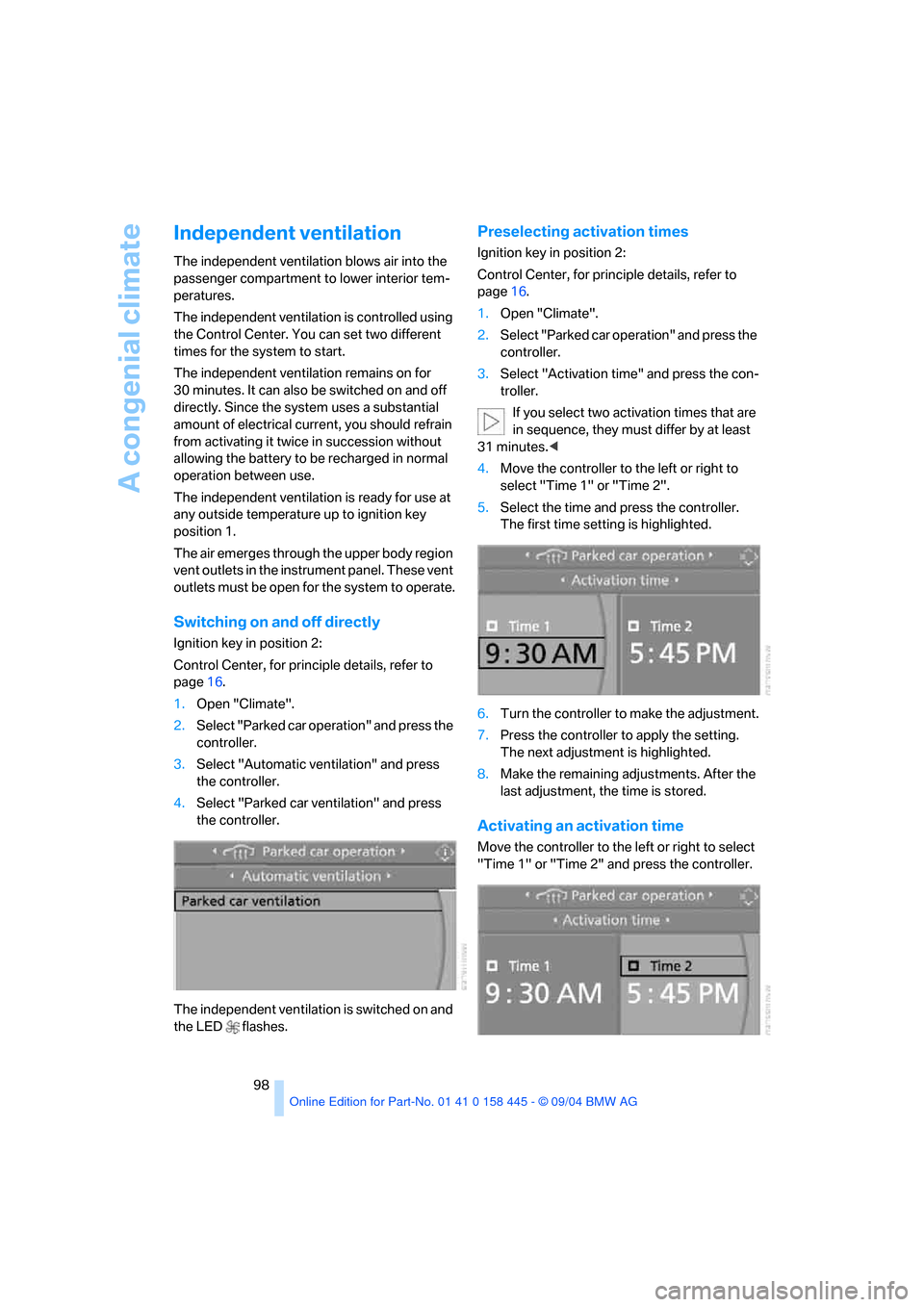
1.Open "Climate".
2.Select "Parked car operation" and press the
controller.
3.Select "Automatic ventilation" and press
the controller.
4.Select "Parked car ventilation" and press
the controller.
The independent ventilation is switched on and
the LED flashes.
Preselecting activation times
Ignition key in position 2:
Control Center, for principle details, refer to
page16.
1.Open "Climate".
2.Select "Parked car operation" and press the
controller.
3.Select "Activation time" and press the con-
troller.
If you select two activation times that are
in sequence, they must differ by at least
31 minutes.<
4.Move the controller to the left or right to
select "Time 1" or "Time 2".
5.Select the time and press the controller.
The first time setting is highlighted.
6.Turn the controller to make the adjustment.
7.Press the controller to apply the setting.
The next adjustment is highlighted.
8.Make the remaining adjustments. After the
last adjustment, the time is stored.
Activating an activation time
Move the controller to the left or right to select
"Time 1" or "Time 2" and press the controller.
Page 130 of 217
Navigation
Driving tips
129Reference
At a glance
Controls
Communications
Entertainment
Mobility
What to do if …
What to do if …
>a navigation DVD is inserted, but the
request to insert the DVD is displayed on
the Control Display?
The navigation DVD may not be the right
DVD for the navigation system. The DVD is
labeled accordingly.
>you request the current position of your
vehicle, but do not receive a precise dis-
play?
The system is unable to receive enough
GPS signals at your current position owing
to obstructions, your current position is not
yet available on your navigation DVD, or the
system is in the process of calculating your
current position. As a rule, reception is
guaranteed under a clear sky.
>the destination guidance does not accept a
destination?
The data of the destination is not stored on
the navigation DVD that is loaded. Select a
destination that is as close as possible to
the original.
>the destination guidance does not accept
an address without the street name?
On the navigation DVD, no downtown area
can be determined for the city or town
entered. Enter any street, or a destination
such as the railway station etc., then start
the destination guidance.>you want to enter a destination for the des-
tination guidance, but it is not possible to
select the letters for your desired entry?
The data of the destination is not stored on
the navigation DVD that is loaded. In this
case, the system will not offer you any let-
ters to choose from. Select a destination
that is as close as possible to the original.
>the system stops furnishing directions on
which way to turn as you approach intersec-
tions?
You are driving in an area that has not yet
been completely recorded on the naviga-
tion DVD. Instead of an arrow indicating a
turn, you will see an arrow which indicates
the general direction of your planned route.
Or you have left the recommended route
and the system requires a few seconds to
calculate a new recommended route.
>the navigation system does not react to
entries?
If the battery was disconnected, it then
takes up to 10 minutes before the system is
once again operational.
Page 151 of 217
Telephoning
150
Telephoning
Safety notes
For your own safety
Your car phone makes life more convenient in
many ways, and can even save lives in an emer-
gency. While you should consult your portable
phone's separate Owner's Manual for a detailed
description of safety precautions and informa-
tion, we request that you direct your particular
attention to the following:
Adjustments
To avoid posing a danger to yourself and
other road users, never adjust the system
settings unless your vehicle is stationary.<
Using the phone in your vehicle
Using a portable phone while driving is
already illegal in many states and cities.
Always use your hands-free system, or stop
your vehicle in an area where you will not pose a
safety hazard to other road users.<
Vehicles and portable phones
Do not use your phone within a garage, or
near an open hood. The air in these areas
could contain fuel vapors, and the portable
phone might generate sparks that could result
in burns.
This same precaution applies to open luggage
compartment lids on vehicles equipped for
operation using natural gas or hydrogen, and to
all vehicles with luggage compartment-
mounted batteries.<
Antenna
When using the phone, ensure that all
persons in the area are at least 20 in/
50 cm from the antenna. Never use your porta-
ble phone if the antenna is damaged. Contact
between your skin and a damaged antenna can
result in minor burns.If the antenna is damaged, have it replaced
immediately.<
Special environmental conditions
Always switch off your portable phone in
areas where blasting work is being con-
ducted with explosives. The phone signals
could potentially act as a high-frequency trans-
mitter and set off explosions.
Always switch off your portable phone in areas
where an increased explosion danger is
present. This category includes gas stations
along with fuel and chemical storage depots,
etc., and all areas in which the air can contain
fuel, chemicals or metal particles. Under these
conditions, your portable phone could conceiv-
ably generate sparks that could lead to a fire or
explosion. Always observe all legal regulations
governing the use of portable phones in the
vicinity of gas stations, chemical factories and
other areas where an explosion potential exists.
Never use your portable phone in aircraft; do
not use this portable phone in hospitals, care
centers or at other locations where medical
equipment may be in operation, such as acci-
dent sites, etc.
Your wireless service provider can furnish you
with more detailed information on legal regula-
tions governing the use of your phone.<
Medical equipment
Portable phones can generate interfer-
ence capable of preventing hearing aids
and cardiac pacemakers from operating cor-
rectly. If you or any occupant of the vehicle use
such equipment, consult a physician or the
manufacturer of the equipment to determine
whether it is adequately shielded against high-
frequency energy.<
Batteries
Never attempt to dismantle your portable
phone or its battery. Use only approved
battery types – the wrong battery can destroy
Page 152 of 217
151
Entertainment
Reference
At a glance
Controls
Driving tips Communications
Navigation
Mobility
your portable phone.
To avoid possible short circuits, after removing
a battery you should never allow it to come into
contact with metallic surfaces of any kind.<
Disposing of used batteries
Return used batteries to a recycling col-
lection point or to your BMW center.<
Care instructions
You can find what you need to know about car-
ing for your portable phone in the Caring for
your vehicle brochure and in the separate porta-
ble phone Owner's Manual.
Operating options
You can operate the portable phone* with:
>The steering wheel, refer to page11
>The Control Center, refer to page152
>Voice commands, refer to page156
Information on operating the portable phone is
contained in the separate Owner's Manual on
the Full Preparation Package Cellphone.
Telephoning with car phone:
BMW Assist calls
You can use the car phone via the hands-free
system for BMW Assist calls.
When the status information "Car Phone" is
displayed in "Communication", only BMW
Assist calls are possible.
Hands-free system
The microphone is located:
>In the Coupe near the interior rearview mir-
ror, refer to page14
>In the Convertible on the steering columnThe hands-free system is activated whenever
you establish or receive a call using:
>The button on the steering wheel
>The Control Center
>Voice commands
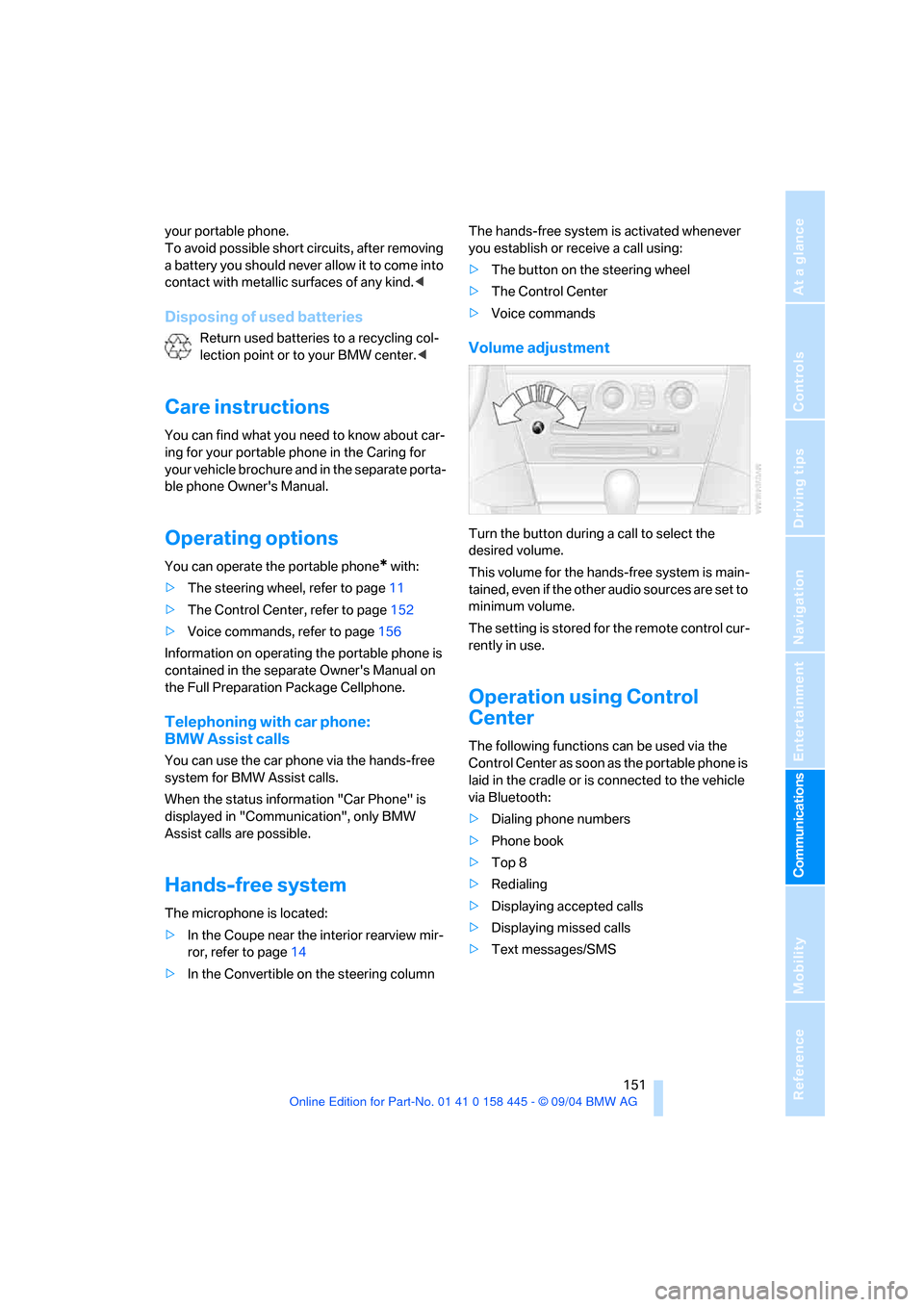
Volume adjustment
Turn the button during a call to select the
desired volume.
This volume for the hands-free system is main-
tained, even if the other audio sources are set to
minimum volume.
The setting is stored for the remote control cur-
rently in use.
Operation using Control
Center
The following functions can be used via the
Control Center as soon as the portable phone is
laid in the cradle or is connected to the vehicle
via Bluetooth:
>Dialing phone numbers
>Phone book
>Top 8
>Redialing
>Displaying accepted calls
>Displaying missed calls
>Text messages/SMS
Page 184 of 217

Mobility
183Reference
At a glance
Controls
Driving tips
Communications
Navigation
Entertainment
1.Push a screwdriver from the left under the
lamp and lever up the lamp to the right.
2.Turn the bulb holder 905 to the left and
remove.
3.Remove and replace the bulb.
LEDs Light-emitting diodes
Light-emitting diodes installed behind translu-
cent lenses serve as the light source for many of
the controls and displays in your vehicle. These
light-emitting diodes, which operate using a
concept similar to that applied in conventional
lasers, are officially designated as Class 1 light-
emitting diodes.
Do not remove the covers, and never
stare into the unfiltered light several
hours, as irritation of the retina could result.<
Changing a wheel
Your BMW is equipped with run-flat tires as
standard. An immediate wheel change in the
event of a flat tire is therefore no longer
required.
You will recognize run-flat tires by a circular
symbol containing the letters RSC on the side
of the tire, refer to Run-flat tires on page171.
If you have new tires mounted or switch from
summer to winter tires, or vice versa, use run-
flat tires, as in the event of a flat tire there is no
spare tire available. Your BMW center will be
glad to advise you.
Also refer to New wheels and tires, page172.
Car jacking points
The jacking points for the car jack are located in
the positions shown.
The suitable tools for changing tires are
available as accessories from your BMW
center.<
Vehicle battery
Battery care
The battery is 100 % maintenance-free, i.e., the
electrolyte will last for the life of the battery
when the vehicle is operated in a temperate cli-
mate.
Your BMW center will be glad to advise in all
matters concerning the battery.
Charging battery
Only charge the battery in the vehicle via the
terminals in the engine compartment with the
engine switched off. For the connections, refer
to Jump starting on page186.
Disposal
After replacement, have old batteries dis-
posed of by your BMW center or deposit
them at a recycling center. Maintain the battery
in an upright position for transport and storage.
Always secure the battery to prevent it from tip-
ping over during transport.<
Page 187 of 217
Giving and receiving assistance
186
Warning triangle*
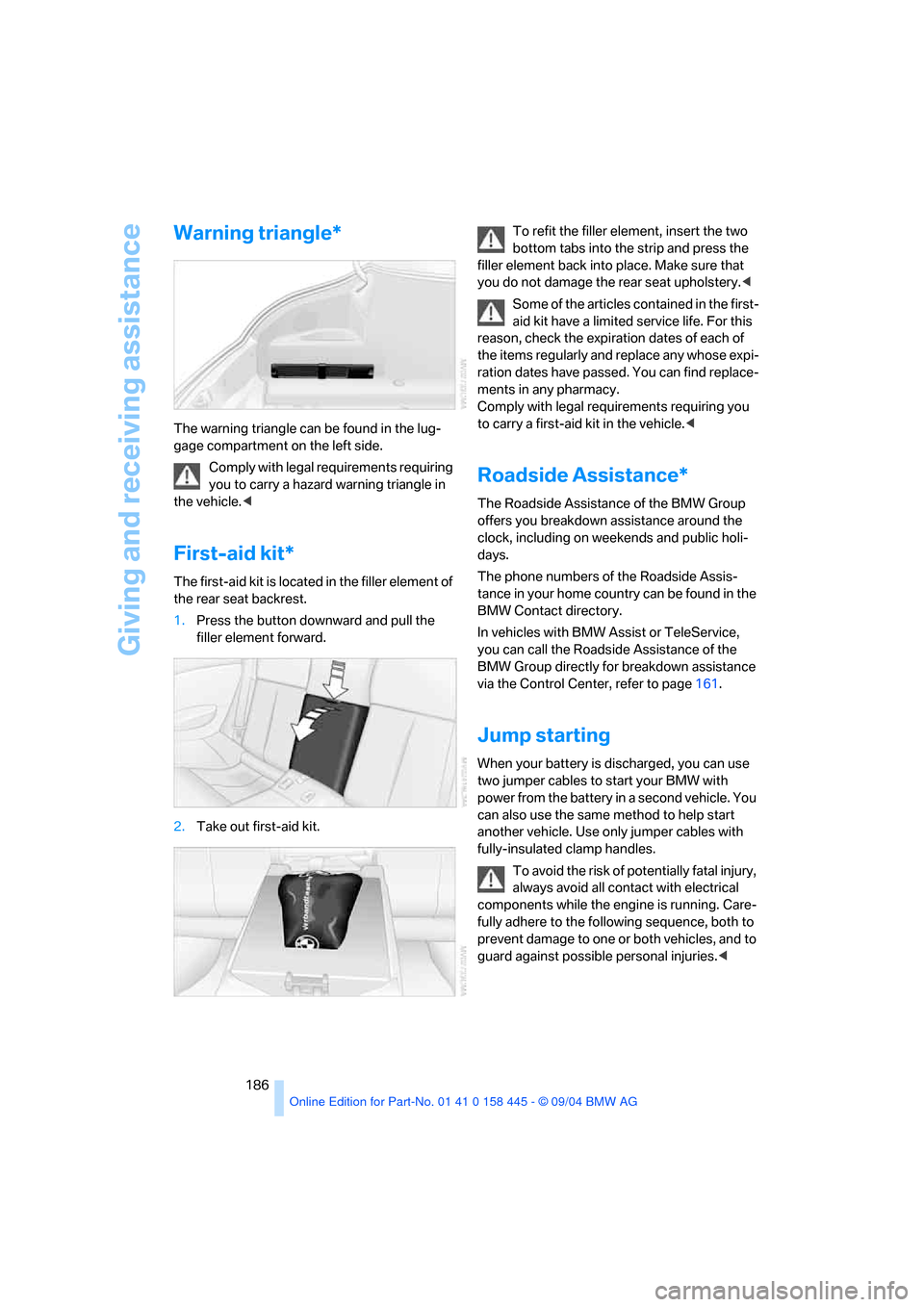
The warning triangle can be found in the lug-
gage compartment on the left side.
Comply with legal requirements requiring
you to carry a hazard warning triangle in
the vehicle.<
First-aid kit*
The first-aid kit is located in the filler element of
the rear seat backrest.
1.Press the button downward and pull the
filler element forward.
2.Take out first-aid kit.To refit the filler element, insert the two
bottom tabs into the strip and press the
filler element back into place. Make sure that
you do not damage the rear seat upholstery.<
Some of the articles contained in the first-
aid kit have a limited service life. For this
reason, check the expiration dates of each of
the items regularly and replace any whose expi-
ration dates have passed. You can find replace-
ments in any pharmacy.
Comply with legal requirements requiring you
to carry a first-aid kit in the vehicle.<
Roadside Assistance*
The Roadside Assistance of the BMW Group
offers you breakdown assistance around the
clock, including on weekends and public holi-
days.
The phone numbers of the Roadside Assis-
tance in your home country can be found in the
BMW Contact directory.
In vehicles with BMW Assist or TeleService,
you can call the Roadside Assistance of the
BMW Group directly for breakdown assistance
via the Control Center, refer to page161.
Jump starting
When your battery is discharged, you can use
two jumper cables to start your BMW with
power from the battery in a second vehicle. You
can also use the same method to help start
another vehicle. Use only jumper cables with
fully-insulated clamp handles.
To avoid the risk of potentially fatal injury,
always avoid all contact with electrical
components while the engine is running. Care-
fully adhere to the following sequence, both to
prevent damage to one or both vehicles, and to
guard against possible personal injuries.<
Page 188 of 217
Mobility
187Reference
At a glance
Controls
Driving tips
Communications
Navigation
Entertainment
Preparing
1.Check whether the battery of the other
vehicle has a voltage of 12 Volts and
approximately the same capacitance in Ah.
This information can be found on the bat-
tery.
2.Switch off the engine of the vehicle provid-
ing assistance.
3.Switch off all electrical accessories in both
vehicles.
There must not be any contact between
the bodies of the two vehicles, as other-
wise there is a danger of shorting.<
Connecting jumper cables
To avoid personal injury from sparks,
observe this sequence when connecting
jumper cables.<
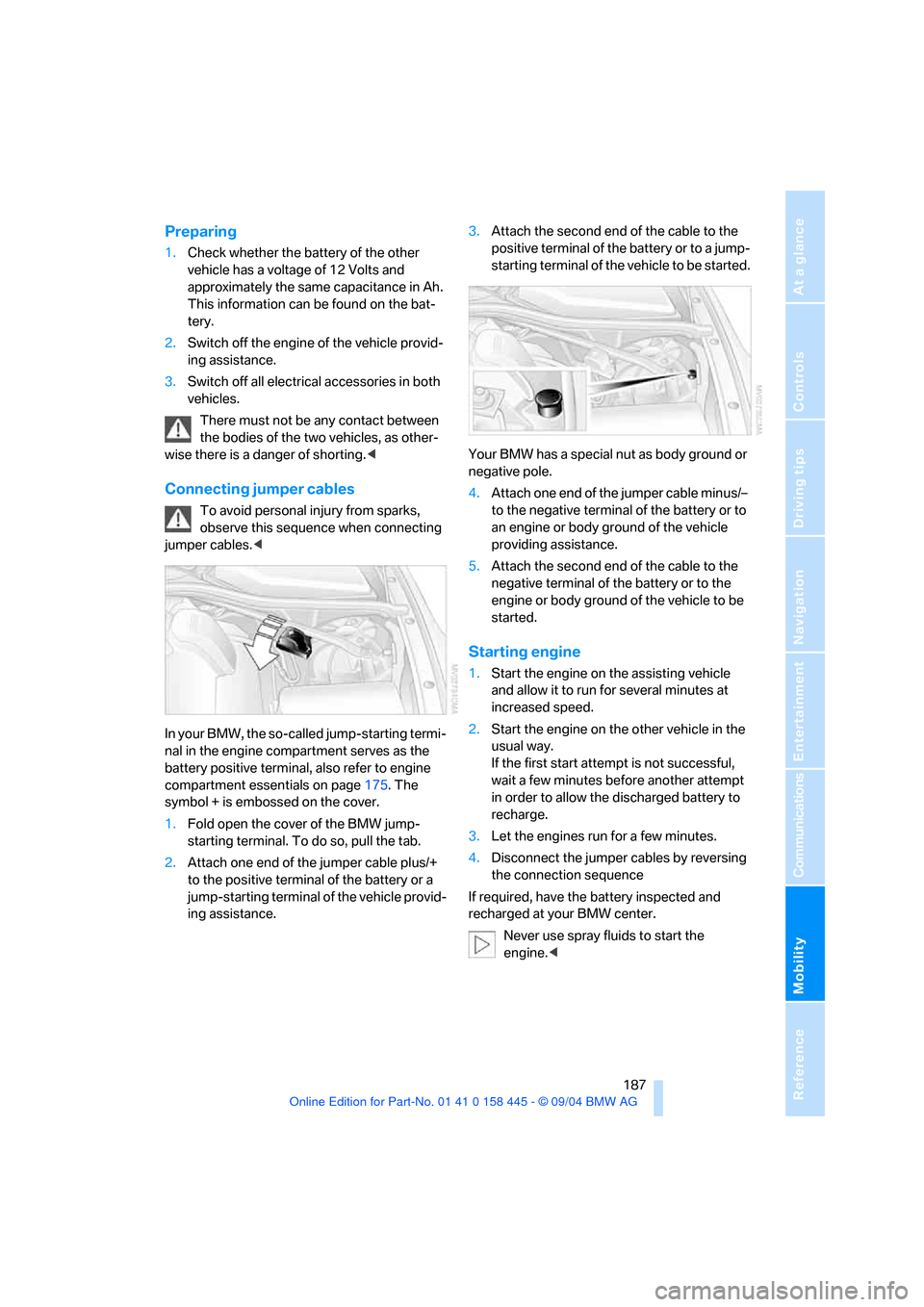
In your BMW, the so-called jump-starting termi-
nal in the engine compartment serves as the
battery positive terminal, also refer to engine
compartment essentials on page175. The
symbol + is embossed on the cover.
1.Fold open the cover of the BMW jump-
starting terminal. To do so, pull the tab.
2.Attach one end of the jumper cable plus/+
to the positive terminal of the battery or a
jump-starting terminal of the vehicle provid-
ing assistance.3.Attach the second end of the cable to the
positive terminal of the battery or to a jump-
starting terminal of the vehicle to be started.
Your BMW has a special nut as body ground or
negative pole.
4.Attach one end of the jumper cable minus/–
to the negative terminal of the battery or to
an engine or body ground of the vehicle
providing assistance.
5.Attach the second end of the cable to the
negative terminal of the battery or to the
engine or body ground of the vehicle to be
started.
Starting engine
1.Start the engine on the assisting vehicle
and allow it to run for several minutes at
increased speed.
2.Start the engine on the other vehicle in the
usual way.
If the first start attempt is not successful,
wait a few minutes before another attempt
in order to allow the discharged battery to
recharge.
3.Let the engines run for a few minutes.
4.Disconnect the jumper cables by reversing
the connection sequence
If required, have the battery inspected and
recharged at your BMW center.
Never use spray fluids to start the
engine.<
Page 201 of 217
Everything from A to Z
200 Audio132
– controls132
– switching on/off132
– tone control133
– volume133
Automatic
– air distribution95
– air volume95
– cruise control61,62
– headlamp control91
– service notification160
– steering wheel adjustment,
refer to Easy entry/exit50
– storing stations138
Automatic car washes110
– also refer to the Caring for
your vehicle brochure
Automatic climate control94
– automatic air distribution95
– convertible program97
– settings using Control
Center96
– switching off96
Automatic curb monitor47
"Automatic programs"97
Automatic recirculated-air
control AUC95
Automatic station search137
Automatic transmission with
Steptronic58
– convenience start55
– Dynamic Driving Control59
– interlock54
– kick-down58
– selector lever interlock58
– shiftlock58
– starting engine55
– towing188
– tow-starting189
"Automatic ventilation"98
AUTO program with
automatic climate control95
"Autostore" on the
radio136,138
Average fuel consumption74
– setting units77
Average speed74"Avoid ferries" for
navigation123
Avoid freeways for
navigation122
"Avoid highways" for
navigation122
Avoiding unintentional
alarms35
"Avoid tollroads" for
navigation123
Axle loads, refer to
Weights192
"A - Z"153
B
Backrests, refer to Seats44
Backup lamps, refer to
Reverse gear56
Balance, refer to Tone
control134
Balance adjustment in audio
mode, right/left134
Bandages, refer to First-aid
kit186
"Bass", refer to Tone
control134
Bass, refer to Tone
control133
Battery
– jump starting186
– refer to Vehicle battery183
Being towed188
Belts, refer to Safety belts48
Beverage holder, refer to Cup
holders103
Black ice, refer to Ice
warning69
Blower, refer to Air volume95
BMW Assist159
– enabling159
– services offered160
BMW maintenance
system178
"BMW Service"161
"BMW Service settings"159
Bottle holder, refer to Cup
holders103Brake Assistant, refer to DBC
Dynamic Brake Control81
Brake fluid177
– warning lamp177
Brake Force Display86
Brake hydraulic system177
Brake lamps
– Brake Force Display86
– replacing bulbs182
Brake pads177
– breaking-in108
Brake rotors110
Brakes109
– ABS Antilock Brake
System81
– brake fluid177
– Brake Force Display86
– brake pads108,177
– breaking-in108
– CBC Cornering Brake
Control81
– handbrake55
Brake system108
– brake fluid level177
– brake pads108,177
– brake rotors110
– breaking-in108
– warning lamp13,83,177
Brake wear warning
– brake pads177
Braking
– electronic brake-force
distribution81
– refer to Braking safely109
Breakdown assistance161
Breakdown services, refer to
Roadside Assistance186
Breaking-in108
– clutch108
– differential108
Break wear warning
– warning lamp177
"Brightness"77
Buttons on steering wheel11
Bypassing route sections128