Page 2 of 223
325i
330iOwner's Manual for Vehicle
Congratulations, and thank you for choosing a BMW.
Thorough familiarity with your vehicle will provide you with
enhanced control and security when you drive it. We therefore
have this request:
Please take the time to read this Owner's Manual and familiarize
yourself with the information that we have compiled for you
before starting off in your new vehicle. It contains important data
and instructions intended to assist you in gaining maximum use
and satisfaction from your BMW's unique range of technical fea-
tures. The manual also contains information on maintenance
designed to enhance operating safety and contribute to main-
taining the value of your BMW throughout an extended service
life.
This manual is supplemented by a Service and Warranty Informa-
tion Booklet for US models or a Warranty and Service Guide
Booklet for Canadian models.
We wish you an enjoyable driving experience.
BMW AG
Page 4 of 223
Reference
At a glance
Controls
Driving tips
Communications
Navigation
Entertainment
Mobility
Contents
The fastest way to find information on a partic-
ular topic or item is by using the index, refer to
page206.
Using this Owner's Manual
4Notes
At a glance
10Cockpit
16iDrive
22Voice command system
Controls
28Opening and closing
38Adjustments
46Transporting children safely
49Driving
64Everything under control
77Technology for driving comfort
and safety
85Lamps
89Controlling the climate for
pleasant driving
93Practical interior accessories
Driving tips
106Things to remember when driving
Navigation
114Starting the navigation system
115Destination entry
125Destination guidance
130What to do if …
Entertainment
134On/off and settings
138Radio
145CD player and CD changer
149External audio device
Communications
152Telephoning
160TeleService, BMW Assist
Mobility
168Refueling
170Wheels and tires
180Under the hood
185Maintenance
187Replacing components
193Giving and receiving assistance
Reference
200Technical data
202Short commands for the voice
command system
206Everything from A - Z
Page 12 of 223
At a glance
11Reference
Controls
Driving tips
Communications
Navigation
Entertainment
Mobility
7Instrument cluster12
10Ignition lock49
11Buttons
* on the steering wheel12Horn: the entire surface
13Steering wheel adjustment44
15Releasing the hood180
16Opening the luggage compartment lid
*
6
Turn signals53
High beams, headlamp flasher86
Roadside parking lamps
*86
Computer65
Settings and information about the
vehicle68
Instrument lighting87
8
Windshield wipers54
Rain sensor
*54
9Switching the ignition on/off and
starting/stopping the engine49
Telephone
*:
>Press briefly: receiving and
ending a call, starting dialing
*
for a selected number
>Press longer: redialing
Volume
Activating/deactivating voice com-
mand system
*
Switching radio stations
Selecting music tracks
Scrolling through phone book
Individually programmable45
Individually programmable45
14
Cruise control*55
Active cruise control
*57
Page 14 of 223
At a glance
13Reference
Controls
Driving tips
Communications
Navigation
Entertainment
Mobility
Indicator and warning lamps
The concept
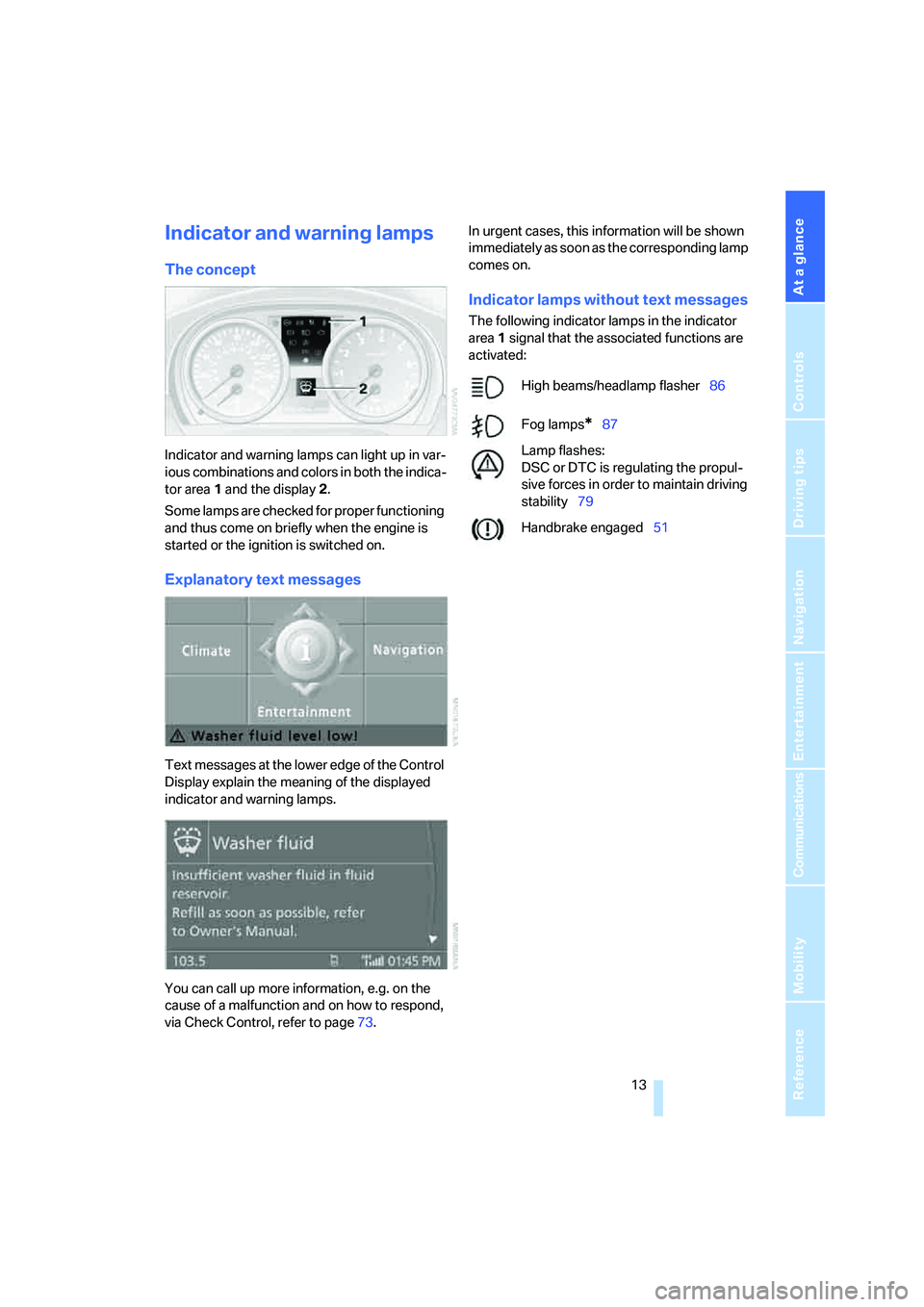
Indicator and warning lamps can light up in var-
ious combinations and colors in both the indica-
tor area 1 and the display 2.
Some lamps are checked for proper functioning
and thus come on briefly when the engine is
started or the ignition is switched on.
Explanatory text messages
Text messages at the lower edge of the Control
Display explain the meaning of the displayed
indicator and warning lamps.
You can call up more information, e.g. on the
cause of a malfunction and on how to respond,
via Check Control, refer to page73.In urgent cases, this information will be shown
immediately as soon as the corresponding lamp
comes on.
Indicator lamps without text messages
The following indicator lamps in the indicator
area1 signal that the associated functions are
activated:
High beams/headlamp flasher86
Fog lamps
*87
Lamp flashes:
DSC or DTC is regulating the propul-
sive forces in order to maintain driving
stability79
Handbrake engaged51
Page 16 of 223
At a glance
15Reference
Controls
Driving tips
Communications
Navigation
Entertainment
Mobility
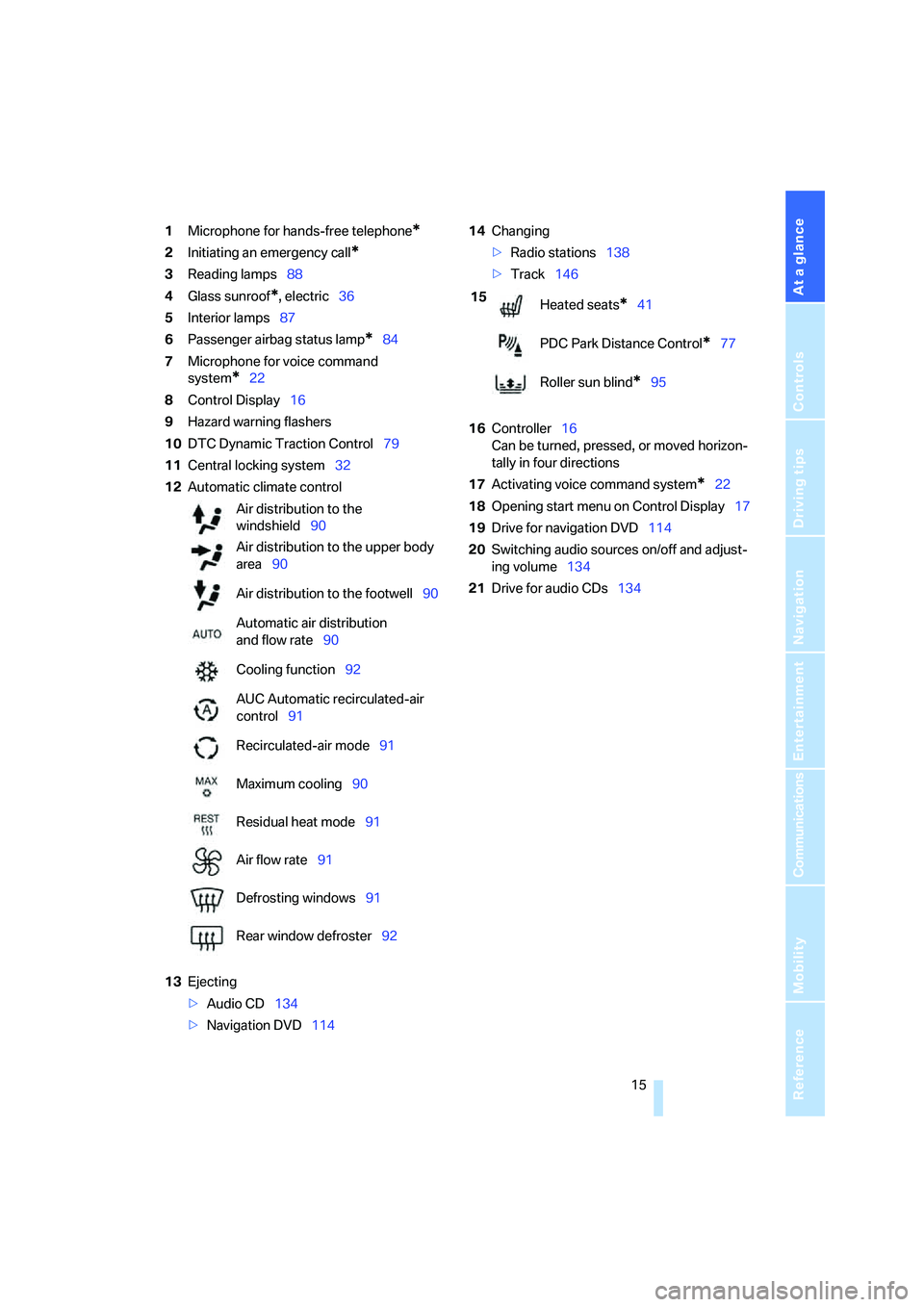
1Microphone for hands-free telephone*
2Initiating an emergency call*
3Reading lamps88
4Glass sunroof
*, electric36
5Interior lamps87
6Passenger airbag status lamp
*84
7Microphone for voice command
system
*22
8Control Display16
9Hazard warning flashers
10DTC Dynamic Traction Control79
11Central locking system32
12Automatic climate control
13Ejecting
>Audio CD134
>Navigation DVD11414Changing
>Radio stations138
>Track146
16Controller16
Can be turned, pressed, or moved horizon-
tally in four directions
17Activating voice command system
*22
18Opening start menu on Control Display17
19Drive for navigation DVD114
20Switching audio sources on/off and adjust-
ing volume134
21Drive for audio CDs134 Air distribution to the
windshield90
Air distribution to the upper body
area90
Air distribution to the footwell90
Automatic air distribution
and flow rate90
Cooling function92
AUC Automatic recirculated-air
control91
Recirculated-air mode91
Maximum cooling90
Residual heat mode91
Air flow rate91
Defrosting windows91
Rear window defroster92
15
Heated seats*41
PDC Park Distance Control
*77
Roller sun blind
*95
Page 17 of 223
iDrive
16
iDrive
iDrive integrates the functions of a large num-
ber of switches. This allows these functions to
be operated from a single central position. The
following section provides an introduction to basic menu navigation. The control of the indi-
vidual functions is described in connection with
the relevant equipment.
Controls
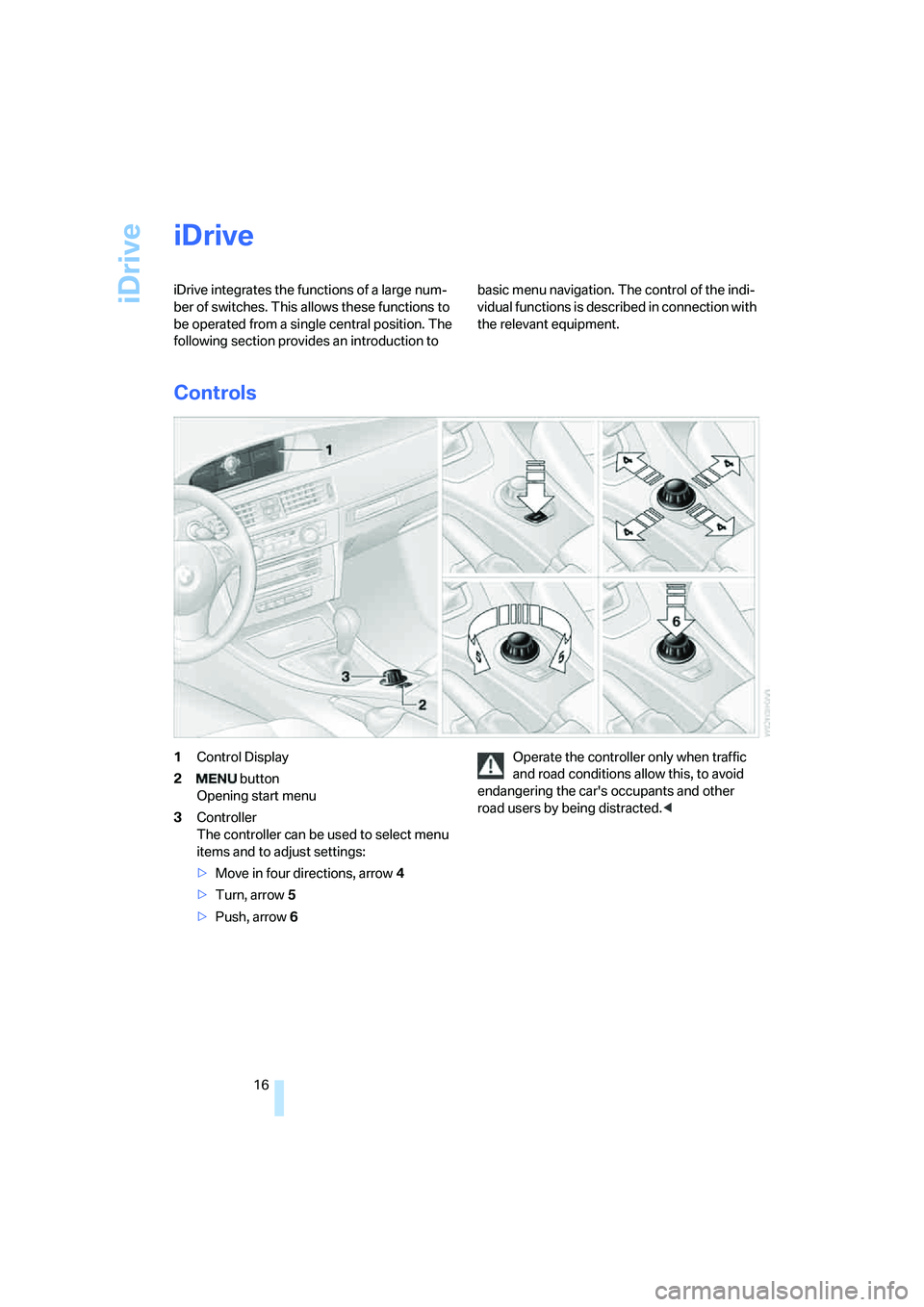
1Control Display
2 button
Opening start menu
3Controller
The controller can be used to select menu
items and to adjust settings:
>Move in four directions, arrow 4
>Turn, arrow 5
>Push, arrow 6Operate the controller only when traffic
and road conditions allow this, to avoid
endangering the car's occupants and other
road users by being distracted.<
Page 18 of 223
At a glance
17Reference
Controls
Driving tips
Communications
Navigation
Entertainment
Mobility
Menu overview
Communication
>Telephone*
>BMW Assist* or TeleService*
Navigation
>Navigation system
>Onboard information, e.g. for displaying the
average fuel consumption.
Entertainment
>Radio
>CD player and CD changer
*
>External audio device
Climate
>Air distribution
>Automatic program
menu
>Switching off Control Display
>Tone and display settings
>Settings for traffic information
>Settings for your vehicle, e.g. for the central
locking system
>Display of service requirements and dates
for statutory emissions and vehicle inspec-
tions
>Settings for telephone
Operating principle
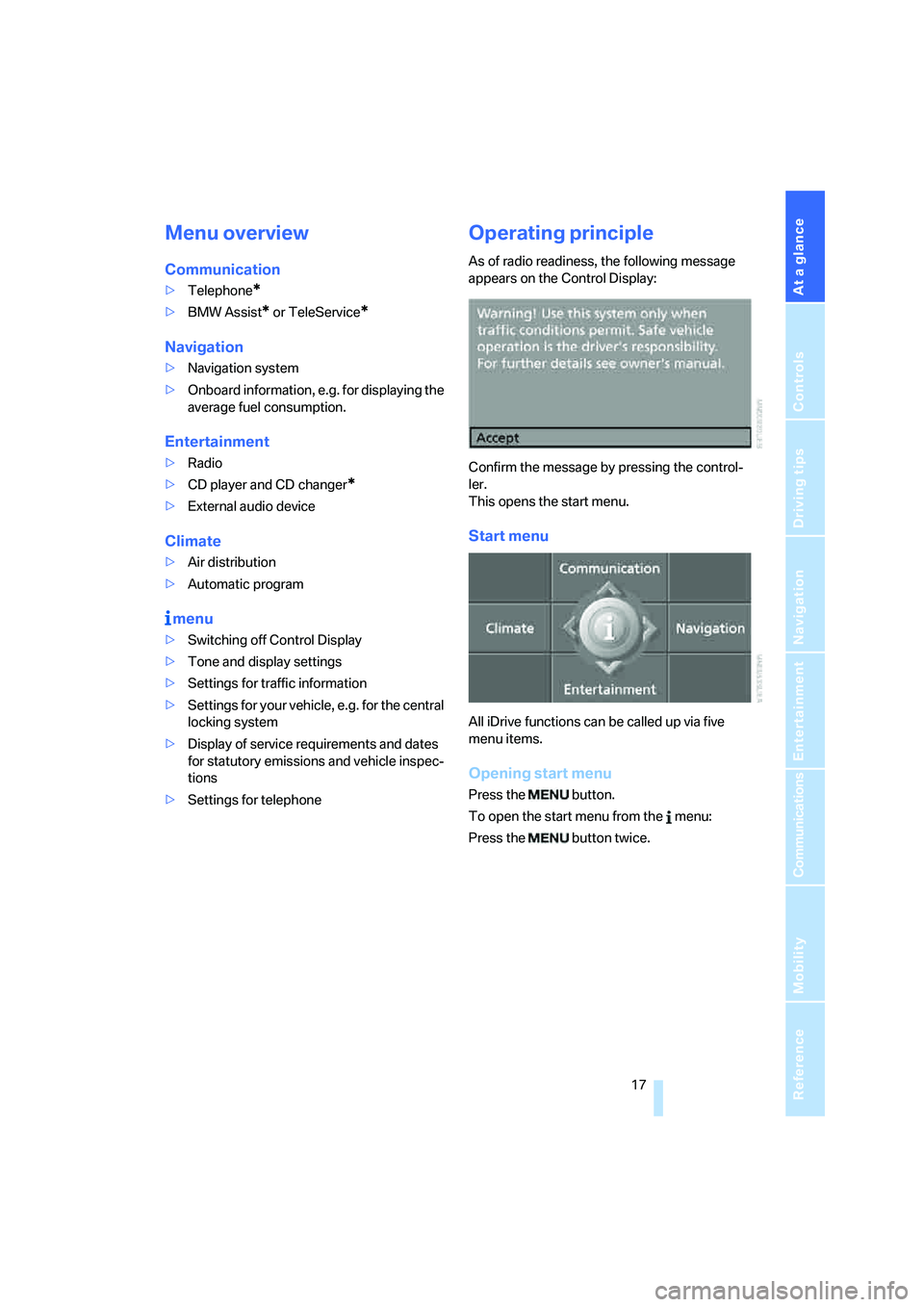
As of radio readiness, the following message
appears on the Control Display:
Confirm the message by pressing the control-
ler.
This opens the start menu.
Start menu
All iDrive functions can be called up via five
menu items.
Opening start menu
Press the button.
To open the start menu from the menu:
Press the button twice.
Page 19 of 223
iDrive
18
Calling up menu items in the start menu
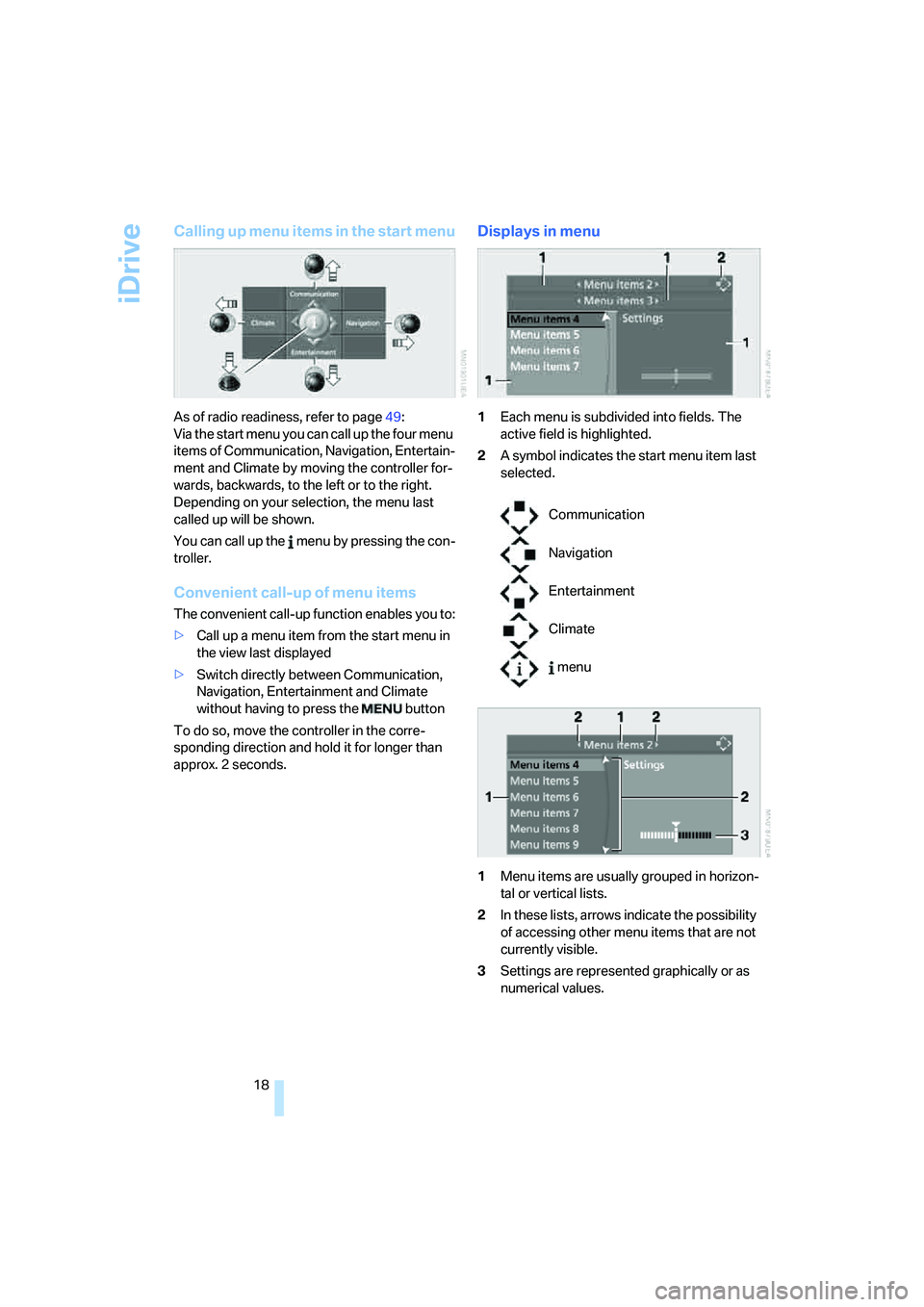
As of radio readiness, refer to page49:
Via the start menu you can call up the four menu
items of Communication, Navigation, Entertain-
ment and Climate by moving the controller for-
wards, backwards, to the left or to the right.
Depending on your selection, the menu last
called up will be shown.
You can call up the menu by pressing the con-
troller.
Convenient call-up of menu items
The convenient call-up function enables you to:
>Call up a menu item from the start menu in
the view last displayed
>Switch directly between Communication,
Navigation, Entertainment and Climate
without having to press the button
To do so, move the controller in the corre-
sponding direction and hold it for longer than
approx. 2 seconds.
Displays in menu
1Each menu is subdivided into fields. The
active field is highlighted.
2A symbol indicates the start menu item last
selected.
1Menu items are usually grouped in horizon-
tal or vertical lists.
2In these lists, arrows indicate the possibility
of accessing other menu items that are not
currently visible.
3Settings are represented graphically or as
numerical values.
Communication
Navigation
Entertainment
Climate
menu