Page 5 of 243
Your Vehicle at a Glance
4
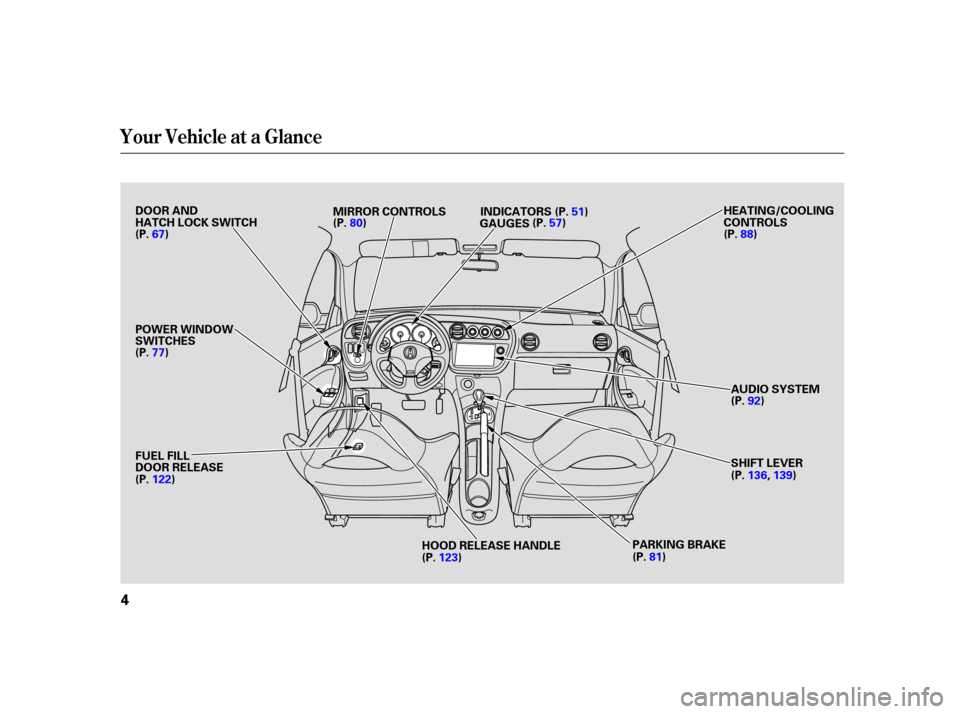
DOOR AND
HATCH LOCK SWITCH
POWER WINDOW
SWITCHESHEATING/COOLING
CONTROLS
AUDIO SYSTEM
SHIFT LEVER
FUEL FILL
DOOR RELEASE
HOOD RELEASE HANDLE
(P.
67) INDICATORS
GAUGES
MIRROR CONTROLS
(P. 122)
(P.123) (P.
136, 139)
(P.
92)
(P.
88)
PARKING BRAKE
(P.
80) (P.57)(P.
51)
(P.81)
(P.
77)
Page 50 of 243

This section gives inf ormation about
the controls and displays that
contribute to the daily operation of
your vehicle. All the essential
controls are within easy reach............................
Control Locations .50
............................
Instrument Panel .51
..........
Instrument Panel Indicators . 52
.............................................
Gauges .57
.....................................
Odometer .57
...................................
Trip Meter .57
..................................
Fuel Gauge .58
...................
Temperature Gauge . 58
..........
Check Fuel Cap Indicator . 58
Controls Near the Steering ...........................................
Wheel .59
.
Windshield Wipers and Washers . 60
...........
Turn Signal and Headlights . 61
........
Instrument Panel Brightness . 62
.................
Hazard Warning Button . 62
.................
Rear Window Def ogger . 62
..........
Steering Wheel Adjustment . 63
...............................
Keys and Locks .64
........................
Immobilizer System .65
................................
Ignition Switch .66
......................................
Door Locks .67
.........
Power Door/Hatch Locks . 67
............................................
Hatch .68
.......................
Remote Transmitter .69
.................................................
Seats .71
....................................
Seat Heaters .74 ...........................
Cargo Area Cover .75
..............................
Power Windows .77
.........................................
Moonroof .79
.............................................
Mirrors .79
.................................
Parking Brake .81
...........
Interior Convenience Items . 82
.......................
Beverage Holders .83
..........
Accessory Power Sockets . 83
...............
Console Compartment . 84
....................................
Glove Box .84
..............................
Vanity Mirror .85
....................................
Coat Hook .85
.................................
Interior Lights .86
Instruments and Controls
Inst rument s and Cont rols
49
Page 51 of 243
AT model is shown.
Control L ocations
50
POWER WINDOW
SWITCHES
FUEL FILL
DOOR RELEASEMIRROR CONTROLS
GAUGES HEATING/COOLING
CONTROLS
AUDIO SYSTEM
SHIFT LEVER
HOOD RELEASE HANDLE
DOOR AND
HATCH LOCK SWITCH
INDICATORS
(P. 67) (P.88)
(P. 92)
(P. 136, 139)
(P. 123)
(P.
122)
PARKING BRAKE
(P.
77) (P.
80) (P.
51)
(P. 57)
(P.81)
Page 78 of 243
�µTo open/close the driver’s
window, push the window switch
f irmly down or up to the second
detent, and release it. The window
will automatically go up or down all
the way. To stop the window, pull/
push on the window switch brief ly.
If the MAIN switch is OFF, the
passenger window cannot be raised
or lowered. Keep the MAIN switch
off whenyouhavechildreninthe
vehicle so they do not injure
themselves by operating the window
unintentionally.
Turn the ignition switch to ON (II)
to raise or lower either window. To
open the window, push the switch
downandholdit.Releasetheswitch
when you want the window to stop.
Pull back on the switch and hold it to
close the window.
CONT INUED
AUTO
Power Windows
Inst rument s and Cont rols
77
MAIN SWITCH
DRIVER’S WINDOW SWITCH
Closing a power window on
someone’s hands or fingers can
cause serious injury.
Make sure your passengers are
away from the windows before
closing them.
Page 79 of 243
�µ
Auto reverse stops sensing when the
window is almost closed. You should
always check that all passengers and
objects are away from the window
bef ore closing it. If your vehicle’s battery is
disconnected or goes dead, or the
driver’s window f use is removed, the
AUTO f unction will be disabled. The
power window system needs to be
reset af ter reconnecting the battery
or installing the f use.
Start the engine. Push down and
hold the driver’s window switch
until the window is f ully open.
Pull and hold the driver’s window
switch to close the window
completely, then hold the switch
f or a second or two more.
If the driver’s
window senses any obstacle while it
is closing automatically, it will
reverse direction and then stop. To
close the window, remove the
obstacle, then use the window switch
again.
If the power windows do not operate
properly af ter resetting, have your
vehicle checked by your dealer. 1.
2.
Power Windows
AUTO REVERSE
78
Page 189 of 243

�µ
Check the condition of the battery
monthlybylookingatthetest
indicator window. The label on the
battery explains the test indicator’s
colors.
Check the terminals f or corrosion (a
white or yellowish powder). To
remove it, cover the terminals with a
solution of baking soda and water. It
will bubble up and turn brown. When
this stops, wash it of f with plain
water. Dry off the battery with a
cloth or paper towel. Coat the terminals with grease to help prevent
f urther corrosion.
If additional battery maintenance is
needed, see your dealer or a
qualif ied technician.
Battery posts,
terminals, and related accessories
contain lead and lead compounds.
If your vehicle’s battery is
disconnected or goes dead, your
driver’s power window loses its
calibration and must be
reprogrammed (see page ), and
your audio system will disable itself .
Thenexttimeyouturnontheradio
youwillsee‘‘ ’’inthe
f requency display. Use the Preset
buttons to enter the five-digit code
(see page ). If you need to connect the battery to
a charger, disconnect both cables to
prevent damaging your vehicle’s
electrical system. Always disconnect
the negative ( ) cable first, and
reconnect it last.
78
112
Checking the Battery
WARNING:
Wash your hands af ter handling.
188
TEST INDICATOR WINDOW
The battery gives off explosive
hydrogen gas during normal
operation.
A spark or flame can cause the
battery to explode with enough
force to kill or seriously hurt you.
Wear protective clothing and a
face shield, or have a skilled
mechanic do the battery
maintenance.
Page 205 of 243

This indicator should never
come on when the engine is
running. If it starts f lashing or stays
on, the oil pressure has dropped very
low. Serious engine damage is
possible and you should take
immediate action. Saf ely pull of f the road, and shut
of f the engine. Turn on the hazard
warning indicators.
Let the vehicle sit f or a minute.
Open the hood, and check the oil
level (see page ). An engine
very low on oil can lose pressure
during cornering and other driving
maneuvers.
If necessary, add oil to bring the
level back to the full mark on the
dipstick (see page ).
Start the engine, and watch the oil
pressure indicator. If it does not go
out within 10 seconds, turn of f the
engine. There is a mechanical
problem that needs to be repaired
bef ore you can continue driving
(see
on page
). If the charging system
indicator comes on brightly
when the engine is running, the
battery is not being charged.
Immediately turn of f all electrical
accessories. Try not to use other
electrically operated controls such as
the power windows. Keep the engine
running; starting the engine will
discharge the battery rapidly.
Go to a service station or garage
where you can get technical
assistance.
1.
2.
3.
4.
125
162
213
L ow Oil Pressure Indicator, Charging System Indicator
L ow Oil Pressure Indicator
Emergency T owingCharging System Indicator
204
Running the engine with low oil
pressure can cause serious mechanical
damage almost immediately. Turn of f
the engine as soon as you can saf ely get
the vehicle stopped.
Page 212 of 243
�Î
�Î
�Î
�Î �Î
�µ
�µ
�µ
�µ �Î
�Î
�Î
CONT INUED
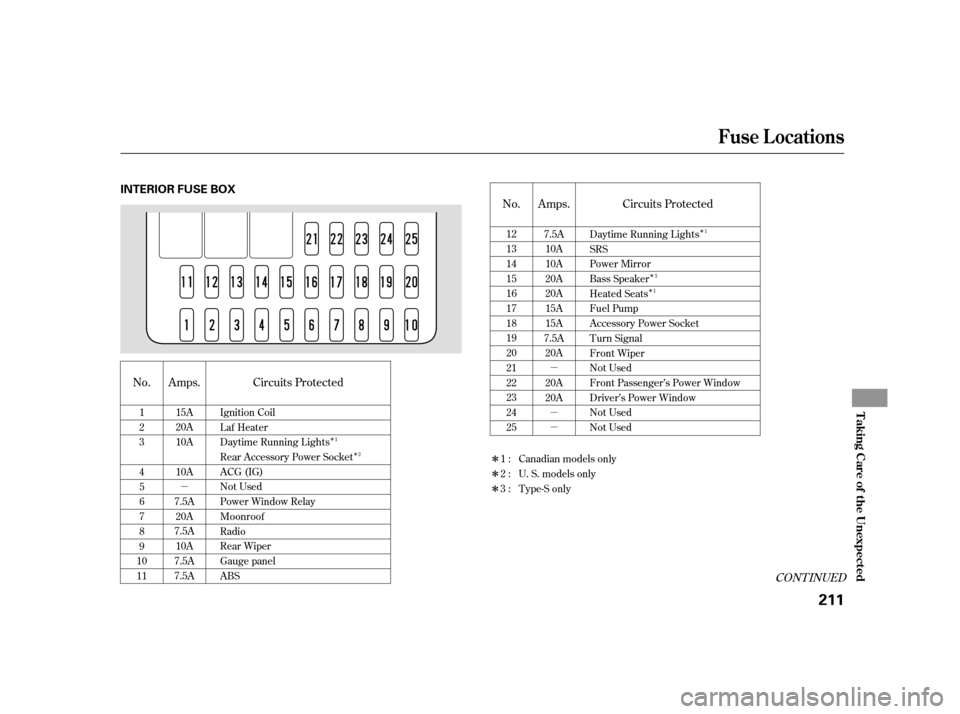
Circuits Protected
Amps.
No.
No. Circuits Protected
Amps.
Daytime Running Lights
SRS
Power Mirror
Bass Speaker
Heated Seats
Fuel Pump
Accessory Power Socket
Turn Signal
Front Wiper
Not Used
Front Passenger’s Power Window
Driver’s Power Window
Not Used
Not Used
7.5A
10A
10A
20A
20A
15A
15A
7.5A 20A
20A
20A
12
13
14
15
16
17
18
19
20
21
22
23
24
25
1
2
3
4
5
6
7
8
9
10
11 Ignition Coil
Laf Heater
Daytime Running Lights
Rear Accessory Power Socket
ACG (IG)
Not Used
Power Window Relay
Moonroof
Radio
Rear Wiper
Gauge panel
ABS
15A
20A
10A
10A
7.5A 20A
7.5A 10A
7.5A
7.5A 1:
2:
3:
Canadian models only
U. S. models only
Type-S only1
3
1
1 2
Fuse Locations
T aking Care of t he Unexpect ed
211
INTERIOR FUSE BOX