Page 64 of 394

This indicator normally comes on f or
a f ew seconds when you turn the
ignition switch to ON (II).This indicator has three f unctions.
Itcomesonasareminderthatyou
have turned off the vehicle
stability assist (VSA) system.
It flashes when VSA is active (see
page ).
This indicator normally comes on f or
a f ew seconds when you turn the
ignition switch to ON (II). For more
inf ormation, see page . The lef t or right turn signal indicator
blinks when you signal a lane change
or turn. If the indicator does not
blink or blinks rapidly, it usually
means one of the turn signal bulbs is
burned out (see page ). Replace
the bulb as soon as possible, since
other drivers cannot see that you are
signaling.
When you press the hazard warning
button, both turn signals blink. All
turn signals on the outside of the
vehicle should f lash.
If itcomesonandstaysonatany
other time, or it does not come on
when you turn the ignition switch to
ON (II), there is a problem with the
VSA system. You will also see a
‘‘CHECK VSA SYSTEM’’ message
on the multi-information display (see
page ). Take your vehicle to a
dealer to have it checked. Without
VSA, your vehicle still has normal
driving ability, but will not have VSA
traction and stability enhancement.
For more inf ormation, see page .
It comes on along with the VSA
system indicator if there is a
problem with the VSA system.
You will also see a ‘‘CHECK VSA
SYSTEM’’ message on the multi-
inf ormation display (see page ).
1.
2.
3.
281
281
76
281316
76
Instrument Panel Indicators
Vehicle Stability Assist
(VSA ) System Indicator VSA Activation Indicator
Turn Signal and
Hazard Warning
Indicators
Inst rument s and Cont rols
63
Page 77 of 394
When a problem is detected with
your vehicle, a message will be
shown on the multi-inf ormation
display.
If this happens, refer to the
applicable pages of this owner’s
manual, and f ollow the instructions.
Here is a list of messages shown on
the multi-information display. When there are several messages to
be shown, the system switches the
messages every 5 seconds.
The message is shown until you
push the INFO button.
To see the message again, press the
INFO button, 5 seconds af ter the
display disappears.See page
61, 350
See page 350
See page 60, 348
See page 60, 349
See page 60, 348
See page 264
See page 347 See page
62, 275
See page 63, 281
See page 67, 107
See page 66
See page 65, 272
See page 265
See page 32, 61
Multi-Inf ormation Display
Message Display
76
Page 79 of 394

�Û�Ý
�µ�™�´
�µ�™�´�
�
With the multi-information display
and the , , and SEL/RESET
buttons on the right side of the
steering wheel, you can change
several vehicle control settings to
your pref erence (see page ).
To change the settings, the ignition
switch must be in the ON (II)
position.
Here are the settings you can
change: 81
CUST OMIZE MENU
ENGLISH
FRENCH
SPANISH5°F 5°F
3°C 3°C
ON
OFF
ON
OFF
ON
OFF
ALL DOORS
ON
OFF
ON
OFF
60 SEC
30 SEC
15 SEC
60 SEC
30 SEC
See page
83
See page
83
See page
84
See page
86
See page
86
See page
89
See page
89
See page
90
See page
92
See page
92
LANGUAGE
SELECTION
ADJUST OUTSIDE
TEMP. DISPLAY
TRIP A & AVG. FUEL A
RESET with REFUEL
EXIT
MEMORY POSIT ION
LINK
AUTO TILT &
TELESCOPIC
EXIT
DOOR UNLOCK MODE
KEYLESS ACCESS
LIGHT FLASH
KEYLESS ACCESS
BEEP
EXIT
INTERIOR LIGHT
DIMMING T IME
HEADLIGHT AUT O
OFF TIMER
MET ER SET UP
POSITION SETUP
KEYLESS ACCESS
SETUP
LIGHTING SETUP
DEFAULT
ENGLISH
0°F
0°C
OFF
ON
ON
ON
ON
30 SEC
15 SECCUST OMIZE SET UP
DRIVER DOOR ONLY
CUST OMIZE GROUP
DRIVER
DOOR ONLY
Multi-Inf ormation Display
Customized Settings
78
Page 81 of 394
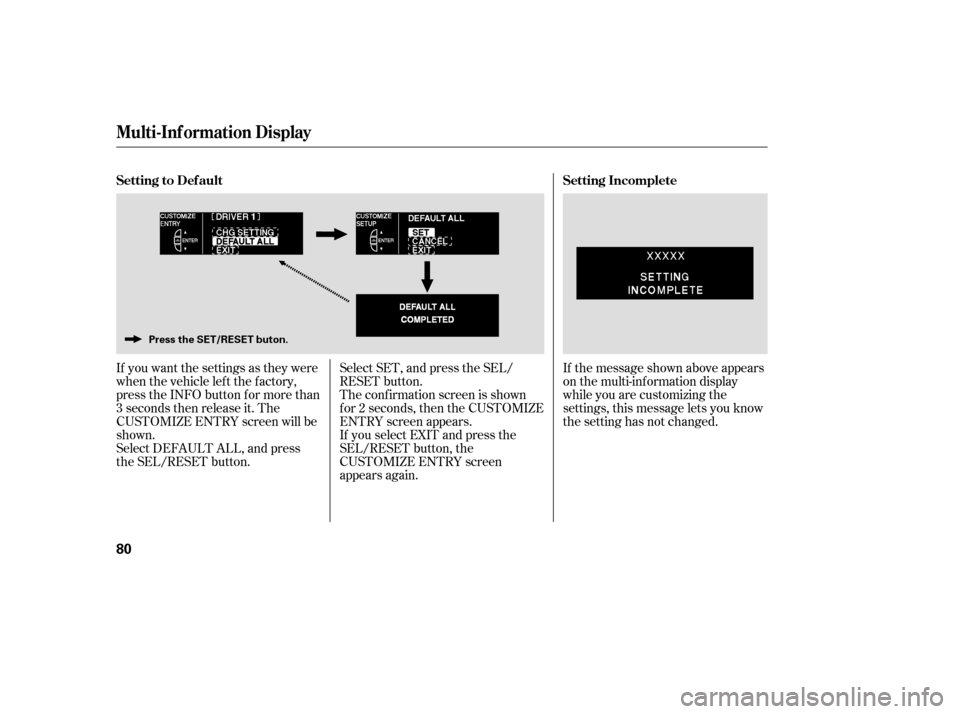
If you want the settings as they were
when the vehicle lef t the f actory,
press the INFO button for more than
3 seconds then release it. The
CUSTOMIZE ENTRY screen will be
shown.
Select DEFAULT ALL, and press
the SEL/RESET button.Select SET, and press the SEL/
RESET button.
The conf irmation screen is shown
f or 2 seconds, then the CUSTOMIZE
ENTRY screen appears.
If you select EXIT and press the
SEL/RESET button, the
CUSTOMIZE ENTRY screen
appears again.If the message shown above appears
on the multi-information display
while you are customizing the
settings, this message lets you know
the setting has not changed.
Multi-Inf ormation Display
Setting to Def ault
Setting Incomplete
80
Press the SET/RESET buton.
Page 84 of 394
�µ�µ�Û�Ý
�Û�Ý
Language Selection
Adjust Outside Temp. Display
The conf irmation screen is shown
f or 2 seconds, then the CUSTOMIZE
ENTRY screen returns.To exit this mode without changing
the current settings, select EXIT,
and press the SEL/RESET button.
You can adjust the outside
temperature shown on the multi-
inf ormation display in the range of5°F ( 3°C) to 5°F (3°C).
Adjust the temperature by pressing
the or button, and enter your
selection by pressing the SEL/
RESET button.
The conf irmation screen is shown
f or 2 seconds, then the CUSTOMIZE
ENTRY screen returns.
You can select the language shown
on the multi-information display to
English, French, or Spanish.
Select the desired language by
pressing the or button, and
enter your selection by pressing the
SEL/RESET button.
CONT INUED
Multi-Inf ormation Display
Inst rument s and Cont rols
83
Page 110 of 394
�´
�µ�´ �µ
Push the button between the center
vents to turn on the hazard warning
lights (f our-way f lashers). This
causes all f our outside turn signals
and both indicators in the instrument
panel to f lash. Use the hazard
warning lights if you need to park in
a dangerous area near heavy traffic,
or if your vehicle is disabled. Adjust the brightness of the
instrument panel by pressing the
or button. Press the button to
increase the brightness and the
button to decrease it. You can adjust
the brightness with the headlight
switch on or of f .
The level of brightness is shown on
the multi-information display while
you adjust it. It goes out 5 seconds
af ter you f inish adjusting.
CONT INUED
Instrument Panel Brightness
Hazard Warning Button
Hazard Warning Button, Instrument Panel Brightness
Inst rument s and Cont rols
109
ADJUSTMENT BUTTON
U.S.
CANADA
Page 202 of 394

Cruise control allows you to maintain
asetspeedabove25mph(40km/h)
without keeping your f oot on the
accelerator pedal. It should be used
f or cruising on straight, open
highways. It is not recommended f or
city driving, winding roads, slippery
roads, heavy rain, or bad weather.Press and release the DECEL/
SET button on the steering wheel.
The CRUISE CONTROL icon
appears on the multi-inf ormation
display to show the system is now
activated.
Accelerate to the desired cruising
speedabove25mph(40km/h). Push in the CRUISE button on the
steering wheel. The CRUISE
MAIN indicator on the instrument
panel comes on. When cruise control is on while
driving, the SH-AWD torque
distribution monitor and the tire
pressure monitor are not shown
on the multi-information display.
1.
2. 3.
CONT INUED
Cruise Control
Using Cruise Control
Features
201
RES/
ACCEL
BUTTON
DECEL/SET BUTTON
CRUISE BUTTON
Improper use of the cruise
control can lead to a crash.
Use the cruise control only
when traveling on open
highways in good weather.
Page 280 of 394
CONT INUED
If there is a system error with the
TPMS, the multi-inf ormation display
showsa‘‘SYSTEMFUNCTION
ERROR’’ message (see page ),
and the tire pressure readings will
not be displayed. You will also see a
‘‘CHECK TPMS SYSTEM’’ message
on the multi-information display (see
page ).If any of the tires have low pressure,
the multi-information display will
shows a ‘‘CHECK TIRE PRESSURE’’
message. You will also see one or
more low pressure tire positions
blinking in the display (see page
). When the TPMS is functioning
normally, you can press the SEL/
RESETbuttononthesteeringwheel
to see the pressure readings of each
tire in psi (U.S. models) or kPa
(Canadian models) (see page ).
280 72
277 74
Tire Pressure Monitoring System (TPMS)
T ire Pressure Readings
Driving
279
VEHICLE ICONU.S.