Page 3 of 394

Congratulations on your selection of the 2005 Acura RL. We are certain you
will be pleased with your purchase of one of the f inest luxury vehicles in the
world.Calif ornia Proposition 65 WarningThis product contains
or emits chemicals known to the
State of Calif ornia to cause cancer
and birth defects or other
reproductive harm.
Event Data Recorders
This vehicle is equipped with one or
more recording devices commonly
ref erred to as event data recorders
or sensing and diagnostic modules.
One of the best ways to enhance the enjoyment of your new vehicle is to
read this manual. In it, you will learn how to operate its driving controls and
convenience items. Af terwards, keep this owner’s manual in your vehicle so
youcanrefertoitatanytime.
Several warranties protect your new vehicle. Read the warranty booklet
thoroughly so you understand the coverages and are aware of your rights
and responsibilities.
Maintaining your vehicle according to the schedules given in this manual
helps to keep your driving trouble-f ree while it preserves your investment.
When your vehicle needs maintenance, keep in mind that your dealer’s staf f
is specially trained in servicing the many systems unique to your vehicle.
Your dealer is dedicated to your satisf action and will be pleased to answer
any questions and concerns. As you read this manual, you will
f ind inf ormation that is preceded by
a
symbol. This
inf ormation is intended to help you
avoid damage to your vehicle, other
property, or the environment.
Introduction
WARNING:
i
Page 76 of 394

You can receive or make phone calls
f rom your cell phone through your
Acura’s HandsFreeLink (HFL)
system without touching your cell
phone.When the engine oil lif e reaches 15
percent, the display shows
‘‘SERVICE DUE SOON’’ and the
code f or the maintenance items to be
perf ormed.
When the engine oil lif e reaches 5
percent, the display shows
‘‘SERVICE DUE NOW’’ along with
the same maintenance items.Have your dealer do the indicated
maintenance as soon as you see this
message, and have them reset the
display af ter completing the service.
If you do not perf orm the indicated
maintenance or do not reset the
display, the message changes to
‘‘SERVICE PAST DUE’’ when the
engine oil lif e becomes 0 percent.
These messages appear on the multi-
inf ormation display each time you
turn the ignition switch to ON (II).
For details on engine oil lif e and
maintenance messages, ref er to page
.
Also ref er to page f or important
maintenance saf ety precautions.
To use the system, your cell phone
and the HFL system must be linked.
Not all cell phones are compatible
with this system. Ref er to page
for instructions on how to link
your cell phone to the HFL and how
to receive or make phone calls. 291
290
230
HandsFreeL ink
Maintenance Messages
Multi-Inf ormation Display
Inst rument s and Cont rols
75
TM
Page 209 of 394
AcuraLink enhances your ownership
experience by providing a direct
communication link between your
vehicleandtheAcuraServer.
Working through the XM radio
satellite, AcuraLink works in
conjunction with the navigation
system, HandsFreeLink (HFL), and
audio system in your vehicle. It
displays and receives several kinds
of messages, including:Operating tips and inf ormation on
your vehicle’s f eatures.
Important recall and safety
inf ormation.
Maintenance inf ormation to keep
your vehicle in top condition.
Diagnostic inf ormation to provide
inf ormation about any problems
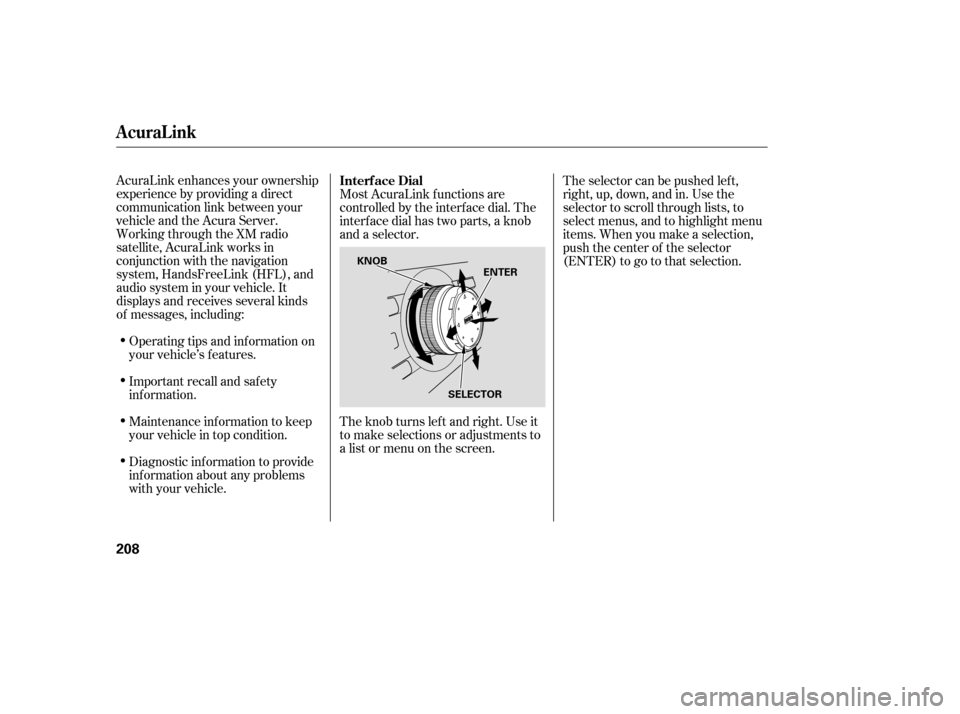
with your vehicle. Most AcuraLink f unctions are
controlled by the interf ace dial. The
interface dial has two parts, a knob
and a selector.
The knob turns lef t and right. Use it
to make selections or adjustments to
a list or menu on the screen.
The selector can be pushed lef t,
right, up, down, and in. Use the
selector to scroll through lists, to
select menus, and to highlight menu
items. When you make a selection,
push the center of the selector
(ENTER)togotothatselection.
Interf ace Dial
AcuraLink
208
ENTER
SELECTOR
KNOB
Page 215 of 394
If your vehicle is af f ected by a recall
or other important saf ety
inf ormation, a letter will be mailed to
you about the issue and how to f ix it.
If you don’t get your vehicle f ixed,
you will also receive a reminder
message through AcuraLink. You
can then use the message options to
call your dealer f or an appointment
or to f ind the nearest dealer.
You can then use the message
options to call your dealer f or an
appointment or to f ind the nearest
dealer.
These messages provide detailed
inf ormation about the service
needed f or your vehicle. When a
maintenance message appears on
the multi-information display, a list of
needed maintenance items also
appearsinanAcuraLinkmessage.
These messages tell you the exact
maintenance needed, helping you to
avoid unnecessary maintenance
costs.
AcuraLink
Recall/Campaigns
Maintenance Minder
214
Page 255 of 394

Combine several short trips into
one.
The air conditioning puts an extra
load on the engine which makes it
usemorefuel.Usethefresh-air
ventilation when possible.
an underinf lated tire
causes more ‘‘rolling resistance,’’
which uses more f uel.
The build-up of snow or mud on
your vehicle’s underside adds
weight and rolling resistance.
Frequent cleaning helps your f uel
mileage and reduces the chance of
corrosion.
Always drive in the highest gear
possible.
Refer to
on page f or inf ormation
about checking other items on your
vehicle. Always maintain your vehicle
according to the maintenance
schedule. See
on page
.
Drive moderately. Rapid
acceleration, abrupt cornering,
and hard braking use more f uel. Try to maintain a constant speed.
Everytimeyouslowdownand
speed up, your vehicle uses extra
f uel. Use cruise control when
appropriate.
298
298
For example,
Improving Fuel Economy
Owner’s Maintenance
Checks
Owner’s
Maintenance Checks
Service Station Procedures, Fuel Economy
254
Page 291 of 394

To eliminate potential hazards, read
the instructions bef ore you begin,
and make sure you have the tools
and skills required.To clean parts, use a commercially
available degreaser or parts
cleaner, not gasoline. Be sure there is
adequate ventilation whenever you
operate the engine.
Let the
engine and exhaust system cool
bef ore touching any parts. Do
not run the engine unless
instructed to do so.
Some of the most important saf ety
precautions are given here. However,
we cannot warn you of every
conceivable hazard that can arise in
perf orming maintenance. Only you
can decide whether or not you
should perf orm a given task.
Make sure your vehicle is parked
on level ground, the parking brake
is set, and the engine is of f .
To reduce the possibility of f ire or
explosion, keep cigarettes, sparks,
and f lames away f rom the battery
and all f uel-related parts.
Wear eye protection and
protective clothing when working
with the battery or compressed air.
All service items not detailed in this
section should be perf ormed by a
certif ied technician or other qualif ied
mechanic.
Maintenance Saf ety
Important Saf ety Precautions
Potential Vehicle HazardsCarbon Monoxide poison f rom
engine exhaust.
Burns f rom hot parts. Injury f rom moving parts.
290
Improperly maintaining this
vehicle, or failing to correct a
problem before driving can
cause a crash in which you can
be seriously hurt or killed.
Always follow the inspection
and maintenance
recommendations and
schedules in this owner’s
manual.
Failure to properly follow
maintenance instructions and
precautions can cause you to
be seriously hurt or killed.
Always follow the procedures
and precautions in this owner’s
manual.
Page 292 of 394

�µ
�µ
�µ
�µ
�µ
�µ
�µ
�µ
�µ
�µ�µ
�µ
One of the most convenient and
important f eatures of the multi-
inf ormation display on your vehicle
is the maintenance minder.
Based on engine operating
conditions and accumulated engine
revolutions, the onboard computer in
your vehicle calculates the remaining
engine oil lif e.
The system also displays the code
f or other scheduled maintenance
items needing service.
The remaining engine oil lif e is
displayed on the engine oil lif e
minder according to the table shown
below.
Calculated Engine Oil Lif e (%)
100% 91% 90% 81%
80% 71%
70% 61%
60% 51%
50% 41%
40% 31%
30% 21%
20% 16%
15% 11%10% 6% 5% 1% 0% Displayed
Engine Oil Lif e (%)
100% 90%
80%
70%
60%
50%
40%
30%
20%
15%
10% 5%
0%
To see the remaining engine oil lif e
displayed on the lower right corner
on the multi-information display as a
percentage, turn the ignition switch
to ON (II), and press the SEL/
RESETbuttononthesteeringwheel
repeatedly until the engine oil lif e
minder appears (see page ).
71
CONT INUED
Maintenance Minder
Engine Oil L if e Minder
Maint enance
291
REMAINING ENGINE OIL LIFE
Page 293 of 394
�Ý�Û�Ý�Û
Press the SEL/RESET button on the
steering wheel repeatedly to select
the engine oil lif e minder, the
message ‘‘CHANGE OIL’’ along with
the percentage of oil lif e remaining,
and the maintenance item code, are
displayed on the lower part of the
multi-inf ormation display.
The message will be canceled if the
or buttononthesteeringwheel
is pressed. Press the or button
to see the message again.
When the remaining engine oil lif e is
15 to 6 percent, the multi-inf ormation
display shows a ‘‘SERVICE DUE
SOON’’ message along with the
maintenance schedule code
indicating the main and sub items
required at the time of the oil change.
Refer to page and for a
complete list of the maintenance
main items and sub items. 299 300
Maintenance Minder
292
MESSAGE
MAINTENANCE
CODE REMAINING
ENGINE OIL LIFT
MAINTENANCE
MAIN ITEM MAINTENANCE
SUB ITEMS

