Page 125 of 394

Store a driving position only when
the vehicle is parked.Turn the ignition switch to ON (II).
You cannot add a new driving
position in the memory unless the
ignition switch is in the ON (II)
position. You can recall a
memorized position with the
ignition switch in any position.
Adjust the steering wheel to a
comf ortable position (see page ).
Adjust the outside mirrors f or best
visibility (see page ). Adjust the seat to a comfortable
position (see page ).
Your vehicle has a memory feature
f or the steering wheel, driver’s seat,
and outside mirror positions.
Two seat, steering wheel, and
outside mirror positions can be
stored in separate memories. You
select a memorized position by
pushing the appropriate button.
Press the MEMO button on the
driver’s door. You will hear a beep.
The indicator in the memory
buttons (1 and 2) will blink.
Immediately press one of the
memory buttons (1 or 2) until you
hear two beeps. The indicator in
the memory button will stay on.
The current positions of the
driver’s seat, steering wheel, and
outside mirrors are now stored.
3.
1.
2.
119
123
111
Storing a Driving Position in
Memory
Driving Posit ion Memory Syst em
124
MEMORY
BUTTONS
MEMO BUTTON
Page 126 of 394

To select a memorized position, do
this:Press the desired memory button
(1 or 2) until you hear a beep.
The system will move the seat,
steering wheel, and outside mirrors
to the memorized positions. The
indicator in the selected memory
button will f lash during movement.
When the adjustments are complete,
you will hear two beeps, and the
indicator will remain on.
Make sure the shif t lever is in
Park. To change the ‘‘MEMORY
POSITION LINK’’ setting, see page
.
To cancel the storing procedure
after pressing the MEMO button:
Do not press a memory button
within 5 seconds.
Readjust the outside mirror
position.
Each memory button stores only one
driving position. Storing a new
position erases the previous setting
stored in that button’s memory.
All stored driving positions will be
lost if your vehicle’s battery goes
dead or is disconnected. Readjust the seat or steering
position.
1. 2.
86
CONT INUED
Selecting a Memorized Position
Driving Posit ion Memory Syst em
Inst rument s and Cont rols
125
MEMORY BUTTONS
Page 129 of 394

This remote is used to lock/unlockthe doors and unlock the trunk.
When you carry the remote, you can
lock/unlock the doors, unlock the
trunk, and start the engine without a
key.
You can lock/unlock the doors
within a about 32 inches (about 80
cm) radius f rom the outside door
handle.
The f ollowing keys come with your
vehicle. Refer to page for how to
separate the keys.
This key is used to lock/unlock the
doors, glove box, trunk pass-through
cover, and to start the engine (af ter
you remove the ignition switch cover,
see page ).
Youcanopenthetrunkwithina
about32inches (about 80cm) radius fromthetrunkreleaseswitch.
It is above or below the vehicle,
even when it is within its operating
range. It is too close to the vehicle.
Theremotemaynotworkif: Anyone can lock/unlock a door or
open the trunk if the remote is
within the operating range of the
door or the trunk.
141
138
Keys
K eyless A ccess System
Built -in K ey
K eyless A ccess Remot e
128
BUILT-IN KEYS OPERATING
RANGE
KEY NUMBER TAG KEYLESS ACCESS
REMOTES
Page 130 of 394

The handle of each f ront door has a
sensor. That sensor works with the
remote so you can automatically
unlock/lock the door(s).If you do not open any of the doors
within 30 seconds, they will
automatically relock.
The unlock sensors do not operate
when:
Theremoteisnotwithinthe
operating range.
To change the ‘‘DOOR UNLOCK
MODE’’ setting, see page . If a remote is within operating range
while you wash your vehicle or when
it is raining heavily, the door sensors
may respond by unlocking the doors.
When you unlock the door(s), some
exterior lights blink twice and the
system beeps twice.
To change the ‘‘KEYLESS ACCESS
LIGHT FLASH’’ setting, see page
.
To change the ‘‘KEYLESS ACCESS
BEEP’’ setting, see page . The remote is too close to the
vehicle.
By def ault, only the driver’s door
unlocks when you grab its handle. All the doors unlock when you grab
the handle of the f ront passenger’s
door.
When the doors are unlocked.
The vehicle battery is dead. Theremotebatteryisdead.
If you grab the handle of the f ront
door by the hand with glove, the
door sensor may delay to respond or
not respond by unlocking the doors. 90
89
89
Unlocking the Door(s)
K eyless A ccess System
Inst rument s and Cont rols
129
Page 131 of 394

Each f ront door has a LOCK/
UNLOCK f eature.
When you touch the door lock
sensor of the f ront door by the hand,
all the doors and the trunk will lock.If you touch the door lock sensor of
the f ront door by the hand with glove,
the door sensor may delay to
respond or not respond by locking
the doors.
Theremoteisnotwithinthe
operating range.
The lock sensors do not operate if :
The built-in key is in the ignition
switch. The doors are open.
The ignition switch is not in the
LOCK (0) position.
The remote is too close to the
vehicle.
The vehicle battery is dead. Theremotebatteryisdead.
When you lock the doors, some
exterior lights blink once and the system beeps once. When you
cannot set the security system
because the trunk or hood is open,
no exterior light blinks and/or no
beeper sounds.
Bef ore locking the doors, make sure
theremoteisnotinsidethevehicle. If a remote is within operating range
while you wash your vehicle or when
it is raining heavily, the door sensors
may respond by locking the doors. Within 2 seconds of touching the
handle to lock the doors or locking
the doors with remote, pull the
handletomakesurethedoorsare
actually locked. The door unlock
sensors do not operate f or about 2
seconds af ter the doors are locked. To change the ‘‘KEYLESS ACCESS
BEEP’’ setting, see page . To change the ‘‘KEYLESS ACCESS
LIGHT FLASH’’ setting, see page
.
90
89
L ocking the Doors
K eyless A ccess System
130
DOOR LOCK SENSOR
Page 133 of 394
�µ
The trunk cannot be locked if :
The remote is too close to the
trunk lid.
Theremoteisontheinteriorrear
panel.
The remote is too close to the
seatback of the rear seat or the
seat cushion.
When the trunk is locked, you can
open it in any of these ways: Press the trunk open switch inside
the vehicle.
Press the trunk button on the
remote.
Pull the trunk release switch when
carrying the remote (the system
beeps once). Keep the trunk lid closed at all times
while driving to avoid damaging the
lid, and to prevent exhaust gas f rom
getting into the interior. See
on page . Pressthisbuttononceto
lock all doors. Some exterior lights
will f lash. When you push LOCK
twice within 5 seconds, you will hear
a beep to verify that the doors are
locked and the security system is
ready.
54
K eyless A ccess System
L ocking and Unlocking the T runk
K eyless A ccess Remote
Carbon
Monoxide Hazard LOCK
132
LED
UNLOCK
BUTTON PANIC
BUTTON
TRUNK
RELEASE
BUTTON
LOCK
BUTTON
TRUNK RELEASE SWITCH
Page 134 of 394

�µ
�µ
�µ
To change the ‘‘SECURITY
RELOCK TIMER’’ setting, see page
.
Pressthisbuttonfor
about 1 second to open the trunk.
You cannot open the trunk if the
built-in key is in the ignition or the
ignition switch is in any position
except the LOCK (0) position. You
cannot open the trunk with the
remote if the trunk main switch is
turned off. To change the ‘‘KEYLESS LOCK
ACKNOWLEDGMENT’’ setting, see
page .
Pressthisbuttonfor
about 2 seconds to attract attention:
thehornwillsoundandtheexterior
lights will f lash f or about 30 seconds.
To cancel panic mode, press any
other button on the remote.
You cannot lock the doors if any
door, the trunk, or the hood is not
f ully closed if the built-in key is in
the ignition switch, or if the ignition
switch is in any position except the
LOCK (0) position.
Press this button once
to unlock the driver’s door. Press it
twice to unlock the other doors.
Some exterior lights will f lash twice
each time you press the button. The
ceiling light (if the ceiling light
switch is in the DOOR position) will
come on when you press the
UNLOCK button. If you do not open
anydoorswithin30seconds,the
ceiling light f ades out. If you relock
the doors with the remote before 30
seconds have elapsed, the ceiling
light will go of f immediately.
If you unlock the doors with the
remote, but do not open any doors
within 30 seconds, the doors
automatically relock and the security
system sets. To change the ‘‘INTERIOR LIGHT
DIMMING TIME,’’ see page . To change the ‘‘DOOR LOCK
MODE’’ setting, see page .
When you cannot set the security
system because the trunk or hood is
open, no exterior light blinks and/or
no beeps.
98
97
89 92
K eyless A ccess System
TRUNK
PA NIC
UNL OCK
Inst rument s and Cont rols
133
Page 135 of 394
Here are the settings activated with
the remote;Driving position memory
(see page ).
To turn of f this f eature, press and
hold the LOCK and UNLOCK
buttonsatthesametime.TheLED
in the remote will blink once. Then
release the buttons. Doing this
cancels the keyless memory settings
f or that remote and restores the
def ault settings. Audio system settings
(see page ). Customized settings
(see page ).
Climate control settings
(see page ).
Navigation system pref erences
(see the navigation system owner’s
manual).
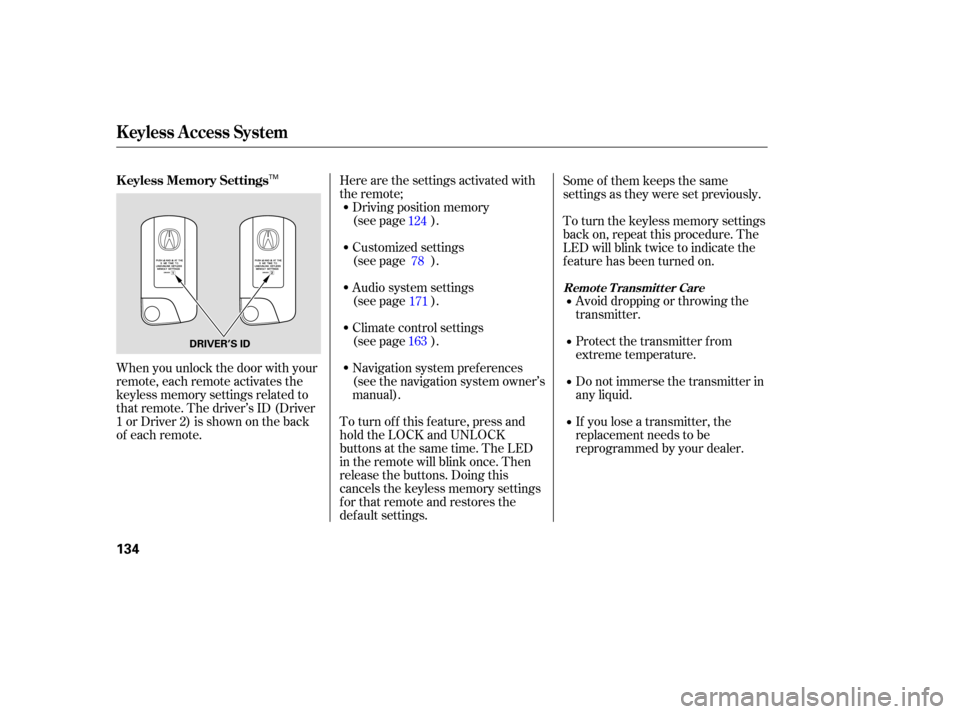
When you unlock the door with your
remote, each remote activates the
keyless memory settings related to
that remote. The driver’s ID (Driver
1orDriver2)isshownontheback
of each remote. Some of them keeps the same
settings as they were set previously.
To turn the keyless memory settings
back on, repeat this procedure. The
LED will blink twice to indicate the
f eature has been turned on.
Avoid dropping or throwing the
transmitter.
Protect the transmitter from
extreme temperature.
Do not immerse the transmitter in
any liquid.
If you lose a transmitter, the
replacement needs to be
reprogrammed by your dealer.
124
171
163 78
K eyless A ccess System
K eyless Memory Settings
Remote Transmitter Care
134
DRIVER’S ID
TM
