Page 6 of 245

2004 VOLVO XC90
5. Temperature gauge 24
6. Odometer/Trip odometer/Cruise control indicator 24, 37
7. Speedometer iv
8. Turn signal indicator lights 24
9. Tachometer 24
10. Ambient temperature gauge, clock, gear indicator 24
11. Fuel gauge 24
12. Indicator and warning symbols 25
13. Panel vents 47
14. Glove compartment 65
15. Hazard warning flashers 35
16. Audio system 159
17. Switches in the center console 29
18. Climate system controls 48
19. Windshield wiper/washer lever 33
20. Audio control buttons in steering wheel 161
21. Instrument panel 24
22. Horn iv
23. Cruise control buttons in steering wheel 37
24. Turn signals, High/low beams 32
25. Front fog lights, Rear fog light 30
26. Parking brake pedal 38
27. Parking brake release handle 38
28. Button for unlocking fuel filler door 30
29. Reading lights 61
30. Courtesy light 61
31. Moonroof control (option) 43
32. Seat belt reminder 27
33. Rearview mirror 42
34. Central locking button 75
35. Lockout switch for rear seat power windows 41
36. Power window controls 40
37. Sideview mirror controls 42
WARNING!
If your vehicle is involved in an accident, unseen damage may affect you\
r vehicle's driveability and
safety.
Contents
file:///K|/ownersdocs/2004/2004_XC90/04xc90_00.htm (6 of 7)12/30/2006 \
4:35:10 PM
Page 36 of 245
2004 VOLVO XC90
2 0 0 4
VOLVO XC90
Instruments and controls
pg. 23 Instruments and controls
Instrument panel24
Indicator and warning symbols25
Switches in center console29
Lighting panel30
Lighting panel, Manually unlocking the fuel filler door31
Turn signals, Steering wheel adjustment32
Windshield wipers33
Tailgate wiper/washer34
Hazard warning flashers, rear window/sideview mirror defroster, heated f\
ront seats35
Trip computer (option)36
Cruise control37
Parking brake, Opening/closing the hood38
Opening the tailgate, Auxiliary 12-volt sockets39
Electrically operated windows40
Rearview mirror/power folding sideview mirror42
Power moonroof (option)43
file:///K|/ownersdocs/2004/2004_XC90/04xc90_02a.htm (1 of 16)12/30/200\
6 4:35:14 PM
Page 44 of 245

This system provides an audible warning if you back t")
2004 VOLVO XC90
The positions of these buttons may vary, depending on the specifications\
of your vehicle
1. Rear Parking Assistants (option)
This system provides an audible warning if you back the vehicle to withi\
n approximately 5 feet (1.5
meters) of an object. See
page 97 for more information.
NOTE: The system activates automatically when the engine is started, and can b\
e deactivated by
pressing this button (e.g. when towing a trailer) or reactivated if ne\
cessary.
2. Folding sideview mirrors (option)
Press the button and release it to fold the sideview mirrors in or out. \
On certain models, when the button
is pressed, there may be a long pause before the mirrors move. Pressing \
the button again during this
pause may erase your first button press. If this happens, wait ten secon\
ds and press the button one more
time. The mirrors cannot be adjusted during the first ten seconds after \
they have been folded out. NOTE:
If the sideview mirrors have been inadvertently pushed out of position (\
in a car wash, parking lot, etc.)
manually return them to normal position. If mirror adjustment does not s\
eem to operate after manual
folding, reset the folding mirrors as follows:
l Turn the ignition key to position II.
l Manually fold the mirror(s) to the normal position.
l Press the button to fold both mirrors in.
l Press the button again to fold the mirrors out to their normal position.\
3. Auxiliary lights
This button is used to switch on auxiliary lights (if installed). An L\
ED in the switch will light up to
indicate that the auxiliary lights are illuminated.
4. Dynamic Stability Traction Control system (DSTC)
This button is used to switch off DSTC's stability Control function. Whe\
n the LED in the button is ON,
all DSTC functions are active. See
pages 95 and 96 for additional information.
WARNING!
The Please be aware that the vehicle's handling characteristics may be a\
ffected if the Stability Control
function is switched off.
file:///K|/ownersdocs/2004/2004_XC90/04xc90_02a.htm (9 of 16)12/30/200\
6 4:35:14 PM
Page 49 of 245
.
Move the lever towards the steering wheel. The headlight high beam will \
be on until the lever is
released.
4. Exterior courtesy lights.
Move")
2004 VOLVO XC90
Headlight flasher (headlights off).
Move the lever towards the steering wheel. The headlight high beam will \
be on until the lever is
released.
4. Exterior courtesy lights.
Move the lever towards the steering wheel and release it.
NOTE: If the turn signal indicator flashes faster than normal, check for a bur\
ned-out turn signal bulb.
Home safe lighting
When you leave your vehicle at night, you can make use of the courtesy l\
ighting function:
l Remove the key from the ignition switch.
l Pull the turn signal lever towards the steering wheel (as when using th\
e headlight flasher function).
l Exit the vehicle and lock the doors.
The headlights, parking lights, license plate lights and the lights in t\
he sideview mirrors will now come
on and remain on for 30, 60 or 90 seconds (the time interval is at your\
discretion and can be changed by
an authorized Volvo retailer).
Approach lighting
When approaching the vehicle at night, press the yellow button in the ce\
ntral locking remote control (see
illustration on
page 73). This lights up the interior courtesy lights, parking lights, license\
plate lights and
the lights in the sideview mirrors.
Steering wheel adjustment
Steering wheel adjustment
Both the height and the reach of the steering wheel can be adjusted to a\
comfortable position for the
driver. Pull down the lever on the left of the steering column. Adjust t\
he steering wheel to a suitable
position and press the lever back into place to lock the steering wheel \
in the new position. Check that the
steering wheel is locked in the new position.
file:///K|/ownersdocs/2004/2004_XC90/04xc90_02a.htm (14 of 16)12/30/20\
06 4:35:14 PM
Page 52 of 245
2004 VOLVO XC90
pg. 34 Instruments and controls
Tailgate wiper/washer
A - Intermittent wiping
B - normal wiping
To operate the tailgate washer: Move the lever forward to start the tail\
gate washer.
Tailgate wiper and reverse gear
If the front wipers are on and the car is put into reverse gear, then th\
e tailgate wiper will go into
intermittent wiping function*.
If the tailgate wiper is already in normal wiping function, the normal w\
iping function will continue.
* Consult your Volvo retailer if you would like to have this function de\
activated.
pg. 35 Instruments and controls
Hazard warning flashers, rear window/sideview mirror
defroster, heated front seats
file:///K|/ownersdocs/2004/2004_XC90/04xc90_02b.htm (1 of 16)12/30/200\
6 4:35:15 PM
Page 53 of 245
2004 VOLVO XC90
Hazard warning flashers
The four-way flasher should be used to indicate that the vehicle has bec\
ome a traffic hazard. To activate
the flashers, press the triangular button in the center dash. Press the \
button again to turn off the flashers.
NOTE: Regulations regarding the use of the hazard warning flasher may vary, de\
pending on where you
live.
Sideview mirror and rear window defroster
Press the switch to start heating the rear window and sideview mirrors t\
o remove ice or condensation.
An LED in the switch will light up.
A timer automatically switches off the heating to the sideview mirrors a\
fter approximately 4 minutes and
to the rear window after approximately 12 minutes. The LED will go out c\
orrespondingly.
Heated front seats (option)
file:///K|/ownersdocs/2004/2004_XC90/04xc90_02b.htm (2 of 16)12/30/200\
6 4:35:15 PM
Page 63 of 245
2004 VOLVO XC90
pg. 42 Instruments and controls
Rearview mirror/power folding sideview mirrors
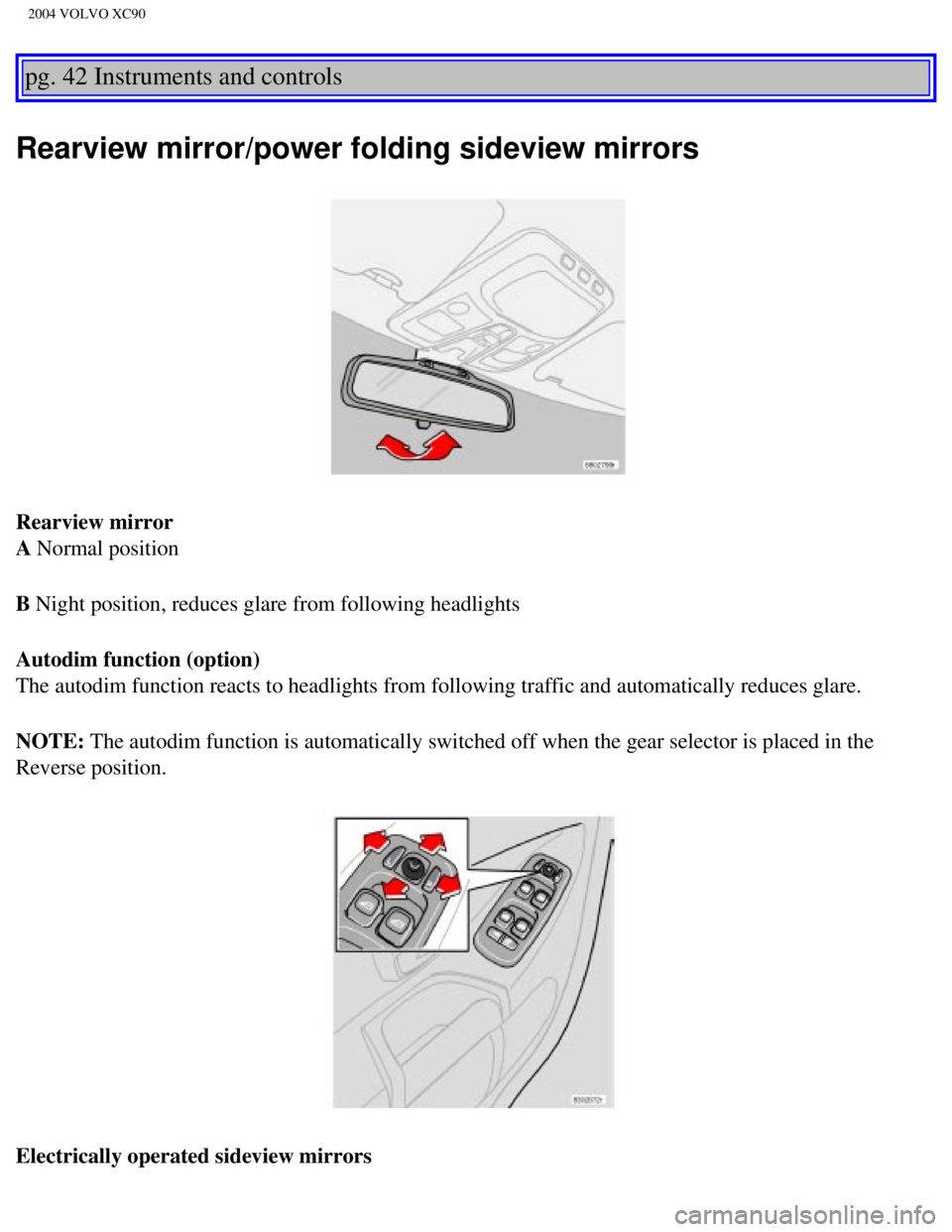
Rearview mirror
A Normal position
B Night position, reduces glare from following headlights
Autodim function (option)
The autodim function reacts to headlights from following traffic and aut\
omatically reduces glare.
NOTE: The autodim function is automatically switched off when the gear selecto\
r is placed in the
Reverse position.
Electrically operated sideview mirrors
file:///K|/ownersdocs/2004/2004_XC90/04xc90_02b.htm (12 of 16)12/30/20\
06 4:35:15 PM
Page 64 of 245
 to activate the \
adjustment control. Use")
2004 VOLVO XC90
The mirror control switches are located on the driver's door armrest.
Driver's side: Press the L button (a light in the switch will go on) to activate the \
adjustment control. Use
this control to adjust the driver's door mirror.
Passenger's side: Press the R switch (a light in the switch will go on) to activate the \
adjustment control.
Use this control to adjust the passenger's door mirror. After you have a\
djusted the mirror(s), press the L
or R switch again (the LED will go out) to deactivate the adjustment c\
ontrol.
WARNING!
The mirrors should always be adjusted prior to driving. Objects seen in \
the passenger's side wide-
angle sideview mirror are closer than they appear to be.
Mirror memory function (with the central locking system) - option
If you lock the vehicle and later unlock it with the same remote control and open the driver's door, the
sideview mirrors (and the driver's seat) will automatically move to th\
e position they were in when you
left the vehicle. This feature will work in the same way with all of the\
remote control transmitters (up to
3) that you use with your vehicle. This feature will not function if yo\
u lock your vehicle with the key.
pg. 43 Instruments and controls
Power moonroof (option)
Power moonroof
To operate the moonroof, turn the ignition key to position I or II, or s\
tart the engine. The moonroof can
be operated in two ways:
file:///K|/ownersdocs/2004/2004_XC90/04xc90_02b.htm (13 of 16)12/30/20\
06 4:35:15 PM