2004 VOLVO XC90 light
[x] Cancel search: lightPage 44 of 245

This system provides an audible warning if you back t")
2004 VOLVO XC90
The positions of these buttons may vary, depending on the specifications\
of your vehicle
1. Rear Parking Assistants (option)
This system provides an audible warning if you back the vehicle to withi\
n approximately 5 feet (1.5
meters) of an object. See
page 97 for more information.
NOTE: The system activates automatically when the engine is started, and can b\
e deactivated by
pressing this button (e.g. when towing a trailer) or reactivated if ne\
cessary.
2. Folding sideview mirrors (option)
Press the button and release it to fold the sideview mirrors in or out. \
On certain models, when the button
is pressed, there may be a long pause before the mirrors move. Pressing \
the button again during this
pause may erase your first button press. If this happens, wait ten secon\
ds and press the button one more
time. The mirrors cannot be adjusted during the first ten seconds after \
they have been folded out. NOTE:
If the sideview mirrors have been inadvertently pushed out of position (\
in a car wash, parking lot, etc.)
manually return them to normal position. If mirror adjustment does not s\
eem to operate after manual
folding, reset the folding mirrors as follows:
l Turn the ignition key to position II.
l Manually fold the mirror(s) to the normal position.
l Press the button to fold both mirrors in.
l Press the button again to fold the mirrors out to their normal position.\
3. Auxiliary lights
This button is used to switch on auxiliary lights (if installed). An L\
ED in the switch will light up to
indicate that the auxiliary lights are illuminated.
4. Dynamic Stability Traction Control system (DSTC)
This button is used to switch off DSTC's stability Control function. Whe\
n the LED in the button is ON,
all DSTC functions are active. See
pages 95 and 96 for additional information.
WARNING!
The Please be aware that the vehicle's handling characteristics may be a\
ffected if the Stability Control
function is switched off.
file:///K|/ownersdocs/2004/2004_XC90/04xc90_02a.htm (9 of 16)12/30/200\
6 4:35:14 PM
Page 45 of 245

This button controls the optional rear seat air conditioning system on s\
even-seat models.
6. Temporarily disconnecting the alarm sensors (op")
2004 VOLVO XC90
5. Rear seat air conditioning (option)
This button controls the optional rear seat air conditioning system on s\
even-seat models.
6. Temporarily disconnecting the alarm sensors (option)
See
page 79 for more details.
7. Not in use
8. 12 volt socket
This 12 volt socket can be used to plug in certain accessories such as c\
ellular telephones, etc. The
ignition key must be in position 1 (or higher) for the auxiliary socke\
t to function.
NOTE: The auxiliary sockets can also be used for cigarette lighters, which are\
available as accessories
at your Volvo retailer.
pg. 30 Instruments and controls
Lighting panel
A - Headlights and parking lights
All lighting off.
Models with daytime running lights:
Low beam headlights will automatically come on if the ignition key is in\
position II. Front and rear
parking lights, tail lights, side marker lights, and license plate light\
s will also be on. Volvo recommends
the use of daytime running lights. If, however, you would prefer to have\
these lights turned off (USA
only), please consult your Volvo retailer. Please note that the use of \
daytime running lights is mandatory
in Canada.
NOTE: Bi-Xenon headlights (option): Turn the headlight switch to position 0\
to activate a daylight
sensor, which automatically switches the low beams on or off, depending \
on ambient light conditions.
When driving in daylight, the headlights will switch off and the daytime\
running lights will come on. In
darkness, the daytime running lights will switch off and the Bi-Xenon he\
adlights will switch on.
Parking lights on. The parking lights should be switched off when you leave the vehicle to \
help avoid battery drain.
file:///K|/ownersdocs/2004/2004_XC90/04xc90_02a.htm (10 of 16)12/30/20\
06 4:35:14 PM
Page 46 of 245

2004 VOLVO XC90
Headlights, parking lights, license plate lights and instrument panel il\
lumination are on if the
ignition key is in position II.
The headlight switch must be in this position before the high beams will\
function (this also applies on
models equipped with the optional Bi-Xenon headlights).
Switch from high to low beams and vice versa by pulling the turn signal \
switch lever on the left side of
steering column toward you.
B - Instrument lighting
Move the thumb wheel up to increase brightness or down to decrease brigh\
tness. There is also an
instrument panel illumination sensor (see illustration on
page 46) which automatically adjusts the level
of illumination. The symbols have maximum illumination in daylight (onl\
y the background lighting can
be adjusted). At night, both the symbol light and background lighting c\
an be adjusted.
C - Unlocking the fuel filler door
Press this button when the vehicle is at a standstill to unlock the fuel\
filler door. Please note that the fuel
filler door will remain unlocked until the vehicle begins to move forwar\
d. An audible click will be heard
when the fuel filler door relocks. See also
page 84.
NOTE: If the fuel filler door does not unlock after the button has been press\
ed, please see
page 31 for
information on manually unlocking this door.
D - Front fog lights
The front fog lights will function only in combination with the low beam\
headlights. The fog lights turn
off when the ignition is switched off.
A light in the switch indicates when the front fog lights are on.
file:///K|/ownersdocs/2004/2004_XC90/04xc90_02a.htm (11 of 16)12/30/20\
06 4:35:14 PM
Page 47 of 245

2004 VOLVO XC90
pg. 31 Instruments and controls
Lighting panel, Manually unlocking the fuel filler door
E - Rear fog light
The rear fog light is considerably brighter than the normal tail lights \
and should be used only when
conditions such as fog, rain, snow, smoke or dust reduce visibility for \
other vehicles to less than 500 ft
(150 meters).
A light in the switch indicates when the rear fog light is on.
The rear fog light will only function in combination with the high/low b\
eam headlights.
By design, there is one rear fog light only, located in the driver's sid\
e tail light cluster.
Manually unlocking the fuel filler door
Panel on passenger's side of cargo area
Manually unlocking the fuel filler door
1. Open the upper and lower sections of the tailgate, and fold up the re\
ar section of the cargo area floor.
2. If the vehicle is equipped with the optional grocery bag holder, deta\
ch the holder's bands.
3. Remove the corner panel (1) from the floor of the cargo area.
file:///K|/ownersdocs/2004/2004_XC90/04xc90_02a.htm (12 of 16)12/30/20\
06 4:35:14 PM
Page 48 of 245
 in the side panel by pulling the tab (3) upwar\
d/outward.
5. Pull down the insulating material (4) to access the fuel filler doo\
r motor (5).
6. Move the catch")
2004 VOLVO XC90
4. Open the cover (2) in the side panel by pulling the tab (3) upwar\
d/outward.
5. Pull down the insulating material (4) to access the fuel filler doo\
r motor (5).
6. Move the catch (6) rearward to unlock the fuel filler door lock, or\
move it forward to lock the filler
door.
pg. 32 Instruments and controls
Turn signals, Steering wheel adjustment
1. Lane change
In maneuvers such as lane changing, the driver can flash the turn signal\
s by moving the turn signal lever
to the first stop and holding it there. The lever will return to the neu\
tral position when released.
2. Signal lever engaged for normal turns
3. High/low beam switch (headlights on).
file:///K|/ownersdocs/2004/2004_XC90/04xc90_02a.htm (13 of 16)12/30/20\
06 4:35:14 PM
Page 49 of 245
.
Move the lever towards the steering wheel. The headlight high beam will \
be on until the lever is
released.
4. Exterior courtesy lights.
Move")
2004 VOLVO XC90
Headlight flasher (headlights off).
Move the lever towards the steering wheel. The headlight high beam will \
be on until the lever is
released.
4. Exterior courtesy lights.
Move the lever towards the steering wheel and release it.
NOTE: If the turn signal indicator flashes faster than normal, check for a bur\
ned-out turn signal bulb.
Home safe lighting
When you leave your vehicle at night, you can make use of the courtesy l\
ighting function:
l Remove the key from the ignition switch.
l Pull the turn signal lever towards the steering wheel (as when using th\
e headlight flasher function).
l Exit the vehicle and lock the doors.
The headlights, parking lights, license plate lights and the lights in t\
he sideview mirrors will now come
on and remain on for 30, 60 or 90 seconds (the time interval is at your\
discretion and can be changed by
an authorized Volvo retailer).
Approach lighting
When approaching the vehicle at night, press the yellow button in the ce\
ntral locking remote control (see
illustration on
page 73). This lights up the interior courtesy lights, parking lights, license\
plate lights and
the lights in the sideview mirrors.
Steering wheel adjustment
Steering wheel adjustment
Both the height and the reach of the steering wheel can be adjusted to a\
comfortable position for the
driver. Pull down the lever on the left of the steering column. Adjust t\
he steering wheel to a suitable
position and press the lever back into place to lock the steering wheel \
in the new position. Check that the
steering wheel is locked in the new position.
file:///K|/ownersdocs/2004/2004_XC90/04xc90_02a.htm (14 of 16)12/30/20\
06 4:35:14 PM
Page 50 of 245
2004 VOLVO XC90
WARNING!
The Never adjust the steering wheel while
driving.
pg. 33 Instruments and controls
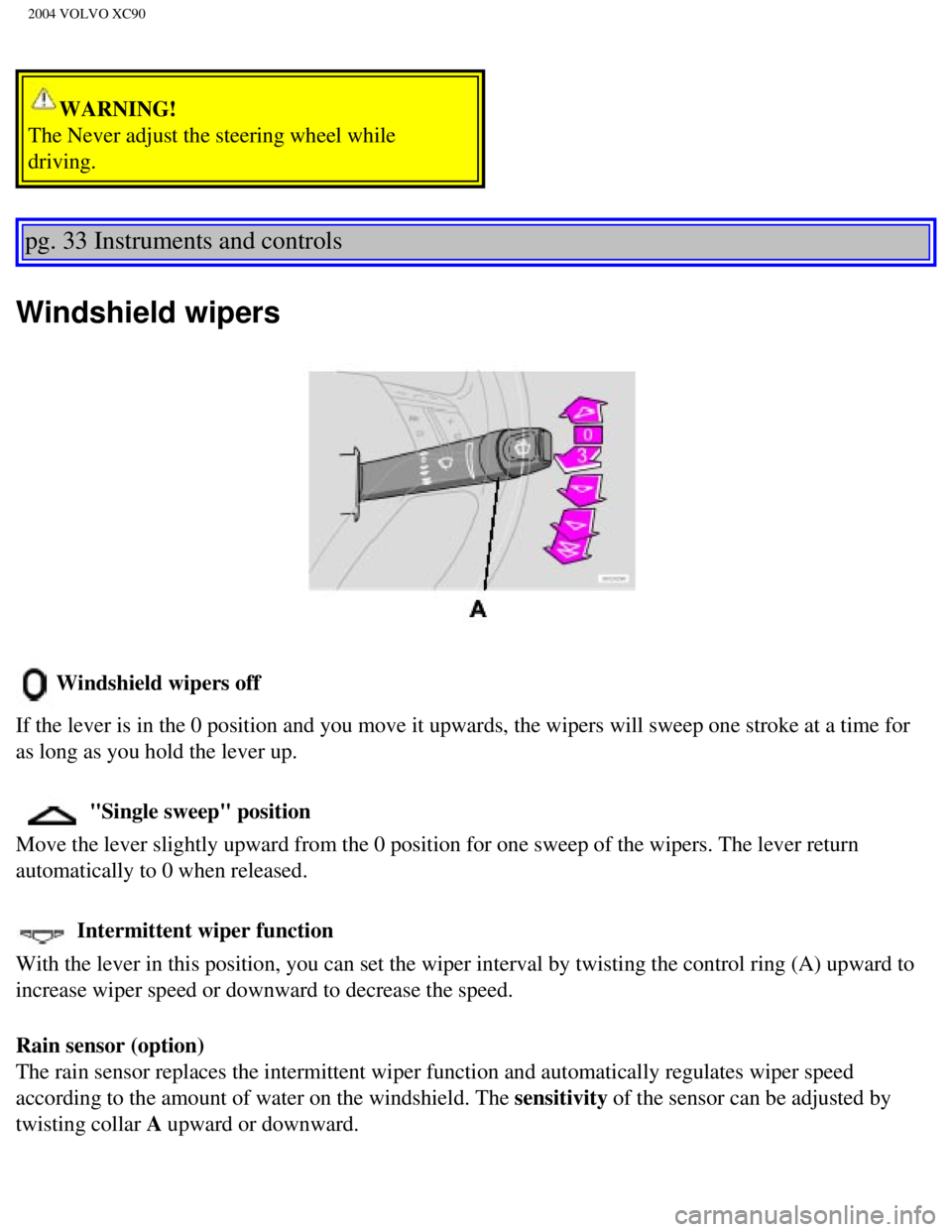
Windshield wipers
Windshield wipers off
If the lever is in the 0 position and you move it upwards, the wipers wi\
ll sweep one stroke at a time for
as long as you hold the lever up.
"Single sweep" position
Move the lever slightly upward from the 0 position for one sweep of the \
wipers. The lever return
automatically to 0 when released.
Intermittent wiper function
With the lever in this position, you can set the wiper interval by twist\
ing the control ring (A) upward to
increase wiper speed or downward to decrease the speed.
Rain sensor (option)
The rain sensor replaces the intermittent wiper function and automatical\
ly regulates wiper speed
according to the amount of water on the windshield. The sensitivity of the sensor can be adjusted by
twisting collar A upward or downward.
file:///K|/ownersdocs/2004/2004_XC90/04xc90_02a.htm (15 of 16)12/30/20\
06 4:35:14 PM
Page 51 of 245
2004 VOLVO XC90
Activating the rain sensor function:
1. Switch on the ignition.
2. Move the windshield wiper lever to the intermittent position.
The rain sensor is deactivated when the ignition is switched completely \
off.
To reactivate the rain sensor function:
1. Switch on the ignition.
2. Move the windshield wiper lever to position 0 and then back to the in\
termittent position. CAUTION
When washing the vehicle in an automatic car wash, move the windshield w\
iper lever to
position 0 to deactivate the rain sensor. If the rain sensor is left on, the wipers will activate in the
car wash and could be damaged.
Wipers operate at "normal" speed
Wipers operate at "high" speed
3 - Windshield washer/headlight washer (certain models)
Pull the lever toward you and release it. High pressure jets mounted in \
the bumper will spray the
headlights.
Contents | Top of Page
file:///K|/ownersdocs/2004/2004_XC90/04xc90_02a.htm (16 of 16)12/30/20\
06 4:35:14 PM