Page 49 of 245
.
Move the lever towards the steering wheel. The headlight high beam will \
be on until the lever is
released.
4. Exterior courtesy lights.
Move")
2004 VOLVO XC90
Headlight flasher (headlights off).
Move the lever towards the steering wheel. The headlight high beam will \
be on until the lever is
released.
4. Exterior courtesy lights.
Move the lever towards the steering wheel and release it.
NOTE: If the turn signal indicator flashes faster than normal, check for a bur\
ned-out turn signal bulb.
Home safe lighting
When you leave your vehicle at night, you can make use of the courtesy l\
ighting function:
l Remove the key from the ignition switch.
l Pull the turn signal lever towards the steering wheel (as when using th\
e headlight flasher function).
l Exit the vehicle and lock the doors.
The headlights, parking lights, license plate lights and the lights in t\
he sideview mirrors will now come
on and remain on for 30, 60 or 90 seconds (the time interval is at your\
discretion and can be changed by
an authorized Volvo retailer).
Approach lighting
When approaching the vehicle at night, press the yellow button in the ce\
ntral locking remote control (see
illustration on
page 73). This lights up the interior courtesy lights, parking lights, license\
plate lights and
the lights in the sideview mirrors.
Steering wheel adjustment
Steering wheel adjustment
Both the height and the reach of the steering wheel can be adjusted to a\
comfortable position for the
driver. Pull down the lever on the left of the steering column. Adjust t\
he steering wheel to a suitable
position and press the lever back into place to lock the steering wheel \
in the new position. Check that the
steering wheel is locked in the new position.
file:///K|/ownersdocs/2004/2004_XC90/04xc90_02a.htm (14 of 16)12/30/20\
06 4:35:14 PM
Page 51 of 245
2004 VOLVO XC90
Activating the rain sensor function:
1. Switch on the ignition.
2. Move the windshield wiper lever to the intermittent position.
The rain sensor is deactivated when the ignition is switched completely \
off.
To reactivate the rain sensor function:
1. Switch on the ignition.
2. Move the windshield wiper lever to position 0 and then back to the in\
termittent position. CAUTION
When washing the vehicle in an automatic car wash, move the windshield w\
iper lever to
position 0 to deactivate the rain sensor. If the rain sensor is left on, the wipers will activate in the
car wash and could be damaged.
Wipers operate at "normal" speed
Wipers operate at "high" speed
3 - Windshield washer/headlight washer (certain models)
Pull the lever toward you and release it. High pressure jets mounted in \
the bumper will spray the
headlights.
Contents | Top of Page
file:///K|/ownersdocs/2004/2004_XC90/04xc90_02a.htm (16 of 16)12/30/20\
06 4:35:14 PM
Page 58 of 245

2004 VOLVO XC90
WARNING!
Always use the parking brake when parking. On hills, also turn the front\
wheels toward the curb.The
indicator light in the instrument panel will light up even if the parkin\
g brake is applied only slightly.
Be sure to press down on the pedal sufficiently.
Opening the hood
Opening/closing the hood
1. Pull the lever (1) located under the left side of the dashboard to \
release the hood lock.
2. Lift the hood slightly.
3. Press up the release control (2) located under the front edge of th\
e hood and lift.
To close the hood, place your hand on it and press down until the hood l\
ocks in the closed position.
WARNING!
l Do not grasp the ribs in the grille when closing the hood. If your finge\
rs protrude through the
grille, they could be injured on components in the engine compartment as\
the grille closes. We
recommend pressing down on the hood to close it.
l Check that the hood locks properly when closed!
pg. 39 Instruments and controls
Opening the tailgate, Auxiliary 12-volt sockets
file:///K|/ownersdocs/2004/2004_XC90/04xc90_02b.htm (7 of 16)12/30/200\
6 4:35:15 PM
Page 70 of 245
2004 VOLVO XC90
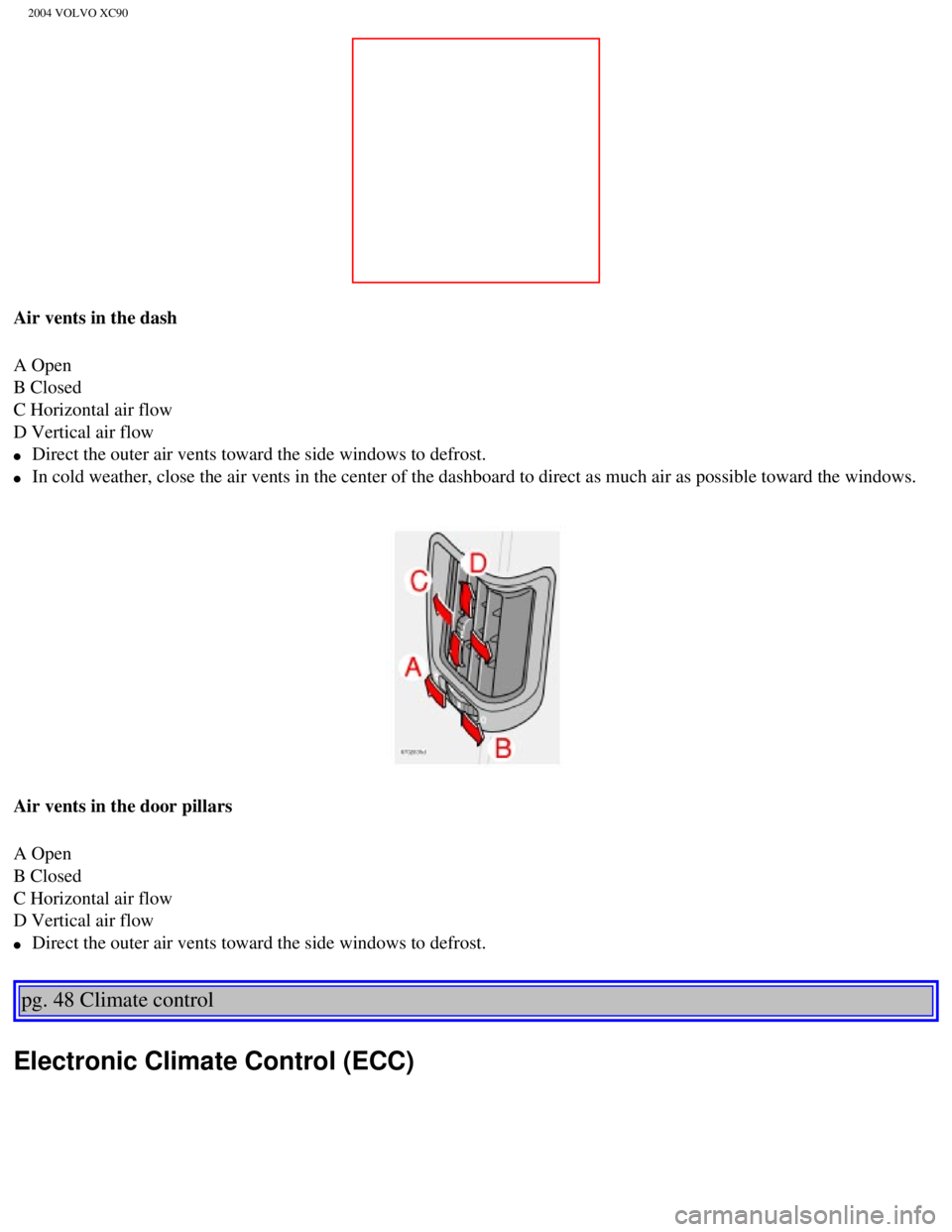
Air vents in the dash
A Open
B Closed
C Horizontal air flow
D Vertical air flow
l Direct the outer air vents toward the side windows to defrost.
l In cold weather, close the air vents in the center of the dashboard to d\
irect as much air as possible toward the windows.
Air vents in the door pillars
A Open
B Closed
C Horizontal air flow
D Vertical air flow
l Direct the outer air vents toward the side windows to defrost.
pg. 48 Climate control
Electronic Climate Control (ECC)
file:///K|/ownersdocs/2004/2004_XC90/04xc90_03.htm (3 of 7)12/30/2006 \
4:35:16 PM
Page 96 of 245
2004 VOLVO XC90
Keys
Two types of keys are provided with your vehicle; master keys and a serv\
ice (valet) key. The master
key, the remote control, and the central locking button may all be used \
to lock and unlock all of your
vehicle's locks.
The service key will operate only the driver's door and the ignition swi\
tch. It is intended to help deter
unwanted entry into the glove compartment.
To use your keys:
l Turn the key once to unlock the driver's door only.
l Turn the key again (within 10 seconds) to unlock all doors and the tai\
lgate.
l One turn with the key towards lock in the drivers door locks all doors, \
tailgate.
l Use the switch on the driver's door armrest to lock/unlock the vehicle f\
rom the inside.
file:///K|/ownersdocs/2004/2004_XC90/04xc90_05.htm (2 of 12)12/30/2006\
4:35:20 PM
Page 104 of 245

2004 VOLVO XC90
l A door is forced open.
l The ignition switch is tampered with.
l If there is movement in the passenger compartment (if the vehicle is eq\
uipped with the optional
movement sensor).
l The vehicle is lifted or towed (if the vehicle is equipped with the opt\
ional inclination sensor).
l The battery is disconnected (while the alarm is armed).
l The siren is disconnected when the alarm is disarmed.
Arming the alarm
Press the LOCK button on the remote control, lock the vehicle using the \
key in the driver's door or press
the central lock button on one of the front doors with the door open. On\
e long flash of the turn signals
will confirm that the alarm is armed.
Disarming the alarm
Press the UNLOCK button on the remote control or unlock the doors with t\
he key.
Turning off (stopping) the alarm
If the alarm is sounding, it can be stopped by pressing the UNLOCK butto\
n on the remote control or by
unlocking the driver's door with the key.
Audible/visual alarm signal
An audible alarm signal is given by a battery powered siren. The alarm c\
ycle lasts for 25 seconds.
The visual alarm signal is given by flashing all turn signals and turnin\
g on the interior lighting for
approximately 5 minutes.
"Panic" button
In an emergency situation, this feature can be used to attract attention\
.
Activate the "panic" button by pressing the red button on the remote con\
trol (see illustration on
page 73)
for at least 3 seconds or by pressing this button twice within 3 seconds\
. The turn signals will flash, the
interior lights will go on and the vehicle's horn will sound.
The function can be turned off by pressing any of the buttons on the rem\
ote control or will stop
automatically after 25 seconds. When a button is pressed, there is a 5 s\
econd delay before the panic
alarm is deactivated.
NOTE: This button will NOT unlock the vehicle.
pg. 79 Locks and Alarms
file:///K|/ownersdocs/2004/2004_XC90/04xc90_05.htm (10 of 12)12/30/200\
6 4:35:20 PM
Page 107 of 245
2004 VOLVO XC90
2 0 0 4
VOLVO XC90
Starting and driving
pg. 81 Starting and driving
Refueling82
Starting the vehicle85
General information87
Automatic transmission with Geartronic89
All Wheel Drive92
Brake system93
Dynamic Stability Traction Control (DSTC)95
Rear Parking Assistance97
Towing 98
Jump starting 100
Towing a trailer 101
Detachable trailer hitch - installing/
removing 103
Load carriers 104
Cold weather precautions 105
Before a long distance trip106
file:///K|/ownersdocs/2004/2004_XC90/04xc90_06a.htm (1 of 15)12/30/200\
6 4:35:22 PM
Page 119 of 245

2004 VOLVO XC90
l Models equipped with a 5-cylinder turbo engine have five forward speeds.\
Models equipped with a 6-
cylinder turbo engine have four forward speeds
l A "lock-up" feature on gears 3 and 4 (and 5, if equipped) reduces engi\
ne speed and help saves fuel.
The currently selected gear will be displayed in the instrument panel (\
see
page 24).
l To access the (MAN)ual shifting position from (D)rive, move the gear selector to the left to MAN.
l To return to the (D)rive position from MAN, move the gear selector to the right.
While driving
If you select the (MAN)ual position while driving, the gear that was being used in the (D)rive position
will also initially be selected in (MAN)ual position.
l Move the gear selector forward (toward "+") to shift to a higher gear \
or rearward (toward "-") to shift
to a lower gear.
l If you hold the gear selector toward "-", the transmission will downshif\
t one gear and will utilize the
braking power of the engine. If the current speed is too high for using \
a lower gear, the downshift will
not occur until the speed has decreased enough to allow the lower gear t\
o be used.
l If you slow down to a very low speed, the transmission will automaticall\
y shift down.
l When starting in the (MAN)ual position, 3rd gear is the highest gear that may be selected.
Kickdown
Automatic shift to a lower gear (kickdown) is achieved by depressing t\
he accelerator pedal fully and
briskly. An upshift will occur when approaching the top speed for a part\
icular gear or by releasing the
accelerator pedal slightly. Kickdown can be used for maximum acceleratio\
n or when passing at highway
speeds.
NOTE: The gear selector must be in the D (Drive) position for kickdown to fu\
nction.
Automatic transmission - adaptive system
The automatic transmission is controlled by an adaptive control system t\
hat constantly monitors the way
in which the transmission functions. It senses and adapts each gear shif\
t for optimal performance. The
system also monitors your particular driving style and adapts gear shift\
ing accordingly.
pg. 91 Starting and driving
file:///K|/ownersdocs/2004/2004_XC90/04xc90_06a.htm (13 of 15)12/30/20\
06 4:35:22 PM
 key. The master
key, the remote control, and the central locking button may all be used \")