Page 78 of 245

2004 VOLVO XC90
1. Within 40 seconds of the ignition key being turned to position 0 or r\
emoved from the ignition switch.
2. After you have unlocked the driver's door with the key or remote cont\
rol, the driver's seat can be
adjusted during a 10 minute period if the door remains open. If the door is closed, the seat can be
adjusted for 40 seconds. The ignition key can be in position 0 or not yet inserted in the ignition switch.
Remote keyless entry system and driver's seat
The remote control transmitter also controls the electrically operated d\
river's seat in the following way:
l Adjust the seat to your preferences.
l When you leave your vehicle, lock it using the remote control.
Power seat control panel
The next time you unlock the driver's door with the same remote control \
(the one you used to lock the
doors with) and open the driver's door, the driver's seat will automati\
cally move to the position in which
you left it.
The seat will move to this position even if someone else has adjusted it\
since you last unlocked the
vehicle with the same remote control.
NOTE: This feature will work in the same way with all of the remote control tr\
ansmitters (up to 3) that
you use with your vehicle. This feature will not function if you lock yo\
ur vehicle with the key.
Seat adjustment
Adjust the power seat(s) with the two switches at the side of the seat\
as follows:
A - Front edge of seat (raise/lower)
B - Forward - rearward
C - Rear edge of seat (raise/lower)
D - Backrest tilt
NOTE: The power seats have an overload protector that activates if a seat is b\
locked by any object. If
this occurs, switch off the ignition (key in position 0) and wait abou\
t 20 seconds before operating the
seat again.
Please refer to the following page for information on programming the me\
mory function in the
driver's seat.
file:///K|/ownersdocs/2004/2004_XC90/04xc90_04a.htm (4 of 11)12/30/200\
6 4:35:19 PM
Page 96 of 245
2004 VOLVO XC90
Keys
Two types of keys are provided with your vehicle; master keys and a serv\
ice (valet) key. The master
key, the remote control, and the central locking button may all be used \
to lock and unlock all of your
vehicle's locks.
The service key will operate only the driver's door and the ignition swi\
tch. It is intended to help deter
unwanted entry into the glove compartment.
To use your keys:
l Turn the key once to unlock the driver's door only.
l Turn the key again (within 10 seconds) to unlock all doors and the tai\
lgate.
l One turn with the key towards lock in the drivers door locks all doors, \
tailgate.
l Use the switch on the driver's door armrest to lock/unlock the vehicle f\
rom the inside.
file:///K|/ownersdocs/2004/2004_XC90/04xc90_05.htm (2 of 12)12/30/2006\
4:35:20 PM
Page 99 of 245
: Press this button when approaching the car at night to light up the
interior courtesy light, parking lights, license plate lights and the li\
ghts in th")
2004 VOLVO XC90
Button 3 (Approach lighting): Press this button when approaching the car at night to light up the
interior courtesy light, parking lights, license plate lights and the li\
ghts in the sideview mirrors.
Button 4 (Panic): See
page 78 for more information on this function.
Button 5 (Tailgate unlock): Press this button twice within 3 seconds to unlock the tailgate (witho\
ut
unlocking the other doors).
Button 6 (Unlock): Press this button once to unlock the driver's door only. Wait for at le\
ast 1 second
and press the button again (within 10 seconds) to unlock all doors, an\
d the tailgate.
NOTE:
l Airbag deployment will automatically unlock the doors.
l The keys may also be used to lock and unlock the doors, and to activate \
and deactivate the alarm
system.
l To avoid leaving your keys in the vehicle, make a habit of always lockin\
g the vehicle with the remote
control.
Automatic re-locking If the doors are unlocked, the locks will automatically reengage (re-l\
ock) and the
alarm will rearm after 2 minutes unless a door or the tailgate has been \
opened.
pg. 74 Locks and Alarms
l FCC ID:LQNP2T-APU This device complies with part 15 of the FCC rules. Op\
eration is subject to
the following conditions: (1) This device may not cause harmful interf\
erence, and (2) this device must
accept any interference received, including interference that may cause \
undesired operation.
l Canadian 2306104388 Model 504 2927 by Donnelly Operation is subject to t\
he following conditions:
(1) this device may not cause interference, and (2) this device must\
accept any interference, including
interference that may cause undesired operation of the device.
l Canadian 2306104388A Model 509 977 by Connaught Electronics Operation is\
subject to the
following conditions: (1) this device may not cause interference, and \
(2) this device must accept any
interference, including interference that may cause undesired operation \
of the device.
file:///K|/ownersdocs/2004/2004_XC90/04xc90_05.htm (5 of 12)12/30/2006\
4:35:20 PM
Page 101 of 245
2004 VOLVO XC90
pg. 75 Locks and Alarms
Locking and unlocking
Locking and unlocking the vehicle from the inside
The switch on the driver's door armrest can be used to lock or unlock al\
l doors and the tailgate, and to
set the alarm.
Locking the glove compartment
The glove compartment can be locked with the master key.
pg. 76 Locks and Alarms
Locking and unlocking (contd)
file:///K|/ownersdocs/2004/2004_XC90/04xc90_05.htm (7 of 12)12/30/2006\
4:35:20 PM
Page 102 of 245
2004 VOLVO XC90
Unlocking the tailgate
The tailgate lock is incorporated in the central locking system and is l\
ocked or unlocked when all doors
are locked/unlocked.
The tailgate can be unlocked by:
l Pressing UNLOCK on the remote control twice.
l Using the central locking button on the driver's door.
l Pressing twice on the remote control's tailgate unlock button (see illustration above\
).
Automatic relocking:
l If you use the tailgate unlock button to unlock the tailgate without ope\
ning it, it will automatically
relock after approximately 2 minutes.
Note: If you open the tailgate and close it again, it will remain unlocked an\
d the alarm will not be
rearmed. Press the lock button on the remote control to relock the tailg\
ate and rearm the alarm.
pg. 77 Locks and Alarms
file:///K|/ownersdocs/2004/2004_XC90/04xc90_05.htm (8 of 12)12/30/2006\
4:35:20 PM
Page 103 of 245
2004 VOLVO XC90
Child safety locks
Manual child safety locks - rear doors/tailgate
The controls are located on the rear door jambs and at the lower edge of\
the tailgate. Use a screwdriver
to adjust these controls.
A The door/tailgate locks function normally.
B The door/tailgate cannot be opened from the inside. Normal operation fr\
om the outside.
WARNING!
Remember, in the event of an accident, the rear seat passengers cannot o\
pen the doors from the inside
with the buttons in position A.
pg. 78 Locks and Alarms
Alarm
Alarm
The alarm is automatically armed whenever you lock your vehicle.
When armed, the alarm continuously monitors a number of points on the ve\
hicle. The following
conditions will set off the alarm:
l The hood is forced open.
l The tailgate is forced open.
file:///K|/ownersdocs/2004/2004_XC90/04xc90_05.htm (9 of 12)12/30/2006\
4:35:20 PM
Page 104 of 245

2004 VOLVO XC90
l A door is forced open.
l The ignition switch is tampered with.
l If there is movement in the passenger compartment (if the vehicle is eq\
uipped with the optional
movement sensor).
l The vehicle is lifted or towed (if the vehicle is equipped with the opt\
ional inclination sensor).
l The battery is disconnected (while the alarm is armed).
l The siren is disconnected when the alarm is disarmed.
Arming the alarm
Press the LOCK button on the remote control, lock the vehicle using the \
key in the driver's door or press
the central lock button on one of the front doors with the door open. On\
e long flash of the turn signals
will confirm that the alarm is armed.
Disarming the alarm
Press the UNLOCK button on the remote control or unlock the doors with t\
he key.
Turning off (stopping) the alarm
If the alarm is sounding, it can be stopped by pressing the UNLOCK butto\
n on the remote control or by
unlocking the driver's door with the key.
Audible/visual alarm signal
An audible alarm signal is given by a battery powered siren. The alarm c\
ycle lasts for 25 seconds.
The visual alarm signal is given by flashing all turn signals and turnin\
g on the interior lighting for
approximately 5 minutes.
"Panic" button
In an emergency situation, this feature can be used to attract attention\
.
Activate the "panic" button by pressing the red button on the remote con\
trol (see illustration on
page 73)
for at least 3 seconds or by pressing this button twice within 3 seconds\
. The turn signals will flash, the
interior lights will go on and the vehicle's horn will sound.
The function can be turned off by pressing any of the buttons on the rem\
ote control or will stop
automatically after 25 seconds. When a button is pressed, there is a 5 s\
econd delay before the panic
alarm is deactivated.
NOTE: This button will NOT unlock the vehicle.
pg. 79 Locks and Alarms
file:///K|/ownersdocs/2004/2004_XC90/04xc90_05.htm (10 of 12)12/30/200\
6 4:35:20 PM
Page 183 of 245
2004 VOLVO XC90
Bulbs (contd)
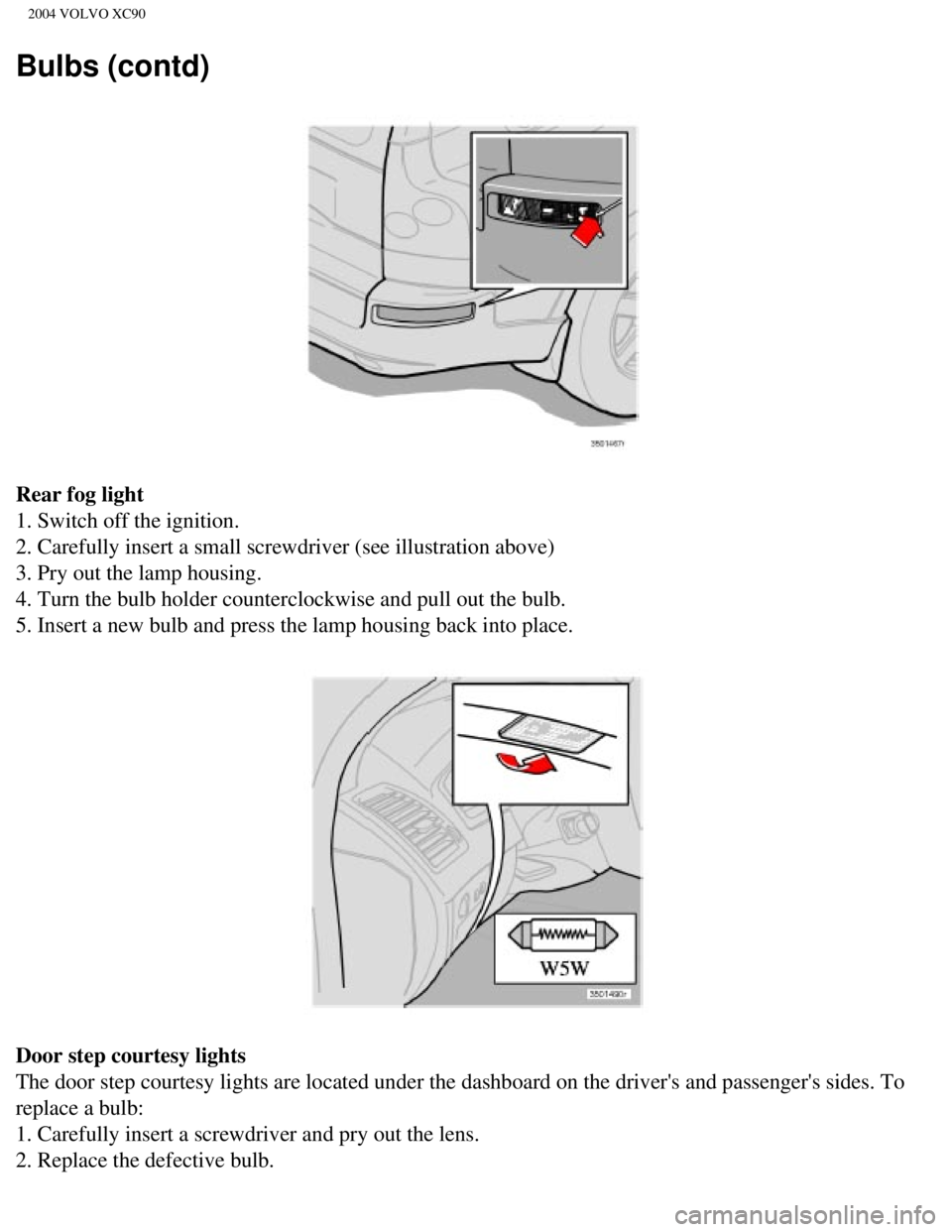
Rear fog light
1. Switch off the ignition.
2. Carefully insert a small screwdriver (see illustration above)
3. Pry out the lamp housing.
4. Turn the bulb holder counterclockwise and pull out the bulb.
5. Insert a new bulb and press the lamp housing back into place.
Door step courtesy lights
The door step courtesy lights are located under the dashboard on the dri\
ver's and passenger's sides. To
replace a bulb:
1. Carefully insert a screwdriver and pry out the lens.
2. Replace the defective bulb.
file:///K|/ownersdocs/2004/2004_XC90/04xc90_09b.htm (13 of 23)12/30/20\
06 4:35:28 PM
 key. The master
key, the remote control, and the central locking button may all be used \")