Page 185 of 245
2004 VOLVO XC90
Rear reading lights
These bulbs may be difficult for you to replace yourself. We recommend t\
hat you let an authorized
Volvo retailer replace these bulbs if necessary.
NOTE: Other bulbs may be difficult for you to replace yourself. Let an authori\
zed Volvo retailer
replace these bulbs if necessary.
Vanity mirror lights
1. Carefully insert a screwdriver and pry out the lens.
2. Pry out the bulb and replace it.
3. Carefully press the lower edge of lens onto the four tabs and press t\
he upper edge of the lens into
place.
pg. 142 Maintenance
file:///K|/ownersdocs/2004/2004_XC90/04xc90_09b.htm (15 of 23)12/30/20\
06 4:35:28 PM
Page 186 of 245
2004 VOLVO XC90
Bulbs (contd)
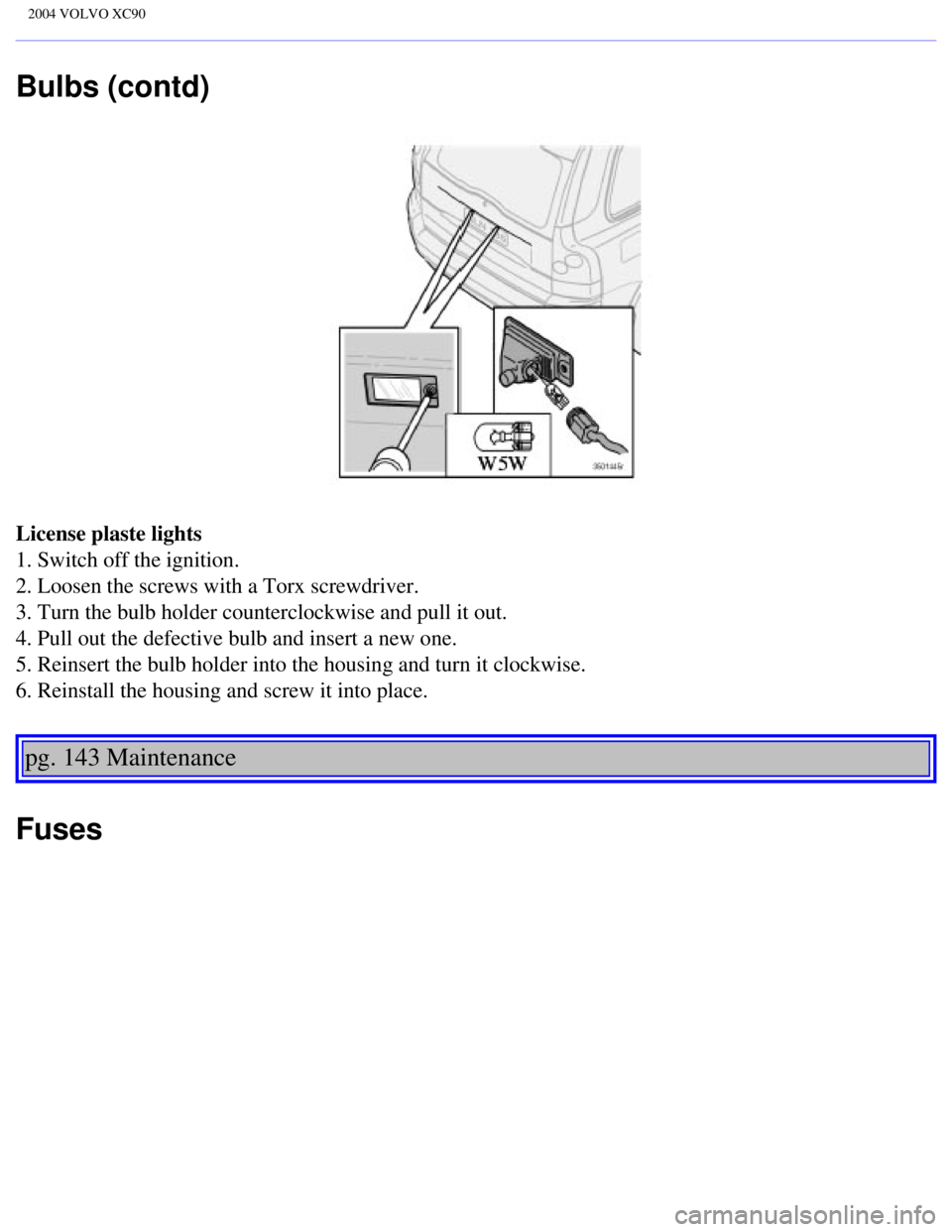
License plaste lights
1. Switch off the ignition.
2. Loosen the screws with a Torx screwdriver.
3. Turn the bulb holder counterclockwise and pull it out.
4. Pull out the defective bulb and insert a new one.
5. Reinsert the bulb holder into the housing and turn it clockwise.
6. Reinstall the housing and screw it into place.
pg. 143 Maintenance
Fuses
file:///K|/ownersdocs/2004/2004_XC90/04xc90_09b.htm (16 of 23)12/30/20\
06 4:35:28 PM
Page 189 of 245
2004 VOLVO XC90
3. -
4. Oxygen sensors 20
5. Crankcase ventilation heater, solenoid valves 10
6. Mass air flow sensor, engine control module, injectors 15
7. -
8. A/C compressor, accelerator pedal position sensor, E-box
fan 10
9. Horn 15
10. Tailgate washer 10
11. A/C compressor, ignition coils 20
12. Brake light contact 5
13. Windshield wipers 25
14. ABS/DSTC 30
15. Headlight washers 25
16. Windshield washers 15
17. Low beam, right 10
18. Low beam, left 10
19. ABS/DSTC 30
20. High beam, left 15
21. High beam, right 15
22. Starter motor 25
23. Engine control module, system relay 5
24. -
pg. 145 Maintenance
file:///K|/ownersdocs/2004/2004_XC90/04xc90_09b.htm (19 of 23)12/30/20\
06 4:35:28 PM
Page 190 of 245
2004 VOLVO XC90
Fuses in the passenger compartment
Fuses are located inside the access panel on the end face of the dashboa\
rd. There are also a number of
spare fuses. No. Amperage
1. Blower - climate system 30
2. Audio amplifier 30
3. Power driver's seat 30
4. Power passenger's seat (option) 30
5. Driver's door - central locking, power windows, door mirror 25
6. Front passenger's door - central locking, power windows, door mirror \
25
7. Rear side doors - power windows, child safety locks 30
8. -
9. -
10. Power passenger's seat 5
11. Electric socket 12V 15
12. Ignition switch (30-feed), central electronic module, starter moto\
r relay,
SRS, antenna ring, engine management system 10
13. -
14. Electronic module (ceiling), courtesy lighting (ceiling) 10
15. -
16. Speed-sensitive power steering (T6 only), vacuum pump 15
17. ABS/DSTC 5
18. Heated driver's seat (option) 15
file:///K|/ownersdocs/2004/2004_XC90/04xc90_09b.htm (20 of 23)12/30/20\
06 4:35:28 PM
Page 191 of 245
15
20. Infotainment system 10
21. Relay extended D1 feed: climate control system, power drivers seat,\
instrument panel 10
22. Headlight s")
2004 VOLVO XC90
19. Heated front passenger's seat (option)15
20. Infotainment system 10
21. Relay extended D1 feed: climate control system, power driver's seat,\
instrument panel 10
22. Headlight switch module, climate control system, onboard diagnostic \
connector,
steering wheel lever modules 5
23. Turn signals 20
24. Automatic transmission - shift inhibitor, extended D2 feed 10
25. Fuel pump 15
26. Moonroof (option) 15
27. Central electronic module, vanity mirror lighting, courtesy lighting\
, glove compartment
lighting, alarm siren* 10
28. Alarm siren* 5
29. -
30. Daytime running lights 10
31. Daytime running lights 10
32. Left front/rear parking lights 7.5
33. Right front/rear parking lights, license plate lights 7.5
34. Front fog 15
35. -
36. High beam headlights 20
37. Navigation system (option), DVD player 10
38. Low beam headlights, Bi-Xenon headlights (option) 15
* Please be aware that if these fuses are not intact, or have been remov\
ed, the alarm will not sound.
pg. 146 Maintenance
Fuses (contd)
file:///K|/ownersdocs/2004/2004_XC90/04xc90_09b.htm (21 of 23)12/30/20\
06 4:35:28 PM
Page 192 of 245
2004 VOLVO XC90
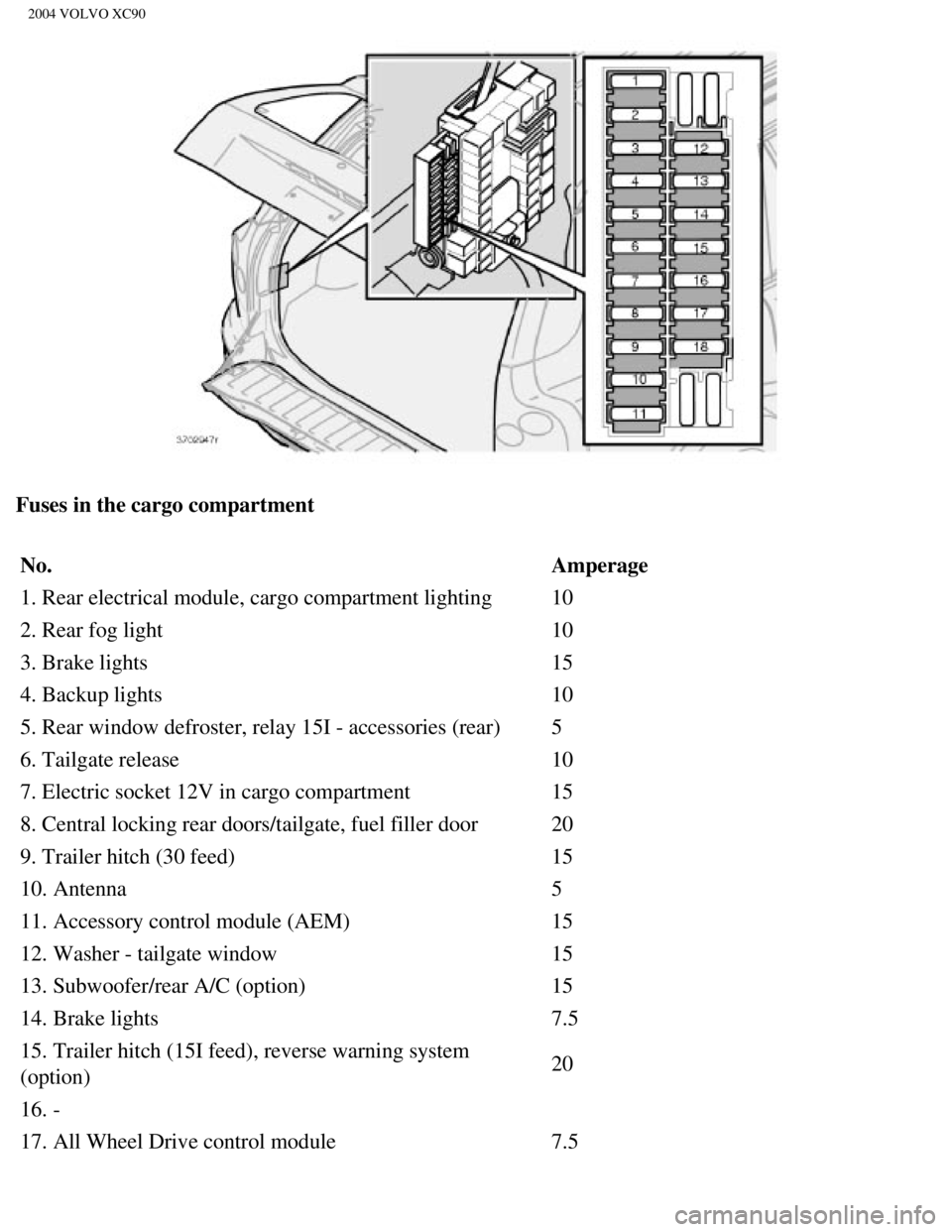
Fuses in the cargo compartment No. Amperage
1. Rear electrical module, cargo compartment lighting 10
2. Rear fog light 10
3. Brake lights 15
4. Backup lights 10
5. Rear window defroster, relay 15I - accessories (rear) 5
6. Tailgate release 10
7. Electric socket 12V in cargo compartment 15
8. Central locking rear doors/tailgate, fuel filler door 20
9. Trailer hitch (30 feed) 15
10. Antenna 5
11. Accessory control module (AEM) 15
12. Washer - tailgate window 15
13. Subwoofer/rear A/C (option) 15
14. Brake lights 7.5
15. Trailer hitch (15I feed), reverse warning system
(option) 20
16. -
17. All Wheel Drive control module 7.5
file:///K|/ownersdocs/2004/2004_XC90/04xc90_09b.htm (22 of 23)12/30/20\
06 4:35:28 PM
Page 202 of 245
2004 VOLVO XC90
Gap 0.028-0.032 in.0.7-0.8
mm
Tightening torque 22 ft. lbs. (30 Nm)
Firing order 1-2-4-5-3 1-5-3-6-2-4
* Models equipped with the optional rear A/C unit have 160 A generators.\
pg. 155 Specifications
Bulbs
Bulbs OutputSocket
Low beam 55 W H7
High beam 55 W H7
Bi-Xenon headlights
(option) 35 W
D2R
Fog lights, front 55 W H 1
Parking lights, front 5W5 W2.1x9.5d
Turn signals, front 21 W PY (amber)
Turn signals, rear 21 W PY (amber)
Parking lights, rear 5 W BA15
Brake light 21 W BA15
Back up lights 21 W BA15
Fog light, left rear 5 W BA15
License plate lighting 5 W W 2.1x9.5 d
Courtesy lighting, front 5 W SV 8.5
Cargo compartment lighting 5 W SV 8.5
Glove compartment lighting 3 W BA 9
Vanity mirror 1.2 W SV 5.5
pg. 156 Specifications
Engine specifications, Transmission
file:///K|/ownersdocs/2004/2004_XC90/04xc90_10.htm (9 of 11)12/30/2006\
4:35:29 PM
Page 221 of 245

2004 VOLVO XC90
Search for a specific program type - PTY
This functions enables you to search for a certain type of program by se\
arching through the entire
waveband.
1. Select FM1 or FM2 and press the MENU button.
2. Select RADIO SETTINGS and press ENTER.
3. Select PTY and press ENTER.
4. Choose SELECT PTY and press ENTER.
5. Press ENTER for one or more of the listed program types to select. Th\
e PTY symbol is displayed and
lights up when you make your first selection and the radio goes into PTY\
mode.
6. When you have made all of your selections, press EXIT/CLEAR to exit t\
he PTY list.
7. Select SEARCH PTY and press ENTER. If the radio finds a station with \
the selected program type,
this station will be played.
8. If the radio finds a station that does not match your selections, con\
tinue the search with the
and
buttons.
9. If no station with the selected program type is found, the radio will\
return to the previously tuned
frequency. PTY will remain in standby mode.
10. To deactivate the PTY standby mode, select CLEAR ALL PTY and press E\
NTER. The PTY symbol
then disappears and the radio returns to the normal operating mode.
PTY standby
To set the radio in PTY standby, repeat steps 1-6.
Contents | Top of Page
file:///K|/ownersdocs/2004/2004_XC90/04xc90_11a.htm (17 of 17)12/30/20\
06 4:35:31 PM




Firing order 1-2-4-5-3 1-5-3-6-2-4
* Models equipped with the optional rear A/C unit have 160 A generators.\")