Page 19 of 479
’04 TUNDRA_U (L/O 0309)
10
2004 TUNDRA from Sep. ’03 Prod. (OM34426U)
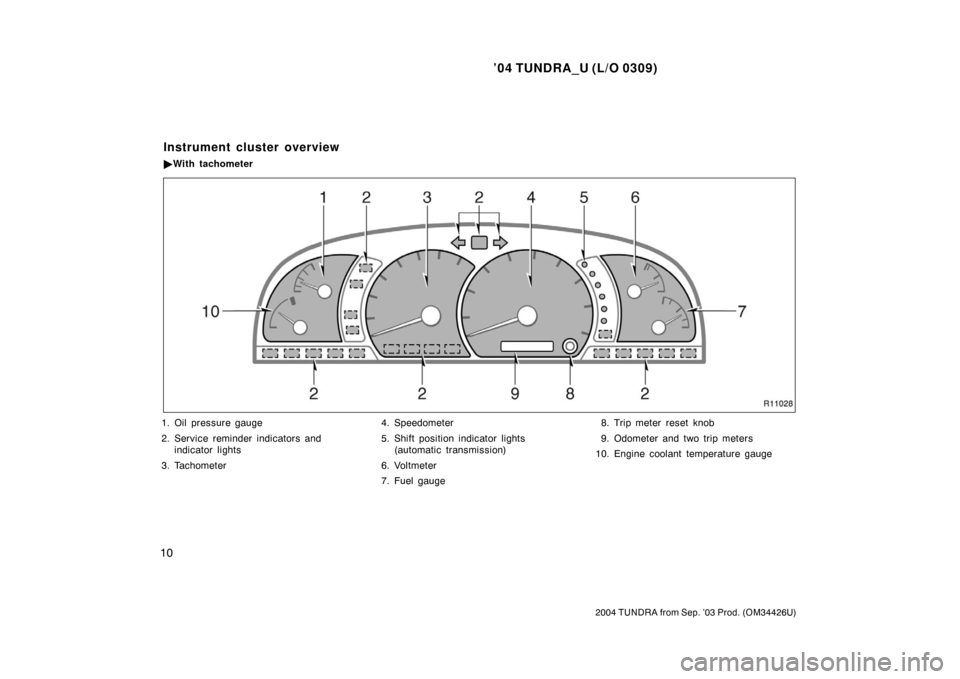
1. Oil pressure gauge
2. Service reminder indicators and
indicator lights
3. Tachometer 4. Speedometer
5. Shift position indicator lights
(automatic transmission)
6. Voltmeter
7. Fuel gauge 8. Trip meter reset knob
9. Odometer and two trip meters
10. Engine coolant temperature gauge
Instrument cluster overview
� With tachometer
Page 20 of 479
’04 TUNDRA_U (L/O 0309)
11
2004 TUNDRA from Sep. ’03 Prod. (OM34426U)
1. Engine coolant temperature gauge
2. Service reminder indicators and
indicator lights 3. Speedometer
4. Fuel gauge
5. Trip meter reset knob
6. Odometer and two trip meters
�
Without tachometer
Page 21 of 479
’04 TUNDRA_U (L/O 0309)
12
2004 TUNDRA from Sep. ’03 Prod. (OM34426U)
Driver ’s seat belt reminder light∗
1
Low engine oil pressure warning light∗1
Low fuel level warning light∗1
Brake system warning light∗1
Discharge warning light∗1
Malfunction indicator lamp∗1
Anti −lock brake system warning light∗
1or
Front passenger ’s seat belt reminder light∗1
�Vehicle stability control system warning
light∗1
�Traction control system warning light∗1
�“AUTO LSD” system warning light∗1
SRS warning light∗1
Automatic transmission fluid temperature
warning light∗1
Unengaged “Park” warning light∗1
Low windshield washer fluid level warning
light∗1
Headlight high beam indicator light Passenger airbag off indicator light
Open door warning light∗1
Indicator symbols on the instrument panel
Page 22 of 479
’04 TUNDRA_U (L/O 0309)
13
2004 TUNDRA from Sep. ’03 Prod. (OM34426U)
∗
1: For details, see “Service reminder indicators and warning
buzzers” in Section 1 −6.
∗
2: If this light flashes, see “Four −wheel drive system” in Sec-
tion 1 −7.
∗
3: If this light flashes, see “Cruise control” in Section 1− 7.
Cruise control indicator light
∗
3
Low speed four −wheel drive indicator light∗
2
Four −wheel drive indicator light
High speed four −wheel drive indicator light
∗
2
Automatic transmission indicator lights
Overdrive −off indicator light
Turn signal indicator lights
“AUTO LSD” indicator light
Slip indicator light
Vehicle stability control system off indicator light
Page 27 of 479
’04 TUNDRA_U (L/O 0309)
18
2004 TUNDRA from Sep. ’03 Prod. (OM34426U)
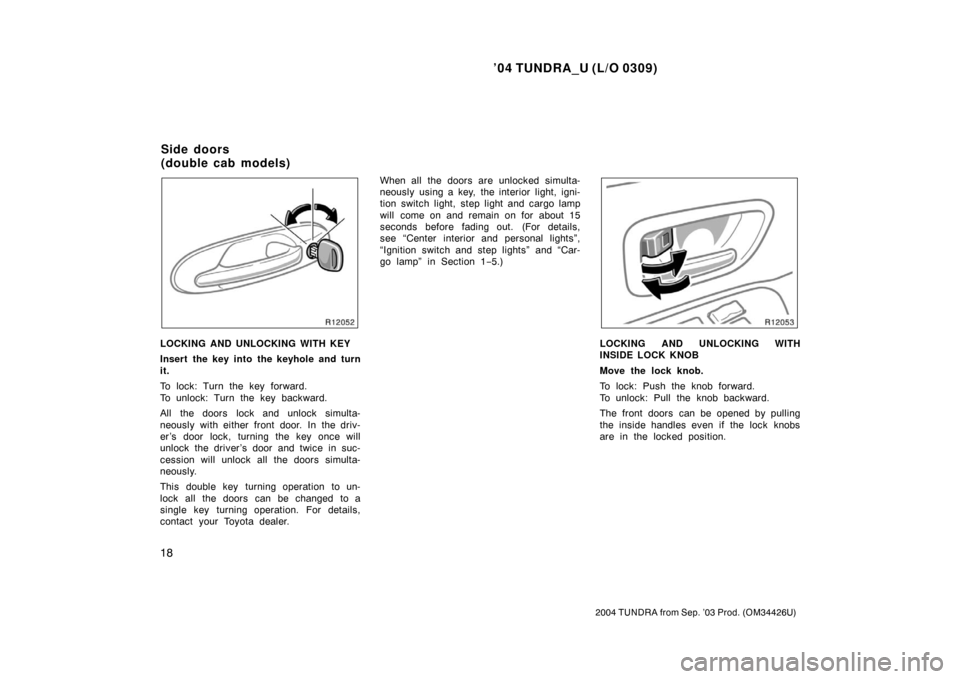
LOCKING AND UNLOCKING WITH KEY
Insert the key into the keyhole and turn
it.
To lock: Turn the key forward.
To unlock: Turn the key backward.
All the doors lock and unlock simulta-
neously with either front door. In the driv-
er’s door lock, turning the key once will
unlock the driver’s door and twice in suc-
cession will unlock all the doors simulta-
neously.
This double key turning operation to un-
lock all the doors can be changed to a
single key turning operation. For details,
contact your Toyota dealer. When all the doors are unlocked simulta-
neously using a key, the interior light, igni-
tion switch light, step light and cargo lamp
will come on and remain on for about 15
seconds before fading out. (For details,
see “Center interior and personal lights”,
“Ignition switch and step lights” and “Car-
go lamp” in Section 1
−5.)LOCKING AND UNLOCKING WITH
INSIDE LOCK KNOB
Move the lock knob.
To lock: Push the knob forward.
To unlock: Pull the knob backward.
The front doors can be opened by pulling
the inside handles even if the lock knobs
are in the locked position.
Side doors
(double cab models)
Page 30 of 479

’04 TUNDRA_U (L/O 0309)
21
2004 TUNDRA from Sep. ’03 Prod. (OM34426U)
For easy access to the rear seat, open
the access door (rear door).
To open: First, open the front door widely.
Then pull the outside handle or inside le-
ver of the access door.
If you try to open the front and rear doors
simultaneously, they will not open.
To close: First, close the access door
completely. Then close the front door.
You can open and close the access door
only when the front door is widely opened.
NOTICE
The front door and access door could
be damaged if they hit each other
when being opened or closed. Be
sure to follow the above instructions.
Locking operation
Unlocking operation
The wireless remote control system is
designed to lock or unlock all the
doors or activate the “PANIC” mode
from a distance within approximately 1
m (3 ft.) of the vehicle.
LOCKING AND UNLOCKING THE
DOORS
To lock and unlock all the doors, push
the switches slowly and securely.
To lock: Push the “LOCK” switch. All the
doors are locked simultaneously. At this
time one beep will be heard, and the tail
lights and front side marker lights will
flash once.
Check to see that the doors are securely
locked.
If any door is not securely closed, locking
cannot be performed by the “LOCK”
switch and a beep will sound continuously
for 5 seconds. However, if the key is in
the ignition, a beep will not sound.
To stop the beep, close all the doors se-
curely or push the “UNLOCK” switch.
Wireless remote control
(standard and access cab
models for U.S.A. only)
Page 31 of 479

’04 TUNDRA_U (L/O 0309)
22
2004 TUNDRA from Sep. ’03 Prod. (OM34426U)
To unlock: Push the “UNLOCK” switch
once to unlock the driver ’s door alone.
Pushing the switch twice within 3 seconds
unlocks all the doors simultaneously. Each
time the “UNLOCK” switch is pushed, two
beeps will be heard, and the tail lights
and front side marker lights will flash
twice.
When the “UNLOCK” switch is pressed,
the interior light, ignition switch light, step
light and cargo lamp come on. The lights
remain on for about 30 seconds unless
any door is opened and closed.
You have 30 seconds to open a door after
using the wireless remote unlock feature.
If a door is not opened by then, all the
doors will be automatically locked again.
If the “LOCK” or “UNLOCK” switch is kept
pressed in, the locking or unlocking opera-
tion is not repeated. Release the switch
and then push again.
“PANIC” SWITCH
Pushing the “PANIC” switch blows the
horn intermittently, flashes the head-
lights and tail lights, and turns on the
interior light.
The “PANIC” switch is used to deter ve-
hicle theft when you witness anyone at-
tempting to break into or damage your
vehicle.
The alarm will last for one minute. To stop
alarm midway, push the “PANIC” switch
once again, lock or unlock any door with
the key or transmitter, or turn the ignition
key from the “LOCK” to “ON” position.
The “PANIC” mode does not work when
the ignition key is in the ignition switch. WIRELESS REMOTE CONTROL
The wireless remote control transmitter is
an electronic component. Observe the fol-
lowing instructions in order not to cause
damage to the transmitter.
�Do not leave the transmitter on places
where the temperature becomes high
such as on the dashboard.
�Do not disassemble it.
�Avoid knocking it hard against other
objects or dropping it.
�Avoid putting it in water.
You can use up to 4 remote keyless entry
transmitters for the same vehicle. Contact
your Toyota dealer for detailed information.
If the wireless remote control transmitter
does not actuate the doors or alarm, or
operate from a normal distance:
�Check for closeness to a radio trans-
mitter such as a radio station or an
airport which can interfere with normal
operation of the transmitter.
�The battery may have been consumed.
Check the battery in the transmitter. To
replace the battery, see “REPLACING
THE BATTERY”.
Page 34 of 479

’04 TUNDRA_U (L/O 0309)
25
2004 TUNDRA from Sep. ’03 Prod. (OM34426U)
�Do not touch or move any compo-
nents inside of the transmitter, or
it may interfere with proper opera-
tion.
� Be careful not to bend the electrode
of the transmitter battery insertion
and that dust or oils do not adhere
to the transmitter case.
� Close the transmitter case securely.
After replacing the battery, check that the
transmitter operates properly. If the trans-
mitter still does not operate properly, con-
tact your Toyota dealer.
Locking operation
Unlocking operation
The wireless remote control system is
designed to lock or unlock all the
doors or activate the “PANIC” mode
from a distance within approximately 1
m (3 ft.) of the vehicle.
LOCKING AND UNLOCKING THE
DOORS
To lock and unlock all the doors, push
the switches slowly and securely.
To lock: Push the “LOCK” switch. All the
doors are locked simultaneously. At this
time one beep will be heard, and the
parking lights and tail lights flash once.
Check to see that all the doors are se-
curely locked.
If any of the doors is not securely closed,
locking cannot be performed by the
“LOCK” switch and a beep will sound con-
tinuously for 10 seconds. However, if the
key is in the ignition, a beep will not
sound.
To stop the beep, close all the doors se-
curely or push the “UNLOCK” switch.
The beep can be disabled. For details,
contact your Toyota dealer.
Wireless remote control
(double cab models)