Page 98 of 266

’04MY CELICA U (L/O 0308)
90
2004 CELICA from Aug. ’03 Prod. (OM20823U)
“START”—Starter motor on. The key
will return to the “ON” position when
released.
For starting tips, see Section 3.
“ON”—Engine on and all accessories
on.
This is the normal driving position.
“ACC”—Accessories such as the radio
operate, but the engine is off.
If you leave the key in the “ACC” or
“LOCK” position and open the driver’s
door, a buzzer will remind you to remove
the key.“LOCK”—Engine is off and the steering
wheel is locked. The key can be re-
moved only at this position.
You must push in the key to turn the key
from “ACC” to the “LOCK” position. On
vehicles with an automatic transmission,
the selector lever must be in the “P” posi-
tion before pushing the key.
When starting the engine, the key may
seem stuck at the “LOCK” position. To
free it, first be sure the key is pushed all
the way in, and then rock the steering
wheel slightly while turning the key gently.CAUTION
For manual transmission:
Never remove the key when the ve-
hicle is moving, as this will lock the
steering wheel and result in loss of
steering control.
NOTICE
Do not leave the key in the “ON”
position if the engine is not running.
The battery will discharge and the
ignition could be damaged.
Ignition switch with steering
lock
Page 99 of 266
’04MY CELICA U (L/O 0308)
91
2004 CELICA from Aug. ’03 Prod. (OM20823U)
Your automatic transmission has a shift
lock system to minimize the possibility of
incorrect operation. This means you can
only shift out of “P” position when the
brake pedal is depressed (with the ignition
switch in “ON” position and the lock re-
lease button depressed).
(a) Selector lever
The shift position is also displayed on the
instrument cluster.
P:Parking, engine starting and key
removal
R: Reverse
N: Neutral
D: Normal driving (with overdrive on)
2: Stronger engine braking
L: Maximum engine braking
Automatic transmission
�1ZZFE engine
Lock release button
To prevent misshifting
With the brake pedal depressed,
shift while holding the lock
release button in.
(The ignition switch must be in
“ON” position.)
Shift while holding the lock
release button in.
Shift normally. Overdrive switch
Selector lever
Page 103 of 266
’04MY CELICA U (L/O 0308)
95
2004 CELICA from Aug. ’03 Prod. (OM20823U)
Your automatic transmission has a shift
lock system to minimize the possibility of
incorrect operation. This means you can
only shift out of “P” position when the
brake pedal is depressed (with the ignition
switch in “ON” position and the lock re-
lease button depressed).
(a) Selector lever
The shift position is also displayed on the
instrument cluster.
P:Parking, engine starting and key
removal
R: Reverse
N: Neutral
D: Normal driving (with overdrive on)
M: “M” position
2: Stronger engine braking
L: Maximum engine braking
�
2ZZGE engine
Lock release button
To prevent misshifting
With the brake pedal depressed,
shift while holding the lock
release button in.
(The ignition switch must be in
“ON” position.)
Shift while holding the lock
release button in. Overdrive switch
Selector lever
To select “M”, lean the selector
lever leftward from “D”.
Shift normally.
Page 114 of 266

’04MY CELICA U (L/O 0308)
106
2004 CELICA from Aug. ’03 Prod. (OM20823U)
AM·FM radio/cassette player/compact disc
player (with compact disc changer con-
troller)
This section describes some of the basic
features on Toyota audio systems. Some
information may not pertain to your sys-
tem.
Your audio system works when the ignition
key is in the “ACC” or “ON” position.
TURNING THE SYSTEM ON AND OFF
Push “PWR·VOL” to turn the audio system
on and off.
Push “AM”, “FM”, “TAPE” or “DISC” to
turn on that function without pushing
“PWR·VOL”. To turn on the cassette or
compact disc player, a cassette or com-
pact disc must be loaded in the player.
You can turn on each player by inserting
a cassette tape or compact disc.
You can turn off each player by ejecting
the cassette tape or compact disc. If the
audio system was previously off, then the
entire audio system will be turned off
when you eject the cassette tape or com-
pact disc. If the another function was pre-
viously playing, it will come on again.
SWITCHING BETWEEN FUNCTIONS
Push “AM”, “FM”, “TAPE” or “DISC” if the
system is already on but you want to
switch from one function to another.TONE AND BALANCE
For details about your system’s tone and
balance controls, see the description of
your own system.
Tone
How good an audio program sounds to
you is largely determined by the mix of
the treble, midrange (on some models)
and bass levels. In fact, different kinds of
music and vocal programs usually sound
better with different mixes of treble, mi-
drange and bass.
Balance
A good balance of the left and right stereo
channels and of the front and rear sound
levels is also important.
Keep in mind that if you are listening to
a stereo recording or broadcast, changing
the right/left balance will increase the vol-
ume of one group of sounds while de-
creasing the volume of another.
Reference
Using your audio system—
—Some basics
Page 115 of 266

’04MY CELICA U (L/O 0308)
107
2004 CELICA from Aug. ’03 Prod. (OM20823U)
YOUR RADIO ANTENNA
Mast type power antenna—
To lower the power antenna, turn off the
audio system by pushing “PWR·VOL”, or
turn the ignition key to “LOCK”.
The power antenna automatically retracts
when the radio mode is switched off to
turn on the cassette tape player or com-
pact disc player.
Some models also have a glass antenna
printed on the inside of the rear window.
Mast type antenna—
To remove the antenna, carefully turn it
counterclockwise.
Some models also have a glass antenna
printed on the inside of the rear window.NOTICE
�To prevent damage to the antenna,
make sure it is retracted or re-
moved before driving your Toyota
through an automatic car wash.
� With glass antenna—Attaching the
film (especially conductive or metal-
lic type) on the rear glass will no-
ticeably reduce the sensitivity of
the radio.
YOUR CASSETTE PLAYER
When you insert a cassette, the exposed
tape should face to the right.
NOTICE
Do not oil any part of the player and
do not insert anything other than cas-
sette tapes into the slot, or the tape
player may be damaged.
YOUR COMPACT DISC PLAYER
When you insert a disc, gently push it in
with the label side up. (The player will
automatically eject a disc if the label side
is down.) The player will play from track
1 through the end of the disc. Then it will
play from track 1 again.
NOTICE
Never try to disassemble or oil any
part of the compact disc player. Do
not insert anything other than com-
pact discs into the slot.
The player is intended for use with 12 cm
(4.7 in.) discs only.
Page 134 of 266

’04MY CELICA U (L/O 0308)
126
2004 CELICA from Aug. ’03 Prod. (OM20823U)
Ty p e A
Ty p e B
The digital clock indicates the time.
The key must be in the “ACC” or “ON”
position.
To reset the hour: Push the “H” button.
To reset the minutes: Push the “M” button.
If the electrical power source has been
disconnected from the clock, the time dis-
play will automatically be set to 1:00 (one
o’clock).
When the instrument panel lights are
turned on, the brightness of the time indi-
cator is reduced.
Type A only—
If quick adjustment to a full hour is de-
sired, push the “:00” button.
For example, if the “:00” button is de-
pressed when the time is between
1:01—1:29, the time will change to 1:00.
If the time is between 1:30—1:59, the
time will change to 2:00.
Type B only—
When the key is in the “ON” position,
push the “MODE” button to change the
display from clock to outside temperature
display. (See “Outside temperature dis-
play” in this Section.)
The outside temperature display indi-
cates the outside air temperature.
The key must be in the “ON” position.
To change the display from clock to out-
side temperature display, push and release
“MODE”. The display changes from clock
to outside temperature display (�C), then
back to clock each time you push. (See
“Clock” in this Section.)
Outside temperature display ( �C)—Shows
the outside air temperature in Celsius.
The displayed temperature ranges from
− 30 �C to 50 �C.
When you return the key to the “ACC”
position, the display returns to clock
mode.
Clock Outside temperature display
Page 135 of 266

’04MY CELICA U (L/O 0308)
127
2004 CELICA from Aug. ’03 Prod. (OM20823U)
If there is a problem with the connection
to the outside air temperature sensor, “−−”
will appear on the display. Contact your
Toyota dealer.
When the instrument panel lights are
turned on, the brightness of the tempera-
ture indicator is reduced.
CIGARETTE LIGHTER
To use the cigarette lighter, press it in.
After it finishes heating up, it automati-
cally pops out ready for use.
If the engine is not running, the key must
be in the “ACC” position.
Do not hold the cigarette lighter pressed
in.
Use a Toyota genuine cigarette lighter or
equivalent for replacement. ASHTRAY
To use the ashtray, pull out the lid.
When finished with your cigarette, thor-
oughly extinguish it in the ashtray to pre-
vent other cigarette butts from catching
fire. After using the ashtray, close the lid
completely.
To remove the ashtray, pull the lid and
pull it out.
CAUTION
To reduce the chance of injury in
case of an accident or sudden stop
while driving, always close the lid
completely after use.
Cigarette lighter and ashtray
Page 136 of 266
’04MY CELICA U (L/O 0308)
128
2004 CELICA from Aug. ’03 Prod. (OM20823U)
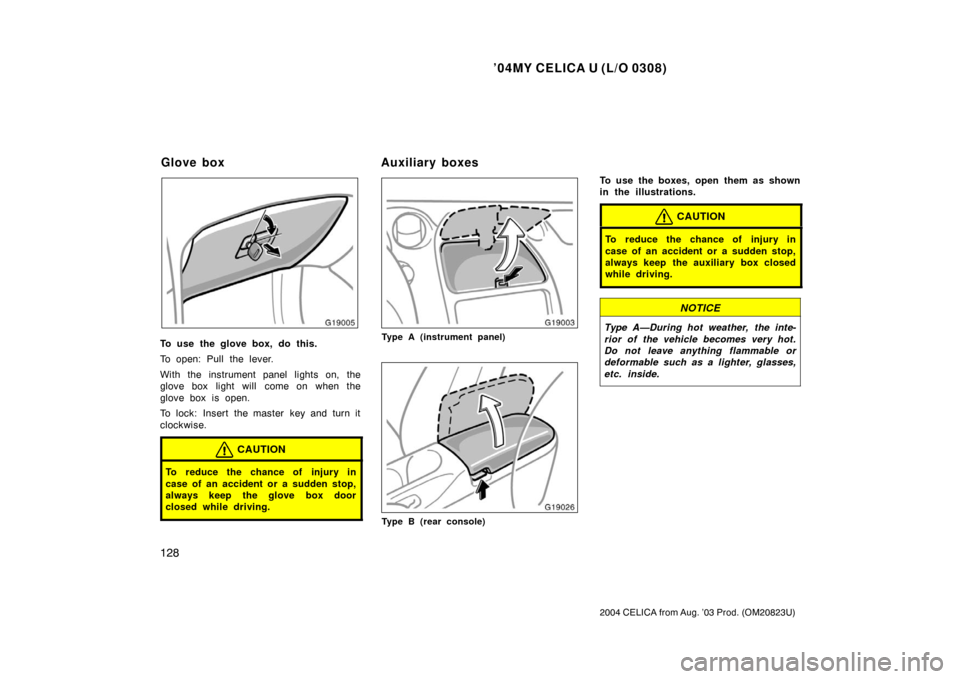
To use the glove box, do this.
To open: Pull the lever.
With the instrument panel lights on, the
glove box light will come on when the
glove box is open.
To lock: Insert the master key and turn it
clockwise.
CAUTION
To reduce the chance of injury in
case of an accident or a sudden stop,
always keep the glove box door
closed while driving.
Type A (instrument panel)
Type B (rear console)
To use the boxes, open them as shown
in the illustrations.
CAUTION
To reduce the chance of injury in
case of an accident or a sudden stop,
always keep the auxiliary box closed
while driving.
NOTICE
Type A—During hot weather, the inte-
rior of the vehicle becomes very hot.
Do not leave anything flammable or
deformable such as a lighter, glasses,
etc. inside.
Glove boxAuxiliary boxes