2004 SUBARU OUTBACK ECU
[x] Cancel search: ECUPage 144 of 525

3-1
3
Instruments and controls
Ignition switch .............................................. 3-3 LOCK .................................................................. 3-3
ACC .................................................................... 3-4
ON ....................................................................... 3-5
START ................................................................ 3-5
Key reminder chime .......................................... 3-5
Ignition switch light .......................................... 3-5
Key interlock release (AT vehicles only) ........ 3-5
Hazard warning flasher ................................ 3-6
Meters and gauges ....................................... 3-7 Speedometer ..................................................... 3-7
Odometer/Trip meter ........................................ 3-7
Tachometer ........................................................ 3-8
Outside temperature indicator (if equipped) .. 3-8
Fuel gauge ......................................................... 3-8
Temperature gauge ........................................... 3-9
Warning and indicator lights ....................... 3-10 Seatbelt warning light and chime .................... 3-10
SRS airbag system warning light .................... 3-10
CHECK ENGINE warning light/Malfunction indicator lamp ................................................. 3-11
Charge warning light ........................................ 3-12
Oil pressure warning light ................................ 3-12
AT OIL TEMPerature warning light (for AT vehicles) ............................................. 3-12
ABS warning light ............................................. 3-13
VDC (Vehicle Dynamics Control) warning light (if equipped) ........................................... 3-13
Brake system warning light ............................. 3-14
Door open warning lights ................................. 3-15
Low fuel warning light ...................................... 3-15 Front-wheel drive warning light (for AT
vehicles except GT and vehicle with VDC) .. 3-15
VDC (Vehicle Dynamics Control) operation indicator light (if equipped) ........................... 3-15
VDC (Vehicle Dynamics Control) OFF indicator light (if equipped) ........................... 3-16
Security system status indicator light
(if equipped) .................................................... 3-16
Selector lever position indicator (AT vehicles) ................................................... 3-17
Gear position indicator (AT vehicle with SPORTSHIFT) ................................................. 3-17
Turn signal indicator lights .............................. 3-17
High beam indicator light ................................. 3-18
Cruise control set indicator light .................... 3-18
Clock .............................................................. 3-18
Light control switch ...................................... 3-19 Headlights ......................................................... 3-19
High/low beam change (dimmer) .................... 3-20
Headlight flasher ............................................... 3-20
Daytime running light system ......................... 3-21
Turn signal lever ........................................... 3-21
Illumination brightness control ................... 3-22
Parking light switch ...................................... 3-23
Fog light switch (if equipped) ...................... 3-24
Wiper and washer ......................................... 3-24 Windshield wiper and washer switches ......... 3-26
Rear window wiper and washer switch (if equipped) .................................................... 3-27
Rear window defogger switch ..................... 3-28
Page 159 of 525

3-16
Instruments and controls
It blinks when the skid suppression function is activat-
ed. It illuminates when only the traction control func-
tion is operating.
The VDC system is probably faulty under any of the
following conditions. Have your vehicle checked at a
SUBARU dealer immediately. y
The light does not come on when the ignition switch
is turned to the “ON” position. y The light does not go out even after a period of
about 2 seconds after the ignition switch has been
turned to the “ON” position. „ VDC (Vehicle Dynamics Control)
OFF indicator light (if equipped)
y This indicator light comes on when the ignition
switch is turned ON and goes out about 6 seconds af-
ter the engine has started. y It comes on when the VDC system is deactivated
(by operating “VDC OFF” switch or in the standby state).
NOTE y The light may stay on for a while after the engine
has been started, especially in cold weather. This
does not indicate the existence of a problem. The
light should go out as soon as the engine has warmed up.y
The “VDC OFF” indicator light comes on when
the engine has developed a problem and the
CHECK ENGINE warning light is on.
The VDC system is probably faulty under any of the
following conditions. Have your vehicle checked at a
SUBARU dealer as soon as possible. y The VDC OFF indicator light does not come on
when the ignition switch is turned to the “ON” position. y The light does not go out even after several minutes
have passed (the engine has warmed up) after the en-
gine has been started. „ Security system status indicator
light (if equipped)
This light is found at the bottom center of the combina-
tion meter panel.
On vehicles equipped with a security system, it blinks
to show the driver the operational status of the security
system. For detailed information, refer to the “Security
system (if equipped)” in Chapter 2.
Page 179 of 525

3-36
Instruments and controls
place.
5. Make sure that the steering wheel is securely
locked by moving it up and down.Horn
To sound the horn, push the horn pad.
HS3044BA
Page 261 of 525

6-16
Interior equipment
(flat tire, out of gas, or engine trouble), just call OnStar.
We will contact your vehicle manufacturer’s roadside
service provider for the help you need to get you quick-
ly back on the road.
*3: There will be no charge for Roadside Assistance as long
as the basic limited warranty on your vehicle has not expired. T
Stolen vehicle location
OnStar doesn’t just protect you, it protects your vehi-
cle, too. If your vehicle is ever stolen, just contact On-
Star. We will put you in touch with the authorities and
aid them in locating your vehicle. Ask your insurance
carrier about possible premium discounts. T AccidentAssist
AccidentAssist provides step-by-step guidance about
what to do in case of an accident. Working with leading
insurance companies we have developed a “best
practices” list to assist you through most accident sit-
uations. OnStar AccidentAssist can make the process
of completing a police report and/or insurance claim
less stressful. T Remote door unlock/vehicle alert
If you’ve locked your keys in your vehicle, just call On-
Star at 1-888-466-7827 (888-4ONSTAR) and an Advi-
sor will send a signal to attempt to unlock your door. If
you’re having trouble locating your vehicle, OnStar can flash your lights and sound your horn for you. This
feature is disabled 48 hours after the vehicle is parked
in order to maintain battery charge. T
OnStar MED-NET *4
OnStar MED-NET securely stores your personal med-
ical information (e.g., physician’s name, emergency
contacts, medications, chronic conditions) and in an
emergency, can quickly send it to a medical facility.
This important information can help assist with diagno-
sis and treatment.
*4: Requires activation and additional fee for Safe & Sound
and Directions & Connections subscribers. To enroll or for
more OnStar Med-Net information, call 1-800-320-3991. T Route support
With OnStar Route Support, an Advisor can help you
find your way, no matter how far off course you are.
You can get exact street directions, or guidance to
nearby gas stations, restaurants, hotels or ATMs. T RideAssist
If you need a lift, anytime of the day or night, just call
OnStar. We’ll contact a transportation provider and
send them right to you. T Information and convenience services
Our Advisors have access to over six million service
Page 262 of 525

6-17
Interior equipment
– CONTINUED –
listings including hotels, restaurants, gas stations,
dealerships, hospitals, ATMs and airports – more than
250 service categories in all. Our Advisors can even
assist you with hotel and restaurant reservations. TOnStar concierge
Safe & Sound, Directions & Connections and Luxury
and Leisure plan subscribers can access self-serve
Online Concierge services for event tickets, dining
reservations, gift recommendations and more at
www.myonstar.com
.
Luxury & Leisure subscribers have access to Personal
Concierge services. A Concierge Advisor can help you
with virtually any type of request via email, live chat,
phone (1-888-4ONSTAR) or the blue button in your
vehicle. Just ask! „ OnStar personal calling
As an OnStar subscriber, you have access to OnStar
Personal Calling (if available in your area). OnStar
Personal Calling provides you with a nationwide wire-
less phone service that is completely integrated in
your vehicle. OnStar Personal Calling operates with
the touch of a button and a few simple voice com-
mands. All it takes to get started is a package of OPCminutes. With OnStar Personal Calling, you can enjoy the sim-
plicity of a one-touch wireless connection. Whether
you are placing or receiving a call, once you press the
white dot button, you don’t have to take your hands off
the wheel or your eyes off the road. The ease of the
hands-free wireless communication service allows
you to enjoy an even greater level of safety, security
and convenience while driving. „
OnStar virtual advisor
As an OnStar Personal Calling subscriber, you can
make your driving time more enjoyable and productive
with the OnStar Virtual Advisor. With OnStar Virtual
Advisor you can now listen to your favorite financial in-
formation, news, entertainment and information top-
ics, such as stock quotes , weather reports and sports
scores. You can receive your email, listen to it being
read and reply, without taking your hands off the wheel
or eyes off the road. With the press of the white DOT
button and a few simple voice commands, you can
browse the pre-selected topics from your profile which
you established on the MyOnStar website, or you can
skip to the subjects that interest you.
To find out more about Virtual Advisor or to set-up your
Virtual Advisor personal profile, visit www.myon-
star.com.
Page 266 of 525
6-21
Interior equipment
– CONTINUED –
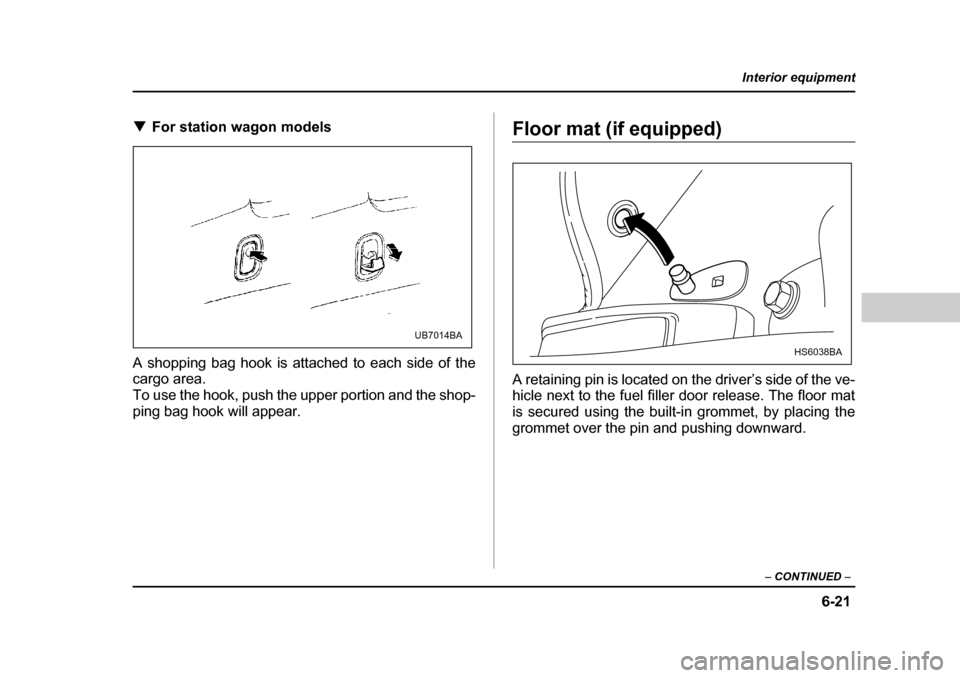
TFor station wagon models
A shopping bag hook is attached to each side of the
cargo area.
To use the hook, push the upper portion and the shop-
ping bag hook will appear.Floor mat (if equipped)
A retaining pin is located on the driver’s side of the ve-
hicle next to the fuel filler door release. The floor mat
is secured using the built-in grommet, by placing the
grommet over the pin and pushing downward.
UB7014BA
HS6038BA
Page 267 of 525
6-22
Interior equipment
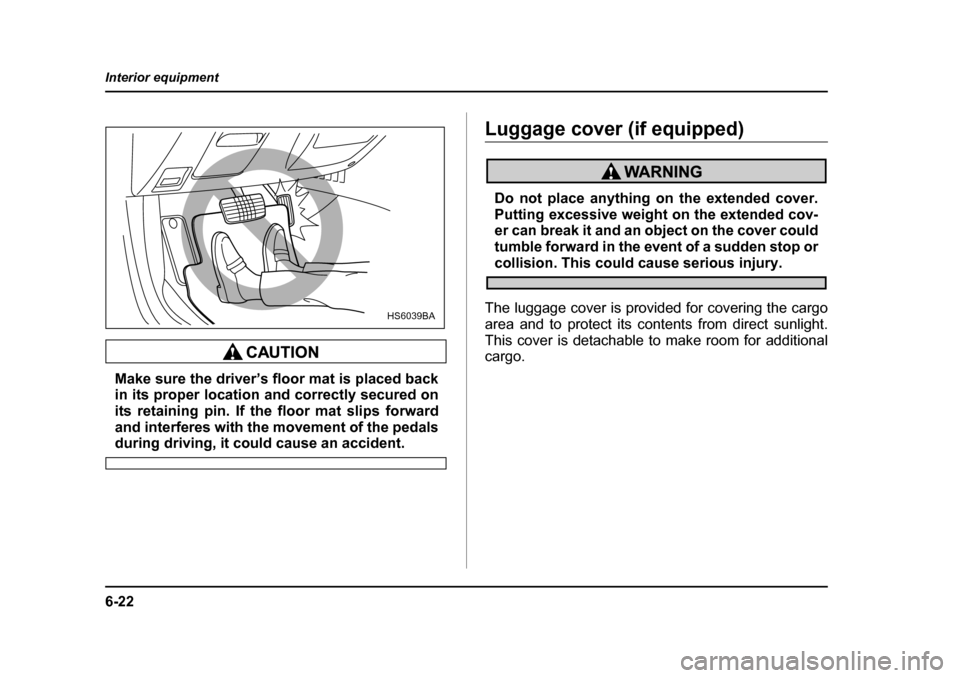
Make sure the driver’s floor mat is placed back
in its proper location and correctly secured on
its retaining pin. If the floor mat slips forward
and interferes with the movement of the pedals
during driving, it could cause an accident.
Luggage cover (if equipped)
Do not place anything on the extended cover.
Putting excessive weight on the extended cov-
er can break it and an object on the cover could
tumble forward in the event of a sudden stop or
collision. This could cause serious injury.
The luggage cover is provided for covering the cargo
area and to protect its contents from direct sunlight.
This cover is detachable to make room for additional
cargo.
HS6039BA
Page 269 of 525

6-24
Interior equipment
1. Rewind the cover.
2. To take it off the cover rails, lift it out while pressing
the release knobs located both sides of the cover
housing.
3. Store the cover in the cargo area.
To install the cover:
Hang the both ends of the cover housing on the cover
rails. Make sure that the cover is mounted securely by
pulling it up.
Convenient tie-down hooks (if
equipped)
The convenient tie-down hooks are designed
only for securing light cargo. Never try to se-
cure cargo that exceeds the capacity of the
hooks. The maximum load capacity is 44 lbs (20
kg) per hook.
The cargo area is equipped with four tie-down hooks
UB7018BA