2004 SKODA SUPERB battery
[x] Cancel search: batteryPage 48 of 270

Unlocking and locking47
Using the systemSafetyDriving TipsGeneral MaintenanceBreakdown assistanceTechnical Data
Note
•The remote control is automatically deactivated when the ignition is
switched on.
•The operation of the remote control may temporarily be affected by
interference from transmitters close to the car and which operate in the
same frequency range (e.g. mobile phone, TV transmitter).
•The battery must be replaced, ideally by the Škoda dealer, if the
central locking or anti-theft alarm system does react to the remote control
at less than 3 metres away.
Unlocking and locking car
Unlocking the vehicle
– Press button ⇒fig. 27 for about 1 second. Locking the vehicle
– Press button for about 1 second.
Boot lid remote release
– Press button for about 1 second.
Deactivating safe securing system
– Press button zwice in 2 seconds. Further information
⇒page 42.
The turn signal lights flash twice as confirmation that the vehicle has been
unlocked. If you unlock the car with button but do not open a door or
the boot lid within the next 30 seconds, the car locks again automatically.
This function is intended to prevent the car being unlocked unintentionally.
The safe securing system along with the anti-theft alarm system* are,
however, deactivated during these 30 seconds.
If the single door opening function has been activated on your car, you
unlock only the driver door by pressing button once and the complete
vehicle by pressing the button twice ⇒page 41.
In addition, when the car is unlocked, the power seats and exterior mirrors
move into the position assigned to this key. The stored setting of driver
seat and exterior mirrors is retrieved automatically.
When the vehicle is unlocked or locked, the interior lights in the door
contact are automatically switched on or off.
The turn signal lights flash once to confirm that the vehicle has been
correctly locked. If the turn signal lights do not flash, check the doors,
bonnet and boot lid again to ensure that they are closed. If the doors, the
bonnet or the boot lid remain open when the anti-theft alarm system is
activated, the turn signal lights do not flash until after they have been
closed.
Fig. 27 Key: Assign-
ment of buttons
AA
AB
AC
AB
AA
AA
Page 49 of 270

Unlocking and locking
48
WARNING
If the vehicle is locked from the outside and the safe securing
system is activated, there must not be any person in the vehicle as
it is then not possible to open either a door or a window from the
inside. The locked doors make it mo re difficult for rescuers to get
into the vehicle in an emergency - hazard!
Note
•Operate the radio remote control only when the doors and boot lid are
closed and you have visual contact with the vehicle.
•Once in the car, you must not press the lock button of the master key
before inserting the key into the ignition lock in order to avoid the car being
inadvertently locked and, in addition, the anti-theft alarm system* being
switched on. Should this happen, press the unlock button
of the master
key.
Synchonisation of the remote control
If the vehicle cannot be unlocked by actuating the remote control system
then it is possible that the code in the key and the control unit in the vehicle
are no longer synchronised. This can occur when the buttons on the radio-
operated key are actuated a number of times outside of the operative
range of the equipment or the battery on the remote control was replaced.
This means it is necessary to synchronise the code as follows:
•Press any button on the remote control.
•Pressing of the button means that the door will unlock with the key
within 1 minute.
Anti-theft alarm system*
Description
The anti-theft alarm system increases the level of protection against
people seeking to break into the vehicle. The system triggers audible and
visual warning signals if an attempt is made to break into the vehicle.
How is the alarm system switched on?
The anti-theft alarm system is activated automatically when the vehicle is
locked with the key on the closed driver's door or by using the remote
control. It is activated 30 seconds after closing the door.
How is the alarm system switched off?
The anti-theft alarm system is switched off if the vehicle is unlocked by
only using the remote control. The vehicle is automatically locked again if
the vehicle is not opened within 30 seconds after reactivating the anti-theft
alarm system.
Once you unlock the vehicle by inserting the key into the driver door you
then have to insert the key into the ignition lock and switch the ignition on
within 15 seconds after opening the door in order to deactivate the anti-
theft alarm system. The alarm will be triggered if you do not switch on
the ignition within 15 seconds.
When is the alarm triggered?
The following security areas of the locked vehicle are monitored:
•Bonnet
•Boot lid
•Doors
•Ignition lock
•Vehicle interior* ⇒page 49.
•A drop in voltage of the on-board power supply
Page 50 of 270

Unlocking and locking49
Using the systemSafetyDriving TipsGeneral MaintenanceBreakdown assistanceTechnical Data
An alarm is immediately triggered if either of the two battery terminals is
disconnected while the anti-theft alarm system is activated.
If you unlock and open the boot lid with the key, the alarm is immediately
triggered.
How is the alarm switched off?
You switch the alarm off if you unlock the car with the radio remote control
in the key or if you switch the ignition on.
Indicator light (LED)
The LED in the top of the door trim on the driver door first of all flashes
rapidly after the car is locked, then slowly. This indicates that the anti-theft
alarm system
including the interior monitor* is activated.
Note
•The working life of the alarm siren is 5 years. More detailed information
is available from your Škoda dealer.
•Before leaving the car, check that all the doors, windows and the elec-
tric sliding/tilting roof* are properly closed in order to ensure that the anti-
theft alarm system is fully operational.
•Coding of the radio remote control and the receptor part precludes the
use of the radio remote control from other vehicles.
Interior monitor*
The interior monitor detects movements inside the car and
then triggers the alarm.
You can switch the interior monitor off if, for example, an animal
or other moving objects inside the car might trigger the alarm.
Switching interior monitor off
– Press the button
on the center column at the driver's side
⇒ fig. 28 .
– Lock the car.
The interior monitor is switched on again automatically the next time the
car is locked.
Fig. 28 Interior
monitor pushbutton
Page 53 of 270

Unlocking and locking
52
windows! A person may otherwise suffer severe injuries as a result
of getting an arm, for example, jammed in the window!
Note
After switching the ignition off, it is still possible to open or close the
windows for a further 10 minutes. The automatic closing and opening
functions will not operate during this time. The power windows are
switched off completely once you open the driver or front passenger
door.
Convenience operation of windows
You can open and close the electrically powered windows as
follows when unlocking and locking the vehicle (just closing of the
sliding roof).
Opening windows with the key
– Turn the key in the lock of the driver door into the opening
position or press the opening button of the remote control until
all the windows are open.
Closing windows with the key
– Turn the key in the lock of the driver door into the closing posi- tion or press the closing button of the remote control until all
the windows are closed ⇒.
You can interrupt the opening or closing operation of the windows imme-
diately by releasing the key of the button of the remote control.
WARNING
•Obstruction protection is not active during the convenience
operating feature ⇒ in “Switches in front passenger door and in
rear doors” on page 51.
•You should take particular care when closing the windows! A
person may otherwise suffer severe injuries as a result of getting
an arm, for example, jammed in the window!
Operational problems
Automatic closing or opening does not operate
If the battery of the car has been disconnected and then reconnected, the
automatic closing and opening function does not operate. The system
must be activated. Proceed as follows in order to re-establish the function:
•Turn the key in the lock of the driver door into the closing position and
hold it there until all of the windows are closed.
•Release the key.
•Insert the key again and turn it to the closing position for about 3
seconds.
Operation in winter
Ice accumulating on the surface of the windows during the winter may
result in a greater resistance when closing the windows and the window
may stop and move back several centimetres
Proceed as follows to close the window fully:
•Turn the key in the lock of the driver door into the closing position and
hold it there until all of the windows are closed.
•Repeat this operatiive cycle when the window stops.
WARNING (continued)
Page 54 of 270
Unlocking and locking53
Using the systemSafetyDriving TipsGeneral MaintenanceBreakdown assistanceTechnical Data
WARNING
•Obstruction protection is not active during the closing of the
windows ⇒ in “Switches in front passenger door and in rear
doors” on page 51.
•You should take particular care when closing the windows! A
person may otherwise suffer severe injuries as a result of getting
an arm, for example, jammed in the window!
Electric slidin g/tilting roof*
Description
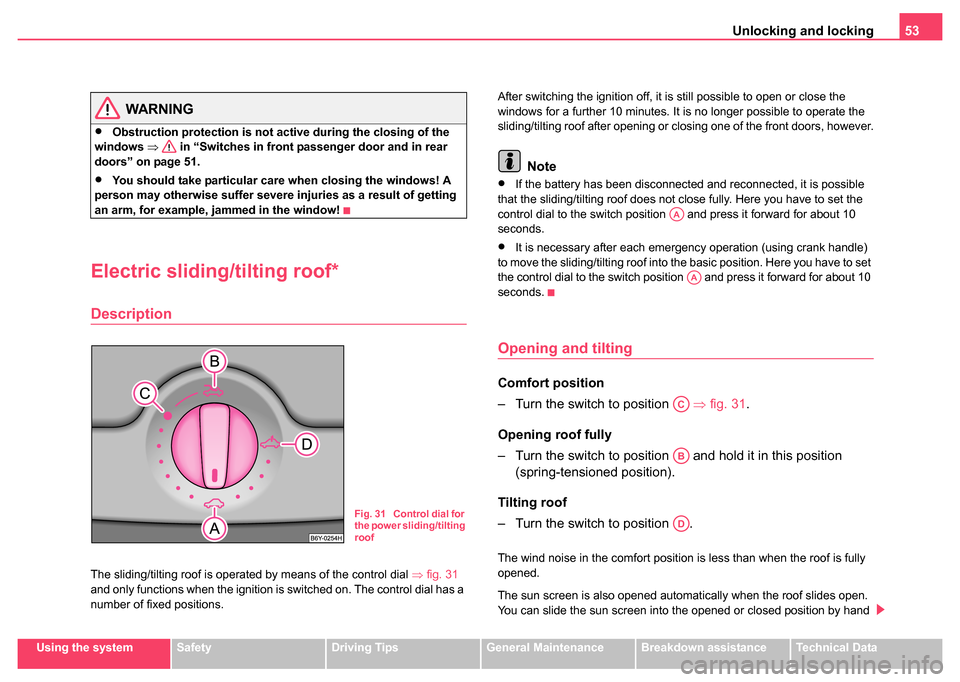
The sliding/tilting roof is operated by means of the control dial ⇒fig. 31
and only functions when the ignition is switched on. The control dial has a
number of fixed positions. After switching the ignition off, it is still possible to open or close the
windows for a further 10 minutes. It is no longer possible to operate the
sliding/tilting roof after opening or closing one of the front doors, however.
Note
•If the battery has been disconnected and reconnected, it is possible
that the sliding/tilting roof does not close fully. Here you have to set the
control dial to the switch position and press it forward for about 10
seconds.
•It is necessary after each emergency operation (using crank handle)
to move the sliding/tilting roof into the basic position. Here you have to set
the control dial to the switch position and press it forward for about 10
seconds.
Opening and tilting
Comfort position
– Turn the switch to position ⇒fig. 31 .
Opening roof fully
– Turn the switch to position and hold it in this position (spring-tensioned position).
Tilting roof
– Turn the switch to position .
The wind noise in the comfort position is less than when the roof is fully
opened.
The sun screen is also opened automatically when the roof slides open.
You can slide the sun screen into the opened or closed position by hand
Fig. 31 Control dial for
the power sliding/tilting
roof
AA
AA
AC
AB
AD
Page 62 of 270

Lights and Visibility61
Using the systemSafetyDriving TipsGeneral MaintenanceBreakdown assistanceTechnical Data
Switching the interior light off
– Press the switch on the symbol O.
Front reading lights
– Press on one of the switches ⇒page 60, fig. 39 in order to
switch the right or left reading light on or off.
Lighting of storage compar tment on the front passenger
side
– Open the flap of the storage compartment on the front passenger side, the lighting of the storage compartment
switches on automatically and switches off when the flap is
closed.
If the interior lighting is fitted with a delayed-off control*, the lighting of the
interior of the car remains on for a few seconds after the doors are closed.
The interior light comes on as soon as you unlock the car or open a door
or when the ignition key has been removed. The light goes out again
about 30 seconds after all the doors have been closed. The interior
lighting is switched off when you lock the car or switch the ignition on. This
only applies when the switch for the corresponding interior lights is
standing n the door contact setting.
The interior lighting goes off after about 60 minutes when a door has been
left open in order to avoid discharging the battery of the vehicle.
Two LEDs are integrated in the interior lighting, which illuminates the shift
lever and the middle of the dash panel. They are switched on automati-
cally when switching on the parking light.
In addition, the lighting of the door handle is switched on after the ignition
is switched on when the side lights are switched on.
Rear interior lighting
The lights with interior monitoring sensors ⇒fig. 40 are actuated by
moving the switch to the symbol , O or to the middle position .
AA
AB
Fig. 40 The roof light
at the rear with interior
monitoring sensors
Fig. 41 The interior
light at the rear without
interior monitoring
sensors
Page 80 of 270

Seats and Stowage79
Using the systemSafetyDriving TipsGeneral MaintenanceBreakdown assistanceTechnical Data
Caution
•You should not kneel on the seats or otherwise apply pressure at
specific points in order to avoid damaging the heating elements of the seat
heaters.
•Do not clean the seats moist ⇒page 201.
Note
The seat heating should only be switched on when the engine is running.
This has a significant effect of saving on the battery capacity.
Pedals
You should use only footmats which do not obstruct the movement of the
pedals and have an anti-slip protection.
Operation of the pedals must not be hindered!
WARNING
•Greater pedal distances may be needed when there is a fault in
the brake system.
•Do not place any footmats or other additional floor coverings in
the area of the pedals in order to ensure that all the pedals can be
fully depressed and are able to return unobstructed to their initial
position - risk of accident!
•There must be no objects on the floor which could roll under the
pedals. You would then no longer be able to apply the brakes,
operate the clutch or accelerator - risk of accident!
Luggage compartment
Loading the luggage compartment
Please observe the following in the interest of having good
handling characteristics of your vehicle:
– Distribute the items of luggage as evenly as possible.
– Place heavy objects as far forward as possible.
– Attach the items of luggage with the safety net* or with tensioning straps attached to the lashing eyes ⇒page 80.
In the event of an accident, there is such a high kinetic energy which is
produced by small and light objects that they can cause severe injuries.
The magnitude of the kinetic energy depends on the speed at which the
vehicle is travelling and on the weight of the object. The speed at which
the vehicle is travelling is in this case the more significant factor.
Example: In the event of a frontal collision at a speed of 50 km/h, an unse-
cured object with a weight of 4.5 kg produces an energy, which corre-
sponds to 20 times its own weight. This means that it results in a weight
of approx. 90 kg. You can imagine the injuries that can occur, if this “bullet”
is flying through the interior compartment and hits an occupant.
WARNING
•Store the objects in the luggage compartment and attach them
to the lashing eyes.
•Loose objects in the passenger compartment can be thrown
forward during a sudden manoeuvre or in case of an accident and
can injure the occupants or other onc oming traffic. This risk is still
increased, if the objects which are flying around are hit by a
Page 86 of 270

Seats and Stowage85
Using the systemSafetyDriving TipsGeneral MaintenanceBreakdown assistanceTechnical Data
Opening and Closing
– Pull the handle ⇒page 84, fig. 68 and pull the lid downwards.
– Open up the lid of the cool box upwards until it is heard to lock.
Switching on and off
– The cooling action of the cool box is switched on and off using switch ⇒page 84, fig. 68 . It is signalised by the lighting up
of the indicator light on the switch.
You can remove the cool box if necessary ⇒page 86. You can replace the
cool box with a storage net ⇒fig. 69 .
Caution
Never cover the ventilator on the cool box otherwise it will overheat and
could be damaged.
Note
The cool box also operates if the ignition is switched off. The battery will
not run down fully, however, since the system is fitted with a device which
monitors the battery charge level. The cool box will be automatically
switched off when it is threatening to empty the battery.
Partition with storage net
If the cool box is removed, install the partition with the storage net
⇒fig. 69 which is fixed with a velcro fastener to the side wall of
the cool box.
– The partition is installed and removed in a similar way to the cool box ⇒ page 86.
AA
Fig. 69 Partition with
storage net