2004 PONTIAC GTO horn
[x] Cancel search: hornPage 65 of 326
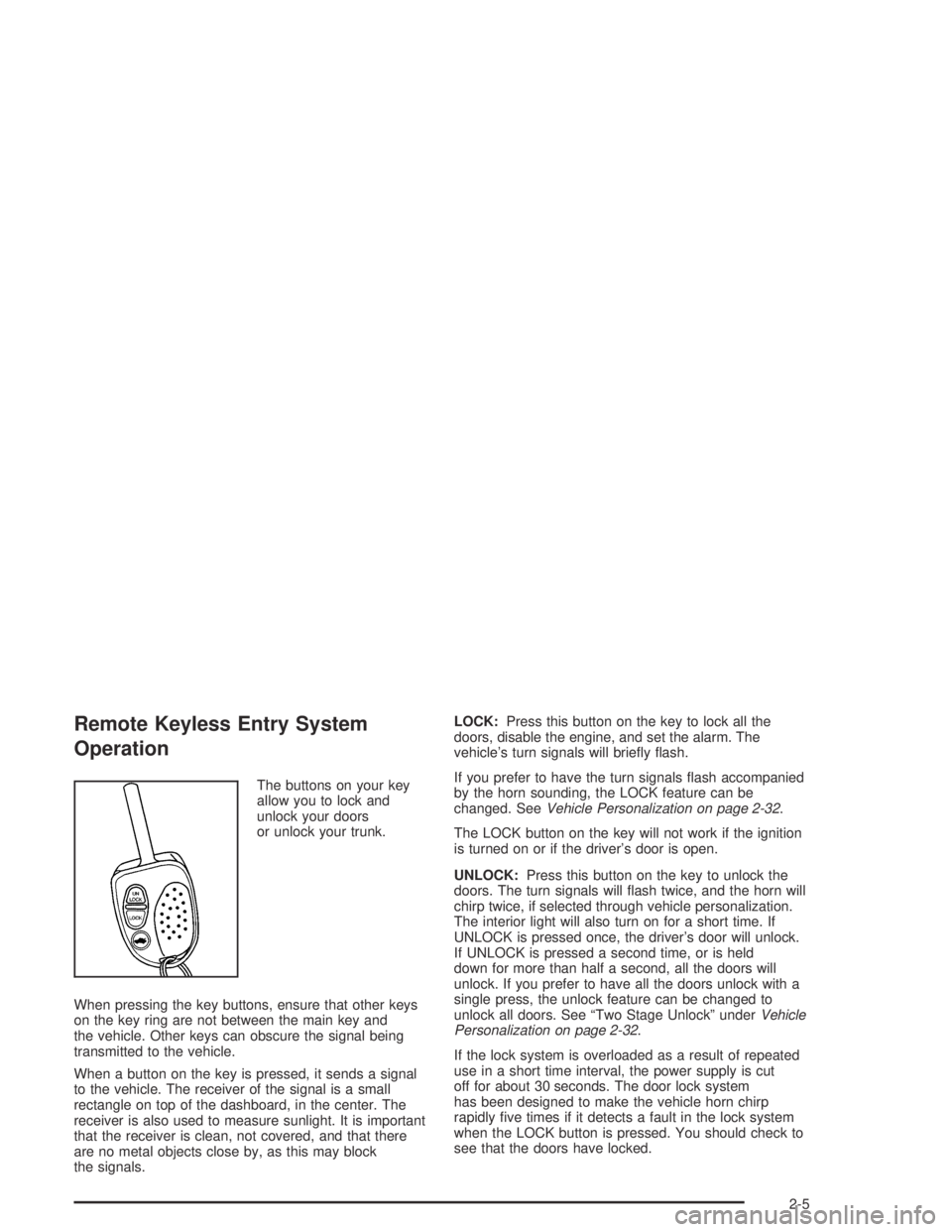
Remote Keyless Entry System
Operation
The buttons on your key
allow you to lock and
unlock your doors
or unlock your trunk.
When pressing the key buttons, ensure that other keys
on the key ring are not between the main key and
the vehicle. Other keys can obscure the signal being
transmitted to the vehicle.
When a button on the key is pressed, it sends a signal
to the vehicle. The receiver of the signal is a small
rectangle on top of the dashboard, in the center. The
receiver is also used to measure sunlight. It is important
that the receiver is clean, not covered, and that there
are no metal objects close by, as this may block
the signals.LOCK:Press this button on the key to lock all the
doors, disable the engine, and set the alarm. The
vehicle’s turn signals will briefly flash.
If you prefer to have the turn signals flash accompanied
by the horn sounding, the LOCK feature can be
changed. SeeVehicle Personalization on page 2-32.
The LOCK button on the key will not work if the ignition
is turned on or if the driver’s door is open.
UNLOCK:Press this button on the key to unlock the
doors. The turn signals will flash twice, and the horn will
chirp twice, if selected through vehicle personalization.
The interior light will also turn on for a short time. If
UNLOCK is pressed once, the driver’s door will unlock.
If UNLOCK is pressed a second time, or is held
down for more than half a second, all the doors will
unlock. If you prefer to have all the doors unlock with a
single press, the unlock feature can be changed to
unlock all doors. See “Two Stage Unlock” underVehicle
Personalization on page 2-32.
If the lock system is overloaded as a result of repeated
use in a short time interval, the power supply is cut
off for about 30 seconds. The door lock system
has been designed to make the vehicle horn chirp
rapidly five times if it detects a fault in the lock system
when the LOCK button is pressed. You should check to
see that the doors have locked.
2-5
Page 97 of 326

AUTO LOCK IN DRIVE (Automatic
Transmission Only)
This option is used to enable or disable the automatic
door locking when in Drive function. Use the up or down
arrows to select Yes or No. If Yes is selected, the
Auto Lock In Drive function is activated, the default is
No. Press the MODE button to continue. SeeDoor
Locks on page 2-6.
DOOR LOCK INDICATION
This option is used to select the type of indication
provided to the driver upon locking and unlocking the
vehicle’s doors. Use the up or down arrows to select
Indicators or Indicators & Horn, the default is Indicators.
Press the MODE button to continue.
Exiting Programming Mode
To exit, do one of the following:
•Press the MODE button to scroll through to the exit
screen.
•Drive the vehicle at more than 6 mph (10 km/h).
•Switch the ignition off if vehicle is stopped.
EXIT OPTIONS MENU
This option is used to either exit personalization mode
options menu or to return to the start of the options
menu. Use the up or down arrows to select Yes or No.
If Yes is selected, the trip computer exits calibration
mode and returns to the previous trip computer display.
If No is selected, the menu jumps back to the start of
the options menu, RESTORE TO FACTORY SETTINGS
display. Press the MODE button to continue.
2-37
Page 99 of 326

Instrument Panel Overview...............................3-2
Hazard Warning Flashers................................3-4
Other Warning Devices...................................3-4
Horn.............................................................3-4
Tilt Wheel.....................................................3-5
Turn Signal/Multifunction Lever.........................3-5
Exterior Lamps.............................................3-12
Interior Lamps..............................................3-15
Accessory Power Outlets...............................3-17
Ashtrays and Cigarette Lighter........................3-18
Climate Controls............................................3-19
Climate Control System.................................3-19
Outlet Adjustment.........................................3-22
Warning Lights, Gages, and Indicators............3-23
Instrument Panel Cluster................................3-24
Speedometer...............................................3-25
Tachometer.................................................3-25
Safety Belt Reminder Light.............................3-25
Air Bag Readiness Light................................3-26
Charging System Light..................................3-27
Brake System Warning Light..........................3-27Anti-Lock Brake System Warning Light.............3-28
Engine Coolant Temperature Gage..................3-28
Malfunction Indicator Lamp.............................3-29
Oil Pressure Light.........................................3-32
Change Engine Oil Light................................3-33
Security Light...............................................3-33
Fog Lamp Light............................................3-33
Highbeam On Light.......................................3-33
Daytime Running Lamps Indicator Light...........3-34
Service Vehicle Soon Light............................3-34
Fuel Gage...................................................3-35
Trip Computer................................................3-36
Audio System(s).............................................3-42
Setting the Time...........................................3-42
Radio with Six-Disc CD.................................3-43
Theft-Deterrent Feature..................................3-52
Audio Steering Wheel Controls.......................3-53
Radio Reception...........................................3-54
Care of Your CDs.........................................3-54
Care of Your CD Player................................3-54
Backglass Antenna.......................................3-55
Section 3 Instrument Panel
3-1
Page 101 of 326

The main components of the instrument panel are the following:
A. Side Outlets. SeeOutlet Adjustment on page 3-22.
B. Headlamps Dial. SeeExterior Lamps on page 3-12.
C. Instrument Panel Cluster. SeeInstrument Panel
Cluster on page 3-24.
D. Windshield Wiper Lever. See “Windshield Wipers”
underTurn Signal/Multifunction Lever on page 3-5.
E. Trip Computer Control. SeeTrip Computer on
page 3-36.
F. Outlets. SeeOutlet Adjustment on page 3-22.
G. Hazard Warning Lights. SeeHazard Warning
Flashers on page 3-4.
H. Sunlight Sensor. See “Automatic Headlamp System”
underExterior Lamps on page 3-12.
I. Climate Controls. SeeClimate Control System on
page 3-19.
J. Audio System Controls. SeeAudio System(s) on
page 3-42.
K. Passenger’s Air Bag. SeeWhere Are the Air Bags?
on page 1-48.L. Cruise Control Lever. See “Cruise Control” under
Turn Signal/Multifunction Lever on page 3-5.
M. Audio Steering Wheel Controls. SeeAudio Steering
Wheel Controls on page 3-53.
N. Driver’s Air Bag. SeeWhere Are the Air Bags? on
page 1-48.
O. Tilt Wheel. SeeTilt Wheel on page 3-5.
P. Horn. SeeHorn on page 3-4.
Q. Ignition Switch. SeeIgnition Positions on page 2-16.
R. Shift Lever. SeeShifting Into Park (P) on page 2-24.
S. Cupholders. SeeCupholder(s) on page 2-31.
T. Power Window Switches. SeePower Windows on
page 2-11.
U. Parking Brake. SeeParking Brake on page 2-23.
V. Glovebox. SeeGlove Box on page 2-30.
3-3
Page 102 of 326

Hazard Warning Flashers
Your hazard warning flashers let you warn others. They
also let police know you have a problem. Your front
and rear turn signal lamps will flash on and off.
The hazard warning
flasher button is located
near the center of the
instrument panel.Your hazard warning flashers work no matter what
position your key is in, and even if the key isn’t in.
Press the button to make the front and rear turn signal
lamps flash on and off. Press the button again to
turn the flashers off.
When the hazard warning flashers are on, your turn
signals won’t work.
Other Warning Devices
If you carry reflective triangles, you can set one up at
the side of the road about 300 feet (100 m) behind your
vehicle.
Horn
You can sound the horn by pressing the horn symbol
anywhere on your steering wheel.
3-4
Page 278 of 326

Instrument Panel Fuse Block
This fuse block is located under the driver’s side of the
instrument panel. The fuses here protect each
separate circuit including headlamps. There are spare
fuses inside the fuse box. If you have electrical
failure, check here first.
Fuses Usage
FLASHER
UNITHazard Warning Flashers
POWER
WINDOWSPower Window Switches
POWER
SEATSPower Seat Controls
SPARE Spare
INSTRUMENT
ILLUM. PARK
LAMPSInstrument Cluster Brightness
Controls, Parking Lamps
STOP LAMPS Stop Lamps
INTERIOR
ILLUM.Interior light Controls
HAZARD
WARNINGHazard Warning Flashers
SPARE Spare
HORN Horn
IGNITION Ignition Switch
INSTRUMENT
ILLUM.Instrument Panel Lighting
TURN SIGNAL Turn Signal Lamp
5-88
Page 279 of 326

Fuses Usage
ACC HTR
CONT INST.
TRIP COMPHeater Controls, Trip Computer
CIGAR
LIGHTERCigarette Lighter
CRUISE CONT.
PWR STEER,
MIRRORSCruise Control System, Power
Steering, Power Mirrors
RADIO,
CELLPHONERadio System, Cellphone
ACC SOCKET Accessory Power Outlet
FRONT WIPER Front Windshield Wipers
SPARE Spare
PWR DOOR
LOCKS, ANT.
& WINDOWSPower Door Locks, Antenna, Power
Windows
INSTRUMENTS
THEFT HORNTheft System, Horn
HEATED REAR
WINDOWRear Window Defogger
RADIO Radio SystemFuses Usage
SUB WOOFER
& AMPLIFIERSub Woofer and Amplifier
SPARE Spare
AIRBAG Airbag
ABS Anti-Lock Brake System
SPARE Spare
SPARE Spare
SPARE Spare
Relays Usage
ACC RELAY Accessory Power Outlet
IGNITION
RELAYIgnition Switch
POWER
WINDOW
RELAYPower Windows
BLOWER
INHIBIT RELAYBlower
PARK LAMPS
RELAYParking Lamps
INTERIOR
ILLUM RELAYInterior Light Controls
5-89
Page 281 of 326

Relays Usage
FUEL PUMP
RELAYFuel Pump
FOG LAMP
CANCEL
RELAYFog Lamp Cancel
FOG LAMP
RELAYFog Lamp
CRUISE
CANCEL
RELAYCruise Control Cancel
HIGH BEAM
RELAYHigh-Beam Headlamp
DAYTIME
RUNNING
LAMP RELAYDaytime Running Lamps
LOW BEAM
RELAYLow-Beam HeadlampRelays Usage
A/C RELAY Air Conditioning
HORN RELAY Horn
RAD FAN LOW
SPEED RELAYEngine Cooling Fan 1
RAD FAN
HIGH SPEED
RELAYEngine Cooling Fan 2
ENGINE
CONT. RELAYEngine Controls
HEATED REAR
WINDOW
RELAYRear Window Defogger
BLOWER
RELAYBlower
START RELAY Start
5-91