Page 71 of 262

or damage the rear window de-
froster.
�Do not use the rear window defroster
switch while the soft top is being
operated or fully opened. The heat
may damage the top material and/or
components. (for Roadster models)
XENON HEADLIGHTS (if so
equipped)
WARNINGHIGH VOLTAGE
�When xenon headlights are on, they
produce a high voltage. To prevent an
electric shock, never attempt to
modify or disassemble. Always have
your xenon headlights replaced at a
NISSAN dealer.
�Xenon headlights provide consider-
ably more light than conventional
headlights. If they are not correctly
aimed, they might temporarily blind
an oncoming driver or the driver
ahead of you and cause a serious
accident. If headlights are not aimed
correctly, immediately take your ve-
hicle to a NISSAN dealer and have
the headlights adjusted correctly.
When the xenon headlight is initially turned on,
its brightness or color varies slightly. However,
the color and brightness will soon stabilize.�The life of xenon headlights will be
shortened by frequent on-off operation.
It is generally desirable not to turn off
the headlights for short intervals (for
example, when the vehicle stops at a
traffic signal). Even when the daytime
running lights are active (Canada only),
the xenon headlights do not turn on.
This way the life of the xenon headlights
is not reduced.
�If the xenon headlight bulb is close to
burning out, the brightness will drasti-
cally decrease, the light will start blink-
ing, or the color of the light will become
reddish. If one or more of the above
signs appear, contact a NISSAN dealer.
HEADLIGHT AND TURN SIGNAL
SWITCH
2-22
Instruments and controls
�
04.5.17/Z33-D/V5.0
�
Page 72 of 262
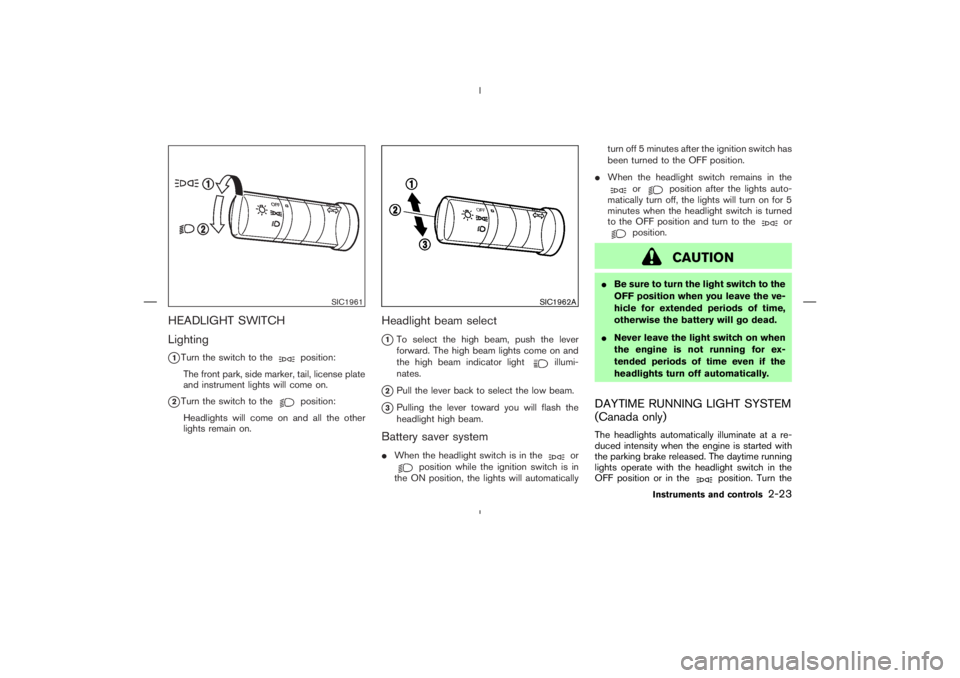
HEADLIGHT SWITCH
Lighting
�1Turn the switch to the
position:
The front park, side marker, tail, license plate
and instrument lights will come on.
�2Turn the switch to the
position:
Headlights will come on and all the other
lights remain on.
Headlight beam select
�1To select the high beam, push the lever
forward. The high beam lights come on and
the high beam indicator light
illumi-
nates.
�2Pull the lever back to select the low beam.
�3Pulling the lever toward you will flash the
headlight high beam.
Battery saver system�When the headlight switch is in the
or
position while the ignition switch is in
the ON position, the lights will automaticallyturn off 5 minutes after the ignition switch has
been turned to the OFF position.
�When the headlight switch remains in the
or
position after the lights auto-
matically turn off, the lights will turn on for 5
minutes when the headlight switch is turned
to the OFF position and turn to the
or
position.
CAUTION
�Be sure to turn the light switch to the
OFF position when you leave the ve-
hicle for extended periods of time,
otherwise the battery will go dead.
�Never leave the light switch on when
the engine is not running for ex-
tended periods of time even if the
headlights turn off automatically.DAYTIME RUNNING LIGHT SYSTEM
(Canada only)The headlights automatically illuminate at a re-
duced intensity when the engine is started with
the parking brake released. The daytime running
lights operate with the headlight switch in the
OFF position or in the
position. Turn the
SIC1961
SIC1962A
Instruments and controls
2-23
�
04.5.17/Z33-D/V5.0
�
Page 73 of 262
headlight switch to the
position for full
illumination when driving at night.
If the parking brake is applied before the engine
is started, the daytime running lights do not
illuminate. The daytime running lights illuminate
once the parking brake is released. The daytime
running lights will remain on until the ignition
switch is turned off.
WARNING
When the daytime running light system
is active, tail lights on your vehicle are
not on. It is necessary at dusk to turn on
your headlights. Failure to do so could
cause an accident injuring yourself and
others.
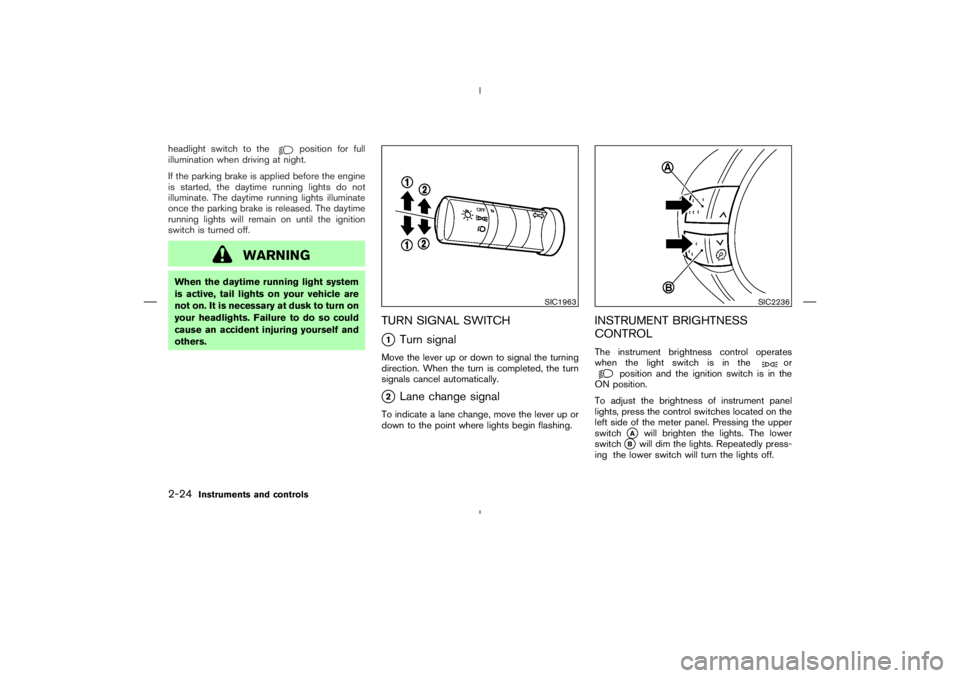
TURN SIGNAL SWITCH�1
Turn signal
Move the lever up or down to signal the turning
direction. When the turn is completed, the turn
signals cancel automatically.�2
Lane change signal
To indicate a lane change, move the lever up or
down to the point where lights begin flashing.
INSTRUMENT BRIGHTNESS
CONTROLThe instrument brightness control operates
when the light switch is in the
or
position and the ignition switch is in the
ON position.
To adjust the brightness of instrument panel
lights, press the control switches located on the
left side of the meter panel. Pressing the upper
switch�A
will brighten the lights. The lower
switch
�B
will dim the lights. Repeatedly press-
ing the lower switch will turn the lights off.
SIC1963
SIC2236
2-24
Instruments and controls
�
04.5.17/Z33-D/V5.0
�
Page 78 of 262

120W (10A) for both the front and
rear power outlets. Do not use
double adapters or more than one
accessory with a single power outlet.
�Use this power outlet with the engine
running. (If the engine is stopped,
this could result in a discharged bat-
tery.)
�Avoid using when the air conditioner,
headlights or rear window defroster
is on.�Before inserting or disconnecting a
plug, be sure to turn off the power
switch of electrical accessory being
used or the ACC power of the vehicle.
�Push the plug in as far as it will go. If
good contact is not made, the plug
may overheat or the internal tem-
perature fuse may blow.
�Do not allow water to contact the
socket. When not in use, be sure to
close the lid.
INSTRUMENT POCKET (except for
navigation system equipped models)�aTo open the lid, push the button.
�bTo close, pull the lid down.
WARNING
�The instrument pocket should not be
used while driving so full attention
may be given to vehicle operation.
SIC1968
Rear
SIC2259
STORAGE
Instruments and controls
2-29
�
04.5.17/Z33-D/V5.0
�
Page 82 of 262
REAR FLOOR BOXThe rear floor box is located behind the passen-
ger’s seat. Fold the seat to use the rear floor box.
When locking or unlocking the rear floor box, use
the master key.
The rear floor box may be opened by pulling the
handle. The rear floor box light illuminates when
the box lid is opened with the headlight switch
ON.The rear floor box has another storage space
under the bottom plate.
WARNING
Keep rear floor box lid closed while
driving to help prevent injury in an acci-
dent or a sudden stop.
REAR PARCEL BOXPush the upper part of the lid to open the rear
parcel box. For models without the Navigation
system, two boxes are available.
WARNING
�The rear parcel box should not be
used while driving so full attention
may be given to vehicle operation.
�Keep rear parcel box lid closed while
driving to help prevent injury in an
SIC1975
SIC2377
SIC1977
Instruments and controls
2-33
�
04.5.17/Z33-D/V5.0
�
Page 99 of 262
Keep pressing the UNLOCK button until the
windows are fully open.
To stop lowering the windows, release the UN-
LOCK button.
To start lowering the windows again, press the
UNLOCK button again for 3 more seconds.Releasing the rear hatch/trunk lid1. Push the HATCH/TRUNK button on the key-
fobfor longer than 0.5 seconds with the key
removed from the ignition key cylinder.
2. The rear hatch (Coupe) or trunk lid (Road-
ster) opens.Using the panic alarmIf you are near your vehicle and feel threatened,
you may activate the alarm to call attention as
follows:
1. Push the PANIC button on the keyfob for
longer than 0.5 secondswith the key
removed from the ignition key cylinder.
2. The theft warning alarm and headlights will
stay on for 30 seconds.
3. The panic alarm stops when:
�It has run for 30 seconds, or�The LOCK or the UNLOCK button is
pressed, or
�The PANIC or the HATCH/TRUNK button is
pushed on the keyfobfor longer than 0.5
seconds.3-6
Pre-driving checks and adjustments
�
04.5.17/Z33-D/V5.0
�
Page 109 of 262
CAUTION
Store the main sun visor after storing
the extension sun visor.
To use the extension sun visor, pull it out from
the main sun visor as shown.
INSIDE MIRRORThe night position will reduce glare from the
headlights of vehicles behind you at night.
WARNING
Use the night position only when neces-
sary, because it reduces rear view clar-
ity.
SPA1592A
PD1006M
EXTENSIONSUNVISOR (if so
equipped)MIRRORS3-16
Pre-driving checks and adjustments
�
04.5.17/Z33-D/V5.0
�
Page 110 of 262
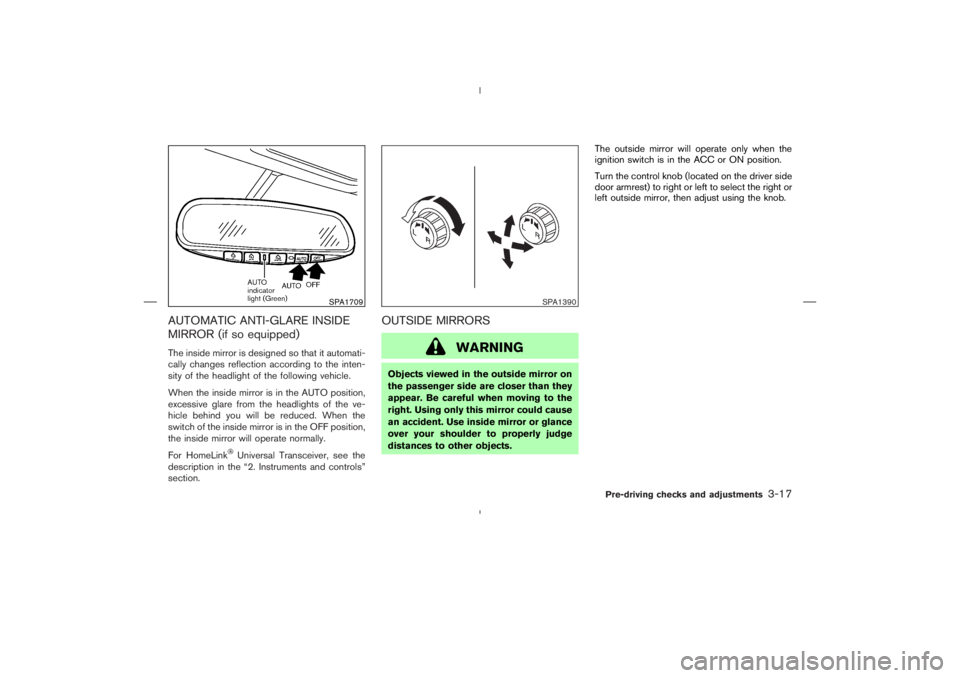
AUTOMATIC ANTI-GLARE INSIDE
MIRROR (if so equipped)The inside mirror is designed so that it automati-
cally changes reflection according to the inten-
sity of the headlight of the following vehicle.
When the inside mirror is in the AUTO position,
excessive glare from the headlights of the ve-
hicle behind you will be reduced. When the
switch of the inside mirror is in the OFF position,
the inside mirror will operate normally.
For HomeLink
Universal Transceiver, see the
description in the “2. Instruments and controls”
section.
OUTSIDE MIRRORS
WARNING
Objects viewed in the outside mirror on
the passenger side are closer than they
appear. Be careful when moving to the
right. Using only this mirror could cause
an accident. Use inside mirror or glance
over your shoulder to properly judge
distances to other objects.The outside mirror will operate only when the
ignition switch is in the ACC or ON position.
Turn the control knob(located on the driver side
door armrest) to right or left to select the right or
left outside mirror, then adjust using the knob.
SPA1709
SPA1390
Pre-driving checks and adjustments
3-17
�
04.5.17/Z33-D/V5.0
�

