Page 5 of 240

SAFETY AND ENVIRONMENT PROTECTION
Warning symbols in this guide
How can you reduce the risk of personal injury and prevent possible
damage to others, your vehicle and its equipment? In this guide, answers
to such questions are contained in comments highlighted by the warning
triangle symbol. These comments should be read and observed.
Warning symbols on your vehicle
When you see this symbol, it is
imperative that you consult the
relevant section of this guide before
touching or attempting adjustment
of any kind.
Protecting the environment
We must all play our part in
protecting the environment. Correct
vehicle usage and the authorized
disposal of waste, cleaning and
lubrication materials are significant
steps towards this aim. Information in this respect is highlighted in this
guide with the tree symbol.
BREAKING-IN YOUR VEHICLE
Your vehicle does not need an extensive break-in. Try not to drive
continuously at the same speed for the first 1,000 miles (1,600 km) of
new vehicle operation. Vary your speed to allow parts to adjust
themselves to other parts.
Drive your new vehicle at least 500 miles (800 km) before towing a
trailer.
Do not add friction modifier compounds or special break-in oils during
the first few thousand miles (kilometers) of operation, since these
additives may prevent piston ring seating. SeeEngine oilin the
Maintenance and Specificationschapter for more information on oil
usage.
2004 Grand Marquis(grn)
Owners Guide (post-2002-fmt)
USA English(fus)
Introduction
5
Page 13 of 240
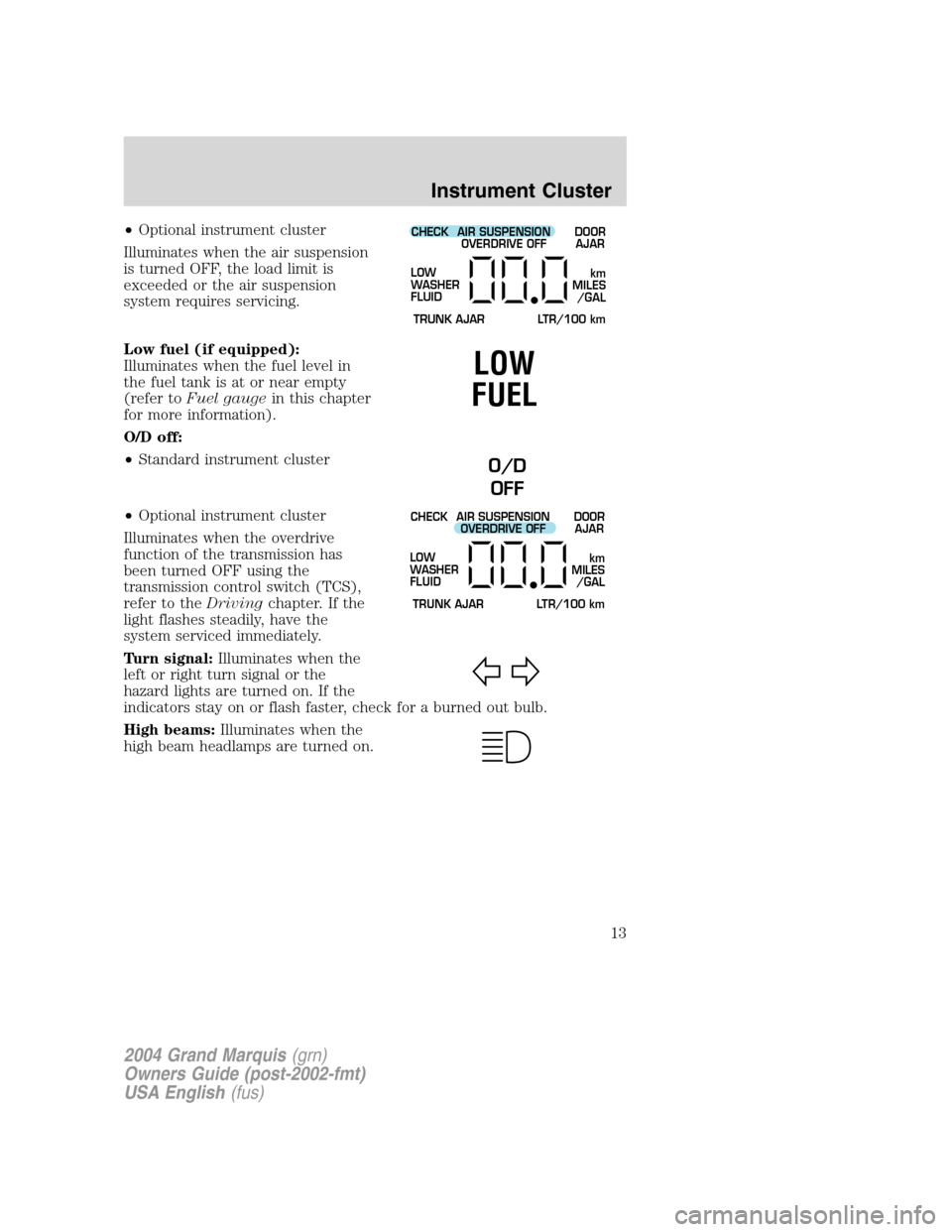
•Optional instrument cluster
Illuminates when the air suspension
is turned OFF, the load limit is
exceeded or the air suspension
system requires servicing.
Low fuel (if equipped):
Illuminates when the fuel level in
the fuel tank is at or near empty
(refer toFuel gaugein this chapter
for more information).
O/D off:
•Standard instrument cluster
•Optional instrument cluster
Illuminates when the overdrive
function of the transmission has
been turned OFF using the
transmission control switch (TCS),
refer to theDrivingchapter. If the
light flashes steadily, have the
system serviced immediately.
Turn signal:Illuminates when the
left or right turn signal or the
hazard lights are turned on. If the
indicators stay on or flash faster, check for a burned out bulb.
High beams:Illuminates when the
high beam headlamps are turned on.CHECK
TRUNK AJAR LTR/100 kmAIR SUSPENSION
OVERDRIVE OFFDOOR
AJAR
LOW
WASHER
FLUID
km
MILES
/GAL
LOW
FUEL
O/D
OFF
CHECK
TRUNK AJAR LTR/100 kmAIR SUSPENSION
OVERDRIVE OFFDOOR
AJAR
LOW
WASHER
FLUID
km
MILES
/GAL
2004 Grand Marquis(grn)
Owners Guide (post-2002-fmt)
USA English(fus)
Instrument Cluster
13
Page 14 of 240

MESSAGE CENTER INDICATOR LIGHTS (IF EQUIPPED)
Speed control:This light comes on
when either the SET/ACCEL or
RESUME controls are pressed. It
turns off when the speed control OFF control is pressed, the brake is
applied or the ignition is turned to the OFF position.
Door ajar:Illuminates when one of
the doors is not completely shut and
the ignition is turned to ON. With
the ignition ON, this light will flash
six times (if a door is open). With
the ignition in RUN position, a tone
will sound for one second (if a door
is open).
Low washer fluid:Momentarily
illuminates when the ignition is
turned to ON and will stay on when
the windshield washer fluid is low.
Trunk ajar:If the trunk is not
completely closed, this light comes
on when you turn the ignition to
ON. With the ignition ON, this light
will flash five times and sound a
tone for one second, then the light
remains on (if the trunk is open).
Headlamps on warning chime:Sounds when the headlamps or parking
lamps are on, the ignition is off (the key is not in the ignition) and the
driver’s door is opened.
Key-in-ignition warning chime:Sounds when the key is left in the
ignition in the OFF/LOCK or ACCESSORY position and the driver’s door
is opened.
SPEED CONTROL
CHECK
TRUNK AJAR LTR/100 kmAIR SUSPENSION
OVERDRIVE OFFDOOR
AJAR
LOW
WASHER
FLUID
km
MILES
/GAL
CHECK
TRUNK AJAR LTR/100 kmAIR SUSPENSION
OVERDRIVE OFFDOOR
AJAR
LOW
WASHER
FLUID
km
MILES
/GAL
CHECK
TRUNK AJAR LTR/100 kmAIR SUSPENSION
OVERDRIVE OFFDOOR
AJAR
LOW
WASHER
FLUID
km
MILES
/GAL
2004 Grand Marquis(grn)
Owners Guide (post-2002-fmt)
USA English(fus)
Instrument Cluster
14
Page 17 of 240
Odometer:Registers the total kilometers (miles) of the vehicle.
•Standard instrument cluster
•Optional instrument cluster
Refer toElectronic Message Center
in theDriver Controlschapter on
how to switch the display from
Metric to English.
Trip odometer:Registers the kilometers (miles) of individual journeys.
•Standard instrument cluster
To reset, depress the control.
MPH km/h10 203040506070
80
90
10 0
11 0
12 0
20 406080100
120
140
160
180
200
0000000
0 0 0 0
km/h
MPH
km S
MPH km/h10 203040506070
80
90
10 0
11 0
12 0
20 406080100
120
140
160
180
200
0000000
0 0 0 0
2004 Grand Marquis(grn)
Owners Guide (post-2002-fmt)
USA English(fus)
Instrument Cluster
17
Page 67 of 240
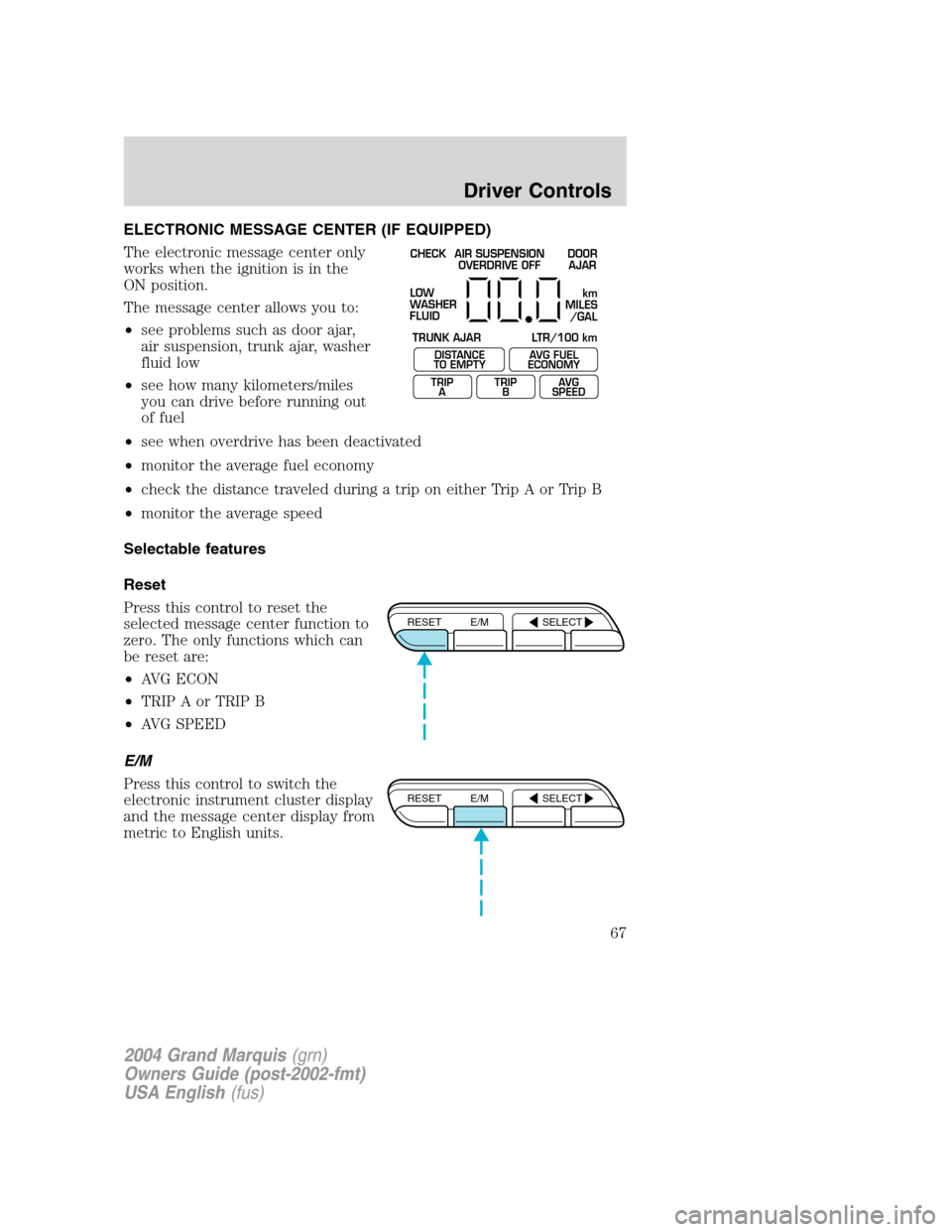
ELECTRONIC MESSAGE CENTER (IF EQUIPPED)
The electronic message center only
works when the ignition is in the
ON position.
The message center allows you to:
•see problems such as door ajar,
air suspension, trunk ajar, washer
fluid low
•see how many kilometers/miles
you can drive before running out
of fuel
•see when overdrive has been deactivated
•monitor the average fuel economy
•check the distance traveled during a trip on either Trip A or Trip B
•monitor the average speed
Selectable features
Reset
Press this control to reset the
selected message center function to
zero. The only functions which can
be reset are:
•AVG ECON
•TRIP A or TRIP B
•AVG SPEED
E/M
Press this control to switch the
electronic instrument cluster display
and the message center display from
metric to English units.
CHECK
TRUNK AJAR LTR/100 kmAIR SUSPENSION
OVERDRIVE OFFDOOR
AJAR
LOW
WASHER
FLUID
DISTANCE
TO EMPTY
TRIP
AAVG FUEL
ECONOMY
TRIP
BAVG
SPEED
km
MILES
/GAL
RESET E/M SELECT
RESET E/M SELECT
2004 Grand Marquis(grn)
Owners Guide (post-2002-fmt)
USA English(fus)
Driver Controls
67
Page 68 of 240

Select
Each press of the SELECT control
will select a different function.
•Press the right side of the control
to advance the function to the
right.
•Press the left side of the control
to advance the function to the
left.
To reset any function:
1. Push either the right or left side of the SELECT control to choose the
desired function.
2. Press the RESET control and the
selected message center function
will be reset to zero.
Message center functions
DISTANCE TO EMPTY (DTE)
This function estimates
approximately how far you can drive
with the fuel remaining in your tank
under normal driving conditions.
Remember to turn the ignition OFF
when refueling to allow this feature to correctly detect the added fuel.
The DTE function will flash for 5 seconds and sound a tone for 1 second
when you have approximately:
•80 km (50 miles) left before you run out of fuel
•40 km (25 miles)
•16 km (10 miles)
RESET E/M SELECT
RESET E/M SELECT
DISTANCE
TO EMPTY
TRIP
AAVG FUEL
ECONOMY
TRIP
BAVG
SPEED
2004 Grand Marquis(grn)
Owners Guide (post-2002-fmt)
USA English(fus)
Driver Controls
68
Page 69 of 240

The message center will remain in
the DTE function until the SELECT
control is pressed to change
functions.
DTE is calculated using a running
average fuel economy, which is
based on your recent driving history
of 800 km (500 miles). This value is
not the same as the average fuel
economy display. The running average fuel economy is reinitialized to a
factory default value if the battery is disconnected.
If“CO”or“CS”is displayed, there is a problem with the fuel indication
system and you should contact your dealer for service as soon as
possible.
AVG FUEL ECONOMY (average fuel economy)
Select this function to display your
average fuel economy in liters/
100 km or miles/gallon.
If you calculate your average fuel
economy by dividing miles traveled by gallons used, your figure may be
different than displayed for the following reasons:
•your vehicle was not perfectly level during fill-up
•differences in the automatic shut-off points on the fuel pumps at
service stations
•variations in top-off procedure from one fill-up to another
•rounding of the displayed values to the nearest 0.1 liter (gallons)
Press the RESET control while AVG
ECON is displayed to reset the
function.
The average displayed is the average
since the last reset.RESET E/M SELECT
TRIP
ATRIP
BAVG
SPEED
DISTANCE
TO EMPTYAVG FUEL
ECONOMY
RESET E/M SELECT
2004 Grand Marquis(grn)
Owners Guide (post-2002-fmt)
USA English(fus)
Driver Controls
69
Page 70 of 240
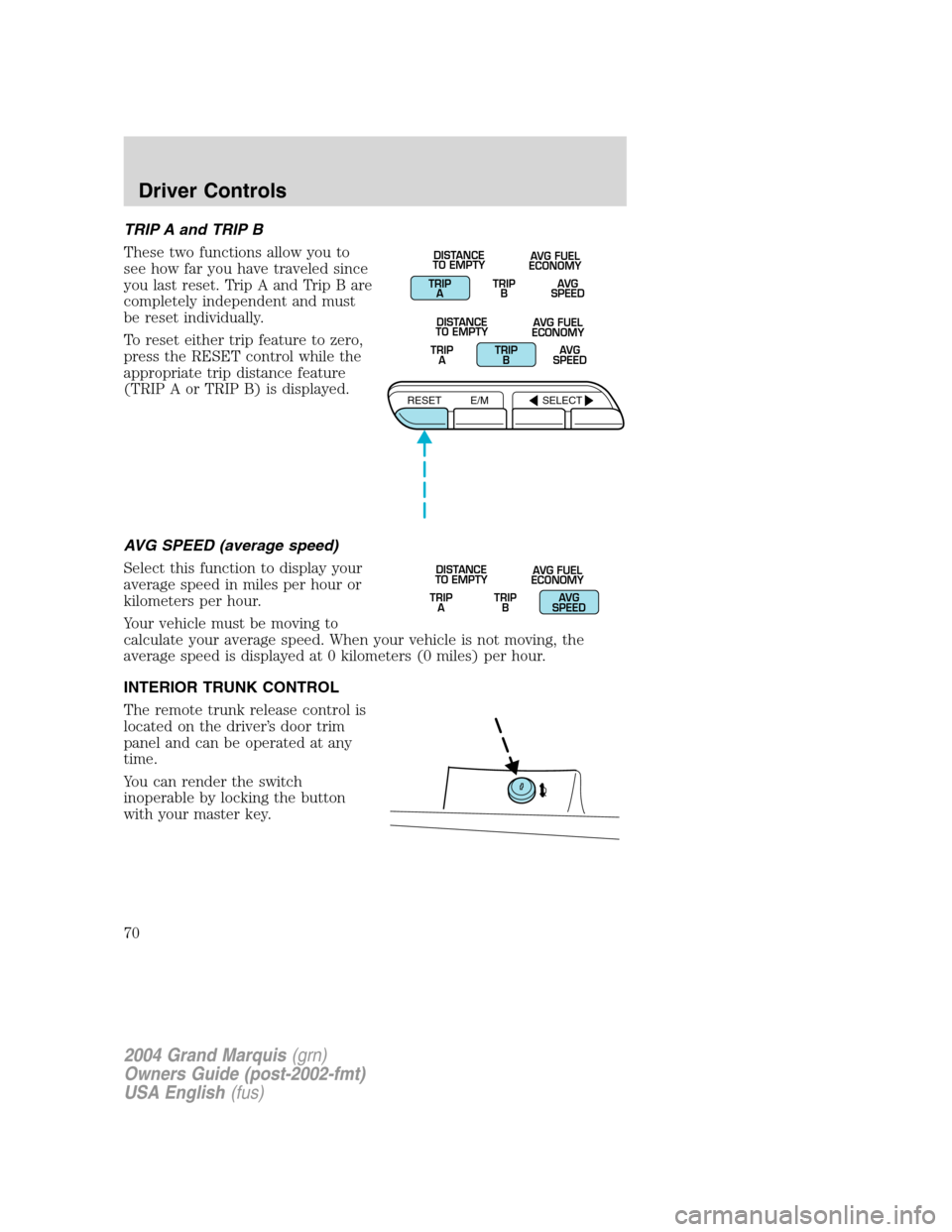
TRIP A and TRIP B
These two functions allow you to
see how far you have traveled since
you last reset. Trip A and Trip B are
completely independent and must
be reset individually.
To reset either trip feature to zero,
press the RESET control while the
appropriate trip distance feature
(TRIP A or TRIP B) is displayed.
AVG SPEED (average speed)
Select this function to display your
average speed in miles per hour or
kilometers per hour.
Your vehicle must be moving to
calculate your average speed. When your vehicle is not moving, the
average speed is displayed at 0 kilometers (0 miles) per hour.
INTERIOR TRUNK CONTROL
The remote trunk release control is
located on the driver’s door trim
panel and can be operated at any
time.
You can render the switch
inoperable by locking the button
with your master key.
TRIP
ATRIP
BAVG
SPEED DISTANCE
TO EMPTYAVG FUEL
ECONOMY
TRIP
ATRIP
BAVG
SPEED DISTANCE
TO EMPTYAVG FUEL
ECONOMY
RESET E/M SELECT
TRIP
ATRIP
BAVG
SPEED DISTANCE
TO EMPTYAVG FUEL
ECONOMY
2004 Grand Marquis(grn)
Owners Guide (post-2002-fmt)
USA English(fus)
Driver Controls
70
