Page 7 of 434

ContentsOperation......................................... 237
The first 1000 miles (1500 km) ......... 238
Driving instructions ............................ 239
Drive sensibly – save fuel ............. 239
Drinking and driving ..................... 239
Pedals .......................................... 239
Power assistance ......................... 240
Brakes .......................................... 240
Driving off..................................... 242
Parking ......................................... 242
Tires ............................................. 243
Hydroplaning ................................ 243
Tire traction .................................. 244
Tire speed rating .......................... 244
Winter driving instructions ........... 245
Standing water ............................. 246
Passenger compartment .............. 246
Driving abroad .............................. 246Control and operation of radio
transmitters ................................. 247
Catalytic converter ....................... 247
Emission control .......................... 248
Coolant temperature .................... 249
At the gas station .............................. 250
Refuelling ..................................... 250
Check regularly and before
a long trip ..................................... 252
Engine compartment ......................... 253
Hood ............................................ 253
Engine oil ..................................... 255
Transmission fluid level ................ 258
Oil level in the ABC system .......... 258
Coolant ........................................ 258
Battery ......................................... 260
Windshield washer system and
headlamp cleaning system ........... 261Tires and wheels................................ 262
Important guidelines .................... 262
Life of tires................................... 263
Direction of rotation..................... 263
Checking tire inflation pressure ... 263
Rotating wheels ........................... 267
Winter driving .................................... 268
Winter tires .................................. 268
Block heater (Canada only) .......... 269
Snow chains................................. 269
Maintenance...................................... 271
Clearing the service indicator ...... 271
Service term exceeded ................ 272
Calling up the service indicator .... 272
Resetting the service indicator .... 272
Vehicle care....................................... 274
Cleaning and care of the vehicle .. 274
Page 27 of 434
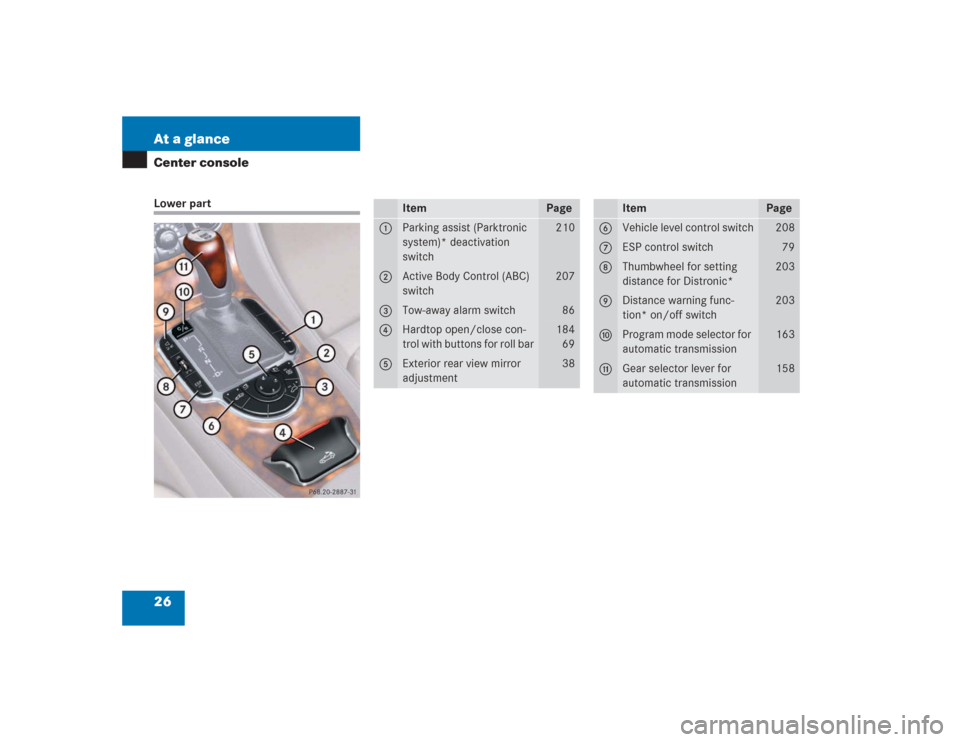
26 At a glanceCenter consoleLower part
Item
Page
1
Parking assist (Parktronic
system)* deactivation
switch
210
2
Active Body Control (ABC)
switch
207
3
Tow-away alarm switch
86
4
Hardtop open/close con-
trol with buttons for roll bar
184
69
5
Exterior rear view mirror
adjustment
38
Item
Page
6
Vehicle level control switch
208
7
ESP control switch
79
8
Thumbwheel for setting
distance for Distronic*
203
9
Distance warning func-
tion* on/off switch
203
a
Program mode selector for
automatic transmission
163
b
Gear selector lever for
automatic transmission
158
Page 92 of 434
91 Controls in detail
Locking and unlocking
Factory setting
Global unlocking�
Press button Œ.
All turn signals flash once. The locking
knobs in the doors move up.
The vehicle will lock again automatically
within approximately 40 seconds of un-
locking if:
�
neither door nor trunk is opened
�
the SmartKey is not inserted in the
starter switch
�
the central locking switch is not acti-
vated
Global locking
�
Press button ‹.
All turn signals flash three times. The lock-
ing knobs in the doors move down.Selective setting
If you frequently travel alone, you may wish
to reprogram the SmartKey so that
pressingŒ only unlocks the driver’s
door, interior lockable storage compart-
ments and the fuel filler flap.
�
Press and hold buttons Œ and ‹
simultaneously for about six seconds
until battery check lamp5 flashes
twice.
The SmartKey will then function as fol-
lows:
Unlocking driver’s door and fuel filler flap
�
Press button Πonce.
Global unlocking
�
Press button Πtwice.
Global locking
�
Press button ‹.
Warning!
G
When leaving the vehicle, always remove the
SmartKey from the starter switch, take the
SmartKey with KEYLESS-GO
* with you and
lock the vehicle. Do not leave children unat-
tended in the vehicle, or with access to an
unlocked vehicle. It is possible for children
to open a locked door from the inside, which
could result in an accident and/or serious
injury.
!To prevent possible malfunction, avoid
exposing the SmartKey to high levels of
electromagnetic radiation.iYou can also open and close the power
windows (
�page 181) and the retract-
able hardtop using the SmartKey
(
�page 188).
Page 95 of 434
94 Controls in detailLocking and unlocking
Important notes on using KEYLESS-GO�
You can also use the SmartKey with
KEYLESS-GO like a normal SmartKey
(�page 90).
�
You can combine KEYLESS-GO func-
tions with normal SmartKey functions
(e.g. unlocking with KEYLESS-GO and
locking with the remote control).
�
Always carry the SmartKey with
KEYLESS-GO with you.
�
Never store the SmartKey with
KEYLESS-GO together with:�
Electronic items such as a cellular
phone or another SmartKey with
KEYLESS-GO
�
Metallic objects such as coins or
metal foil
Doing so could impair the function of
the KEYLESS-GO system.
Warning!
G
When leaving the vehicle, always remove the
SmartKey from the starter switch, take the
SmartKey with KEYLESS-GO with you and
lock the vehicle. Do not leave children unat-
tended in the vehicle, or with access to an
unlocked vehicle. Unsupervised use of vehi-
cle equipment may cause an accident
and/or serious personal injury.!To prevent possible malfunction, avoid
exposing the SmartKey with
KEYLESS-GO to high levels of electro-
magnetic radiation.
iYou can also close the power windows
(�page 181) and the retractable hard-
top using the SmartKey with
KEYLESS-GO (
�page 188).
iIf the vehicle has been parked for a
longer period of time, you must pull the
door handle in order to activate the
KEYLESS-GO function.
When you unlock the vehicle, the SBC
brake system is activated.
Page 112 of 434
111 Controls in detailSeats
Switching off rapid seat heating�
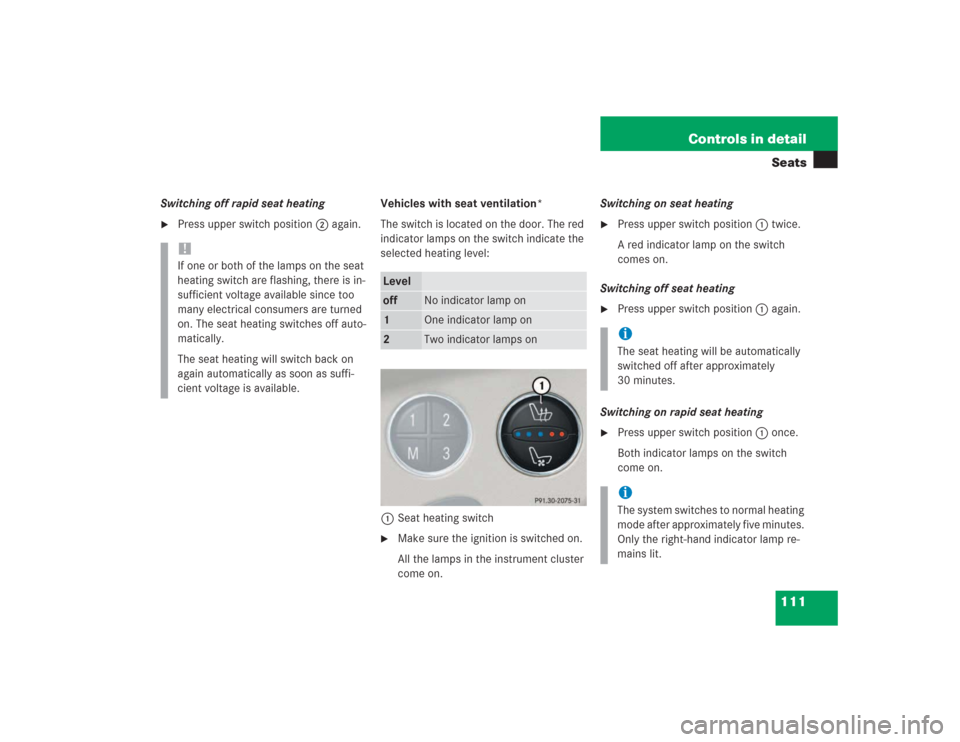
Press upper switch position2 again. Vehicles with seat ventilation*
The switch is located on the door. The red
indicator lamps on the switch indicate the
selected heating level:
1Seat heating switch
�
Make sure the ignition is switched on.
All the lamps in the instrument cluster
come on.Switching on seat heating
�
Press upper switch position1 twice.
A red indicator lamp on the switch
comes on.
Switching off seat heating
�
Press upper switch position1 again.
Switching on rapid seat heating
�
Press upper switch position1 once.
Both indicator lamps on the switch
come on.
!If one or both of the lamps on the seat
heating switch are flashing, there is in-
sufficient voltage available since too
many electrical consumers are turned
on. The seat heating switches off auto-
matically.
The seat heating will switch back on
again automatically as soon as suffi-
cient voltage is available.
Leveloff
No indicator lamp on
1
One indicator lamp on
2
Two indicator lamps on
iThe seat heating will be automatically
switched off after approximately
30 minutes. iThe system switches to normal heating
mode after approximately five minutes.
Only the right-hand indicator lamp re-
mains lit.
Page 113 of 434
112 Controls in detailSeatsSwitching off rapid seat heating�
Press upper switch position1 twice.
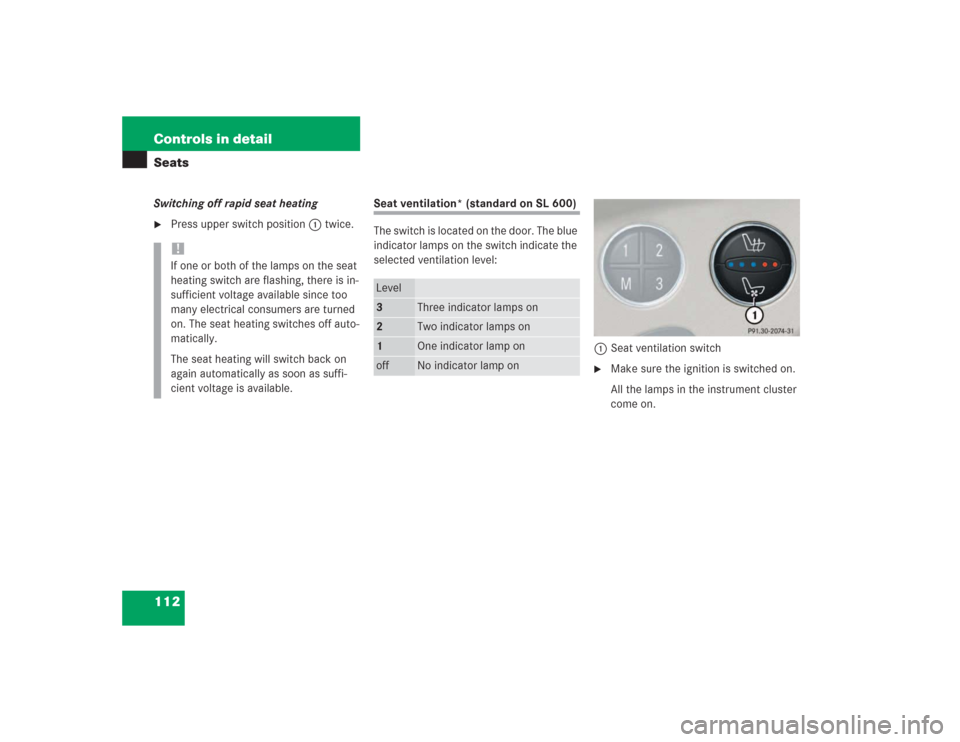
Seat ventilation* (standard on SL 600)
The switch is located on the door. The blue
indicator lamps on the switch indicate the
selected ventilation level:
1Seat ventilation switch
�
Make sure the ignition is switched on.
All the lamps in the instrument cluster
come on.
!If one or both of the lamps on the seat
heating switch are flashing, there is in-
sufficient voltage available since too
many electrical consumers are turned
on. The seat heating switches off auto-
matically.
The seat heating will switch back on
again automatically as soon as suffi-
cient voltage is available.
Level3
Three indicator lamps on
2
Two indicator lamps on
1
One indicator lamp on
off
No indicator lamp on
Page 114 of 434
113 Controls in detailSeats
Switching on seat ventilation�
Press switch1.
Three blue indicator lamps on the
switch come on.
�
Continue pressing switch 1 until the
desired seat ventilation level is
reached.Switching off seat ventilation
�
Press switch1 repeatedly until all in-
dicator lamps go out.iIn normal operation the seat ventilation
will switch off automatically after about
30 minutes. !If one or all of the lamps on the seat
ventilation switch are flashing, there is
insufficient voltage available since too
many electrical consumers are turned
on. The seat ventilation switches off au-
tomatically.
The seat ventilation will switch back on
again automatically as soon as suffi-
cient voltage is available.
Page 132 of 434
131 Controls in detail
Control system
Menus, submenus and functions
Menu 1
Menu 2
Menu 3
Menu 4
Menu 5
Menu 6
Menu 7
Menu 8
Standard dis-
play
AUDIO
NAVI
Distronic*
Malfunction
memory
Settings
Trip computer
Telephone
Commands/submenusDigital speed-
ometer
Select radio
station
Activate
route guid-
ance
Call up set-
tings
Call up malfunc-
tion messages
Reset to factory
settings
Fuel consump-
tion statistics af-
ter start
Load phone
book
Call up FSS
Select satel-
lite radio sta-
tion*
(USA only)
Instrument clus-
ter submenu
Fuel consump-
tion statistics
since the last re-
set
Search for
name in
phone book
Check tire
pressure*
Operate CD
player
Lighting sub-
menu
Call up range
Check engine
oil level
Vehicle sub-
menuConvenience
submenu