305 Operation
Vehicle care
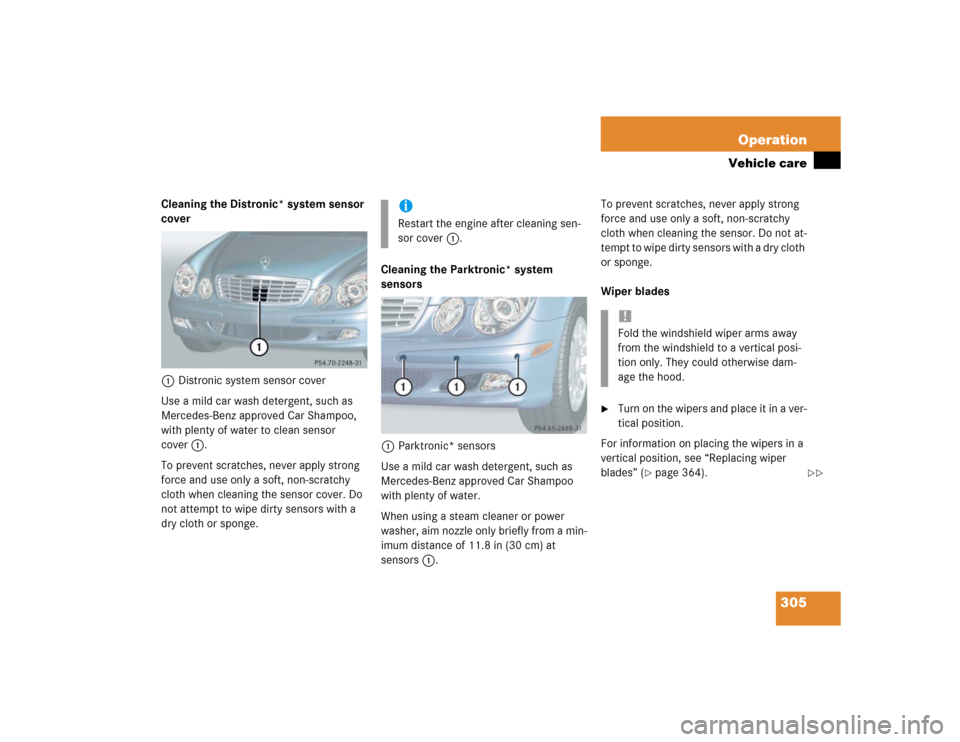
Cleaning the Distronic* system sensor
cover
1Distronic system sensor cover
Use a mild car wash detergent, such as
Mercedes-Benz approved Car Shampoo,
with plenty of water to clean sensor
cover1.
To prevent scratches, never apply strong
force and use only a soft, non-scratchy
cloth when cleaning the sensor cover. Do
not attempt to wipe dirty sensors with a
dry cloth or sponge.Cleaning the Parktronic* system
sensors
1Parktronic* sensors
Use a mild car wash detergent, such as
Mercedes-Benz approved Car Shampoo
with plenty of water.
When using a steam cleaner or power
washer, aim nozzle only briefly from a min-
imum distance of 11.8 in (30 cm) at
sensors1.To prevent scratches, never apply strong
force and use only a soft, non-scratchy
cloth when cleaning the sensor. Do not at-
tempt to wipe dirty sensors with a dry cloth
or sponge.
Wiper blades
�
Turn on the wipers and place it in a ver-
tical position.
For information on placing the wipers in a
vertical position, see “Replacing wiper
blades” (
�page 364).
iRestart the engine after cleaning sen-
sor cover1.
!Fold the windshield wiper arms away
from the windshield to a vertical posi-
tion only. They could otherwise dam-
age the hood.
��
341 Practical hints
What to do if …
Display symbol
Display messages
Possible cause
Possible solution
H
Tire pres. monitor
not activated!
The tire inflation pressure monitor* is un-
able to monitor the tire pressure due to�
the presence of several wheel sensors
in the vehicle.
�
excessive wheel sensor tempera-
tures.
�
a nearby radio interference source.
�
unrecognized wheel sensors mount-
ed.
�
Check the tire pressure at the next
service station.
Tire pres. monitor
Pres. display after
driving a few mins. Re-
activate using R button
The tire pressure is being checked.
Warning!
G
Do not drive with a flat tire. A flat tire affects
the ability to steer or brake the vehicle.
You may lose control of the vehicle. Contin-
ued driving with a flat tire will cause exces-
sive heat build-up and possibly a fire.