Page 219 of 442
219 Controls in detail
Driving systems
Activating Distronic
You can activate Distronic if:�
you are driving between 25 mph
(40km/h) and 110mph (180km/h)
�
the ESP is activated (
�page 76)
If Distronic has not been activated after
pressing the cruise control lever you will
see the message
---
in the multifunction
display.
In the following cases you cannot activate
Distronic:
�
Up to two minutes after starting the en-
gine
�
When you brake
�
If you have set the parking brake
�
If the gear selector lever is in
positionP, R or N
�
If the ESP is switched offSetting the current speed
�
Accelerate or decelerate to the desired
speed.
�
Briefly lift or depress the cruise control
lever.
Distronic is activated and the current
speed is set.
�
Remove your foot from the accelerator
pedal.Setting a higher speed
�
Briefly tip the cruise control lever in the
direction of arrow1 (
�page 218) to
increase vehicle speed in increments
of 5 mph (Canada: 10 km / h).
The new speed is set.
The stored speed is displayed in the
multifunction display for approximately
five seconds (
�page 218), and one or
two segments around the stored speed
come on on the speedometer
(
�page 216).
iIf you do not take your foot off of the
accelerator completely, the following
message will appear in the multifunc-
tion display: Distronic override
. The distance to a
slower moving vehicles in front of you
will not be set. Your vehicle speed will
then be determined only by the accel-
erator pedal position.
iDepressing the accelerator pedal does
not deactivate Distronic. After brief ac-
celeration (e.g. for passing), cruise con-
trol will resume the last speed set.
Page 220 of 442
220 Controls in detailDriving systemsSetting a lower speed�
Briefly tip the cruise control lever in the
direction of arrow2 (
�page 218) to
decrease vehicle speed in increments
of 5 mph (Canada: 10 km / h).
The new speed is set.
The stored speed is displayed in the
multifunction display for approximately
five seconds (
�page 218), and one or
two segments around the stored speed
come on on the speedometer
(
�page 216).Fine adjustment in 1 mph
(Canada: 1 km/h) increments
Faster
�
Briefly tip the cruise control lever in the
direction of arrow4 (
�page 218).Setting stored speed
(“Resume” function)
�
Briefly tip the cruise control lever in the
direction of arrow4 (
�page 218).
Distronic is activated and set to the last
stored speed.
�
Remove your foot from the accelerator
pedal.
iWhen you use the cruise control lever
to decelerate, the transmission will au-
tomatically downshift if the rate of de-
celeration is too low.
Warning!
G
The speed stored in memory should only be
set again if prevailing road conditions per-
mit. Possible acceleration or deceleration
differences arising from returning to preset
speed could cause an accident and / or seri-
ous injury to you and others.
Page 221 of 442
221 Controls in detail
Driving systems
Deactivating Distronic
There are several ways to deactivate the
Distronic system:�
Briefly tip the cruise control lever in the
direction of arrow3 (
�page 218).
or
�
Step on the brake pedal.
Distronic will be deactivated. The last
speed set will be stored in memory.Distronic deactivates automatically when:
�
you set the parking brake
�
you drive slower than 25 mph
(40 km / h)
�
the ESP is active (
�page 76) or you de-
activate the ESP
�
you move the transmission selector le-
ver into positionN
A signal will sound. The
Distronic off
message appears in the multifunction
display for approximately five seconds.Setting the following distance in
Distronic
You can set the specified following dis-
tance for Distronic by varying the time set-
ting between 1.0 and 2.0 seconds. Using
this time setting and the current speed of
your vehicle, Distronic calculates and sets
the required following distance to the vehi-
cle ahead. The set distance will be shown
in the multifunction display field.
The thumbwheel for making the time set-
ting is located on the lower section of the
center console.
iThe following message will appear in
the multifunction display for approxi-
mately five seconds:
Distronic off
.
The last stored speed is deleted when
you turn off the engine.
Warning!
G
Distronic switches off and releases the
brakes when the vehicle decelerates below
the minimum speed of approximately
25 mph (40 km / h) by operation of the sys-
tem. At that time the driver must apply the
brakes in order to reduce vehicle speed fur-
ther or bring it to a stop.
Warning!
G
It is up to the driver to exercise discretion to
select the appropriate setting given road
conditions, traffic, driver’s preferred driving
style and applicable laws and driving recom-
mendations for safe following distance.
Page 222 of 442
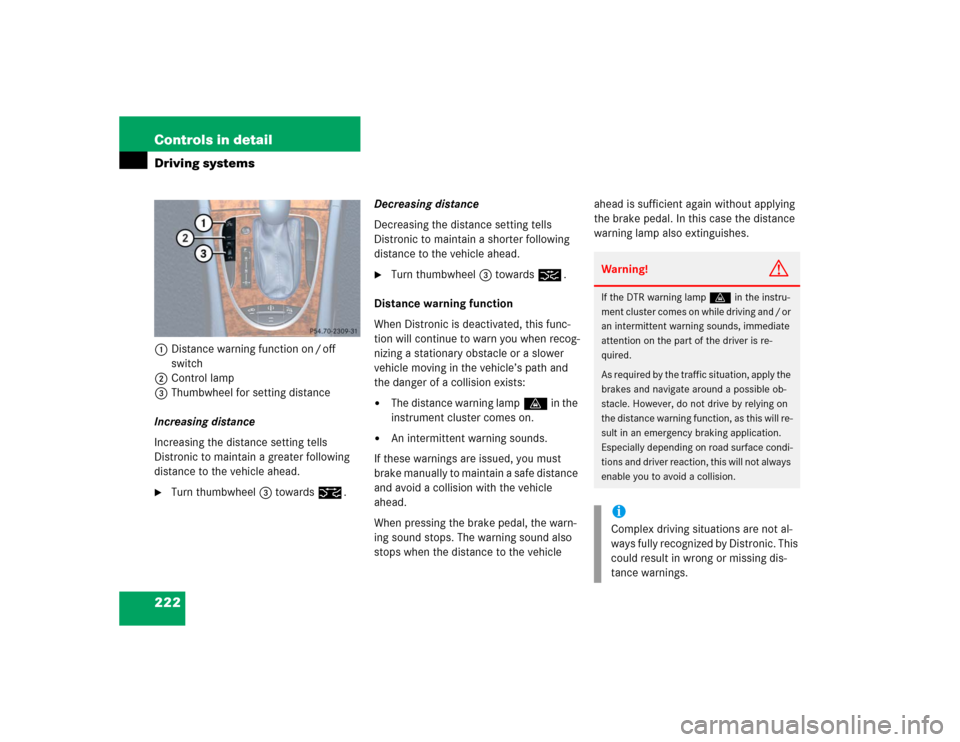
222 Controls in detailDriving systems1Distance warning function on / off
switch
2Control lamp
3Thumbwheel for setting distance
Increasing distance
Increasing the distance setting tells
Distronic to maintain a greater following
distance to the vehicle ahead.�
Turn thumbwheel3 towards¯.Decreasing distance
Decreasing the distance setting tells
Distronic to maintain a shorter following
distance to the vehicle ahead.
�
Turn thumbwheel3 towards®.
Distance warning function
When Distronic is deactivated, this func-
tion will continue to warn you when recog-
nizing a stationary obstacle or a slower
vehicle moving in the vehicle’s path and
the danger of a collision exists:
�
The distance warning lampl in the
instrument cluster comes on.
�
An intermittent warning sounds.
If these warnings are issued, you must
brake manually to maintain a safe distance
and avoid a collision with the vehicle
ahead.
When pressing the brake pedal, the warn-
ing sound stops. The warning sound also
stops when the distance to the vehicle ahead is sufficient again without applying
the brake pedal. In this case the distance
warning lamp also extinguishes.
Warning!
G
If the DTR warning lampl in the instru-
ment cluster comes on while driving and / or
an intermittent warning sounds, immediate
attention on the part of the driver is re-
quired.
As required by the traffic situation, apply the
brakes and navigate around a possible ob-
stacle. However, do not drive by relying on
the distance warning function, as this will re-
sult in an emergency braking application.
Especially depending on road surface condi-
tions and driver reaction, this will not always
enable you to avoid a collision.iComplex driving situations are not al-
ways fully recognized by Distronic. This
could result in wrong or missing dis-
tance warnings.
Page 224 of 442
224 Controls in detailDriving systemsThe most likely cause for a malfunctioning
system is a dirty sensor (located behind
the hood grille), especially at times of snow
and ice or heavy rain. In such a case,
Distronic will switch off, and the message Currently unavailable
see oper. manual
appears in the multifunction display.
For cleaning and care of the Distronic sen-
sor, see “Cleaning the Distronic system
sensor” (
�page 305).Turns and bends
In turns or bends, Distronic may not detect
a moving vehicle in front, or it may detect
one too soon. This may cause your vehicle
to brake late or unexpectedly.
iIf the message “Distronic - clean sen-
sor!” See oper. manual disappears dur-
ing driving and the last speed stored
flashes for approximately five seconds,
the dirt (e.g. slush) has dissolved;
Distronic works again.
Page 227 of 442
227 Controls in detail
Driving systems
Vehicle level control
Your vehicle automatically adjusts its ride
height to�
reduce fuel consumption
�
increase vehicle safety
The following vehicle chassis ride heights
can be selected:
�
Normal
�
RaisedThe vehicle chassis ride height is raised or
lowered according to the selected level
setting and to the vehicle speed:
�
At a speed above approximately above
68 mph (110 km / h) and the sporty
suspension style selected
(�page 226), ride height is reduced
automatically by up to approximately
0.6in (15mm).
�
With decreasing speed, the ride height
is again raised to the “Normal” level.Select the “Raised” level only when re-
quired by current driving conditions. Oth-
erwise
�
fuel consumption may increase
�
handling may be impaired
iThese height adjustments are so small
that you may not notice any change.
Warning!
G
To help avoid personal injury, keep hands
and feet away from wheel housing area, and
stay away from under the vehicle when low-
ering the vehicle chassis.
Page 228 of 442
228 Controls in detailDriving systemsThe following vehicle level settings can be
selected when the vehicle is stationary and
the engine is running:
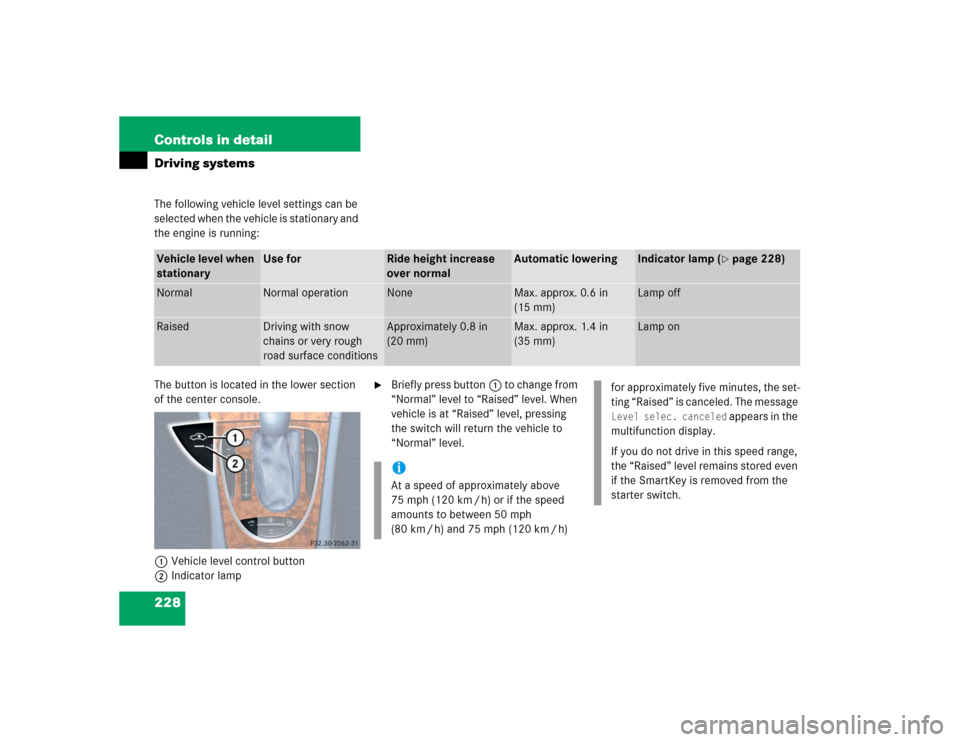
The button is located in the lower section
of the center console.
1Vehicle level control button
2Indicator lamp
�
Briefly press button1 to change from
“Normal” level to “Raised” level. When
vehicle is at “Raised” level, pressing
the switch will return the vehicle to
“Normal” level.
Vehicle level when
stationary
Use for
Ride height increase
over normal
Automatic lowering
Indicator lamp (
�page 228)
Normal
Normal operation
None
Max. approx. 0.6 in
(15 mm)
Lamp off
Raised
Driving with snow
chains or very rough
road surface conditions
Approximately 0.8 in
(20 mm)
Max. approx. 1.4 in
(35 mm)
Lamp on
iAt a speed of approximately above
75 mph (120 km / h) or if the speed
amounts to between 50 mph
(80 km / h) and 75 mph (120 km / h)
for approximately five minutes, the set-
ting “Raised” is canceled. The message Level selec. canceled
appears in the
multifunction display.
If you do not drive in this speed range,
the “Raised” level remains stored even
if the SmartKey is removed from the
starter switch.
Page 236 of 442
236 Controls in detailLoadingRemoval of ski sack
For removal of the ski sack we recommend
that you contact an authorized
Mercedes-Benz Center.
Split rear bench seat*
To expand the trunk, you can fold down the
left and right rear seat backrests.
The two sections can be folded down sep-
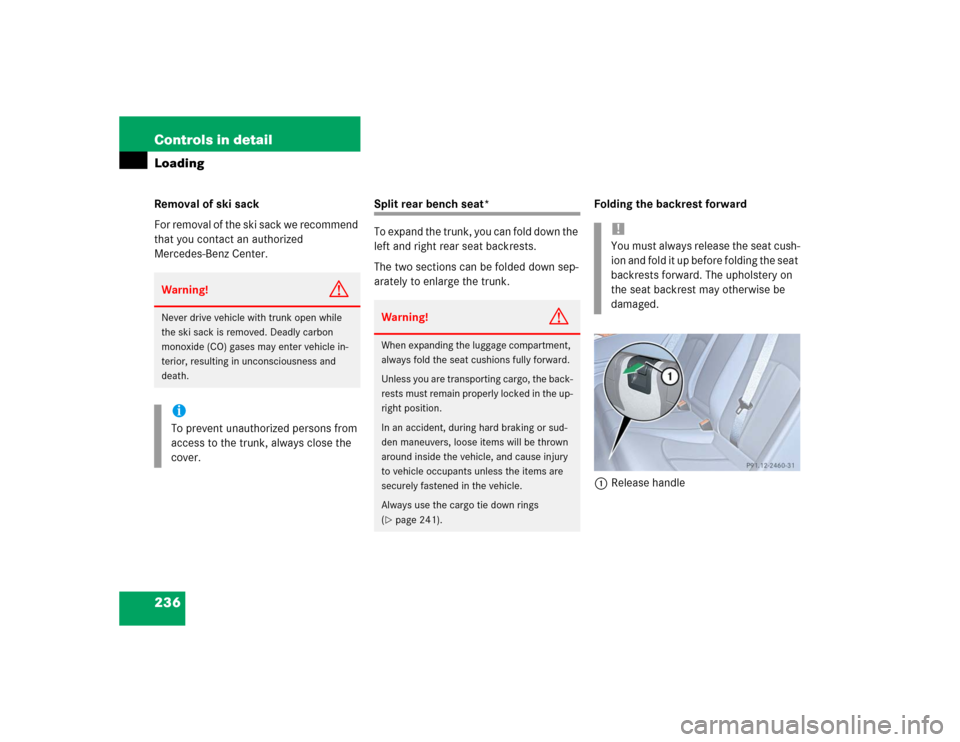
arately to enlarge the trunk.Folding the backrest forward
1Release handle
Warning!
G
Never drive vehicle with trunk open while
the ski sack is removed. Deadly carbon
monoxide (CO) gases may enter vehicle in-
terior, resulting in unconsciousness and
death.iTo prevent unauthorized persons from
access to the trunk, always close the
cover.
Warning!
G
When expanding the luggage compartment,
always fold the seat cushions fully forward.
Unless you are transporting cargo, the back-
rests must remain properly locked in the up-
right position.
In an accident, during hard braking or sud-
den maneuvers, loose items will be thrown
around inside the vehicle, and cause injury
to vehicle occupants unless the items are
securely fastened in the vehicle.
Always use the cargo tie down rings
(�page 241).
!You must always release the seat cush-
ion and fold it up before folding the seat
backrests forward. The upholstery on
the seat backrest may otherwise be
damaged.
