Page 93 of 418

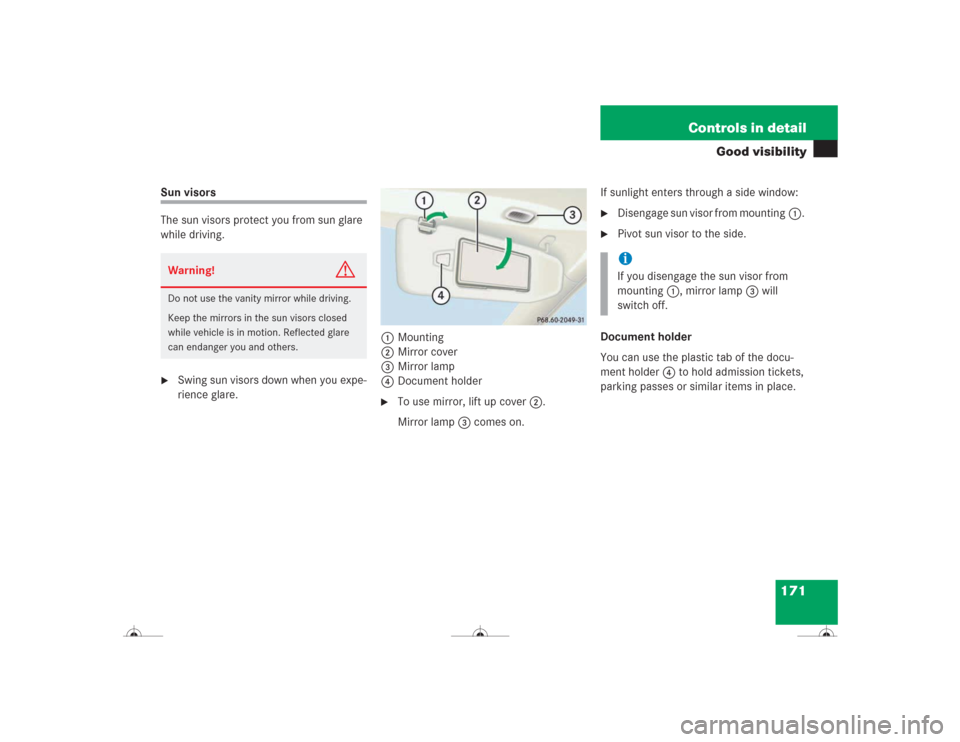
92 Controls in detailLocking and unlockingSmartKey with KEYLESS-GO1‹ Lock button
2Š Unlock button for trunk lid
3Locking tab for mechanical key
4ΠUnlock button
5Battery check lamp
6Â Panic button (
�page 76)
For more information on using the
SmartKey buttons, see “SmartKey”
(
�page 88).Important notes on using KEYLESS-GO
�
You can also use the SmartKey with
KEYLESS-GO like a normal
SmartKey (
�page 88).
�
You can combine KEYLESS-GO func-
tions with normal SmartKey functions
(e.g. unlocking with KEYLESS-GO and
locking with the remote control).
�
Always carry the SmartKey with
KEYLESS-GO with you.
�
Never store the SmartKey with
KEYLESS-GO together with:�
Electronic items such as a cellular
phone or another SmartKey with
KEYLESS-GO
�
Metallic objects such as coins or
metal foil
Warning!
G
When leaving the vehicle, always remove the
SmartKey from the starter switch, take the
SmartKey with KEYLESS-GO* with you and
lock your vehicle. Do not leave children un-
attended in the vehicle, or with access to an
unlocked vehicle. Unsupervised use of vehi-
cle equipment may cause an accident
and/or serious personal injury.!To prevent possible malfunction, avoid
exposing the SmartKey with
KEYLESS-GO to high levels of electro-
magnetic radiation. iIf the vehicle has been parked for a
longer period of time, you must pull the
door handle in order to activate the
KEYLESS-GO function.
You can also close the power windows
(�page 188) and sliding/pop up roof
(�page 193) using the SmartKey with
KEYLESS-GO.
Page 97 of 418
96 Controls in detailLocking and unlockingOpening the doors from the inside
You can open a locked door from the in-
side. Open door only when conditions are
safe to do so.
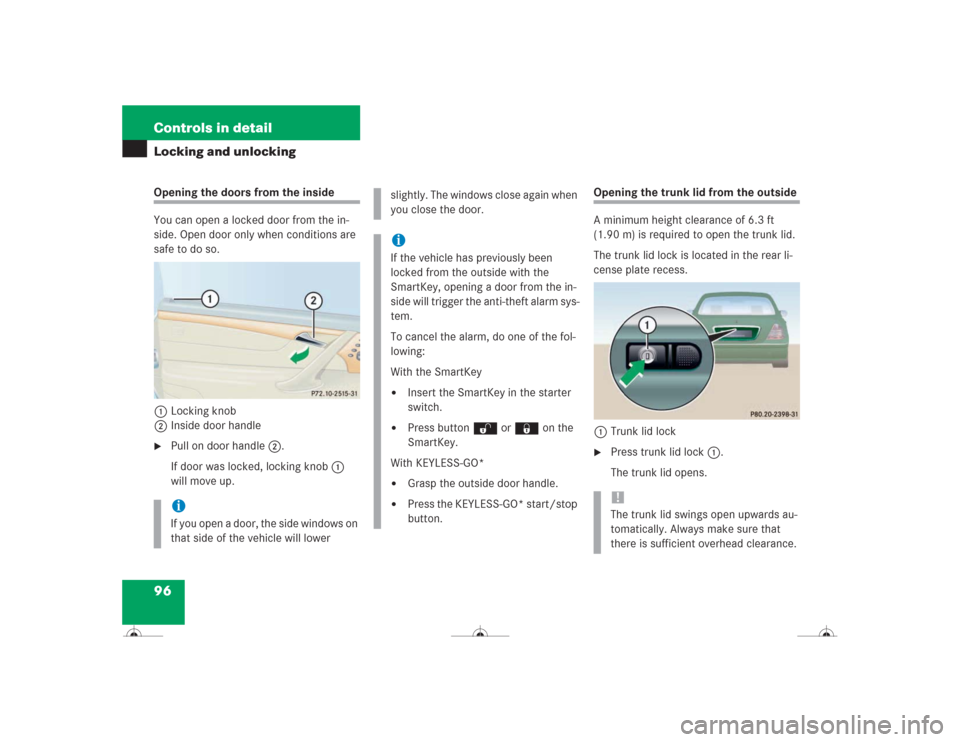
1Locking knob
2Inside door handle�
Pull on door handle2.
If door was locked, locking knob1
will move up.
Opening the trunk lid from the outside
A minimum height clearance of 6.3 ft
(1.90 m) is required to open the trunk lid.
The trunk lid lock is located in the rear li-
cense plate recess.
1Trunk lid lock�
Press trunk lid lock1.
The trunk lid opens.
iIf you open a door, the side windows on
that side of the vehicle will lower
slightly. The windows close again when
you close the door.iIf the vehicle has previously been
locked from the outside with the
SmartKey, opening a door from the in-
side will trigger the anti-theft alarm sys-
tem.
To cancel the alarm, do one of the fol-
lowing:
With the SmartKey�
Insert the SmartKey in the starter
switch.
�
Press button Œ or ‹ on the
SmartKey.
With KEYLESS-GO*
�
Grasp the outside door handle.
�
Press the KEYLESS-GO* start/stop
button.
!The trunk lid swings open upwards au-
tomatically. Always make sure that
there is sufficient overhead clearance.
Page 168 of 418

167 Controls in detail
Good visibility
�Good visibility
For information on the windshield wipers,
see “Windshield wipers” (
�page 50) and
for setting the exterior rear view mirrors,
see “Exterior rear view mirror”
(
�page 40).
Rear view mirror
Automatic antiglare rear view mirror
The reflection brightness of the exterior
rear view mirrors on the driver’s side and
the interior rear view mirror will respond
automatically to glare when�
the ignition is switched on
and
�
incoming light from headlamps falls on
the sensor in the interior rear view
mirror.
The interior rear view mirror will not react if
�
reverse gear is engaged
�
the interior lighting is turned on
Warning!
G
The automatic antiglare function does not
react if incoming light is not aimed directly
at sensors in the interior rear view mirror.
The interior rear view mirror and the exterior
rear view mirror on the driver’s side do not
react, for example, if the rear window sun-
shade is in raised position.
Glare can endanger you and others.Warning!
G
In the case of an accident, liquid electrolyte
may escape from the mirror housing if the
mirror glass breaks.
Electrolyte has an irritating effect. Do not al-
low the liquid to come into contact with
eyes, skin, clothing, or respiratory system.
In case it does, immediately flush affected
area with water, and seek medical help if
necessary.
Warning!
G
Exercise care when using the passen-
ger-side exterior rear view mirror. The mirror
surface is convex (outwardly curved surface
for a wider field of view). Objects in mirror
are closer than they appear. Check your in-
side rear view mirror or glance over your
shoulder before changing lanes.!Electrolyte drops coming into contact
with the vehicle paint finish can be
completely removed only while in the
liquid state by applying plenty of water.
Page 172 of 418
171 Controls in detail
Good visibility
Sun visors
The sun visors protect you from sun glare
while driving.�
Swing sun visors down when you expe-
rience glare.1Mounting
2Mirror cover
3Mirror lamp
4Document holder
�
To use mirror, lift up cover2.
Mirror lamp3 comes on.If sunlight enters through a side window:
�
Disengage sun visor from mounting1.
�
Pivot sun visor to the side.
Document holder
You can use the plastic tab of the docu-
ment holder4 to hold admission tickets,
parking passes or similar items in place.
Warning!
G
Do not use the vanity mirror while driving.
Keep the mirrors in the sun visors closed
while vehicle is in motion. Reflected glare
can endanger you and others.
iIf you disengage the sun visor from
mounting1, mirror lamp3 will
switch off.
Page 173 of 418
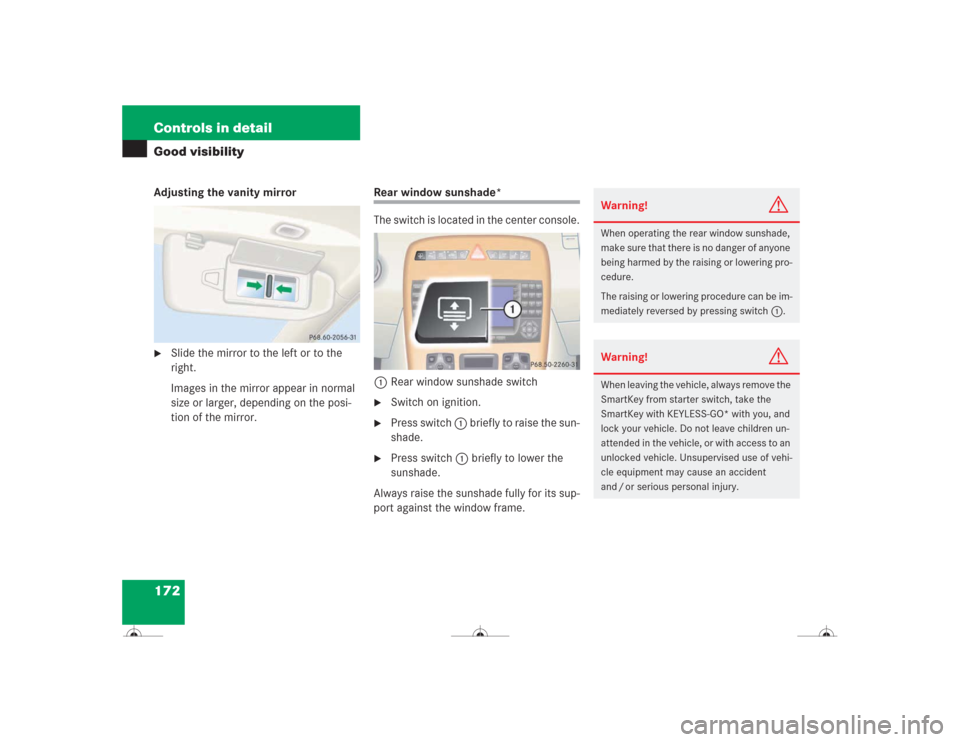
172 Controls in detailGood visibilityAdjusting the vanity mirror�
Slide the mirror to the left or to the
right.
Images in the mirror appear in normal
size or larger, depending on the posi-
tion of the mirror.
Rear window sunshade*
The switch is located in the center console.
1Rear window sunshade switch�
Switch on ignition.
�
Press switch 1 briefly to raise the sun-
shade.
�
Press switch 1 briefly to lower the
sunshade.
Always raise the sunshade fully for its sup-
port against the window frame.
Warning!
G
When operating the rear window sunshade,
make sure that there is no danger of anyone
being harmed by the raising or lowering pro-
cedure.
The raising or lowering procedure can be im-
mediately reversed by pressing switch1.Warning!
G
When leaving the vehicle, always remove the
SmartKey from starter switch, take the
SmartKey with KEYLESS-GO* with you, and
lock your vehicle. Do not leave children un-
attended in the vehicle, or with access to an
unlocked vehicle. Unsupervised use of vehi-
cle equipment may cause an accident
and / or serious personal injury.
Page 176 of 418
175 Controls in detail
Automatic climate control
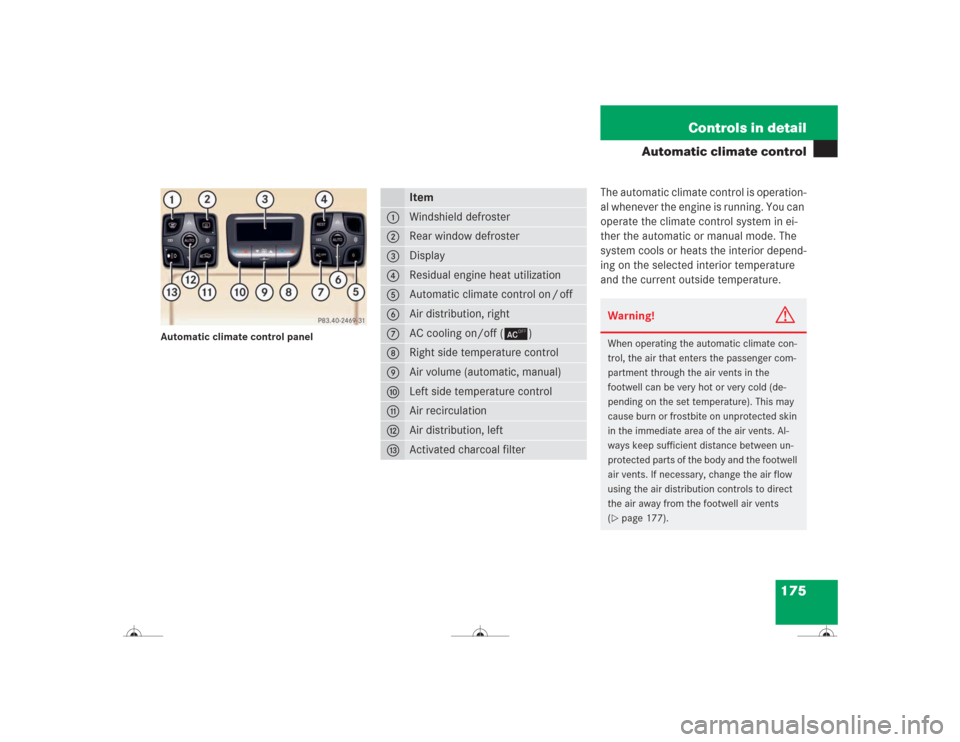
Automatic climate control panel
The automatic climate control is operation-
al whenever the engine is running. You can
operate the climate control system in ei-
ther the automatic or manual mode. The
system cools or heats the interior depend-
ing on the selected interior temperature
and the current outside temperature.
Item
1
Windshield defroster
2
Rear window defroster
3
Display
4
Residual engine heat utilization
5
Automatic climate control on / off
6
Air distribution, right
7
AC cooling on/off (±)
8
Right side temperature control
9
Air volume (automatic, manual)
a
Left side temperature control
b
Air recirculation
c
Air distribution, left
d
Activated charcoal filter
Warning!
G
When operating the automatic climate con-
trol, the air that enters the passenger com-
partment through the air vents in the
footwell can be very hot or very cold (de-
pending on the set temperature). This may
cause burn or frostbite on unprotected skin
in the immediate area of the air vents. Al-
ways keep sufficient distance between un-
protected parts of the body and the footwell
air vents. If necessary, change the air flow
using the air distribution controls to direct
the air away from the footwell air vents
(�page 177).
Page 177 of 418
176 Controls in detailAutomatic climate controlNearly all dust particles, pollutants and
odors are filtered out before outside air en-
ters the passenger compartment through
the air distribution system.
The air conditioning will not engage (no
cooling) if the ± mode is selected
(�page 183).
Setting the temperature
Use temperature controls aand8
(�page 175) to separately adjust the air
temperature on each side of the passenger
compartment. You should raise or lower
the temperature setting in small incre-
ments, preferably starting at 72°F (22°C).
Increasing / decreasing
�
Press button a or 8 repeatedly up or
down until the display shows the de-
sired temperature.
The automatic climate control system
will accordingly adjust the interior air
temperature.
Warning!
G
Follow the recommended settings for heat-
ing and cooling given on the following pag-
es. Otherwise the windows could fog up,
impairing visibility and endangering you and
others.
iThe current climate control settings
(ON / OFF, temperature, air volume, ac-
tivated charcoal filter, etc.) are stored
for each SmartKey before it is removed
from the starter switch or when the ve-
hicle is locked using the SmartKey with
KEYLESS-GO* (
�page 116).
If the vehicle interior is hot, ventilate
the interior before driving off.
Keep the air intake grille in front of the
windshield free of snow, leaves, sticks,
and any other debris.
Do not obstruct air volume by placing
objects on the air volume-through ex-
haust slots below the rear window.
iWhen operating the climate control
system in automatic mode, you will
only rarely need to adjust the tempera-
ture, air volume and air distribution.
Page 178 of 418
177 Controls in detail
Automatic climate control
Adjusting the temperature for center
air vents
When outside temperatures are low, you
can manually raise the air temperature for
the center and side air vents. The
thumbwheel4 is located between the
center air vents (
�page 173).
Automatic temperature control
�
Turn thumbwheel 4 to A.
The indicator lamp above the thumb-
wheel comes on. The temperature is
automatically adjusted to the set value.
Turning on warm air
�
Turn thumbwheel4 in the direction of
the white marking.
Warm air will enter from the center air
vent.Turning on cooler air
�
Turn thumbwheel4 in the direction of
the blue marking.
Cooler air will enter from the center air
vent.
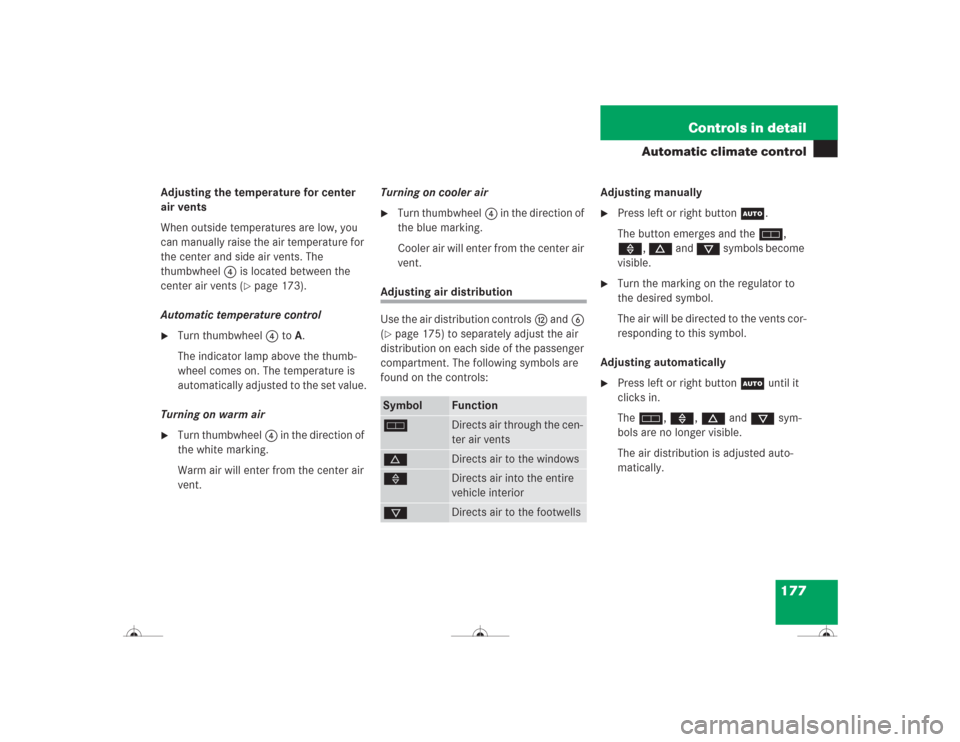
Adjusting air distribution
Use the air distribution controlsc and6
(�page 175) to separately adjust the air
distribution on each side of the passenger
compartment. The following symbols are
found on the controls:Adjusting manually
�
Press left or right buttonU.
The button emerges and theh,
», d and c symbols become
visible.
�
Turn the marking on the regulator to
the desired symbol.
The air will be directed to the vents cor-
responding to this symbol.
Adjusting automatically
�
Press left or right buttonU until it
clicks in.
Theh, », d and c sym-
bols are no longer visible.
The air distribution is adjusted auto-
matically.
Symbol
Function
h
Directs air through the cen-
ter air vents
d
Directs air to the windows
»
Directs air into the entire
vehicle interior
c
Directs air to the footwells