Page 38 of 400

38 Getting startedAdjustingAdjusting steering column in or out�
Move stalk forward or back in the
direction of arrow1 until a comfort-
able steering wheel position is reached
with your arms slightly bent at the
elbow.
Adjusting steering column up or down
�
Move stalk up or down in the direction
of arrow2.
Make sure your legs can move freely
and that all the displays (incl. malfunc-
tion and indicator lamps) on the instru-
ment cluster are clearly visible.
Mirrors
Adjust the interior and exterior rear view
mirrors before driving so that you have a
good view of the road and traffic condi-
tions.
Interior rear view mirror�
Manually adjust the interior rear view
mirror.
For more information, see “Rear view mir-
rors” (
�page 149).Exterior rear view mirrors
iThe memory function* (
�page 99) lets
you store the setting for the steering
wheel together with the settings for the
seat position and exterior rear view
mirrors.
Warning!
G
In the case of an accident, liquid electrolyte
may escape the mirror housing if the mirror
glass breaks.
Electrolyte has an irritating effect. Do not al-
low the liquid to come into contact with
eyes, skin, clothing, or respiratory system.
In case it does, immediately flush affected
area with water, and seek medical help if
necessary.
Warning!
G
Exercise care when using the passenger
side exterior rear view mirror. The mirror
surface is convex (outwardly curved surface
for a wider field of view). Objects in mirror
are closer than they appear. Check your in-
terior rear view mirror or glance over your
shoulder before changing lanes. !Electrolyte drops coming into contact
with the vehicle paint finish can only be
completely removed while in their
liquid state by applying plenty of water.
Page 39 of 400

39 Getting started
Adjusting
The buttons are located above the exterior
lamp switch.
1Driver’s side exterior rear view mirror
button
2Adjustment button
3Passenger-side exterior rear view
mirror button�
Make sure the ignition is switched on.
All lamps in the instrument cluster
come on.
�
Press button1 for the left mirror or
button3 for the right mirror.
�
Push adjustment button2 up, down,
left, or right according to the desired
setting.
For more information, see “Activating exte-
rior rear view mirror parking position*”
(
�page 150).
!If an exterior rear view mirror was
forcibly pushed forward (hit from the
rear) or forcibly pushed rearward (hit
from the front), reposition it by
applying firm pressure until it snaps
into place. The mirror housing is now
properly positioned and you can adjust
the mirror normally.
iThe memory function* (
�page 99) lets
you store the setting for the exterior
rear view mirrors together with the set-
tings for the steering wheel and seat
position.
iAt low ambient temperatures, the
mirrors will be heated automatically.
Page 99 of 400

99 Controls in detail
Memory function*
�Memory function*
The memory button and stored position
switch are located on the door.
You can store up to three different settings
per SmartKey.
The following settings are saved for each
stored position:�
Driver’s seat and backrest position
�
Steering wheel position
�
Driver’s side exterior rear view mirror
position
�
Passenger side exterior rear view mir-
ror position
�
Front passenger seat position
These key-dependent memory settings
can be deactivated if desired
(
�page 135).
!Prior to operating the vehicle, the driv-
er should check and adjust the seat
height, seat position fore and aft, and
seat backrest angle if necessary, to
ensure adequate control, reach and
comfort. The head restraint should also
be adjusted for proper height. See also
the section on airbags (
�page 55) for
proper seat positioning.
In addition, adjust the steering wheel to
ensure adequate control, reach, opera-
tion and comfort. Both the interior and
exterior rear view mirrors should be
adjusted for adequate rear vision.
Fasten seat belts. Infants and small
children should be seated in a properly
secured restraint system that complies
with U.S. Federal Motor Vehicle Safety
Standards 213 and 225 and Canadian
Motor Vehicle Safety Standards 213
and 210.2.
Warning!
G
Do not activate the memory function while
driving. Activating the memory function
while driving could cause the driver to lose
control of the vehicle.
Page 100 of 400

100 Controls in detailMemory function*The memory button and stored position
button are located on the door.
1Memory button
2Stored position button�
Make sure the ignition is switched on
or the relevant door is open and the
SmartKey is inserted in the starter
switch.
Storing positions into memory�
Adjust the seats, steering wheel and
rear view mirrors to the desired posi-
tion (
�page 32).
�
Turn button2 to selected memory
position.
�
Press memory button1.
�
Release memory button and push
button2 within three seconds.
All the settings are stored at the
selected position.
Recalling positions from memory�
Turn button2 to selected memory
position.
�
Press and hold button2 until the seat,
steering wheel and rear view mirrors
have fully moved to the stored posi-
tions.iReleasing the button immediately
stops movement to the stored posi-
tions.Warning!
G
Do not operate the power seats using the
memory button if the seat backrest is in an
excessively reclined position. Doing so
could cause damage to front or rear seats.
First move backrest to an upright position.
Page 101 of 400

101 Controls in detail
Memory function*
Storing exterior rear view mirror parking position
For easier parking, you can adjust the
passenger-side exterior rear view mirror so
that you can see the right rear wheel as
soon as you engage reverse gearR.
For information on activating the parking
position feature, see “Setting parking posi-
tion* for exterior rear view mirror”
(�page 136).1Memory button
2Adjustment button
3Passenger-side exterior rear view
mirror button
�
Stop the vehicle.
�
Switch on ignition (if not already on).
�
Press button3.
The passenger-side exterior rear view
mirror is selected.
�
Adjust the exterior rear view mirror
with button2 so that you see the rear
wheel and the road curb.
�
Press memory button1.
�
Within three seconds, press bottom of
adjustment button2.
The parking position is stored if the
mirror does not move.
iYou can store a parking position for the
passenger-side exterior rear view
mirror for each SmartKey.
iIf the mirror does move, repeat the
above steps. After the setting is stored,
you can move the mirror again.
Page 125 of 400
125 Controls in detail
Control system
The table below shows what settings can
be changed within the various menus.
Detailed instructions on making individual
settings can be found on the following
pages.INSTRUMENT CLUSTER
LIGHTING
VEHICLE
CONVENIENCE
Set time (hours)
Set daytime running lamp mode
(USA only)
Set station selection mode
(radio)
Activate easy-entry/exit feature
Set time (minutes)
Set locator lighting
Set automatic locking
Set key-dependency
Select time display mode
Exterior lamps delayed shut-off
Set parking position for exterior
rear view mirror
Select temperature display
mode
Interior lighting delayed shut-off
Select speedometer display
modeSelect languageSelect display (speed display or
outside temperature)
Page 133 of 400
133 Controls in detail
Control system
�
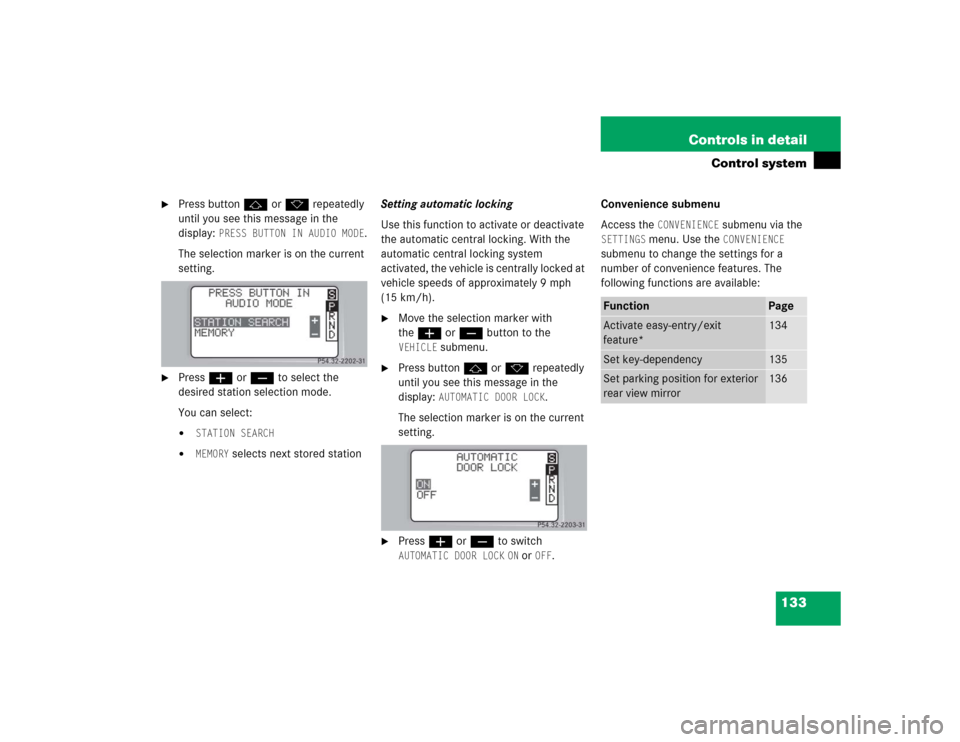
Press buttonj ork repeatedly
until you see this message in the
display:
PRESS BUTTON IN AUDIO MODE
.
The selection marker is on the current
setting.
�
Pressæ orç to select the
desired station selection mode.
You can select:�
STATION SEARCH
�
MEMORY
selects next stored stationSetting automatic locking
Use this function to activate or deactivate
the automatic central locking. With the
automatic central locking system
activated, the vehicle is centrally locked at
vehicle speeds of approximately 9 mph
(15 km/h).
�
Move the selection marker with
theæ orç button to the VEHICLE
submenu.
�
Press buttonj ork repeatedly
until you see this message in the
display:
AUTOMATIC DOOR LOCK
.
The selection marker is on the current
setting.
�
Pressæ orç to switch AUTOMATIC DOOR LOCK
ON or
OFF
.Convenience submenu
Access the
CONVENIENCE
submenu via the
SETTINGS
menu. Use the
CONVENIENCE
submenu to change the settings for a
number of convenience features. The
following functions are available:
Function
Page
Activate easy-entry/exit
feature*
134
Set key-dependency
135
Set parking position for exterior
rear view mirror
136
Page 135 of 400

135 Controls in detail
Control system
�
Move the selection marker with
theæ orç button to the CONVENIENCE
submenu.
�
Press buttonj ork repeatedly
until you see this message in the
display:
EASY-ENTRY FEATURE
ACTIVATE.
The selection marker is on the current
setting.
�
Pressæ orç to change the
easy-entry/exit setting.The following settings are available for
the easy-entry/exit feature:Setting key-dependency
Use this function to set whether the
memory settings for the seats, the steering
wheel and the mirrors should be stored
separately for each SmartKey (
�page 99).
�
Move the selection marker with
theæ orç button to the CONVENIENCE
submenu.
�
Press buttonj ork repeatedly
until you see this message in the
display:
SETTINGS KEY-DEPENDENT
.
The selection marker is on the current
setting.
�
Pressæ orç to set
key-dependency to
ON or
OFF
.
OFF
The
easy-entry/exit
feature is
deactivated
STEERING COLUMN
Only the
steering column
is moved
STEERING COLUMN +
SEAT
Both the
steering column
and the seat are
moved
