Page 5 of 400

Contents
Manual transmission ......................... 141
Shifting into reverse ..................... 141
Automatic transmission* ................... 142
One-touch gearshifting................. 143
Gear ranges ................................. 144
Gear selector lever position ......... 145
Program mode selector switch..... 146
Accelerator position ..................... 147
Emergency operation
(Limp Home Mode) ...................... 147
Good visibility .................................... 148
Windshield wipers ........................ 148
Headlamp cleaning system* ........ 148
Rear view mirrors ......................... 149
Sun visors .................................... 151
Rear window sunshade* .............. 152
Rear window defroster ................. 153
Climate control .................................. 154
Setting the temperature ............... 156
Adjusting air distribution and
volume ......................................... 157
Defrosting .................................... 158
Air recirculation mode.................. 158
Deactivating the climate control
system ......................................... 159
Air conditioning ............................ 160Ventilated storage compartment .. 160
Rear passenger compartment
adjustable air vents....................... 161
Automatic climate control* ................ 162
Setting the temperature................ 165
Adjusting air distribution............... 166
Adjusting air volume ..................... 166
Maximum cooling MAXCOOL ........ 167
Defrosting ..................................... 167
Air recirculation mode .................. 167
Charcoal filter ............................... 169
Air conditioning............................. 170
Residual heat and ventilation ........ 171
Rear passenger compartment
adjustable air vents....................... 172
Audio system ...................................... 173
Audio and telephone, operation .... 173
Operating safety ........................... 173
Operating and display elements.... 174
Button and soft key operation....... 176
Operation ...................................... 176
Radio operation ............................ 179
Satellite radio (SAT)* (USA only)... 182
Cassette operation ....................... 186
CD changer* operation ................. 189
Telephone* operation ................... 193Power windows .................................. 200
Opening and closing
the windows ................................. 200
Synchronizing power windows ...... 202
Sliding/pop-up roof*.......................... 203
Opening and closing
the sliding/pop-up roof ................ 203
Synchronizing
the sliding/pop-up roof ................ 205
Driving systems .................................. 206
Cruise control ............................... 206
Loading .............................................. 209
Roof rack* .................................... 209
Ski sack* ...................................... 209
Split rear bench seat* .................. 212
Loading instructions ..................... 214
Useful features ................................... 216
Interior storage spaces ................. 216
Ashtrays........................................ 220
Cigarette lighter ............................ 221
Telephone* ................................... 222
Tele Aid* ....................................... 223
Garage door opener ...................... 231
Page 23 of 400

23 At a glance
Instrument cluster
Item
Page
1
Left turn signal indicator
lamp
47
2
Speedometer
3
Right turn signal indicator
lamp
47
4
Fuel gauge with:Fuel reserve warning lamp
278
5
warning lamp
60,
278
1Supplemental
restraint system
indicator lamp
54,
278
6
Multifunction display
with:
113
Trip odometer
111
Main odometer
113
Item
Page
Gear selector lever
position
44,
145
Program mode
146
Outside temperature
indicator
111
Digital clock
113
7
?Engine malfunction
indicator lamp
276
vElectronic Stability
Program (ESP)
warning lamp
74,
277
AHigh beam head-
lamp indicator
47,
106
EIndicator lamp
without function
1
DTRIndicator lamp
without function
1
1The indicator lamp illuminates with SmartKey in
starter switch position2. It sh ould go out when the
engine is running.
Item
Page
8
-Antilock Brake
System (ABS)
indicator lamp
72,
274
;Brake warning
lamp, USA only
45,
50,
275
3Brake warning
lamp, Canada only
45,
50,
275
9
Tachometer
111
a
Reset button for:�
Resetting trip
odometer
111
�
Resetting individual
settings
124
�
Instrument cluster
illumination
109
Page 24 of 400
24 At a glanceMultifunction steering wheel
�Multifunction steering wheel
Item
Page
1
Multifunction display in
speedometer
113
Operating control
system
113
2
Selecting the submenu or
setting the volumeçdown/to decreaseæup/to increase
3
Telephone*: Press buttoníto take a callìto end a call
Item
Page
4
Menu systems: Press
buttonèfor next systemÿfor previous system
5
Moving within a menu:
Press buttonjfor next displaykfor previous display
Page 27 of 400
27 At a glance
Overhead control panel
�Overhead control panel
Item
Page
1
Rear interior lighting
on/off
108
2
Sliding/pop-up roof*
203
3
Right reading lamp on/off
108
4
Interior lighting control
107
5
Hands-free microphone for
Tele Aid* (emergency call
system), telephone* and
voice control system*
(see separate operating
instructions)
138,
193,
223
6
Interior rear view mirror
38,
149
7
Garage door opener
231
8
Left reading lamp on/off
108
9
Tele Aid* (emergency call
system) button
223
Page 30 of 400
30 Getting startedUnlocking
�The “Getting started” section provides an
overview of the vehicle’s most basic func-
tions. First-time Mercedes-Benz owners
should pay special attention to the infor-
mation given here.
If you are already familiar with the basic
functions described here, the “Controls in
detail” section will provide you with further
information. The corresponding page
references are located at the end of each
segment.
Unlocking
Unlocking with the SmartKeySmartKey with remote control 1‹Lock button
2ŠOpening button for the trunk lid
3ŒUnlock button
4ÂPanic button* (
�page 71)
�
Press unlock buttonΠon the
SmartKey.
All turn signal lamps flash once. The
locking knobs in the doors move up.
�
Get in the vehicle and insert the
SmartKey in the starter switch.
For more information, see “Locking and
unlocking” (
�page 82).
iCanada only:
Only vehicles equipped with an
anti-theft alarm system* have
SmartKeys with integrated panic
button*4.
Page 34 of 400
34 Getting startedAdjustingHead restraint height
1Release button
Raising:�
Manually adjust the height of the head
restraint by pulling it upward.
Lowering:
�
To lower head the restraint, push
release button1 and push down on
the head restraint.Head restraint tilt
Manually adjust the angle of the head
restraint.
�
Push or pull on the lower edge of the
head restraint cushion.
For more information, see “Seats”
(
�page 92).
Warning!
G
For your protection, drive only with properly
positioned head restraints.
Adjust head restraint so that the head
restraint supports the back of the head at
eye level. This will reduce the potential for
injury to the head and neck in the event of
an accident or similar situation.
Do not drive the vehicle without the seat
head restraints. Head restraints are intend-
ed to help reduce injuries during an acci-
dent.
Page 39 of 400

39 Getting started
Adjusting
The buttons are located above the exterior
lamp switch.
1Driver’s side exterior rear view mirror
button
2Adjustment button
3Passenger-side exterior rear view
mirror button�
Make sure the ignition is switched on.
All lamps in the instrument cluster
come on.
�
Press button1 for the left mirror or
button3 for the right mirror.
�
Push adjustment button2 up, down,
left, or right according to the desired
setting.
For more information, see “Activating exte-
rior rear view mirror parking position*”
(
�page 150).
!If an exterior rear view mirror was
forcibly pushed forward (hit from the
rear) or forcibly pushed rearward (hit
from the front), reposition it by
applying firm pressure until it snaps
into place. The mirror housing is now
properly positioned and you can adjust
the mirror normally.
iThe memory function* (
�page 99) lets
you store the setting for the exterior
rear view mirrors together with the set-
tings for the steering wheel and seat
position.
iAt low ambient temperatures, the
mirrors will be heated automatically.
Page 41 of 400
41 Getting started
Driving
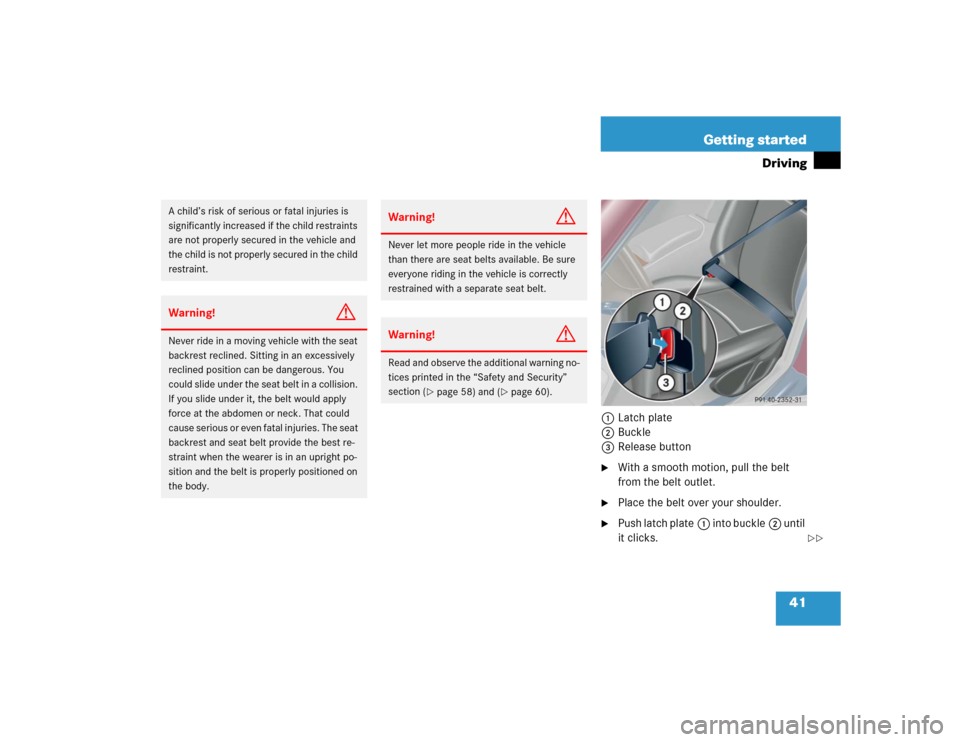
1Latch plate
2Buckle
3Release button�
With a smooth motion, pull the belt
from the belt outlet.
�
Place the belt over your shoulder.
�
Push latch plate1 into buckle2 until
it clicks.
A child’s risk of serious or fatal injuries is
significantly increased if the child restraints
are not properly secured in the vehicle and
the child is not properly secured in the child
restraint.Warning!
G
Never ride in a moving vehicle with the seat
backrest reclined. Sitting in an excessively
reclined position can be dangerous. You
could slide under the seat belt in a collision.
If you slide under it, the belt would apply
force at the abdomen or neck. That could
cause serious or even fatal injuries. The seat
backrest and seat belt provide the best re-
straint when the wearer is in an upright po-
sition and the belt is properly positioned on
the body.
Warning!
G
Never let more people ride in the vehicle
than there are seat belts available. Be sure
everyone riding in the vehicle is correctly
restrained with a separate seat belt.Warning!
G
Read and observe the additional warning no-
tices printed in the “Safety and Security”
section (
�page 58) and (
�page 60).
��


