Page 198 of 400

198 Controls in detailAudio systemEmergency call�
Press button4 longer than one
second.
�
A call will be placed to the saved num-
ber (e.g. 911).
You can make an emergency call to an
emergency rescue station with a mobile
communications network.
The emergency call will be placed as long
as the corresponding mobile communica-
tions network is available. To do this,
switch the telephone on if this has not al-
ready been done.The call will also be placed even if the un-
lock code is not entered.
Emergency calls may not be possible with
all telephone networks or if certain net-
work services and/or telephone functions
are active. Check with your local network
operation company. It may take some time
to set up an emergency call.
To use this function you must ensure that
the number stored in memory location 1 is
the number to be dialed in case of emer-
gency.
If an emergency call cannot be connected,
the message
SYSTM BUSY
appears.Accepting an incoming call
Accepting an incoming call in telephone
mode
With an incoming call, a ringing tone can
be heard and the caller’s telephone num-
ber, or the name under which this tele-
phone number has been saved in the
telephone book, appears on the display. If
the caller’s number is not transmitted,
CALL
will appear in the display.
�
Press the
SND
key to accept call.
!Please be aware that the 911 emergen-
cy call system is a public service. Using
it without due cause is a criminal of-
fense.
Page 200 of 400

200 Controls in detailPower windows
�Power windowsOpening and closing the windows
The side windows can be opened and
closed electrically. The switches for all the
side windows are on the driver’s door. The
switches for the respective windows are
on the front passenger door and the rear
doors.
1Left front window
2Right front window
3Right rear window
4Left rear window
5Rear window override switch
(
�page 70)
Warning!
G
When closing the windows, make sure there
is no danger of anyone being harmed by the
closing procedure.
The closing of the door windows can be im-
mediately halted by releasing the switch or,
if switch was pulled past the resistance
point and released, by either pressing or
pulling the respective switch.
If the window encounters an obstruction
t h a t b l o c k s i t s p a t h i n a c i r c u m s t a n c e w h e r e
you pulled the switch past the resistance
point and released it to close the window,
the automatic reversal function will stop the
window and open it slightly.
If the window encounters an obstruction
t h a t b l o c k s i t s p a t h i n a c i r c u m s t a n c e w h e r e
you are closing the window by pulling and
holding the switch, or by pressing and hold-
ing button‹ on the SmartKey the auto-
matic reversal function will not operate.
When leaving the vehicle, always remove the
SmartKey from starter switch, take it with
you, and lock your vehicle. Do not leave
children unattended in the vehicle, or with
access to an unlocked vehicle. Unsuper-
vised use of vehicle equipment can cause an
accident and/or serious personal injury.iYou can also open or close the
windows using the:�
SmartKey (summer opening/con-
venience feature) (
�page 202).
�
buttonO in the control panel of
the climate control (
�page 155) or
the automatic climate control*
(
�page 163)
�
buttone in the control panel of
the automatic climate control*
(�page 163)
Page 202 of 400
202 Controls in detailPower windowsOpening and closing the windows with
the SmartKey
The sliding/pop-up roof* (
�page 204) will
also be opened or closed when the power
windows are operated with the SmartKey .
�
Aim transmitter eye at the driver’s door
handle.Opening (Summer opening feature)
�
Press and hold buttonΠafter
unlocking the vehicle.
The windows and sliding/pop-up roof*
begin to open after approximately one
second.
�
Release the Œbutton to stop
procedure.
Closing (Convenience feature)
�
Press and hold button‹ after
locking the vehicle.
The windows and sliding/pop-up roof*
begin to close after approximately one
second.
�
Release the ‹button to stop
procedure.
Make sure all side windows and the
sliding/pop-up roof* are properly closed
before leaving the vehicle.
Synchronizing power windows
The power windows must be
resynchronized each time�
after the battery has been
disconnected.
�
if the power windows cannot be fully
opened (Express-open) or closed
(Express-close).
Synchronizing
�
Switch on ignition.
�
Pull the power window switches until
the side windows are closed.
Hold the switches for approximately
one second.
The power windows are adjusted.
Warning!
G
Never operate the windows or
sliding/pop-up roof* if there is the
possibility of anyone being harmed by the
opening or closing procedure.
In the event that the procedure causes
potential danger, the procedure can be
immediately halted by releasing the
transmit button on the SmartKey. To reverse
direction of movement, press buttonŒ
for opening or‹ for closing.
Page 204 of 400

204 Controls in detailSliding/pop-up roof*�
Turn SmartKey in the starter switch to
position1 or2.
Opening and closing the sliding/pop-up
roof
�
To open, close, raise or lower the
sliding/pop-up roof, move the switch
to resistance point in the required
direction1 to4.
Release the switch when the roof has
reached the desired position.Fully opening (Express-open) and
closing (Express-close) the
sliding/pop-up roof
�
To open, close, raise or lower the
sliding/pop-up roof, move the switch
past the resistance point in the
required direction1 to4 and
release.
The sliding/pop-up roof opens or
closes completely.
Stopping the sliding/pop-up roof
�
Move the switch in any direction.Opening and closing the sliding/pop-up
roof with the SmartKey
The power windows (
�page 202) will also
be opened or closed when you operate the
sliding/pop-up roof with the SmartKey .
�
Aim transmitter eye at the driver’s door
handle.
iYou can also open or close the
sliding/pop-up roof using the:�
SmartKey (summer opening/con-
venience feature) (
�page 204)
�
buttonO in the control panel of
the climate control (
�page 155) or
the automatic climate control*
(
�page 163)
�
buttone in the control panel of
the automatic climate control*
(�page 163)
iIf the movement of the sliding/pop-up
roof is blocked during the closing
procedure, the roof will stop and
reopen slightly.
Warning!
G
Never operate the windows or
sliding/pop-up roof* if there is the
possibility of anyone being harmed by the
opening or closing procedure.
In the event that the procedure causes
potential danger, the procedure can be
immediately halted by releasing the
transmit button on the SmartKey. To reverse
direction of movement, press buttonŒ
for opening or‹ for closing.
Page 205 of 400

205 Controls in detail
Sliding/pop-up roof*
Opening (Summer opening feature)�
Press and hold buttonΠafter
unlocking the vehicle.
The windows and the sliding/pop-up
roof begin to open after approximately
one second.
�
Release theΠbutton to stop
procedure.Closing (Convenience feature)
�
Press and hold button‹ after
locking the vehicle.
The windows and the sliding/pop-up
roof begin to close after approximately
one second.
�
Release the‹ button to stop
procedure.
Make sure all side windows and the
sliding/pop-up roof are properly closed
before leaving the vehicle.
Synchronizing the sliding/pop-up roof
The power sliding/pop-up roof must be
resynchronized each time�
after the battery has been
disconnected.
�
after the sliding/pop-up roof has been
closed manually.
�
if the sliding/pop-up roof does not
open smoothly.
�
after a malfunction.
Synchronizing
�
Switch on ignition.
�
Press and hold the switch in
direction1 until the sliding/pop-up
roof is fully raised at the rear.
Hold the switch for approximately one
second.
The sliding/pop-up roof is adjusted.
Page 210 of 400
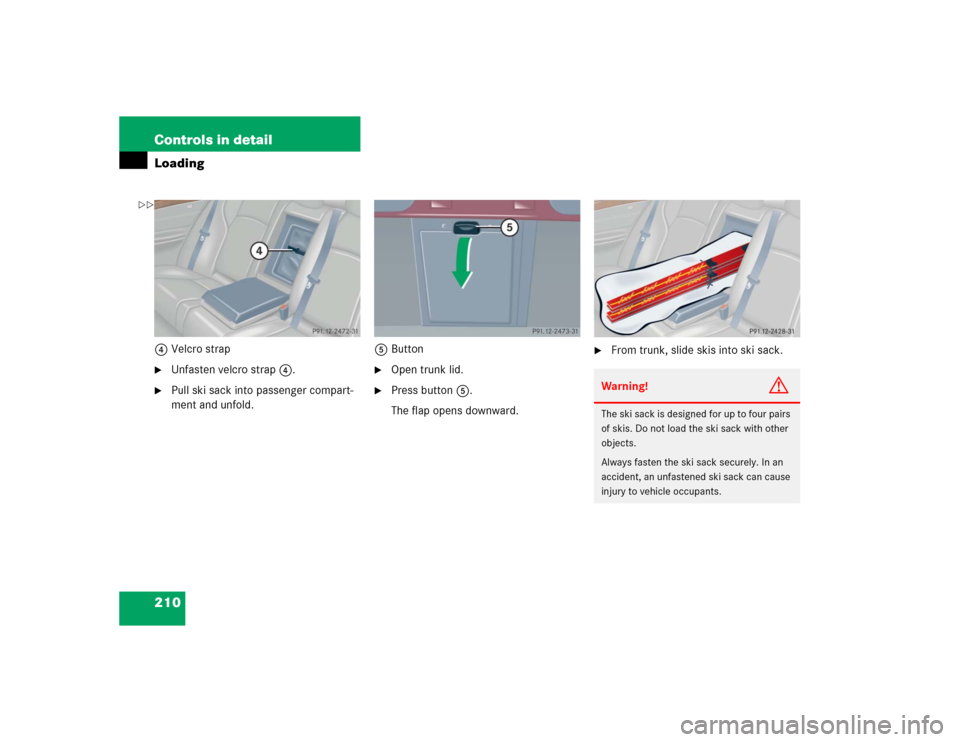
210 Controls in detailLoading4Velcro strap�
Unfasten velcro strap4.
�
Pull ski sack into passenger compart-
ment and unfold.5Button
�
Open trunk lid.
�
Press button5.
The flap opens downward.
�
From trunk, slide skis into ski sack.Warning!
G
The ski sack is designed for up to four pairs
of skis. Do not load the ski sack with other
objects.
Always fasten the ski sack securely. In an
accident, an unfastened ski sack can cause
injury to vehicle occupants.
��
Page 212 of 400
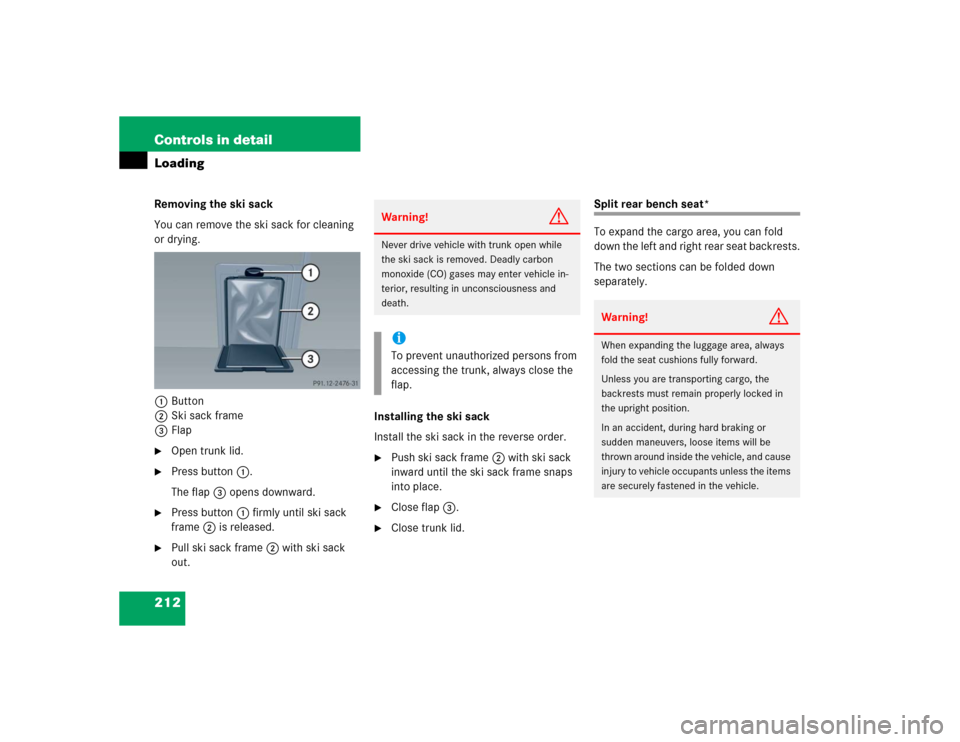
212 Controls in detailLoadingRemoving the ski sack
You can remove the ski sack for cleaning
or drying.
1Button
2Ski sack frame
3Flap�
Open trunk lid.
�
Press button1.
The flap3 opens downward.
�
Press button1 firmly until ski sack
frame2 is released.
�
Pull ski sack frame2 with ski sack
out.Installing the ski sack
Install the ski sack in the reverse order.
�
Push ski sack frame2 with ski sack
inward until the ski sack frame snaps
into place.
�
Close flap3.
�
Close trunk lid.
Split rear bench seat*
To expand the cargo area, you can fold
down the left and right rear seat backrests.
The two sections can be folded down
separately.
Warning!
G
Never drive vehicle with trunk open while
the ski sack is removed. Deadly carbon
monoxide (CO) gases may enter vehicle in-
terior, resulting in unconsciousness and
death.iTo prevent unauthorized persons from
accessing the trunk, always close the
flap.
Warning!
G
When expanding the luggage area, always
fold the seat cushions fully forward.
Unless you are transporting cargo, the
backrests must remain properly locked in
the upright position.
In an accident, during hard braking or
sudden maneuvers, loose items will be
thrown around inside the vehicle, and cause
injury to vehicle occupants unless the items
are securely fastened in the vehicle.
Page 217 of 400
217 Controls in detail
Useful features
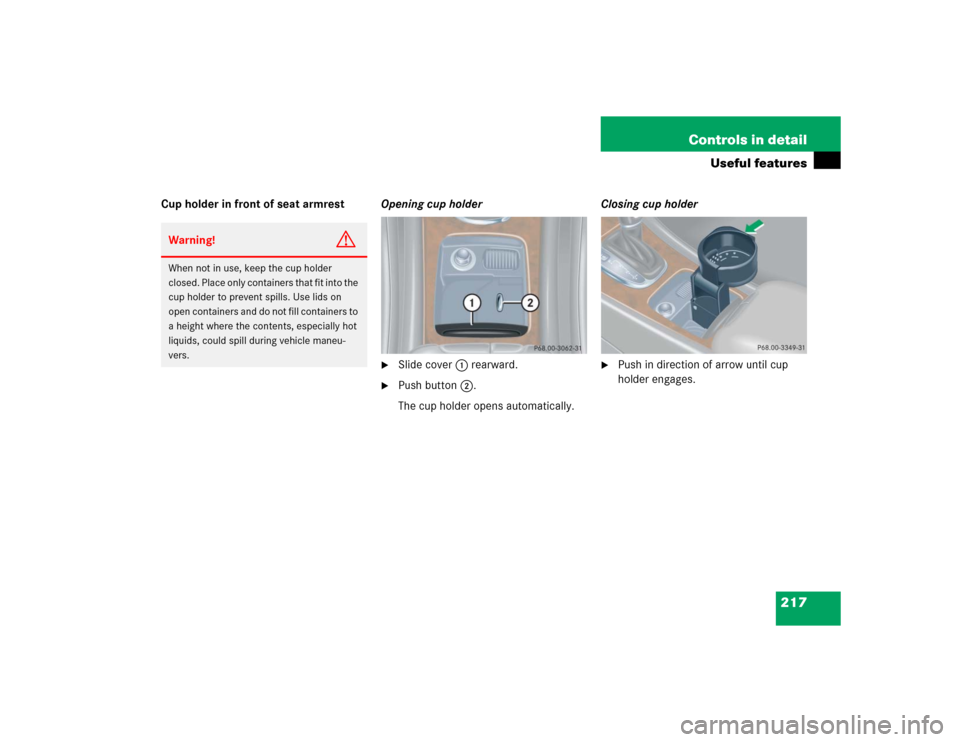
Cup holder in front of seat armrestOpening cup holder
�
Slide cover1 rearward.
�
Push button2.
The cup holder opens automatically.Closing cup holder
�
Push in direction of arrow until cup
holder engages.
Warning!
G
When not in use, keep the cup holder
closed. Place only containers that fit into the
cup holder to prevent spills. Use lids on
open containers and do not fill containers to
a height where the contents, especially hot
liquids, could spill during vehicle maneu-
vers.