Page 1 of 304
Introduction 4
Instrument Cluster 10
Warning and control lights 10
Gauges 15
Entertainment Systems 17
AM/FM stereo cassette with CD 17
CD changer 21
Navigation system 25
Climate Controls 88
Dual automatic temperature control 88
Rear window defroster 91
Lights 92
Headlamps 92
Turn signal control 95
Bulb replacement 96
Driver Controls 101
Windshield wiper/washer control 101
Steering wheel adjustment 102
Power windows 114
Mirrors 115
Speed control 117
Message center 122
Locks and Security 130
Locks 130
Anti-theft system 141
Table of Contents
1
REVIEW COPY
2004 Town Car(tow), Owners Guide (post-2002-fmt)(own2002),
Market:USA_English(fus)
Table of Contents
Page 18 of 304
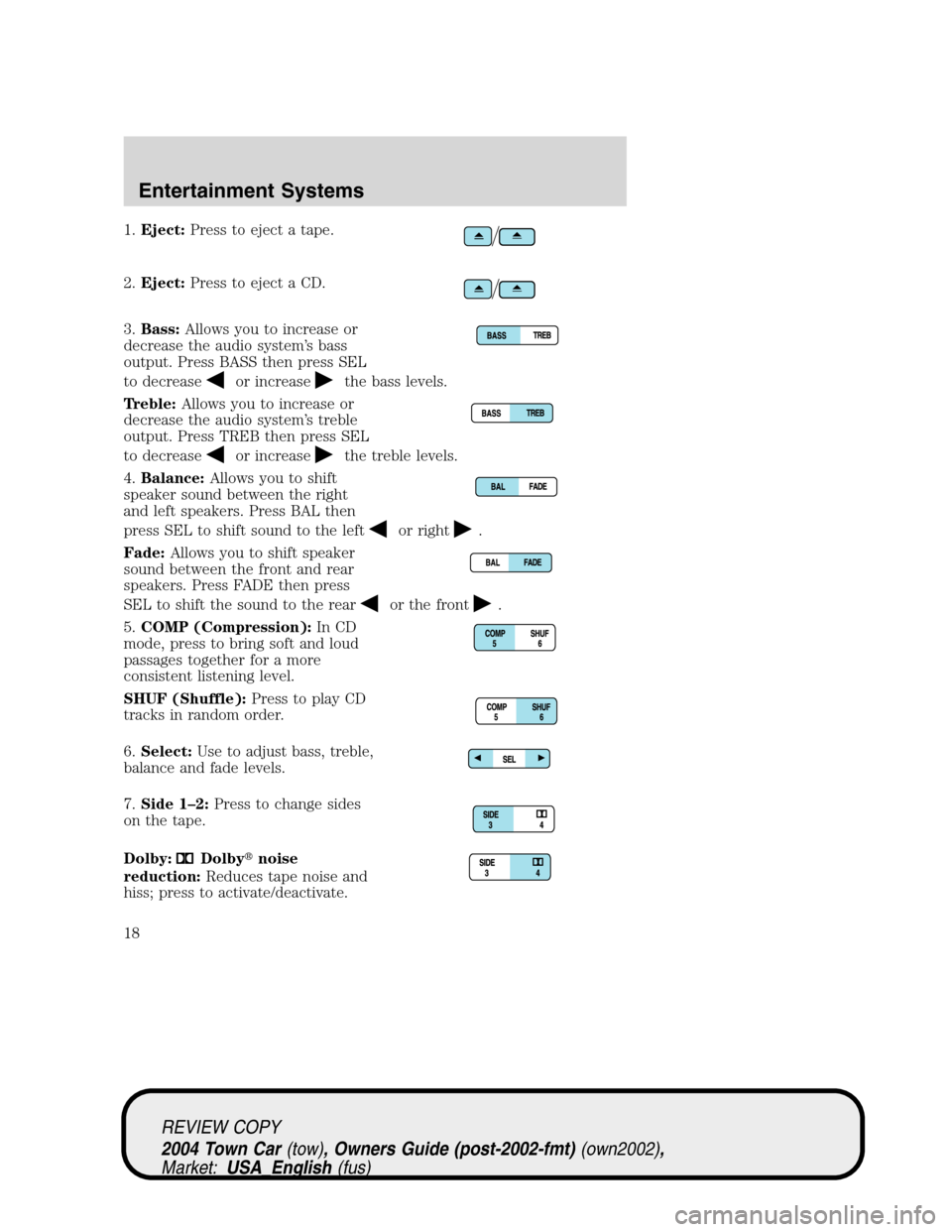
1.Eject:Press to eject a tape.
2.Eject:Press to eject a CD.
3.Bass:Allows you to increase or
decrease the audio system’s bass
output. Press BASS then press SEL
to decrease
or increasethe bass levels.
Treble:Allows you to increase or
decrease the audio system’s treble
output. Press TREB then press SEL
to decrease
or increasethe treble levels.
4.Balance:Allows you to shift
speaker sound between the right
and left speakers. Press BAL then
press SEL to shift sound to the left
or right.
Fade:Allows you to shift speaker
sound between the front and rear
speakers. Press FADE then press
SEL to shift the sound to the rear
or the front.
5.COMP (Compression):In CD
mode, press to bring soft and loud
passages together for a more
consistent listening level.
SHUF (Shuffle):Press to play CD
tracks in random order.
6.Select:Use to adjust bass, treble,
balance and fade levels.
7.Side 1–2:Press to change sides
on the tape.
Dolby:
Dolby�noise
reduction:Reduces tape noise and
hiss; press to activate/deactivate.
REVIEW COPY
2004 Town Car(tow), Owners Guide (post-2002-fmt)(own2002),
Market:USA_English(fus)
Entertainment Systems
18
Page 19 of 304
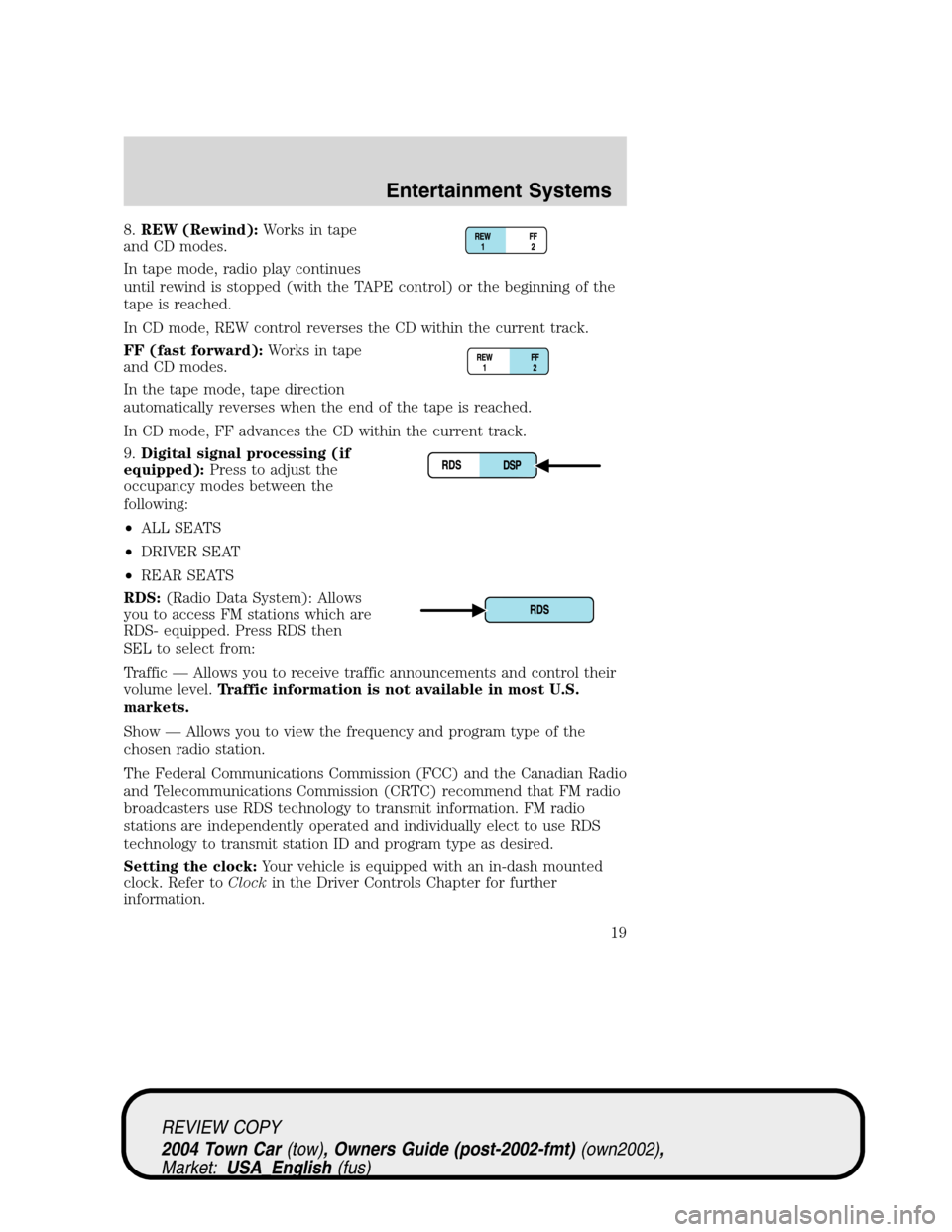
8.REW (Rewind):Works in tape
and CD modes.
In tape mode, radio play continues
until rewind is stopped (with the TAPE control) or the beginning of the
tape is reached.
In CD mode, REW control reverses the CD within the current track.
FF (fast forward):Works in tape
and CD modes.
In the tape mode, tape direction
automatically reverses when the end of the tape is reached.
In CD mode, FF advances the CD within the current track.
9.Digital signal processing (if
equipped):Press to adjust the
occupancy modes between the
following:
•ALL SEATS
•DRIVER SEAT
•REAR SEATS
RDS:(Radio Data System): Allows
you to access FM stations which are
RDS- equipped. Press RDS then
SEL to select from:
Traffic—Allows you to receive traffic announcements and control their
volume level.Traffic information is not available in most U.S.
markets.
Show—Allows you to view the frequency and program type of the
chosen radio station.
The Federal Communications Commission (FCC) and the Canadian Radio
and Telecommunications Commission (CRTC) recommend that FM radio
broadcasters use RDS technology to transmit information. FM radio
stations are independently operated and individually elect to use RDS
technology to transmit station ID and program type as desired.
Setting the clock:Your vehicle is equipped with an in-dash mounted
clock. Refer toClockin the Driver Controls Chapter for further
information.
REVIEW COPY
2004 Town Car(tow), Owners Guide (post-2002-fmt)(own2002),
Market:USA_English(fus)
Entertainment Systems
19
Page 21 of 304
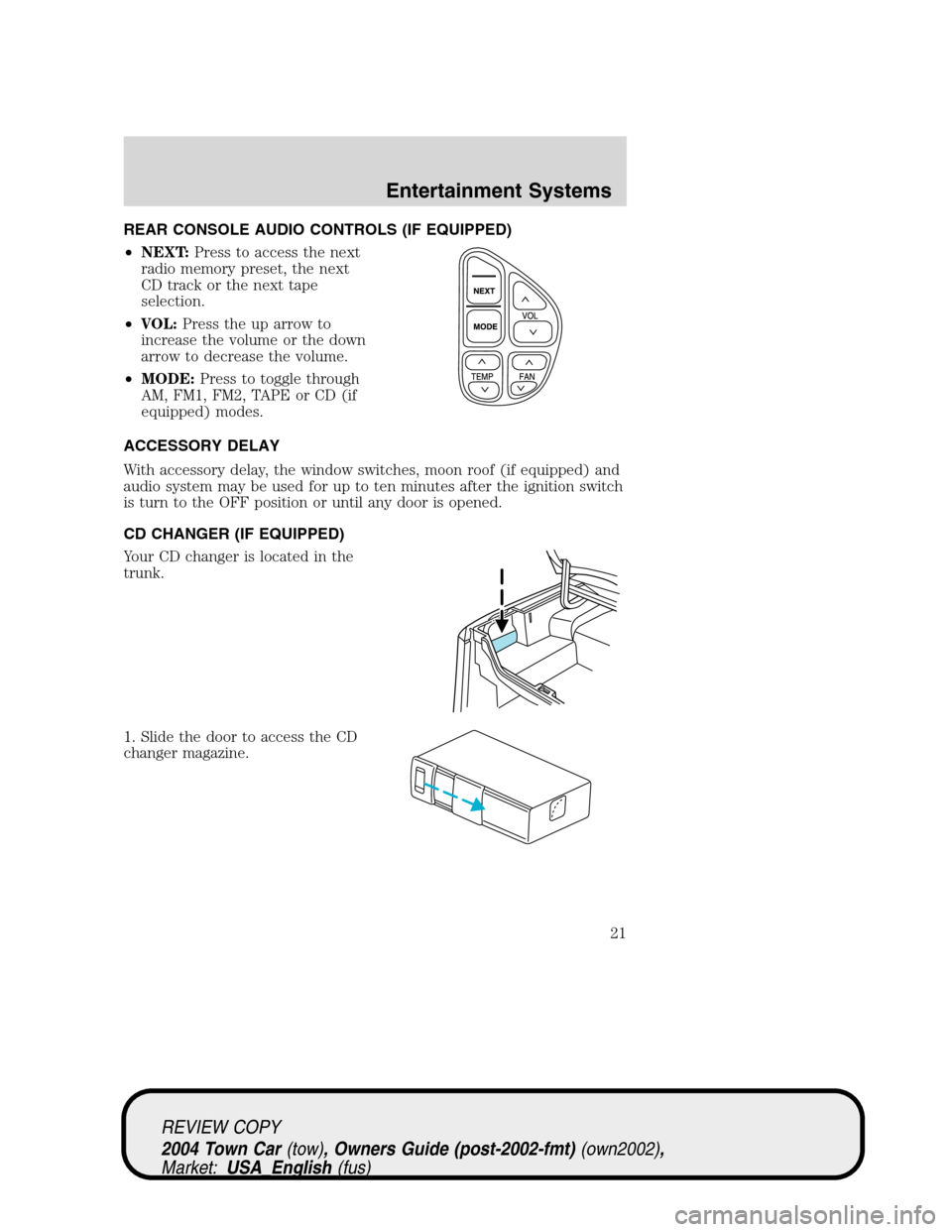
REAR CONSOLE AUDIO CONTROLS (IF EQUIPPED)
•NEXT:Press to access the next
radio memory preset, the next
CD track or the next tape
selection.
•VOL:Press the up arrow to
increase the volume or the down
arrow to decrease the volume.
•MODE:Press to toggle through
AM, FM1, FM2, TAPE or CD (if
equipped) modes.
ACCESSORY DELAY
With accessory delay, the window switches, moon roof (if equipped) and
audio system may be used for up to ten minutes after the ignition switch
is turn to the OFF position or until any door is opened.
CD CHANGER (IF EQUIPPED)
Your CD changer is located in the
trunk.
1. Slide the door to access the CD
changer magazine.
REVIEW COPY
2004 Town Car(tow), Owners Guide (post-2002-fmt)(own2002),
Market:USA_English(fus)
Entertainment Systems
21
Page 31 of 304
Press VOICE briefly (on your steering wheel controls) and the voice
icon
appears on the Navigation display. Press the REPEAT button or
arrow on your steering wheel controls to hear the previous command
repeated from the navigation system.
The voice activated command feature will not operate if a map DVD is
not inserted into the navigation DVD unit.
At any time, you may say these commands to change modes:
•Radio•Audio on
•AM•Audio off
•FM1•Power off
•FM2•CD Changer (if equipped)
•CD•DVD (if equipped)
•Power on
During normal radio operation, you may say:
•Seek up•Seek down
Disc operation commands you may say when using a rear seat DVD (if
equipped):
•Track up•Track down
•Previous track•Disc up
•Disc down•Next disc
•Previous disc
During CDDJ or in-dash CD play, you may say:
•Track up•Track down
•Previous track•Disc up
•Next disc•Disc down
•Previous disc
To change the screen display, you may say the following commands:
•Screen off•Screen day mode
•Day mode on•Screen night mode
•Night mode on•Screen auto mode
•Auto mode on
Note:If you say“Screen off”, you must touch the screen in order to
activate the screen again. The screen will not turn on again with a voice
command.
REVIEW COPY
2004 Town Car(tow), Owners Guide (post-2002-fmt)(own2002),
Market:USA_English(fus)
Entertainment Systems
31
Page 41 of 304
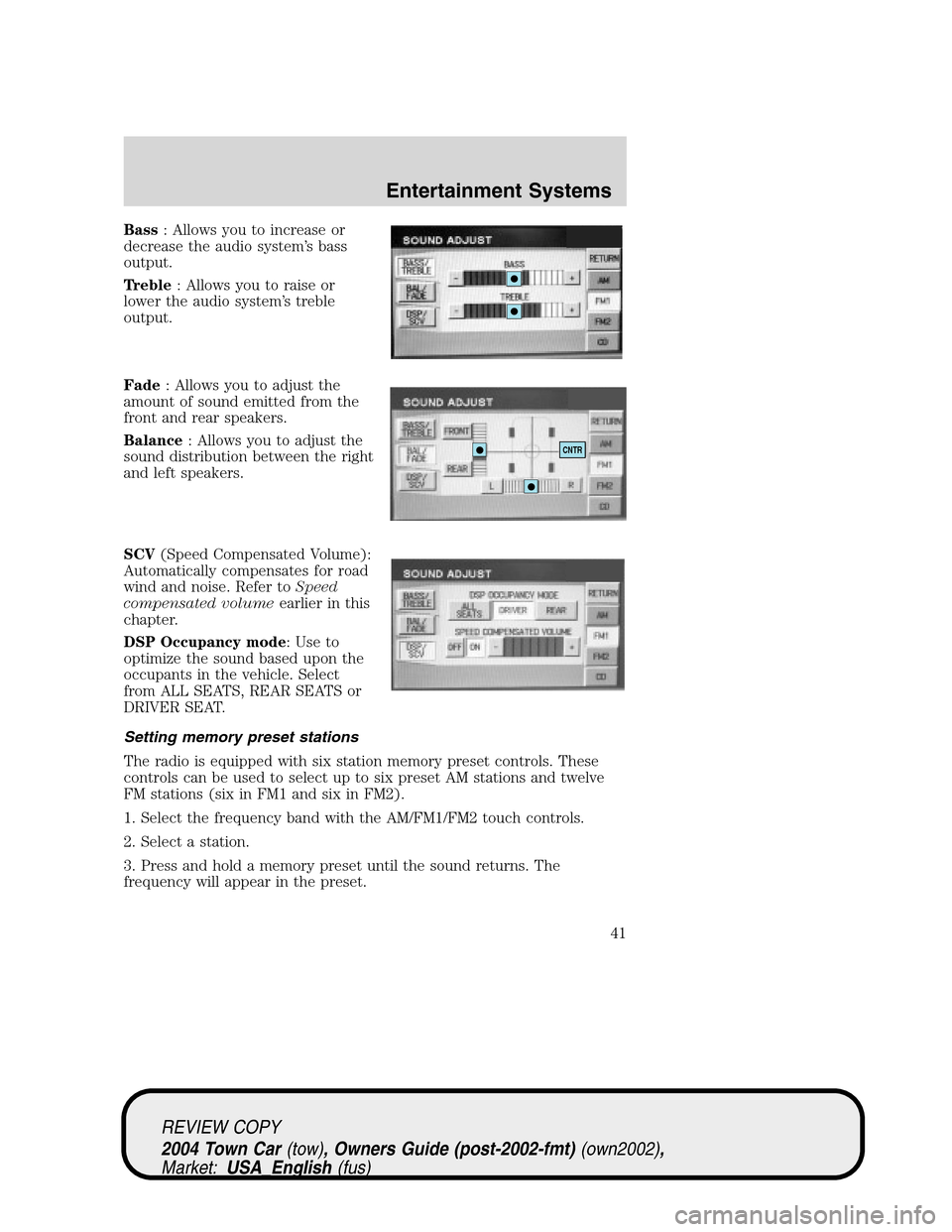
Bass: Allows you to increase or
decrease the audio system’s bass
output.
Treble: Allows you to raise or
lower the audio system’s treble
output.
Fade: Allows you to adjust the
amount of sound emitted from the
front and rear speakers.
Balance: Allows you to adjust the
sound distribution between the right
and left speakers.
SCV(Speed Compensated Volume):
Automatically compensates for road
wind and noise. Refer toSpeed
compensated volumeearlier in this
chapter.
DSP Occupancy mode: Use to
optimize the sound based upon the
occupants in the vehicle. Select
from ALL SEATS, REAR SEATS or
DRIVER SEAT.
Setting memory preset stations
The radio is equipped with six station memory preset controls. These
controls can be used to select up to six preset AM stations and twelve
FM stations (six in FM1 and six in FM2).
1. Select the frequency band with the AM/FM1/FM2 touch controls.
2. Select a station.
3. Press and hold a memory preset until the sound returns. The
frequency will appear in the preset.
CNTR
REVIEW COPY
2004 Town Car(tow), Owners Guide (post-2002-fmt)(own2002),
Market:USA_English(fus)
Entertainment Systems
41
Page 86 of 304
Ensure that you do not have any metal objects on the rear parcel shelf.
If your windows are tinted, ensure that you use non-metal tinting instead
of metal oxide tinting. Both of these factors can interrupt GPS reception.
Cleaning the display
Do not spray cleaning fluid directly onto the unit. Instead, spray onto a
soft cloth and gently wipe the unit. Only recommended products should
be used.
•Recommended products- Rubbing alcohol based cleaner (i.e., methyl
alcohol) or a damp clean cloth.
•Not harmful but not recommended- ammonia cleaner, neutral
detergent.
•Harmful to system and not recommended- acid cleaner, alkali cleaner,
benzene cleaner.
Do not clean any part of the system with benzene, paint thinner or any
other solvent.
Do not spill liquids of any kind onto the unit.
Loading the map DVD
•Your navigation DVD unit is located in the trunk (mounted under the
rear window or in a left side compartment with access door).
•Ensure that the vehicle ignition is ON.
•If a DVD is already loaded in the Navigation unit, push the eject
button.
•Load the DVD with the printed side up. Do not allow moisture or
foreign objects to enter the slot.
The navigation system utilizes a database stored in a special format on a
DVD. It is recommended always to use the latest update of this map
DVD.
•The navigation system will only work with DVDs specifically intended
for your navigation system.
•Always store the map DVDs in their protective cases when not in use.
Ordering additional map DVDs
If you wish to order a replacement or additional map, please call
1–888–NAV-MAPS (1–888–628–6277) or to log onto www.navtech.com.
REVIEW COPY
2004 Town Car(tow), Owners Guide (post-2002-fmt)(own2002),
Market:USA_English(fus)
Entertainment Systems
86