Page 13 of 368

O/D off: Illuminates when the
overdrive function of the
transmission has been turned off,
refer to the Driving chapter. If the
light flashes steadily or does not illuminate, have the transmission
serviced soon, or damage may occur.
AdvanceTrac � (if equipped):
Illuminates when the AdvanceTrac �
system is active. If the light remains
on, have the system serviced
immediately.
Speed control: Illuminates when
the speed control is activated. Turns
off when the speed control system
is deactivated.
Four wheel drive low (if
equipped): Illuminates when
four-wheel drive low is engaged.
Four wheel drive high (if
equipped): Illuminates when
four-wheel drive high is engaged.
Turn signal: Illuminates when the
left or right turn signal or the
hazard lights are turned on. If the
indicators stay on or flash faster, check for a burned out bulb.
High beams: Illuminates when the
high beam headlamps are turned on.
Key-in-ignition warning chime: Sounds when the key is left in the
ignition in the OFF/LOCK or ACC position and the driver ’ s door is
opened.
Headlamps on warning chime: Sounds when the headlamps or parking
lamps are on, the ignition is off (the key is not in the ignition) and the
driver ’ s door is opened.
Door ajar warning chime: Sounds when any door, liftgate or the
liftgate glass is opened (or not fully closed). 4x4
LOW
4x4
HIGH
2004 Navigator (nav)
Owners Guide (post-2002-fmt)
USA English (fus) Instrument Cluster
13
Page 104 of 368

Function Number of bulbs Trade number
Headlamps
(low-beams) 2 9006
Headlamps (hi-beam) 2 9005
Front park/turn lamps 2 3157 AK (amber)
Front sidemarker 2 194 AK (amber)
Foglamps 2 800
Dome/map lamps 2 579
Turn/tail/brake lamps 2 3157K
Approach lamps 2 906
Mirror turn signal
lamps 2 906 (amber)
Liftgate lamp 2 916
Backup lamp 2 3157K
License lamp 2 168
High-mount brake
lamp 5 W5W
All replacement bulbs are clear in color except where noted.
To replace all instrument panel lights - see your dealer
* For vehicles with HID (high intensity discharge) lamps, see your dealer
for service.
Replacing the interior bulbs
Check the operation of all bulbs frequently.
Map lamps
To change the map lamp bulbs:
1. Use a small screwdriver to
remove the map lamp lens.
2. To remove the old bulb, twist 1
⁄ 4
turn and pull it out.
3. Twist in a new bulb.
4. Align and press the map lamp
lens back on and test the lamp operation.
2004 Navigator (nav)
Owners Guide (post-2002-fmt)
USA English (fus)Lights
104
Page 107 of 368
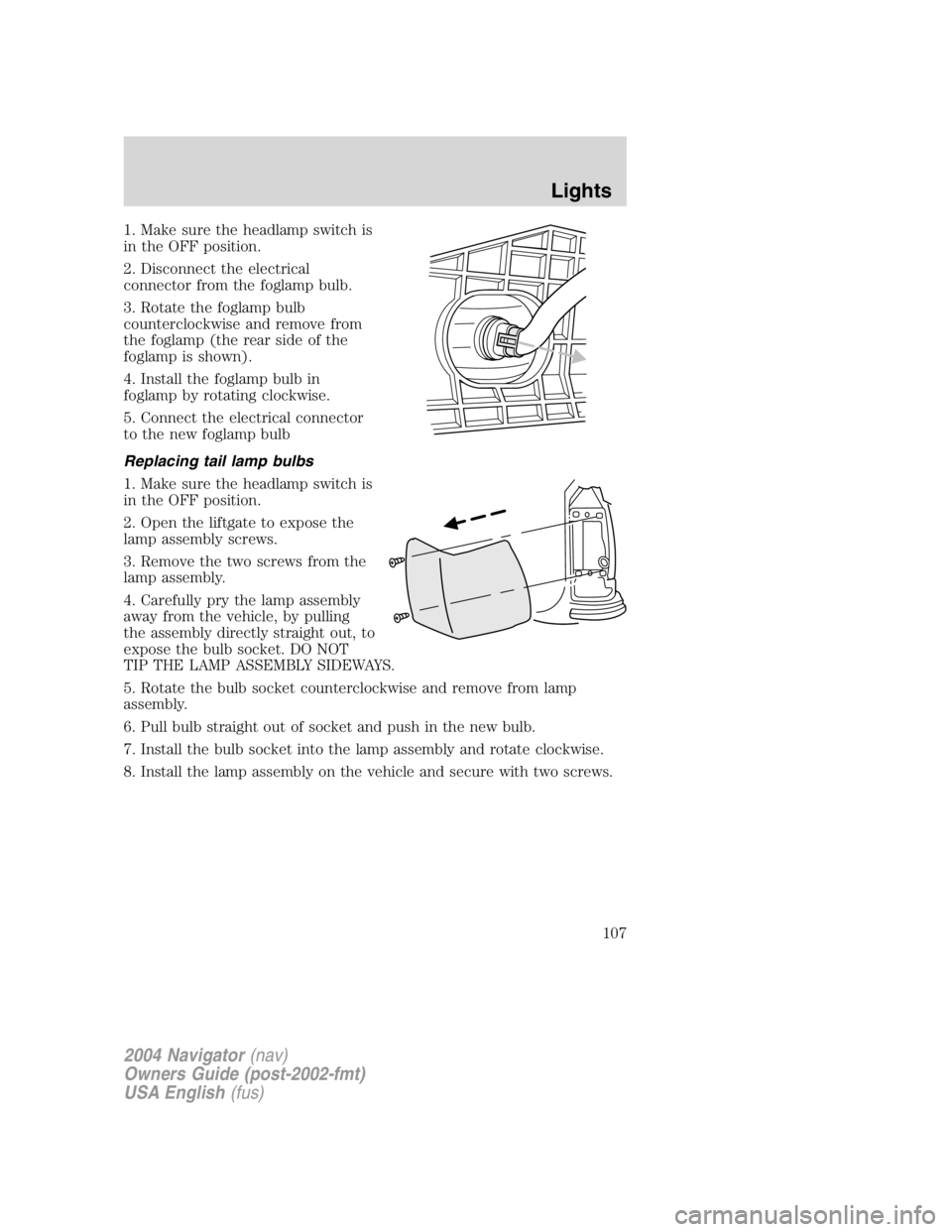
1. Make sure the headlamp switch is
in the OFF position.
2. Disconnect the electrical
connector from the foglamp bulb.
3. Rotate the foglamp bulb
counterclockwise and remove from
the foglamp (the rear side of the
foglamp is shown).
4. Install the foglamp bulb in
foglamp by rotating clockwise.
5. Connect the electrical connector
to the new foglamp bulb
Replacing tail lamp bulbs
1. Make sure the headlamp switch is
in the OFF position.
2. Open the liftgate to expose the
lamp assembly screws.
3. Remove the two screws from the
lamp assembly.
4. Carefully pry the lamp assembly
away from the vehicle, by pulling
the assembly directly straight out, to
expose the bulb socket. DO NOT
TIP THE LAMP ASSEMBLY SIDEWAYS.
5. Rotate the bulb socket counterclockwise and remove from lamp
assembly.
6. Pull bulb straight out of socket and push in the new bulb.
7. Install the bulb socket into the lamp assembly and rotate clockwise.
8. Install the lamp assembly on the vehicle and secure with two screws.
2004 Navigator (nav)
Owners Guide (post-2002-fmt)
USA English (fus) Lights
107
Page 108 of 368
Replacing back-up lamp bulbs
The back-up lamp bulbs are located behind the liftgate trim panels.
To change the back-up lamp bulbs:
1. Make sure the headlamp switch is
in the OFF position.
2. Remove the liftgate trim panel by
removing the retaining nuts to
expose the bulb socket.
3. Turn the bulb socket
counterclockwise and pull it out of
the back-up lamp assembly.
4. Pull out the old bulb and replace
it by pushing in a new bulb.
5. Push the connector back into the back-up lamp assembly and turn it
clockwise to secure it in place.
6. Reinstall the liftgate trim panel.
Replacing liftgate tail lamp bulb
1. Make sure the headlamp switch is
in the OFF position.
2. Raise the liftgate and remove the
two retaining nuts on the underside
of the liftgate.
2004 Navigator (nav)
Owners Guide (post-2002-fmt)
USA English (fus)Lights
108
Page 111 of 368

Replacing license plate lamp bulb
The license plate bulbs are located in the license plate housing assembly
on the liftgate. To change the license plate bulbs:
1. Make sure the headlamp switch is
in the OFF position.
2. Remove the license lamp screw
from the assembly.
3. Pull the lamp down and twist the
bulb socket counterclockwise.
Remove the bulb socket from the
lamp.
4. Pull out the old bulb and push in
the new bulb.
5. Install the bulb socket in the lamp assembly by turning it clockwise.
6. Install the lamp assembly and secure it with the retaining screw.
Approach lamp/mirror turn signal bulb removal (if equipped)
To change the bulbs:
1. Make sure the headlamp switch is
in the OFF position and then fold
the mirror forward.
2. Remove the torx screw on the
bottom of the turn signal lens using
a T-10 torx driver.
3. Pull the turn signal lens down to
remove it from the mirror assembly
4. Disconnect the bulb assembly
from the lens.
5. Remove and replace the bulb.
6. Reverse the order to reassemble lamp and lens.
2004 Navigator (nav)
Owners Guide (post-2002-fmt)
USA English (fus) Lights
111
Page 117 of 368
Power liftgate control (if equipped)
Without a moon roof
With a moon roof
Press and release the top portion of
the control to open the power
liftgate.
Press and release the top portion of
the control again to close the power
liftgate.
Make sure all persons are clear of the power liftgate area before
using the power liftgate control.
CLOCK
Press the right control to increase
the time displayed.
Press the left control to decrease
the time displayed.
2004 Navigator (nav)
Owners Guide (post-2002-fmt)
USA English (fus) Driver Controls
117
Page 119 of 368
A third auxiliary power point is
located on the right rear quarter
panel. The power point is accessible
from the liftgate.
POWER WINDOWS
When closing the power windows, you should verify they are free
of obstructions and ensure that children and/or pets are not in
the proximity of the window openings.
The power window switches located
on the center console are called
push-pull switches.
A. Drivers side
B. Window lock
C. Front passenger side
D. Left and right rear passenger
2004 Navigator (nav)
Owners Guide (post-2002-fmt)
USA English (fus) Driver Controls
119
Page 140 of 368

Trip elapsed drive time
Select this function from the INFO
menu to display a timer.
To operate the Trip Elapsed Drive
Time perform the following:
1. Press and release RESET in order
to start the timer.
2. Press and release RESET to pause the timer.
3. Press and hold RESET for 2 seconds in order to reset the timer.
Distance to empty (DTE)
Selecting this function from the
INFO menu estimates approximately
how far you can drive with the fuel
remaining in your tank under
normal driving conditions.
Remember to turn the ignition OFF
when refueling to allow this feature to correctly detect the added fuel.
The DTE function will display LOW FUEL LEVEL and sound a tone for
one second when you have approximately 80 km (50 miles) to empty. If
you RESET this warning message, this display and tone will return
within 10 minutes.
DTE is calculated using a running average fuel economy, which is based
on your recent driving history of 800 km (500miles). This value is not
the same as the average fuel economy display. The running average fuel
economy is reinitialized to a factory default value if the battery is
disconnected.
Setup menu
Press this control for the following
displays:
• System Check
• Units (English/Metric)
• Autolock
• Easy Exit Seat
• Reverse Mirrors
• Autolamp Delay
• Power Liftgate (if equipped)
2004 Navigator (nav)
Owners Guide (post-2002-fmt)
USA English (fus)Driver Controls
140


