Page 54 of 368

Bass : Allows you to increase or
decrease the audio system ’ s bass
output.
Treble : Allows you to raise or
lower the audio system ’ s treble
output.
Fade : Allows you to adjust sound
between the front and rear
speakers.
Balance : Allows you to adjust the
sound distribution between the right
and left speakers.
SCV (Speed Compensated Volume)
Automatically compensates for road
wind and noise. Refer to Speed
compensated volume earlier in this
chapter.
DSP Occupancy mode :Use to
optimize the sound based upon the
occupants in the vehicle. Select
from ALL SEATS, REAR SEATS or
DRIVER SEAT.
If your vehicle is equipped with rear seat controls, DISABLE
HEADPHONES and DISABLE REAR CONTROLS will appear as options
at the bottom of the screen. These controls allow you to turn off the
headphones and the rear controls for the rear seat passengers. Press the
appropriate button to turn the headphones or rear controls off. The
button will highlight when the function is disabled. When the button is
not highlighted, the function is on (headphones and rear seat controls
are operating and able to be controlled by the rear seat passengers.)
2004 Navigator (nav)
Owners Guide (post-2002-fmt)
USA English (fus)Entertainment Systems
54
Page 89 of 368
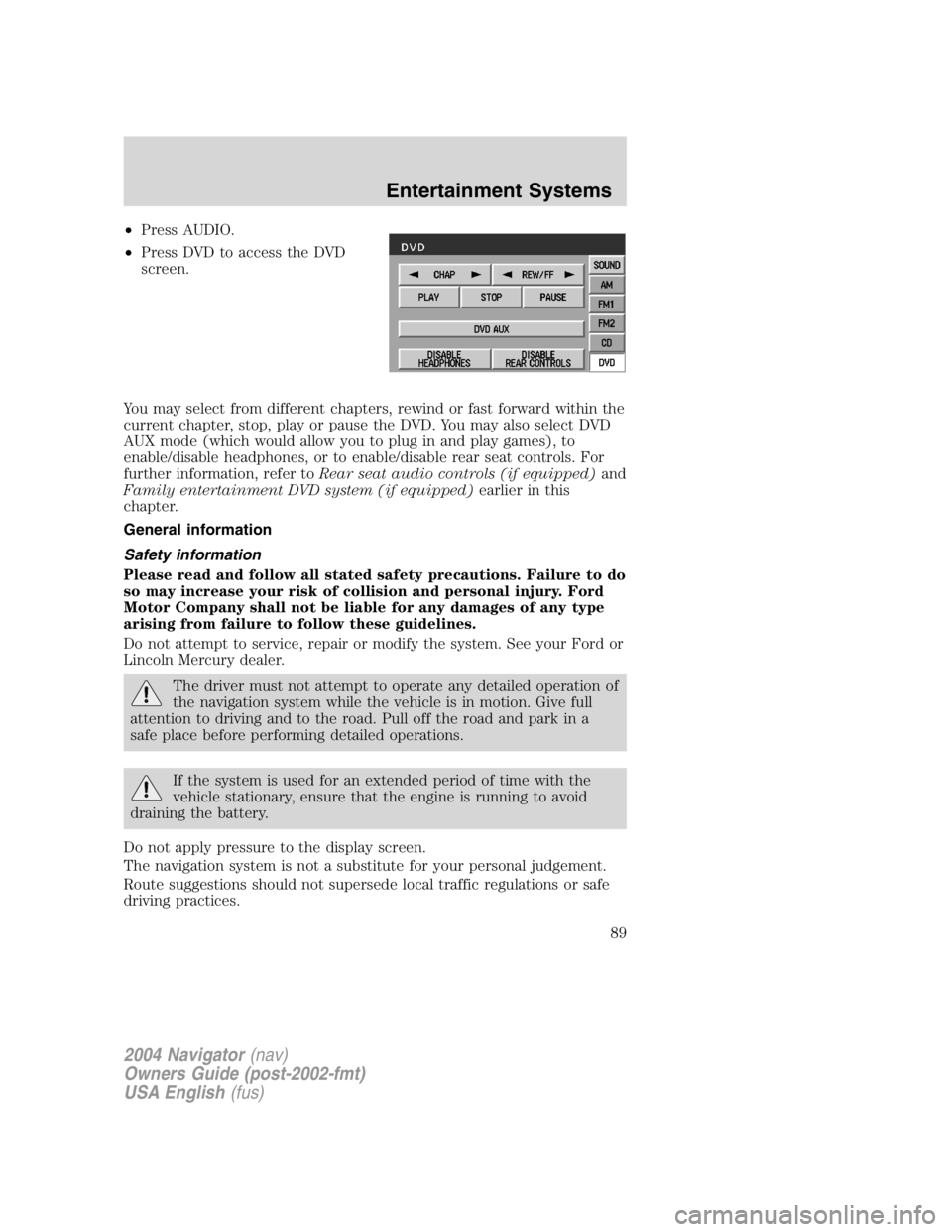
• Press AUDIO.
• Press DVD to access the DVD
screen.
You may select from different chapters, rewind or fast forward within the
current chapter, stop, play or pause the DVD. You may also select DVD
AUX mode (which would allow you to plug in and play games), to
enable/disable headphones, or to enable/disable rear seat controls. For
further information, refer to Rear seat audio controls (if equipped) and
Family entertainment DVD system (if equipped) earlier in this
chapter.
General information
Safety information
Please read and follow all stated safety precautions. Failure to do
so may increase your risk of collision and personal injury. Ford
Motor Company shall not be liable for any damages of any type
arising from failure to follow these guidelines.
Do not attempt to service, repair or modify the system. See your Ford or
Lincoln Mercury dealer.
The driver must not attempt to operate any detailed operation of
the navigation system while the vehicle is in motion. Give full
attention to driving and to the road. Pull off the road and park in a
safe place before performing detailed operations.
If the system is used for an extended period of time with the
vehicle stationary, ensure that the engine is running to avoid
draining the battery.
Do not apply pressure to the display screen.
The navigation system is not a substitute for your personal judgement.
Route suggestions should not supersede local traffic regulations or safe
driving practices.
2004 Navigator (nav)
Owners Guide (post-2002-fmt)
USA English (fus) Entertainment Systems
89
Page 92 of 368

Limited GPS reception
System performance may be adversely affected if GPS reception is
interrupted or interference occurs over a distance of several miles. The
following are possible causes for GPS reception being interrupted. If the
vehicle is:
• in multi-story parking garages
• in tunnels and under bridges
• inside or in between buildings
• by forests or tree-lined avenues
• in heavy rain showers and thunderstorms
• in valleys and in mountainous regions
• roads under cliffs
Ensure that you do not have any metal objects on the rear parcel shelf.
If your windows are tinted, ensure that you use non-metal tinting instead
of metal oxide tinting. Both of these factors can interrupt GPS reception.
Cleaning the display
Do not spray cleaning fluid directly onto the unit. Instead, spray onto a
soft cloth and gently wipe the unit. Only recommended products should
be used.
• Recommended products- Rubbing alcohol based cleaner (i.e., methyl
alcohol) or a damp clean cloth.
• Not harmful but not recommended- ammonia cleaner, neutral
detergent.
• Harmful to system and not recommended- acid cleaner, alkali cleaner,
benzene cleaner.
Do not clean any part of the system with benzene, paint thinner or any
other solvent.
Do not spill liquids of any kind onto the unit.
Loading the map DVD
• Your navigation DVD unit is located in the front lower center stack
area by the passenger ’ s feet (access door).
• Ensure that the vehicle ignition is ON.
• If a DVD is already loaded in the Navigation unit, push the eject
button.
• Load the DVD with the printed side up. Do not allow moisture or
foreign objects to enter the slot.
2004 Navigator (nav)
Owners Guide (post-2002-fmt)
USA English (fus)Entertainment Systems
92
Page 360 of 368

Lifestyle
Bike racks
Cargo organization and management
Engine block heaters and blankets
Rear seat entertainment systems
Trailer hitches, wiring harnesses and accessories
Peace of mind
Airbag anti-theft locks
First aid and safety kits
Full vehicle covers
Locking gas cap
Remote start
Vehicle security systems
For maximum vehicle performance, keep the following information in
mind when adding accessories or equipment to your vehicle:
• When adding accessories, equipment, passengers and luggage to your
vehicle, do not exceed the total weight capacity of the vehicle or of
the front or rear axle (GVWR or GAWR as indicated on the Safety
Compliance Certification label). Consult your dealer for specific weight
information.
• The Federal Communications Commission (FCC) and Canadian Radio
Telecommunications Commission (CRTC) regulate the use of mobile
communications systems — such as two-way radios, telephones and
theft alarms - that are equipped with radio transmitters. Any such
equipment installed in your vehicle should comply with FCC or CRTC
regulations and should be installed only by a qualified service
technician.
• Mobile communications systems may harm the operation of your
vehicle, particularly if they are not properly designed for automotive
use.
2004 Navigator (nav)
Owners Guide (post-2002-fmt)
USA English (fus)Accessories
360
Page:
< prev 1-8 9-16 17-24