2004 LINCOLN NAVIGATOR rear
[x] Cancel search: rearPage 40 of 368

On-screen indicators
Each time a control is pressed, the operational status of the DVD player
is shown on the screen. The following are some possible indicators:
1. CD track
2. DVD chapter
3. SYSTEM COUNTER — displays current viewing time of desired media.
(HOURS:MINUTES:SECONDS)
4. DVD/ CD STATUS (PLAY/FF/REW/PAUSE)
5. AUDIO OUTPUT (not changeable)
6. Subtitles (specific language type - English or Spanish, dependent on
disc capability and ON/OFF selection.)
7. Camera angle (of picture) - Adjustable with cursor controls and
ENTER control.
Safety information
Read all of the safety and operating instructions before operating the
system and retain for future reference.
Do not attempt to service, repair or modify the Rear Seat Entertainment
DVD System. See your Ford or Lincoln Mercury dealer.
Do not insert foreign objects into the DVD compartment.
The front glass on the liquid crystal display (LCD) flip-down
screen may break when hit with a hard surface. If the glass
breaks, do not touch the liquid crystalline material. In case of contact
with skin, wash immediately with soap and water.
2004 Navigator (nav)
Owners Guide (post-2002-fmt)
USA English (fus)Entertainment Systems
40
Page 41 of 368

Do not expose the liquid crystal display (LCD) flip-down screen
to direct sunlight or intensive ultraviolet rays for extensive
periods of time. Ultraviolet rays deteriorate the liquid crystal.
Be sure to review User Manuals for video games and video game
equipment when used as auxiliary inputs for your Rear Seat
Entertainment DVD System.
Do not operate video games or video equipment if the power cords
and/or cables are broken, split or damaged. Carefully place cords and/or
cables where they will not be stepped on or interfere with the operation
of seats and/or compartments.
Disconnect video games and video equipment power cords and/or cables
when not in use.
Avoid touching auxiliary input jacks with your fingers. Do not blow on
them or allow them to get wet or dirty.
Do not clean any part of the DVD player with benzene, paint thinner or
any other solvent.
Whenever a warning is received, the radio volume will be lowered
to a volume that will allow the tones to be heard. The radio
volume will return to the previous level after the warning goes
away.
Federal Communication Commission (FCC) Compliance
Changes or modifications not approved by Ford Lincoln Mercury could
void user ’ s authority to operate the equipment. This equipment has been
tested and found to comply with the limits for a Class B digital device,
pursuant to Part 15 of the FCC Rules. These limits are designed to
provide reasonable protection against harmful interference in a
residential installation. This equipment generates, uses and can radiate
radio frequency energy and, if not installed and used in accordance with
the instructions, may cause harmful interference with radio
communications.
However, there is no guarantee that interference will not occur in a
particular installation. If this equipment does cause harmful interference
to radio or television reception, which can be determined by turning the
equipment off and on, the user is encouraged to consult the dealer or an
experienced radio/TV technician for help.
2004 Navigator (nav)
Owners Guide (post-2002-fmt)
USA English (fus) Entertainment Systems
41
Page 48 of 368

The voice activated command feature will not operate if a map DVD is
not inserted into the navigation DVD unit.
At any time, you may say these commands to change modes:
• Radio • Audio on
• AM • Audio off
• FM1 • Power off
• FM2 • CD Changer (if equipped)
• CD • DVD (if equipped)
• Power on
During normal radio operation, you may say:
• Seek up • Seek down
Disc operation commands you may say when using a rear seat DVD (if
equipped):
• Track up • Track down
• Previous track • Disc up
• Disc down • Next disc
• Previous disc
During CDDJ or in-dash CD play, you may say:
• Track up • Track down
• Previous track • Disc up
• Next disc • Disc down
• Previous disc
To change the screen display, you may say the following commands:
• Screen off • Screen day mode
• Day mode on • Screen night mode
• Night mode on • Screen auto mode
• Auto mode on
Commands that jump over screens:
• Current position • Current location
• Map
2004 Navigator (nav)
Owners Guide (post-2002-fmt)
USA English (fus)Entertainment Systems
48
Page 54 of 368

Bass : Allows you to increase or
decrease the audio system ’ s bass
output.
Treble : Allows you to raise or
lower the audio system ’ s treble
output.
Fade : Allows you to adjust sound
between the front and rear
speakers.
Balance : Allows you to adjust the
sound distribution between the right
and left speakers.
SCV (Speed Compensated Volume)
Automatically compensates for road
wind and noise. Refer to Speed
compensated volume earlier in this
chapter.
DSP Occupancy mode :Use to
optimize the sound based upon the
occupants in the vehicle. Select
from ALL SEATS, REAR SEATS or
DRIVER SEAT.
If your vehicle is equipped with rear seat controls, DISABLE
HEADPHONES and DISABLE REAR CONTROLS will appear as options
at the bottom of the screen. These controls allow you to turn off the
headphones and the rear controls for the rear seat passengers. Press the
appropriate button to turn the headphones or rear controls off. The
button will highlight when the function is disabled. When the button is
not highlighted, the function is on (headphones and rear seat controls
are operating and able to be controlled by the rear seat passengers.)
2004 Navigator (nav)
Owners Guide (post-2002-fmt)
USA English (fus)Entertainment Systems
54
Page 89 of 368
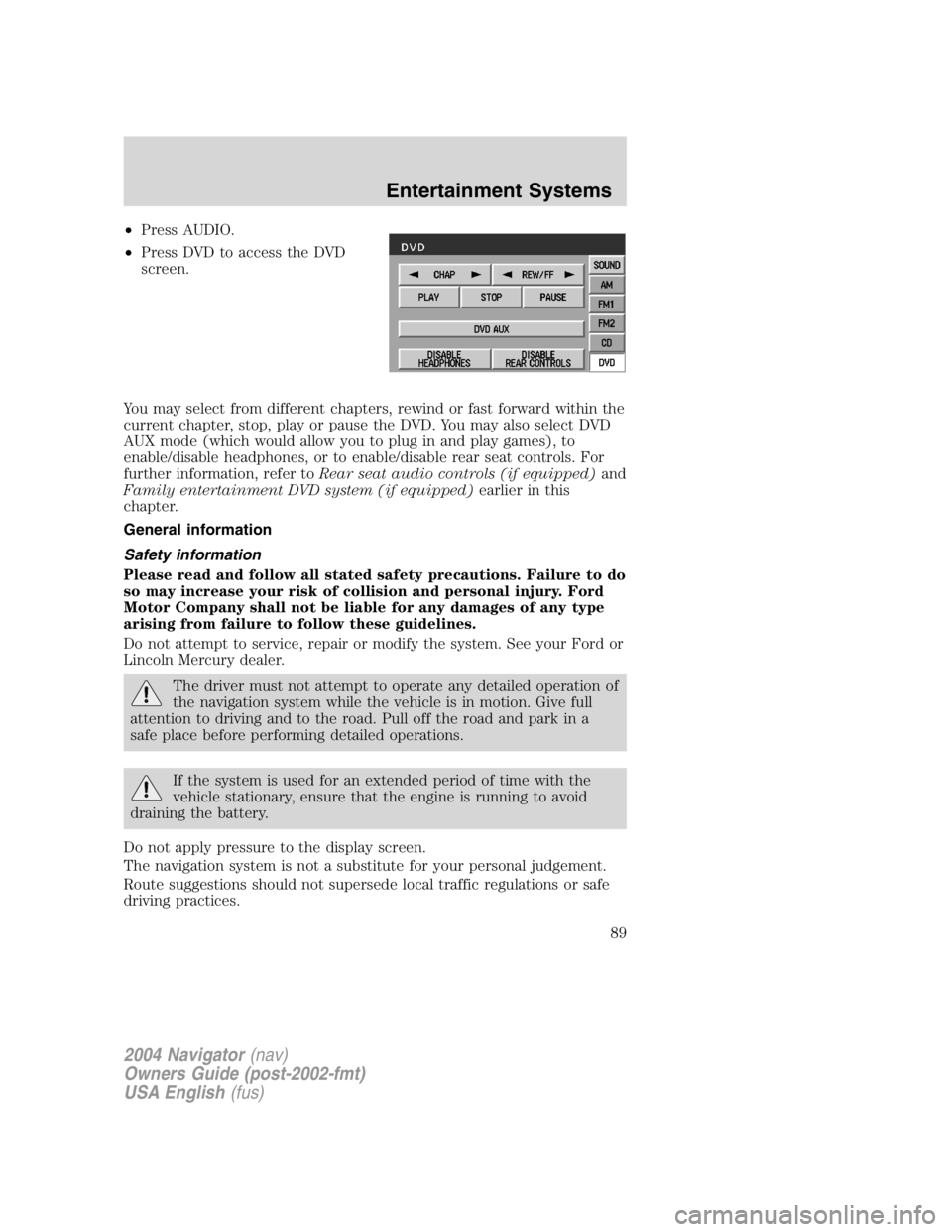
• Press AUDIO.
• Press DVD to access the DVD
screen.
You may select from different chapters, rewind or fast forward within the
current chapter, stop, play or pause the DVD. You may also select DVD
AUX mode (which would allow you to plug in and play games), to
enable/disable headphones, or to enable/disable rear seat controls. For
further information, refer to Rear seat audio controls (if equipped) and
Family entertainment DVD system (if equipped) earlier in this
chapter.
General information
Safety information
Please read and follow all stated safety precautions. Failure to do
so may increase your risk of collision and personal injury. Ford
Motor Company shall not be liable for any damages of any type
arising from failure to follow these guidelines.
Do not attempt to service, repair or modify the system. See your Ford or
Lincoln Mercury dealer.
The driver must not attempt to operate any detailed operation of
the navigation system while the vehicle is in motion. Give full
attention to driving and to the road. Pull off the road and park in a
safe place before performing detailed operations.
If the system is used for an extended period of time with the
vehicle stationary, ensure that the engine is running to avoid
draining the battery.
Do not apply pressure to the display screen.
The navigation system is not a substitute for your personal judgement.
Route suggestions should not supersede local traffic regulations or safe
driving practices.
2004 Navigator (nav)
Owners Guide (post-2002-fmt)
USA English (fus) Entertainment Systems
89
Page 92 of 368

Limited GPS reception
System performance may be adversely affected if GPS reception is
interrupted or interference occurs over a distance of several miles. The
following are possible causes for GPS reception being interrupted. If the
vehicle is:
• in multi-story parking garages
• in tunnels and under bridges
• inside or in between buildings
• by forests or tree-lined avenues
• in heavy rain showers and thunderstorms
• in valleys and in mountainous regions
• roads under cliffs
Ensure that you do not have any metal objects on the rear parcel shelf.
If your windows are tinted, ensure that you use non-metal tinting instead
of metal oxide tinting. Both of these factors can interrupt GPS reception.
Cleaning the display
Do not spray cleaning fluid directly onto the unit. Instead, spray onto a
soft cloth and gently wipe the unit. Only recommended products should
be used.
• Recommended products- Rubbing alcohol based cleaner (i.e., methyl
alcohol) or a damp clean cloth.
• Not harmful but not recommended- ammonia cleaner, neutral
detergent.
• Harmful to system and not recommended- acid cleaner, alkali cleaner,
benzene cleaner.
Do not clean any part of the system with benzene, paint thinner or any
other solvent.
Do not spill liquids of any kind onto the unit.
Loading the map DVD
• Your navigation DVD unit is located in the front lower center stack
area by the passenger ’ s feet (access door).
• Ensure that the vehicle ignition is ON.
• If a DVD is already loaded in the Navigation unit, push the eject
button.
• Load the DVD with the printed side up. Do not allow moisture or
foreign objects to enter the slot.
2004 Navigator (nav)
Owners Guide (post-2002-fmt)
USA English (fus)Entertainment Systems
92
Page 94 of 368

DUAL ELECTRONIC AUTOMATIC TEMPERATURE CONTROL
(DEATC) SYSTEM
1. A/C control: Uses outside air to
cool the vehicle. Press to turn on/off
in all modes except or .
2. Recirculation control: Used to
manually enable or disable the
operation of recirculated air in all
modes except Defrost. Cools the vehicle more quickly by recirculating
the cabin air instead of using outside air and helps prevent unpleasant
outside odors or fumes from entering the vehicle. In automatic operation,
the recirculated air operates automatically as necessary to achieve the
selected temperature.
3. Passenger side temperature
control: Controls the temperature
on the passenger side of the vehicle
when in dual zone mode. To enter
dual zone, press the passenger temperature control or DUAL. The
passenger temperature will appear in the display.
4. Rear defrost control: Removes
ice and fog from the rear
windshield. Press to turn on/off.
5. DUAL (Single/dual electric
temperature control): Allows the
driver to have full control of the
cabin temperature settings (single zone) or allows the passenger to have 1 2
13 14
56
789101112 43
15 16AUTO
OFF DUALA/C
RF F
EXT
F C A/C
R DUAL
2004 Navigator (nav)
Owners Guide (post-2002-fmt)
USA English (fus)Climate Controls
Climate Controls
94
Page 97 of 368

AUXILIARY A/C-HEATER CONTROLS (IF EQUIPPED)
Your vehicle may be equipped with auxiliary climate controls. These
allow the front or rear seat passengers to control airflow direction,
temperature and fan level of the rear compartment to quickly heat or
cool the vehicle.
Auxiliary climate controls are located in the first row overhead console
and in the floor console on the back of the front row console.
If the main climate control system is in the OFF position, the auxiliary
climate control will not operate.
The auxiliary unit can be controlled either by the front seat occupant(s)
using the front auxiliary control or by the rear seat passenger(s) using
the rear auxiliary control but not both. To control the auxiliary unit using
the rear control, the front auxiliary blower control must be in the REAR
position.
Front auxiliary controls:
1. Temperature control:
Determines airflow temperature in
the rear of the vehicle. If the main
climate control system is cooling in
MAX A/C or
mode, the
auxiliary temperature control will
not function as the entire vehicle
will operate at a full cool
temperature.
2. Mode selector: Press to select
air flow direction to (Floor) or (Panel).
Directs air to the floor of the third row seating.
directs air to the overhead registers of the second and third row
seating. The selected mode will illuminate on the temperature control.
3. Fan control: Determines fan speed in the auxiliary system. Turn to
REAR to give rear seat passengers control of the rear auxiliary controls.
Otherwise, the front auxiliary control will determine the settings for the
auxiliary A/C-heater. If set to O (OFF), the rear auxiliary controls will
not function. 432 REAR
0
3
1
2
2004 Navigator (nav)
Owners Guide (post-2002-fmt)
USA English (fus) Climate Controls
97