Page 122 of 368

Security Override
If during a bounce-back condition, the switch is released to the neutral
position, then held in the one touch up position within two seconds after
the window reaches the bounce-back position, the window will travel
up with no bounce-back protection. If the switch is released before
the window reaches fully closed or the ignition is turned OFF (without
accessory delay being active), the window will stop. Security override
can be used if there is ice on the window or seals, causing a restriction.
Window lock
The window lock feature allows only
the driver to operate the rear power
windows.
To lock out the rear window
controls push the control down. To
restore the rear window controls,
push the control down. The control
will spring back up to the neutral
position.
Accessory delay
With accessory delay, the radio, windows, and moonroof operate for up
to ten minutes after the ignition switch is turned from the ON to the
OFF position or until any door is opened.
MIRRORS
Automatic dimming rear view mirror
Your vehicle is equipped with an inside rear view mirror with an
auto-dimming function. The electronic day/night mirror will change from
the normal state to the non-glare state when bright lights (glare) reach
the inside rear view mirror. When the inside rear view mirror detects
bright light from in front of or behind the vehicle, the inside rear view
mirror will automatically adjust (darken) to minimize glare.
Do not block the sensor on the backside of the inside rear view mirror
since this may impair proper system performance.
2004 Navigator (nav)
Owners Guide (post-2002-fmt)
USA English (fus)Driver Controls
122
Page 123 of 368
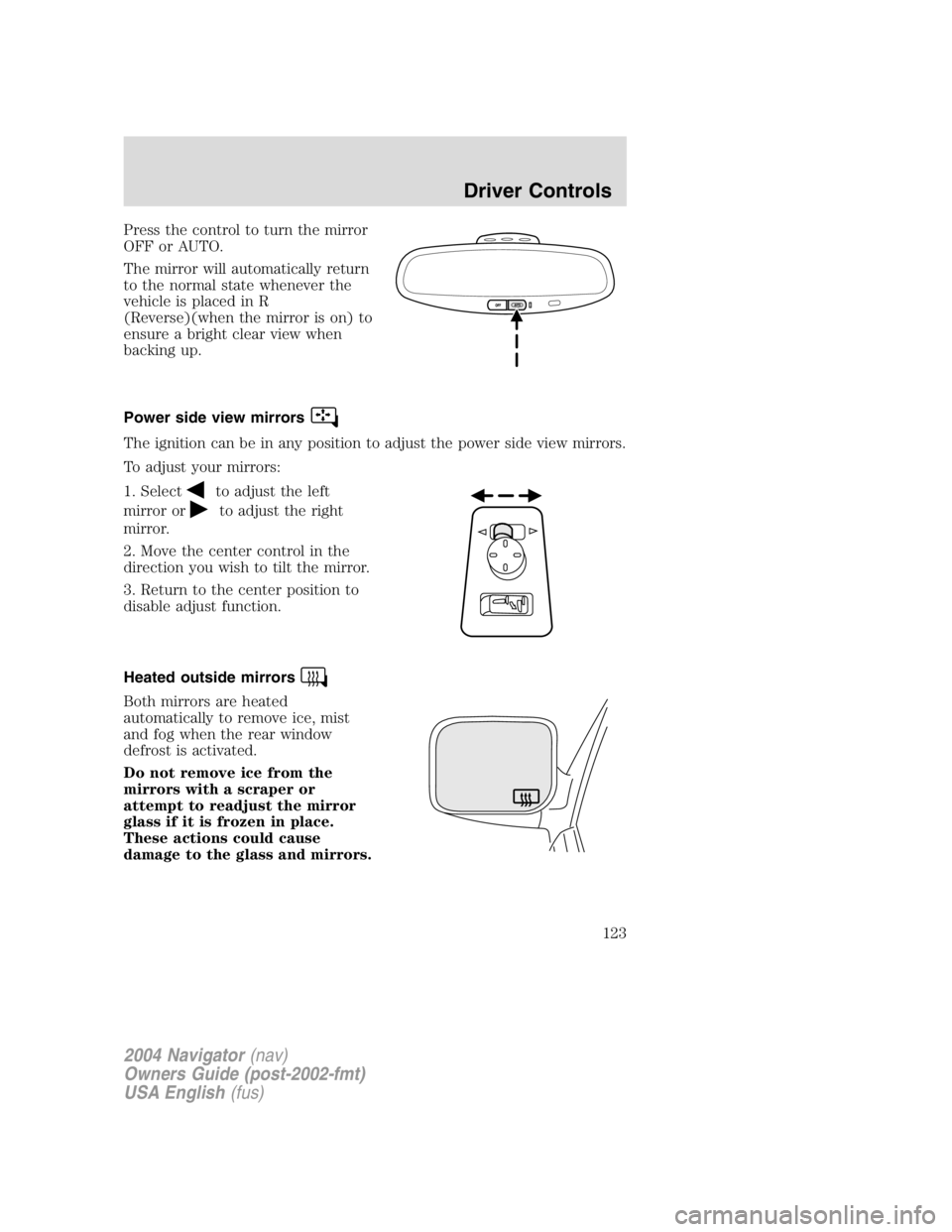
Press the control to turn the mirror
OFF or AUTO.
The mirror will automatically return
to the normal state whenever the
vehicle is placed in R
(Reverse)(when the mirror is on) to
ensure a bright clear view when
backing up.
Power side view mirrors
The ignition can be in any position to adjust the power side view mirrors.
To adjust your mirrors:
1. Select
to adjust the left
mirror or to adjust the right
mirror.
2. Move the center control in the
direction you wish to tilt the mirror.
3. Return to the center position to
disable adjust function.
Heated outside mirrors
Both mirrors are heated
automatically to remove ice, mist
and fog when the rear window
defrost is activated.
Do not remove ice from the
mirrors with a scraper or
attempt to readjust the mirror
glass if it is frozen in place.
These actions could cause
damage to the glass and mirrors.
2004 Navigator (nav)
Owners Guide (post-2002-fmt)
USA English (fus) Driver Controls
123
Page 129 of 368
• Depress the brake pedal or press
CNCL (Cancel) until the desired
vehicle speed is reached, press
the SET + control.
Turning off speed control
There are two ways to turn off the speed control:
• Depress the brake pedal or press
CNCL (Cancel). This will not
erase your vehicle ’ s previously set
speed.
• Press the speed control OFF
control.
Note: When you turn off the speed
control or the ignition, your speed
control set speed memory is erased.
STEERING WHEEL CONTROLS
These controls allow you to operate some radio and climate control
features.
Audio control features
Press MEDIA to select:
• AM, FM1, FM2,
• TAPE, or
• CD.
2004 Navigator (nav)
Owners Guide (post-2002-fmt)
USA English (fus) Driver Controls
129
Page 133 of 368

When programming your HomeLink � Wireless Control System to
a garage door or gate, be sure that people and objects are out of
the way to prevent potential harm or damage.
Do not use the HomeLink � Wireless Control System with any garage
door opener that lacks safety stop and reverse features as required by
U.S. federal safety standards (this includes any garage door opener
model manufactured before April 1, 1982). A garage door which cannot
detect an object, signaling the door to stop and reverse, does not meet
current U.S. federal safety standards. For more information, contact
HomeLink � at: www.homelink.com or 1 – 800 – 355 – 3515.
Retain the original transmitter for use in other vehicles as well as for
future programming procedures (i.e. new HomeLink � equipped vehicle
purchase). It is also suggested that upon the sale of the vehicle, the
programmed Homelink � buttons be erased for security purposes, refer to
Programming in this section.
Programming
Do not program HomeLink � with the vehicle parked in the garage.
Note: Your vehicle may require the ignition switch to be turned to the
ACC position for programming and/or operation of the HomeLink � .Itis
also recommended that a new battery be placed in the hand-held
transmitter of the device being programmed to HomeLink � for quicker
training and accurate transmission of the radio-frequency signal.
1. Press and hold the two outside
buttons releasing only when the red
light begins to flash after 20
seconds. Do not repeat step one to
program additional hand-held
transmitters to the remaining two
HomeLink � buttons. This will erase
previously programmed hand-held
transmitter signals into HomeLink � .
2. Position the end of your
hand-held transmitter 2 – 8cm(1 – 3 inches) away from the HomeLink �
button you wish to program (located on your visor) while keeping the
red light in view.
2004 Navigator (nav)
Owners Guide (post-2002-fmt)
USA English (fus) Driver Controls
133
Page 136 of 368

Erasing HomeLink � buttons
To erase the three programmed
buttons (individual buttons cannot
be erased):
• Press and hold the two outer
HomeLink � buttons until the red
indicator light begins to
flash-after 20 seconds. Release
both buttons. Do not hold for
longer that 30 seconds.
HomeLink � is now in the train (or
learning) mode and can be programmed at any time beginning with step
2inthe “ Programming ” section.
Reprogramming a single HomeLink � button
To program a device to HomeLink � using a HomeLink � button previously
trained, follow these steps:
1. Press and hold the desired HomeLink � button. Do NOT release the
button.
2. The red indicator light will begin to flash after 20 seconds. Without
releasing the HomeLink � button, follow step 2 in the “ Programming ”
section.
For questions or comments, contact HomeLink � at www.homelink.com
or 1 – 800 – 355 – 3515.
MESSAGE CENTER
With the ignition in the ON position,
the message center, located on your
instrument cluster, displays
important vehicle information
through a constant monitor of
vehicle systems. You may select
display features on the message center for a display of status preceded
by a brief indicator chime. The system will also notify you of potential
vehicle problems with a display of system warnings followed by a long
indicator chime.
2004 Navigator (nav)
Owners Guide (post-2002-fmt)
USA English (fus)Driver Controls
136
Page 138 of 368

degrees between adjacent zones and will become noticeable as the
vehicle crosses multiple zones. A correct zone setting will eliminate this
error. Refer to Compass zone/calibration adjustment.
Compass zone/calibration adjustment
1. Determine your magnetic zone by
referring to the zone map.
2. Turn ignition to the ON position.
3. Start the engine.
4. From Info menu, select the
Compass/Odometer function. (Do
not select Trip, DTE, or AFE. The
top of the message center must be
blank).
5. Press and hold the SETUP and
RESET controls until the message
center display changes to show the
current zone setting (XX).
6. Press the SETUP control
repeatedly until the correct zone
setting for your geographic location
is displayed on the message center.
The range of zone values are from
01 to 15 and “ wraps ” back to 01.
7. To exit the zone setting mode,
and to “ lock in ” your change, press
and release the RESET control.
Perform compass calibration in an open area free from steel structures
and high voltage lines. For optimum calibration, turn off all electrical
accessories (heater/air conditioning, wipers, etc.) and make sure all
vehicle doors are shut. 123
4
5
6 7 8 9 1011 12131415
2004 Navigator (nav)
Owners Guide (post-2002-fmt)
USA English (fus)Driver Controls
138
Page 140 of 368

Trip elapsed drive time
Select this function from the INFO
menu to display a timer.
To operate the Trip Elapsed Drive
Time perform the following:
1. Press and release RESET in order
to start the timer.
2. Press and release RESET to pause the timer.
3. Press and hold RESET for 2 seconds in order to reset the timer.
Distance to empty (DTE)
Selecting this function from the
INFO menu estimates approximately
how far you can drive with the fuel
remaining in your tank under
normal driving conditions.
Remember to turn the ignition OFF
when refueling to allow this feature to correctly detect the added fuel.
The DTE function will display LOW FUEL LEVEL and sound a tone for
one second when you have approximately 80 km (50 miles) to empty. If
you RESET this warning message, this display and tone will return
within 10 minutes.
DTE is calculated using a running average fuel economy, which is based
on your recent driving history of 800 km (500miles). This value is not
the same as the average fuel economy display. The running average fuel
economy is reinitialized to a factory default value if the battery is
disconnected.
Setup menu
Press this control for the following
displays:
• System Check
• Units (English/Metric)
• Autolock
• Easy Exit Seat
• Reverse Mirrors
• Autolamp Delay
• Power Liftgate (if equipped)
2004 Navigator (nav)
Owners Guide (post-2002-fmt)
USA English (fus)Driver Controls
140
Page 141 of 368

• Power Deployable Running Boards (if equipped)
• Language
Autolocks
This feature automatically locks all vehicle doors when the vehicle is
shifted into any gear, putting the vehicle in motion.
1. To disable/enable the autolock
feature, select this function from the
SETUP control for the current
display mode.
2. Press the RESET control to turn
the autolocks ON or OFF.
Easy exit seat
This feature automatically moves the drivers seat backwards for easy exit
from the vehicle.
1. To disable/enable the easy exit
seat feature, select this function
from the SETUP control for the
current display mode.
2. Press the RESET control to turn
the easy entry exit seat ON or OFF.
Reverse mirrors
This feature automatically tilts the side view mirrors down when the
vehicle is put in R (Reverse).
1. To disable/enable the reverse
mirror feature, select this function
from the SETUP control for the
current display mode.
2. Press the RESET control to turn
the reverse mirrors ON or OFF.
Autolamp delay
This feature keeps your headlights on for up to three minutes after the
ignition is switched off.
2004 Navigator (nav)
Owners Guide (post-2002-fmt)
USA English (fus) Driver Controls
141