Page 119 of 336

Selectable features
Reset
Press this control to select and reset
functions shown in the INFO menu
and SETUP menu.
Info menu
This control displays the following
control displays:
²Odometer/Compass
²Trip odometer/Odometer/Compass
²Distance to Empty
²Average Fuel Economy
²Trip Elapsed Drive Time
Odometer/Trip odometer
Refer toGaugesin theInstrument Clusterchapter.
Compass display
The compass reading may be affected when you drive near large
buildings, bridges, power lines and powerful broadcast antenna. Magnetic
or metallic objects placed in, on or near the vehicle may also affect
compass accuracy.
Usually, when something affects the compass readings, the compass will
correct itself after a few days of operating your vehicle in normal
conditions. If the compass still appears to be inaccurate, a manual
calibration may be necessary. Refer toCompass zone/calibration
adjustment.
Most geographic areas (zones) have a magnetic north compass point that
varies slightly from the northerly direction on maps. This variation is four
degrees between adjacent zones and will become noticeable as the
vehicle crosses multiple zones. A correct zone setting will eliminate this
error. Refer toCompass zone/calibration adjustment.
Driver Controls
119
Page 132 of 336
Mobile Communication Equipment includes, but is not limited to cellular
phones, pagers, portable email devices, in vehicle communications
systems, telematics devices and portable two-way radios.
A driver's first responsibility is the safe operation of the vehicle.
The most important thing you can do to prevent a crash is to
avoid distractions and pay attention to the road. Wait until it is safe to
operate Mobile Communications Equipment.
CENTER CONSOLE
Your vehicle may be equipped with a variety of console features. These
include:
²Utility compartment with power point
²Cupholders
²Cigarette lighter
Use only soft cups in the cupholder. Hard objects can injure you
in a collision.
REAR CENTER CONSOLE FEATURES (IF EQUIPPED)
The rear center console incorporates the following features:
²Utility compartment
²Cupholders
²Flip forward armrest to provide a
flat load floor
Driver Controls
132
Page 142 of 336

Programming remote transmitters
It is necessary to haveall(maximum of four Ð original and/or new) of
your remote transmitters available prior to beginning this procedure.
To program the transmitters yourself:
1. Ensure the vehicle is
electronically unlocked.
2. Put the key in the ignition.
3. Turn the key from the 1 (LOCK)
position to 3 (ON).
4. Cycle, eight times, rapidly (within
10 seconds) between the 1 (LOCK)
position and 3 (ON).Note:The
eighth turn must end in the 3 (ON)
position.
5. The doors will lock, then unlock, to confirm that the programming
mode has been activated.
6. Within 20 seconds press any button on the remote entry transmitter.
Note:If more than 20 seconds have passed you will need to start the
procedure over again.
7. The doors will lock, then unlock, to confirm that this remote entry
transmitter has been programmed.
8. Repeat the previous steps to program each additional remote entry
transmitter.
9. Turn the ignition to the 1 (LOCK) position after you have finished
programming all of the remote entry transmitters.
10. The doors will lock, then unlock, to confirm that the programming
has been completed.
Illuminated entry
The interior lamps illuminate when the remote entry system is used to
unlock the door(s).
The system automatically turns off after 25 seconds or when the ignition
is turned to the ON or ACC position. The dome lamp control (if
equipped) mustnotbe set to the OFF position for the illuminated entry
system to operate.
The inside lights will not turn off if:
²they have been turned on with the dimmer control, or
4
3
2
1
Locks and Security
142
Page 156 of 336

Memory seats/rearview mirrors/adjustable pedals
This system allows automatic
positioning of the driver seat,
outside rearview mirrors, and
adjustable pedals to two
programmable positions.
The memory seat control is located
on the instrument panel to the left
of the steering wheel.
²To program position one, move
the driver seat to the desired
position using the seat controls. Press the SET control. The SET
control indicator light will briefly illuminate (5 seconds). While the
light is illuminated, press control 1.
²To program position two, repeat the previous procedure using control
2.
A position can only be recalled when the transmission gearshift is in Park
or Neutral. A memory seat position may be programmed at any time.
The memory seat positions can also be recalled when you press your
remote entry transmitter UNLOCK control.
To program the memory seat to remote entry transmitter, refer to
Remote entry systemin theLocks and security chapter.
Easy access/easy out feature
This feature automatically moves the driver's seat backward when:
²the transmission is in N (Neutral) or P (Park)
²the key is removed from the ignition cylinder
The seat will automatically move forward to the original position when:
²the transmission is in N (Neutral) or P (Park)
²the key is placed in the ignition cylinder
Deactivating/activating the easy entry/exit feature
The easy entry/exit feature may also be turned on and off using the
following key sequence. This procedure must be performed within 20
seconds.
1. Remove the key from the ignition (if currently inserted).
2. Insert the ignition key into the ignition switch.
Seating and Safety Restraints
156
Page 157 of 336

3. Turn the ignition key to the on position.
4. Place the ignition key to the off position.
5. Turn the ignition key to the on position.
6. Place the ignition key to the off position.
7. Turn the ignition key to the on position.
8. Place the ignition key to the off position.
9. Momentarily activate the horizontal seat switch in either the forward
or rearward direction.
10. Remove the ignition key from the ignition switch.
CLIMATE CONTROL SEATS (if equipped)
The climate seat controls are located on the inside of the front doors.
To operate the climate control seats the engine must be running.
²Push the icon on the button to
activate cooled seats. A blue light
illuminates on the button. Push
the icon again to disengage.
²Push the icon on the button to
activate heated seats. A red light
illuminates on the button. Push
the icon again to disengage.
In heat mode:
²Rotate the thumbwheel to select
the desired heat level from 1
(MIN) to 5 (MAX).
In cool mode:
²Rotate the thumbwheel to select
the desired cooling level from 1 (MIN) to 5 (MAX). When setting1is
selected, the seat(s) will provide vent cooling only (same temperature
as cabin air).
Allow five minutes for the temperature level to stabilize.
Seating and Safety Restraints
157
Page 169 of 336

Front and second row safety belt height adjustment
Your vehicle has safety belt height
adjustments for the driver, right
front passenger and second row
outboard passengers. Adjust the
height of the shoulder belt so the
belt rests across the middle of your
shoulder.
To lower the shoulder belt height,
push the button and slide the height
adjuster down. To raise the height
of the shoulder belt, push the
button and slide the height adjuster up. Pull down on the height adjuster
to make sure it is locked in place.
Position the safety belt height adjusters so that the belt rests
across the middle of your shoulder. Failure to adjust the safety
belt properly could reduce the effectiveness of the seat belt and
increase the risk of injury in a collision.
Safety belt warning light and indicator chime
The safety belt warning light illuminates in the instrument cluster and a
chime sounds to remind the occupants to fasten their safety belts.
Conditions of operation
If... Then...
The driver safety belt is not
buckled before the ignition switch
is turned to the ON position...The safety belt warning light
illuminates 1-2 minutes and the
warning chime sounds 4-8
seconds.
The driver safety belt is buckled
while the indicator light is
illuminated and the warning chime
is sounding...The safety belt warning light and
warning chime turn off.
The driver safety belt is buckled
before the ignition switch is turned
to the ON position...The safety belt warning light and
indicator chime remain off.
Seating and Safety Restraints
169
Page 170 of 336

BeltMinder
The BeltMinder feature is a supplemental warning to the safety belt
warning function. This feature provides additional reminders to the
driver that the driver's safety belt is unbuckled by intermittently
sounding a chime and illuminating the safety belt warning lamp in the
instrument cluster.
If... Then...
The driver's safety belt is not
buckled before the vehicle has
reached at least 5 km/h (3
mph) and approximately 5
seconds has elapsed after the
safety belt warning light has
turned off.The BeltMinder feature is activated -
the safety belt warning light
illuminates and the warning chime
sounds for 6 seconds every 30
seconds, repeating for approximately
5 minutes or until safety belt is
buckled.
The driver's safety belt is
buckled while the safety belt
indicator light is illuminated
and the safety belt warning
chime is sounding...The BeltMinder feature will not
activate.
The driver's safety belt is
buckled before the ignition
switch is turned to the ON
position...The BeltMinder feature will not
activate.
The following are reasons most often given for not wearing safety belts:
(All statistics based on U.S. data)
Reasons given... Consider...
ªCrashes are rare eventsº36700 crashes occur every day.The
more we drive, the more we are
exposed to ªrareº events, even for
good drivers.1 in 4 of us will be
seriously injured in a crash during
our lifetime.
ªI'm not going farº3of4fatal crashes occur within25
miles of home.
Seating and Safety Restraints
170
Page 171 of 336
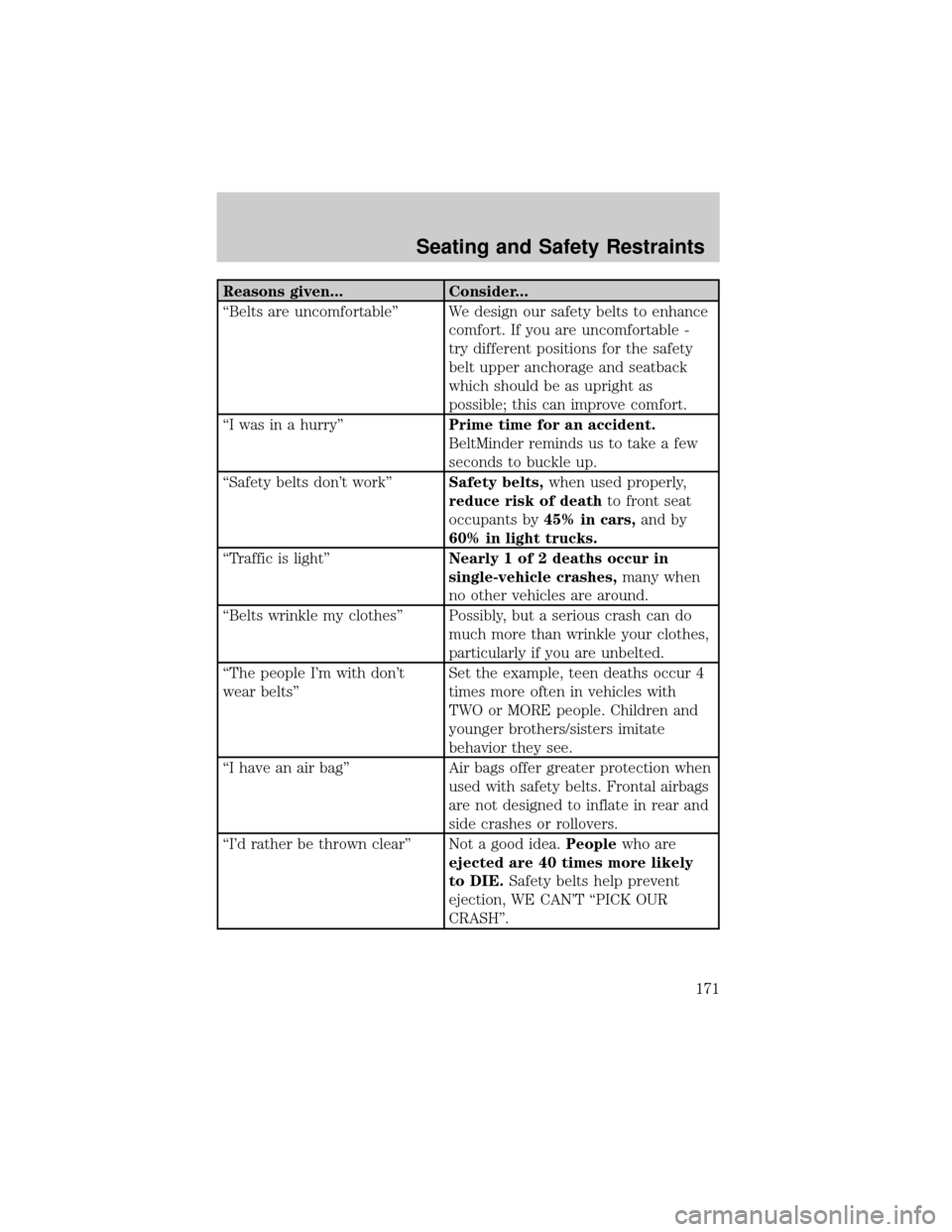
Reasons given... Consider...
ªBelts are uncomfortableº We design our safety belts to enhance
comfort. If you are uncomfortable -
try different positions for the safety
belt upper anchorage and seatback
which should be as upright as
possible; this can improve comfort.
ªI was in a hurryºPrime time for an accident.
BeltMinder reminds us to take a few
seconds to buckle up.
ªSafety belts don't workºSafety belts,when used properly,
reduce risk of deathto front seat
occupants by45% in cars,and by
60% in light trucks.
ªTraffic is lightºNearly 1 of 2 deaths occur in
single-vehicle crashes,many when
no other vehicles are around.
ªBelts wrinkle my clothesº Possibly, but a serious crash can do
much more than wrinkle your clothes,
particularly if you are unbelted.
ªThe people I'm with don't
wear beltsºSet the example, teen deaths occur 4
times more often in vehicles with
TWO or MORE people. Children and
younger brothers/sisters imitate
behavior they see.
ªI have an air bagº Air bags offer greater protection when
used with safety belts. Frontal airbags
are not designed to inflate in rear and
side crashes or rollovers.
ªI'd rather be thrown clearº Not a good idea.Peoplewho are
ejected are 40 times more likely
to DIE.Safety belts help prevent
ejection, WE CAN'T ªPICK OUR
CRASHº.
Seating and Safety Restraints
171
