2004 LINCOLN AVIATOR ECO mode
[x] Cancel search: ECO modePage 152 of 336

²Press the PANIC control on the
remote entry transmitter. This
will only shut off the horn and
parking lamps when the alarm is
sounding. The alarm system will
still be armed.
²Press the liftgate window control
on the remote entry transmitter.
The liftgate and liftgate window
are no longer armed, but the
doors and hood are still armed.
To disarm the doors and hood,
press the liftgate power door lock
control.
Pressing the power door UNLOCK control within the 20 second
prearmed mode will return the vehicle to a disarmed state.
Triggering the anti-theft system
The armed system will be triggered if:
²Any door, liftgate, liftgate window or hood is opened without using the
door key, keypad or the remote entry transmitter.
Locks and Security
152
Page 166 of 336
Safety belts and seats can become hot in a vehicle that has been
closed up in sunny weather; they could burn a small child. Check
seat covers and buckles before you place a child anywhere near them.
Combination lap and shoulder belts
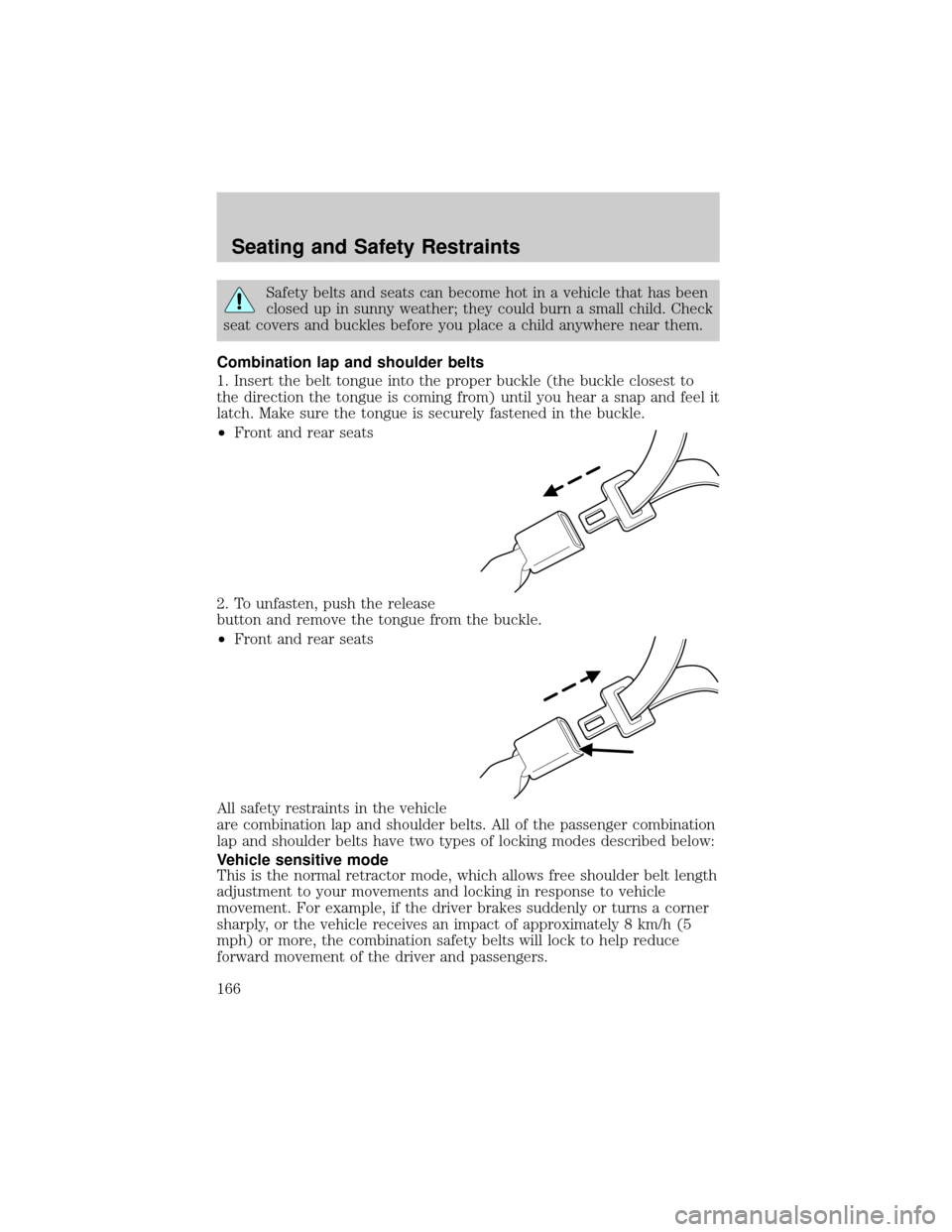
1. Insert the belt tongue into the proper buckle (the buckle closest to
the direction the tongue is coming from) until you hear a snap and feel it
latch. Make sure the tongue is securely fastened in the buckle.
²Front and rear seats
2. To unfasten, push the release
button and remove the tongue from the buckle.
²Front and rear seats
All safety restraints in the vehicle
are combination lap and shoulder belts. All of the passenger combination
lap and shoulder belts have two types of locking modes described below:
Vehicle sensitive mode
This is the normal retractor mode, which allows free shoulder belt length
adjustment to your movements and locking in response to vehicle
movement. For example, if the driver brakes suddenly or turns a corner
sharply, or the vehicle receives an impact of approximately 8 km/h (5
mph) or more, the combination safety belts will lock to help reduce
forward movement of the driver and passengers.
Seating and Safety Restraints
166
Page 185 of 336
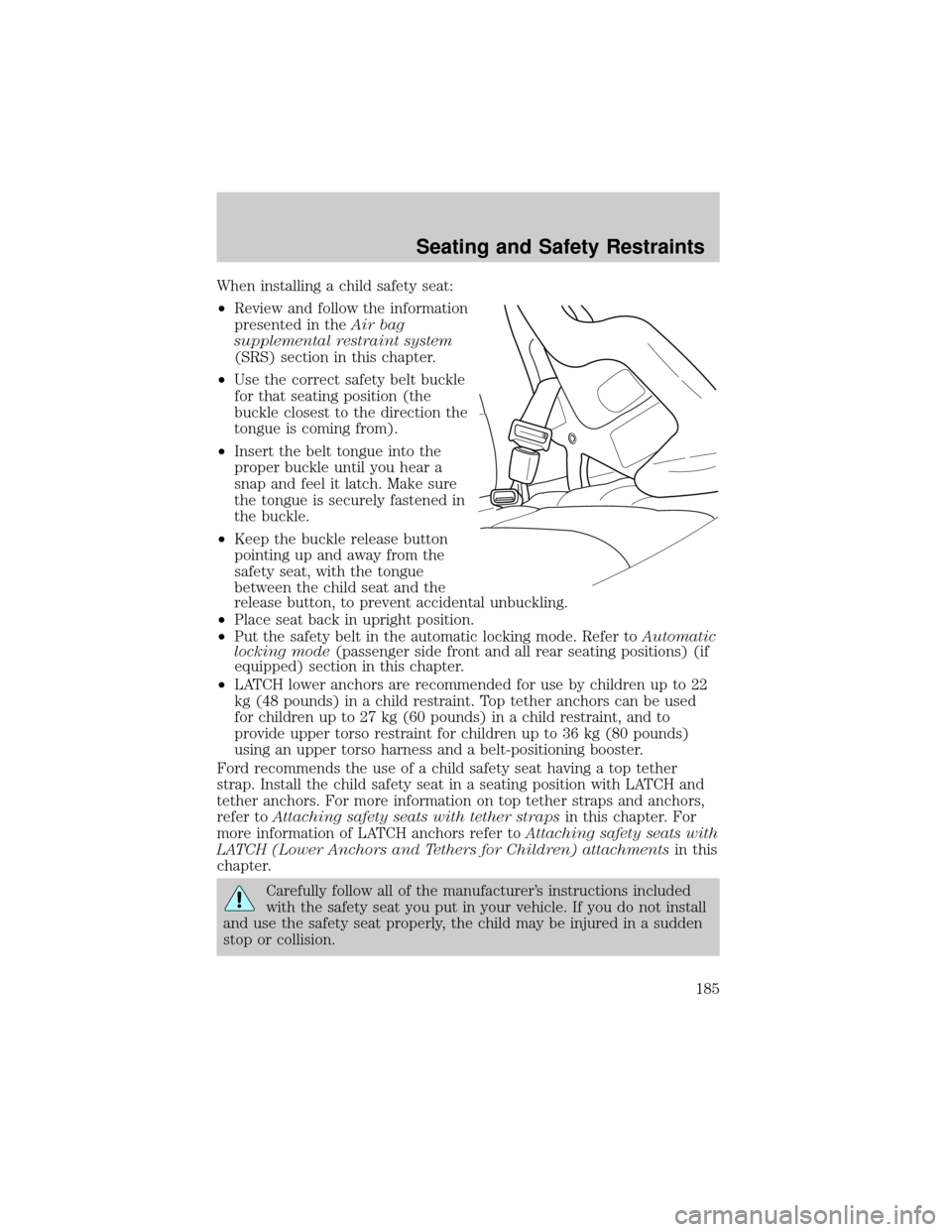
When installing a child safety seat:
²Review and follow the information
presented in theAir bag
supplemental restraint system
(SRS) section in this chapter.
²Use the correct safety belt buckle
for that seating position (the
buckle closest to the direction the
tongue is coming from).
²Insert the belt tongue into the
proper buckle until you hear a
snap and feel it latch. Make sure
the tongue is securely fastened in
the buckle.
²Keep the buckle release button
pointing up and away from the
safety seat, with the tongue
between the child seat and the
release button, to prevent accidental unbuckling.
²Place seat back in upright position.
²Put the safety belt in the automatic locking mode. Refer toAutomatic
locking mode(passenger side front and all rear seating positions) (if
equipped) section in this chapter.
²LATCH lower anchors are recommended for use by children up to 22
kg (48 pounds) in a child restraint. Top tether anchors can be used
for children up to 27 kg (60 pounds) in a child restraint, and to
provide upper torso restraint for children up to 36 kg (80 pounds)
using an upper torso harness and a belt-positioning booster.
Ford recommends the use of a child safety seat having a top tether
strap. Install the child safety seat in a seating position with LATCH and
tether anchors. For more information on top tether straps and anchors,
refer toAttaching safety seats with tether strapsin this chapter. For
more information of LATCH anchors refer toAttaching safety seats with
LATCH (Lower Anchors and Tethers for Children) attachmentsin this
chapter.
Carefully follow all of the manufacturer's instructions included
with the safety seat you put in your vehicle. If you do not install
and use the safety seat properly, the child may be injured in a sudden
stop or collision.
Seating and Safety Restraints
185
Page 208 of 336

D (Drive) without Overdrive
D (Drive) with Overdrive can be
deactivated by pressing the
transmission control switch on the
side of the gearshift lever.
²This position allows for all forward gears except overdrive.
²O/D OFF lamp is illuminated.
²Provides engine braking.
²Use when driving conditions cause excessive shifting from O/D to
other gears. Examples: city traffic, hilly terrain, heavy loads, trailer
towing and when engine braking is required.
²To return to O/D (overdrive mode), press the transmission control
switch. The O/D OFF lamp will not be illuminated.
²O/D (Overdrive) is automatically returned each time the key is turned
off.
3 (Third)
Transmission operates in third gear only.
Used for improved traction on slippery roads. Selecting 3 (Third)
provides engine braking.
2 (Second)
Use 2 (Second) to start-up on slippery roads or to provide additional
engine braking on downgrades.
1 (First)
²Provides maximum engine braking.
²Allows upshifts by moving gearshift lever.
²Will not downshift into 1 (First) at high speeds; allows for 1 (First)
when vehicle reaches slower speeds.
Driving
208
Page 211 of 336

ALL WHEEL DRIVE (AWD) SYSTEM (IF EQUIPPED)
Your vehicle may be equipped with an All Wheel Drive (AWD) transfer
case. With the AWD option, power is supplied to all four wheels
automatically with no need to shift between two-wheel drive and
four-wheel drive. If your vehicle is equipped with the AdvanceTracy
stability enhancement feature, you can change AWD modes, if desired,
by selecting AWD options through the message center.
For the lubricant specification and refill capacity of the AWD transfer
case refer toMaintenance and specificationschapter.
If your vehicle is equipped with AWD, a spare tire of a different
diameter than the road tires should never be used. Such a tire
could make the vehicle difficult to control as well as result in damage
to driveline components.
Utility and four-wheel drive vehicles arenotdesigned for cornering
at speeds as high as passenger cars any more than low-slung sports
cars are designed to perform satisfactorily under off-road conditions.
Avoid sharp turns or abrupt maneuvers in these vehicles.
The following sections,Normal operation,Autolock operationand
Disabling AWD, apply only to vehicles which allow the driver to change
AWD modes through the message center.
Normal operation (vehicles equipped with AdvanceTracYonly)
During normal operation:
²the AWD system is in AWD AUTO mode (AWD LOCKED will
illuminate in the message center for four seconds when you first start
your vehicle). The AWD LOCKED indicator in the instrument cluster
will also come on.
²AWD AUTO mode can be overridden by pressing SETUP in the
message center. When you first press SETUP, AWD
displayed, then if you press RESET within four seconds of pressing
SETUP, AWD
power to all four wheels constantly which allows you to operate your
vehicle in severe winter or off-road conditions such as deep snow, ice
or shallow sand. It is not recommended that you use AWD
on dry pavement.
²AWD
center. (The AWD LOCKED display in the message center will then
turn off and the display will return to AWD
when the shift is complete.)
Driving
211
Page 212 of 336

Autolock operation (vehicles equipped with AdvanceTracYonly)
If the AWD system begins to overheat, the system will place itself in the
Autolock mode:
²the AWD LOCKED indicator light will illuminate in the instrument
cluster and AWD DISABLED
message center.
²AWD LOCKED will be displayed in the message center for four
seconds and a warning chime will sound. This condition may clear
without any action being taken by the driver.
²the AWD LOCKED indicator light in the instrument cluster will turn
off when the AWD system cools down.
²When the system is sufficiently cooled down, AWD AUTO RESTORED
will appear in the message center for four seconds and a warning
chime will sound.
Disabling AWD (vehicles equipped with AdvanceTracYonly)
When a problem is detected in the AWD system:
²the AWD LOCKED indicator light in the instrument cluster will flash
eight times every two minutes in the message center.
²The message center will then display AWD DISABLED for four
seconds, then SEE OWNER'S MANUAL. A warning chime will also
sound. The warning displays and chime will continue until RESET is
pressed (which will clear the message from the display).
²AWD LOCKED can still be engaged by pressing SETUP (the message
center will display AWD
RESET. The AWD LOCKED indicator light will illuminate in the
instrument cluster and the message center will display AWD
DISABLED
²To disable AWD, press RESET. The system will go back to AWD AUTO
mode momentarily, then the AWD LOCKED indicator light will flash in
the instrument cluster eight times every two minutes. The display will
then show AWD
turn off.
²If a serious problem occurs with the AWD system, the AWD LOCKED
indicator light in the instrument cluster will flash 10 times every two
minutes. The message center will also display CHECK AWD and a
warning chime will sound. You can press SETUP to check the status of
the AWD system (which will display AWD
but the AWD system will be disabled until the system is serviced.
Driving
212
Page 253 of 336

3. Connect the negative (-) cable to the negative (-) terminal of the
assisting battery.
4. Make the final connection of the negative (-) cable to the exposed
ground metal surface accessible on the side of the power steering pump
reservoir bracket, facing the battery.Do notuse fuel lines, engine rocker
covers or the intake manifold asgroundingpoints.
Do not connect the end of the second cable to the negative (-)
terminal of the battery to be jumped. A spark may cause an
explosion of the gases that surround the battery.
5. Ensure that the cables are clear of fan blades, belts, moving parts of
both engines, or any fuel delivery system parts.
Jump starting
1. Start the engine of the booster vehicle and run the engine at
moderately increased speed.
2. Start the engine of the disabled vehicle.
+–+–
Roadside Emergencies
253
Page 261 of 336

from Ford and Lincoln Mercury dealership management, recognized for
their business leadership qualities.
What the Board needs
To have your case reviewed you must complete the application in the
DSB brochure and mail it to the address provided on the application
form. Some states will require you to use certified mail, with return
receipt requested.
Your application is reviewed and, if it is determined to be eligible, you
will receive an acknowledgment indicating:
²The file number assigned to your application.
²The toll-free phone number of the DSB's independent administrator.
Your dealership and a Ford Motor Company representative will then be
asked to submit statements.
To properly review your case, the Board needs the following information:
²Legible copies of all documents and maintenance or repair orders
relevant to the case.
²The year, make, model, and Vehicle Identification Number (VIN) listed
on your vehicle ownership license.
²The date of repair(s) and mileage at the time of occurrence(s).
²The current mileage.
²The name of the dealer(s) who sold or serviced the vehicle.
²A brief description of your unresolved concern.
²A brief summary of the action taken by the dealer(s) and Ford Motor
Company.
²The names (if known) of all the people you contacted at the
dealership(s).
²A description of the action you expect to resolve your concern.
You will receive a letter of explanation if your application does not
qualify for Board review.
Oral presentations
If you would like to make an oral presentation, indicate YES to question
6 on the application. While it is your right to make an oral presentation
before the Board, this is not a requirement and the Board will decide the
case whether or not an oral presentation is made. An oral presentation
may be requested by the Board as well.
Customer Assistance
261