Page 202 of 296

Driving tips16
5
1
2
3
4
5
6
7
8
9
Following distance Stay at least twice as far behind the
vehicle ahead as you would when
driving your vehicle without a trailer.
This can help you avoid situations
that require heavy braking and sud-
den turns.Passing You’ll need more passing distance
up ahead when you’re towing a trail-
er. And, because you’re a good deal
longer, you’ll need to go much farther
beyond the passed vehicle before
you can return to your lane.
Backing up Hold the bottom of the steering
wheel with one hand. Then, to move
the trailer to the left, just move your
hand to the left. To move the trailer to
the right, move your hand to the
right. Always back up slowly and, if
possible, have someone guide you.Making turns When you’re turning with a trailer,
make wider turns than normal. Do
this so your trailer won’t strike soft
shoulders, curbs, road signs, trees,
or other objects. Avoid jerky or sud-
den maneuvers. Signal well in
advance.
Turn signals when towing a trailer When you tow a trailer, your vehicle
has to have a different turn signal
flasher and extra wiring. The green
arrows on your instrument panel will
flash whenever you signal a turn or
lane change. Properly connected,
the trailer lights will also flash to alert
other drivers you’re about to turn,
change lanes, or stop.
When towing a trailer, the green
arrows on your instrument panel will
flash for turns even if the bulbs on
the trailer are burned out. Thus, you
may think drivers behind you are
seeing your signals when, in fact,
they are not. It’s important to check
occasionally to be sure the trailer
bulbs are still working. You must also
check the lights every time you dis-
connect and then reconnect the
wires.
Opirus CAN 5-1.qxd 7/8/03 2:21 PM Page 16
Page 211 of 296

525
Driving tips
1
2
3
4
5
6
7
8
9
6. Return to the vehicle and firmlypress and release the pro-
grammed HomeLink button up to
three times. The rolling code
equipped device should now rec-
ognize the HomeLink signal and
activate when the HomeLink but-
ton is pressed. The remaining two
buttons may now be programmed
if this has not previously been
done. Refer to the “Programming”
portion of this text.
Operating HomeLink To operate, simply press the pro-
grammed HomeLink button.
Activation will now occur for the
trained product (garage door, securi-
ty system, entry door lock, estate
gate, or home or office lighting). For
convenience, the hand-held trans-
mitter of the device may also be used
at any time. The HomeLink Wireless
Controls System (once programmed)
or the original hand-held transmitter
may be used to activate the device
(e.g. garage door, entry door lock,
etc.). In the event that there are still
programming difficulties, contact
HomeLink at 1-800-355-3515 or on
the internet at www.homelink.com.
Erasing programmed
HomeLink buttonsTo erase the three programmed but-
tons (individual buttons cannot be
erased):
Press and hold the left and centerbuttons simultaniously, until the
indicator light begins to flash
(approximately 20 seconds).
Release both buttons. Do not hold
for longer than 30 seconds.
HomeLink is now in the train (or
learning) mode and can be pro-
grammed at any time.
MMSA5005
Flashing
Opirus CAN 5-1.qxd 7/8/03 2:21 PM Page 25
Page 215 of 296
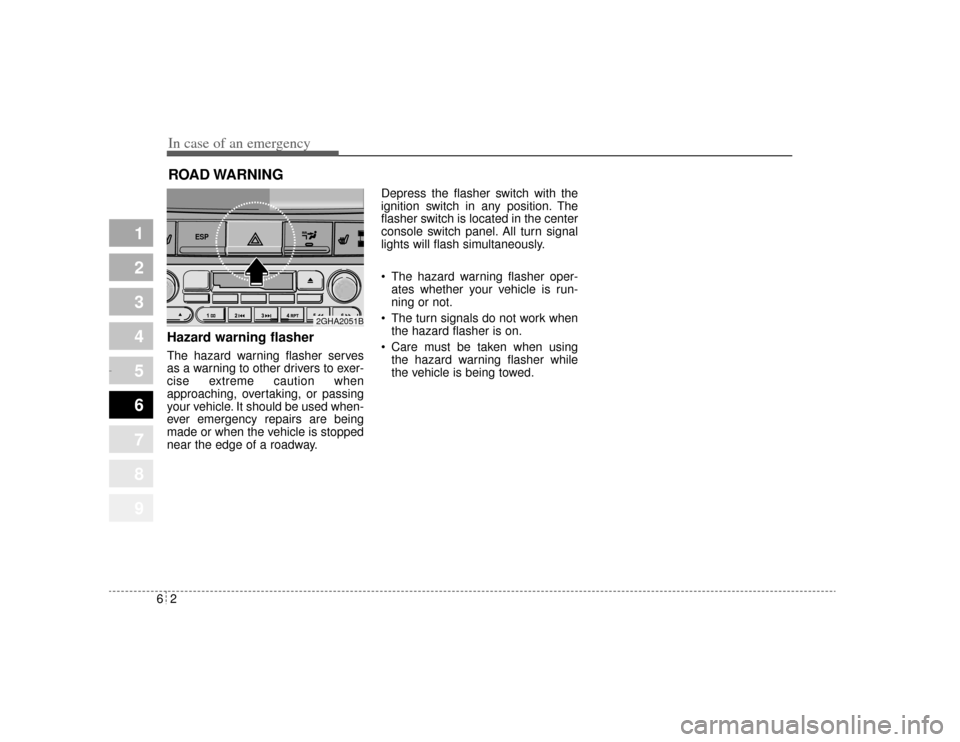
In case of an emergency26ROAD WARNING Hazard warning flasher The hazard warning flasher serves
as a warning to other drivers to exer-
cise extreme caution when
approaching, overtaking, or passing
your vehicle. It should be used when-
ever emergency repairs are being
made or when the vehicle is stopped
near the edge of a roadway.Depress the flasher switch with the
ignition switch in any position. The
flasher switch is located in the center
console switch panel. All turn signal
lights will flash simultaneously.
• The hazard warning flasher oper-
ates whether your vehicle is run-
ning or not.
The turn signals do not work when the hazard flasher is on.
Care must be taken when using the hazard warning flasher while
the vehicle is being towed.
1
2
3
4
5
6
7
8
9
ESP
2GHA2051B
Opirus CAN 6-1.qxd 7/8/03 2:22 PM Page 2
Page 226 of 296

613
In case of an emergency
1
2
3
4
5
6
7
8
9
Driver-side knee bolster
Description Fuse rating Protected component
B/ALARM10A Burglar alarm
A/BAG 15A Airbag
C/LIGHTER 20A Cigar lighter
S/WARMER 10A Seat warmer
P/WDW(RH) 20A Power window (right)
P/HANDLE 15A Power steering wheel
T/SIG LP 15A Turn signal light
HTD GLASS 30A Defroster
TRUNK OPEN 15A Trunk lid opener
CLUSTER 10A Cluster
A/BAG IND 10A Airbag indicator
P/OUTLET 20A Electrical power socket
LAN UNIT 10A Lan unit
CURTAIN(RR) 10A Electric curtain (rear)
FOG LP(RR), PIC 15A Fog light (rear), Personal identifi- cation card
F/LID OPEN 15A Fuel filler lid opener
P/SEAT(RR) 30A Power seat (rear)
B/ALARM 10A Burglar alarm
STOP LP 15A Stop light
TRIP COMPUTER 10A Trip computer
B/UP LP 10A Back-up light
AV 10A Audio
H/LP 10A Headlight
Description Fuse rating Protected component
A/CON10A Air-conditioning system
P/WDW(LH) 20A Power window (left)
TAIL LP(RH) 10A Taillight (right)
BACK WARN’ G10A Back warning
DR LP 10A Door courtesy lamp
MIRROR HTD 10A Outside review mirror defroster
ENG SNSR 10A
Power train control system sensors
T/REDUCER10A Seat belt tension reducer
CLOCK 10A Clock
WIPER(FR) 20A Wiper (front)
EPS 10A Electronic power steering
TAIL LP(LH) 10A Tail light (left)
ROOM LP 10A Room lamp
AV, CLOCK 15A Audio, Clock
LAN UNIT 10A Lan unit
SHUNT CONN - Switch illumination
POWER/CONN - Power connector
Opirus CAN 6-1.qxd 7/8/03 2:22 PM Page 13
Page 246 of 296

79
Maintenance
1
2
3
4
5
6
7
8
9
At least monthly: Check coolant level in the coolantrecovery reservoir.
Check the operation of all exterior lights, including the stoplights, turn
signals and hazard warning flash-
ers.
Check the inflation pressures of all tires including the spare.
At least twice a year
(i.e., every Spring and Fall) : Check radiator, heater and air con- ditioning hoses for leaks or da-
mage.
Check windshield washer spray and wiper operation. Clean wiper
blades with clean cloth dampened
with washer fluid.
Check headlight alignment.
Check muffler, exhaust pipes, shields and clamps.
Check the lap/shoulder belts for wear and function.
Check for worn tires and loose wheel lug nuts.
At least once a year : Clean body and door drain holes.
Lubricate door hinges and checks,and hood hinges.
Lubricate door and hood locks and latches.
Lubricate door rubber weather- strips.
Check the air conditioning system before the warm weather season.
Check the power steering fluid level.
Inspect and lubricate automatic transaxle linkage and controls.
Clean battery and terminals.
Check the brake fluid level.
Opirus CAN 7-1.qxd 7/8/03 2:25 PM Page 9
Page 278 of 296

741
Maintenance
1
2
3
4
5
6
7
8
9
BULB REPLACEMENT Use only the bulbs of the specifiedwattage.
Headlight bulb replacement ✽ ✽ NOTICEAfter heavy, driving rain or washing,
headlight and taillight lenses could
appear frosty. This condition is
caused by the temperature difference
between the lamp inside and outside.
This is similar to the condensation on
your windows inside your vehicle
during the rain and doesn’t indicate
a problem with your vehicle. If the
water leaks into the lamp bulb cir-
cuitry, have the vehicle checked by
an Authorized Kia Dealer.
WARNING
- Working on
the lights
Prior to working on the light,
firmly apply the parking brake
and ensure that the ignition
switch is turned to the “LOCK”
position to avoid sudden move-
ment of the vehicle and burning
your fingers or receiving an
electric shock.
CAUTION
If you don’ t have necessary
tools, the correct bulbs and the expertise, consult anAuthorized Kia Dealer. In manycases, it is difficult to replacevehicle light bulbs becauseother parts of the vehicle mustbe removed before you can getthe bulb. Especially if you mustremove the front bumper toreplace the light bulbs in thefront of the vehicle. This mayresult in damage to the vehicle.
2GHN5013
➀ Headlight (High)
➁ Headlight (Low)
➂ Front fog light
➃ Position light
➄ Front turn signal light
➅ Side mark light
Opirus CAN 7-1.qxd 7/8/03 2:26 PM Page 41
Page 280 of 296
743
Maintenance
1
2
3
4
5
6
7
8
9
6. Install a new headlight bulb andsnap the headlight bulb retaining
wire into position by aligning the
wire with the groove on the bulb.
7. Connect the headlight bulb socket- connector.
8. Install the headlight bulb cover by turning it clockwise.
Headlight (HID type), position
and front fog light, turn signal
light and side mark light bulb
replacementIf the light bulb is not operating, have
the vehicle checked by an authorized
Kia Dealer.
* HID : High Intensity Discharge
WARNING
- HID Headlight
low beam (if equipped)
Do not attempt to replace or
inspect the low beam (XENON
bulb) due to electric shock dan-
ger. If the low beam (XENON
bulb) is not working, have your
vehicle checked by an
Authorized Kia Dealer.
Opirus CAN 7-1.qxd 7/8/03 2:26 PM Page 43
Page 282 of 296
745
Maintenance
1
2
3
4
5
6
7
8
9
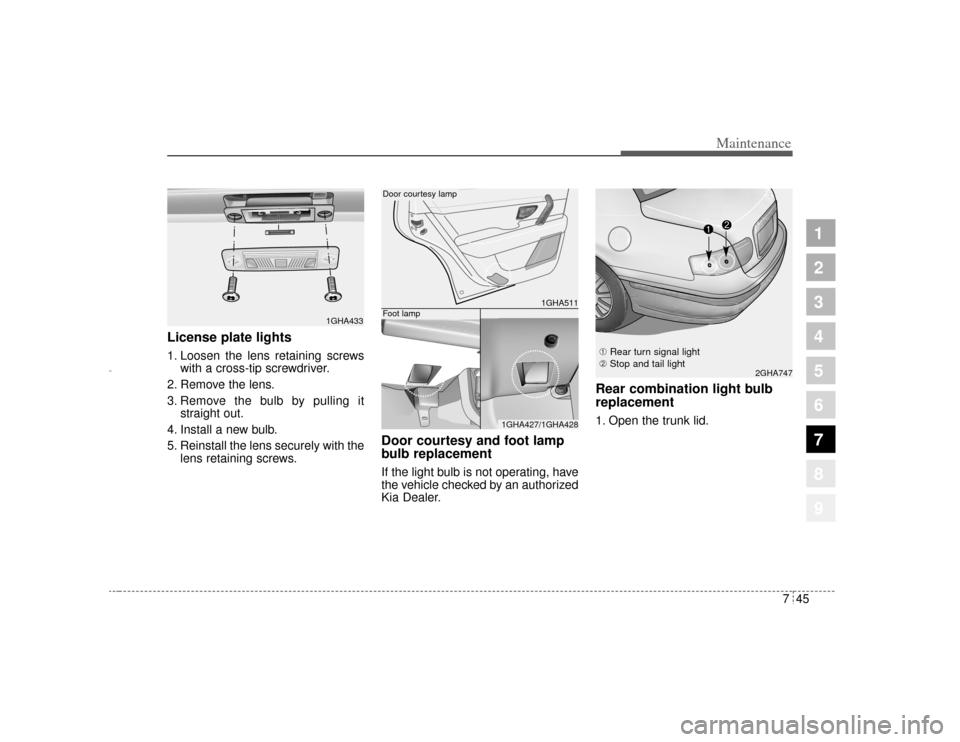
License plate lights 1. Loosen the lens retaining screwswith a cross-tip screwdriver.
2. Remove the lens.
3. Remove the bulb by pulling it straight out.
4. Install a new bulb.
5. Reinstall the lens securely with the lens retaining screws.
Door courtesy and foot lamp
bulb replacementIf the light bulb is not operating, have
the vehicle checked by an authorized
Kia Dealer.
Rear combination light bulb
replacement1. Open the trunk lid.
2GHA747
1GHA433
1GHA511
1GHA427/1GHA428
Door courtesy lampFoot lamp
➀ Rear turn signal light
➁ Stop and tail light
Opirus CAN 7-1.qxd 7/8/03 2:26 PM Page 45