2004 JEEP LIBERTY ad blue
[x] Cancel search: ad bluePage 79 of 374

phone's audio is transmitted through your vehicle's
stereo system; the system will automatically mute your
radio before receiving or sending a call.
UConnectŸ allows you to transfer calls between the
system and your cellular phone as you enter or exit your
vehicle, and enables you to mute the system's micro-
phone for private conversations.
The UConnectŸ; phone book enables you to store up to
32 names and four numbers per name. This system is
driven through your BluetoothŸ Hands-Free Profile
cellular phone. UConnectŸ features BluetoothŸ technol-
ogy - the global standard that enables different electronic
devices to connect to each other without wires or a
docking station, so UConnectŸ works no matter where
you stow your cellular phone (be it your purse, pocket, or
briefcase). UConnectŸ allows up to seven cellular
phones to be linked to the system, and it is available in
English, French, or Spanish formats (as equipped).The rearview mirror contains the microphone for the
system and the control buttons that will enable you to
access the system. The diagram below shows the mirror
with the appropriate buttons. Individual button behavior
is discussed in the ªOperationº Section.
The UConnectŸ system can be used with any Hands
Free Profile certified BluetoothŸ cellular phone. If your
UNDERSTANDING THE FEATURES OF YOUR VEHICLE 79
3
Page 80 of 374

cellular phone has a different profile (i.e. headset profile),
you will not be able to use any UConnectŸ features.
The UConnectŸ system is fully integrated into your
vehicle, including your vehicle's stereo system. All voice
prompts as well as the other party's voice in a conversa-
tion will be played over your vehicle's stereo system. The
volume of the UConnectŸ system can be controlled
through your normal stereo controls.
The radio display will be used for visual prompts from
the UConnectŸ system such as caller ID.
Operation
Voice commands can be used in the operation of the
UConnectŸ system and to navigate through the UCon-
nectŸ menu structure. Voice commands should be given
after each UConnectŸ system prompt. You will be
prompted for a specific command and then guided
through the available options. There are two ways to give
commands to the UConnectŸ system:
²You can say9Dial9at the9Ready9prompt. When
prompted for the phone number you wish to dial, say
the phone number (9123 456 78909).
²Alternatively as you become familiar with the UCon-
nectŸ system, you can combine the commands and
say9Dial 123 456 78909.
Pairing a Cellular Phone to the UConnectŸ System
To begin using your UConnectŸ system, you must pair
your compatible BluetoothŸ enabled cellular phone. To
complete the registration process, you will need to refer-
ence your cellular phone owner's manual.
²Press the 'Phone' button to begin.
²After the9Ready9prompt, say9Setup Phone Pairing9.
²You will be asked to say a four-digit pin number into
the UConnectŸ system which you will later need to
enter into your cellular phone during the cellular
phone pairing process. You can enter any four-digit
80 UNDERSTANDING THE FEATURES OF YOUR VEHICLE
Page 87 of 374

If you would like to connect or disconnect the Blue-
toothŸ connection between a paired cellular phone and
the UConnectŸ system, follow the instruction described
in your cellular phone user's manual.
List Paired Cellular Phone Names
²
Press the 'Phone' button to begin.
²After the9Ready9prompt, say9Setup List Phones9and
the UConnectŸ system will play the phone names of
all paired cellular phones in order from highest prior-
ity to lowest priority.
Select a Lower Priority Paired Cellular Phone
²
Press the 'Phone' button to begin.
²After the9Ready9prompt, say9Setup Select Phone9.
²When prompted, say the phone name of the cellular
phone you wish to use, or say9List Phones9to hear a
list of all the phones that have been paired to yourUConnectŸ system. To select a phone from the list,
press the 'Voice Recognition' button and say9Select9.
²The lower priority phone will only be used for the next
phone call. After that, the UConnectŸ system will
return to using the highest priority phone in the
vehicle.
UConnectŸ System Features
Barge In - Touch Tone Phone Inputs
You can use your UConnectŸ system to access a voice
mail system, an automated service, or any other phone
number that you can dial with any phone. When calling
a number with your UConnectŸ system that normally
requires you to enter in a touch-tone sequence on your
cellular phone keypad, you can push the 'Voice Recogni-
tion' button and say the sequence you wish to enter
followed by9Send9. For example, if required to enter your
pin number, you can press the 'Voice Recognition' button
and say93746Send9, or whatever you have made your
UNDERSTANDING THE FEATURES OF YOUR VEHICLE 87
3
Page 89 of 374

Low Signal, Battery Strength, and Roam
Notification
The UConnectŸ system will provide notification to
inform you if your cellular phone is in roaming status,
has low signal strength, or has a low battery when you
are trying to place a phone call.
Dialing Using the Cellular Phone Keypad
You can dial a phone number with your cellular phone
keypad and still use the UConnectŸ system. By dialing a
number with your paired BluetoothŸ cellular phone, the
audio will be played through your vehicle's stereo sys-
tem. The UConnectŸ system will work the same as if
you dialed the number using voice recognition.
Mute/Unmute
When you mute the UConnectŸ system, you will still be
able to hear the conversation coming from the other
party, but the other party will not be able to hear you. In
order to mute the UConnectŸ system press the 'VoiceRecognition' button and say9Mute9. In order to unmute
the UConnectŸ system; press the 'Voice Recognition'
button and say9Unmute9.
Help
If you need assistance at any prompt or if you want to
know what your options are at any prompt, say9Help9.
The UConnectŸ system will play all the options at any
prompt if you ask for help.
Cancel
At any prompt, you can say9Cancel9and you will be
returned to the previous menu.
Emergency Assistance
If you are in an emergency, say9Dial Emergency9or9Call
Emergency9and the UConnectŸ system will instruct
your cellular phone to call 911.
UNDERSTANDING THE FEATURES OF YOUR VEHICLE 89
3
Page 175 of 374
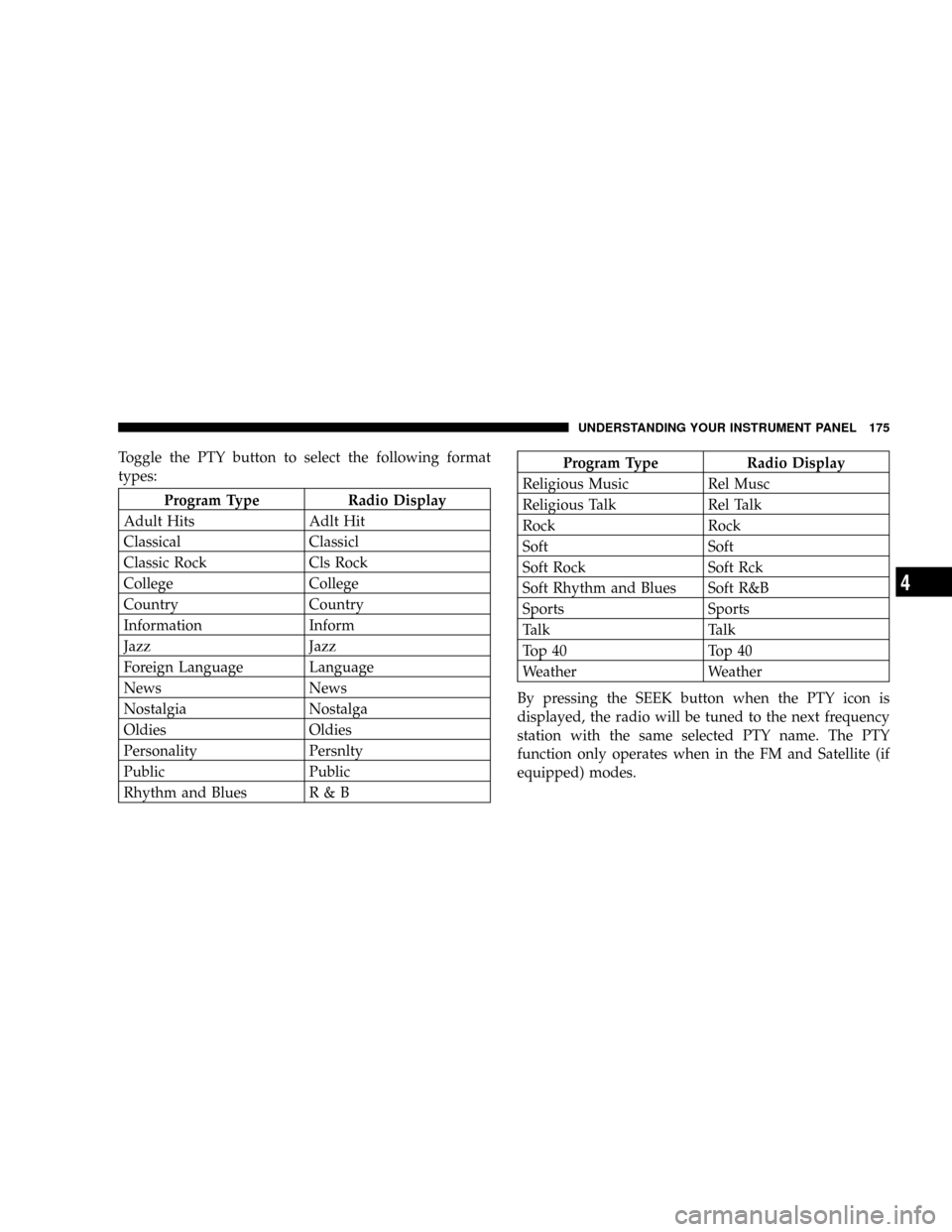
Toggle the PTY button to select the following format
types:
Program Type Radio Display
Adult Hits Adlt Hit
Classical Classicl
Classic Rock Cls Rock
College College
Country Country
Information Inform
Jazz Jazz
Foreign Language Language
News News
Nostalgia Nostalga
Oldies Oldies
Personality Persnlty
Public Public
Rhythm and Blues R & B
Program Type Radio Display
Religious Music Rel Musc
Religious Talk Rel Talk
Rock Rock
Soft Soft
Soft Rock Soft Rck
Soft Rhythm and Blues Soft R&B
Sports Sports
Talk Talk
Top 40 Top 40
Weather Weather
By pressing the SEEK button when the PTY icon is
displayed, the radio will be tuned to the next frequency
station with the same selected PTY name. The PTY
function only operates when in the FM and Satellite (if
equipped) modes.
UNDERSTANDING YOUR INSTRUMENT PANEL 175
4
Page 189 of 374
Program Type Radio Display
Information Inform
Jazz Jazz
Foreign Language Language
News News
Nostalgia Nostalga
Oldies Oldies
Personality Persnlty
Public Public
Rhythm and Blues R & B
Religious Music Rel Musc
Religious Talk Rel Talk
Rock Rock
Soft Soft
Soft Rock Soft Rck
Soft Rhythm and Blues Soft R&B
Sports SportsProgram Type Radio Display
Talk Talk
Top 40 Top 40
Weather Weather
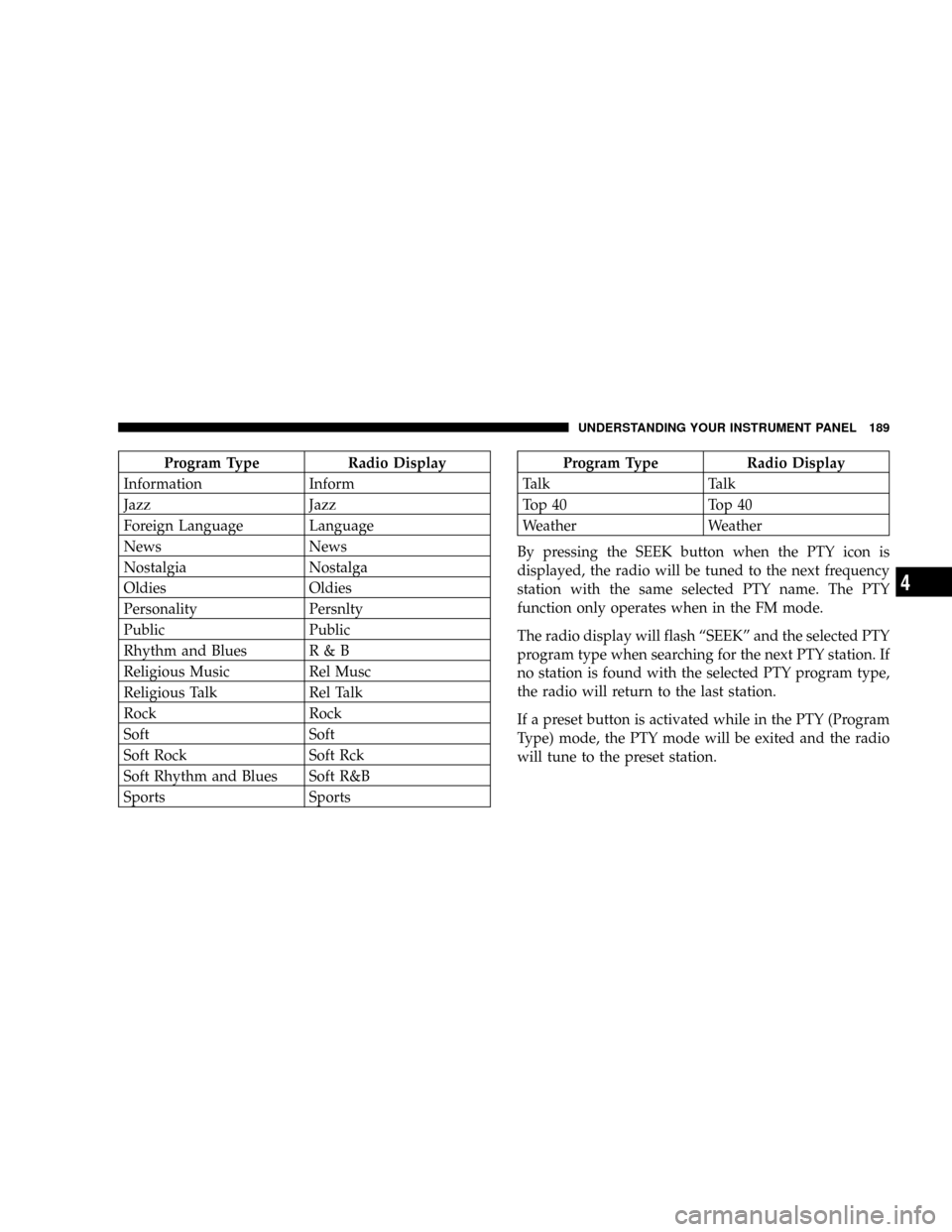
By pressing the SEEK button when the PTY icon is
displayed, the radio will be tuned to the next frequency
station with the same selected PTY name. The PTY
function only operates when in the FM mode.
The radio display will flash ªSEEKº and the selected PTY
program type when searching for the next PTY station. If
no station is found with the selected PTY program type,
the radio will return to the last station.
If a preset button is activated while in the PTY (Program
Type) mode, the PTY mode will be exited and the radio
will tune to the preset station.
UNDERSTANDING YOUR INSTRUMENT PANEL 189
4
Page 321 of 374
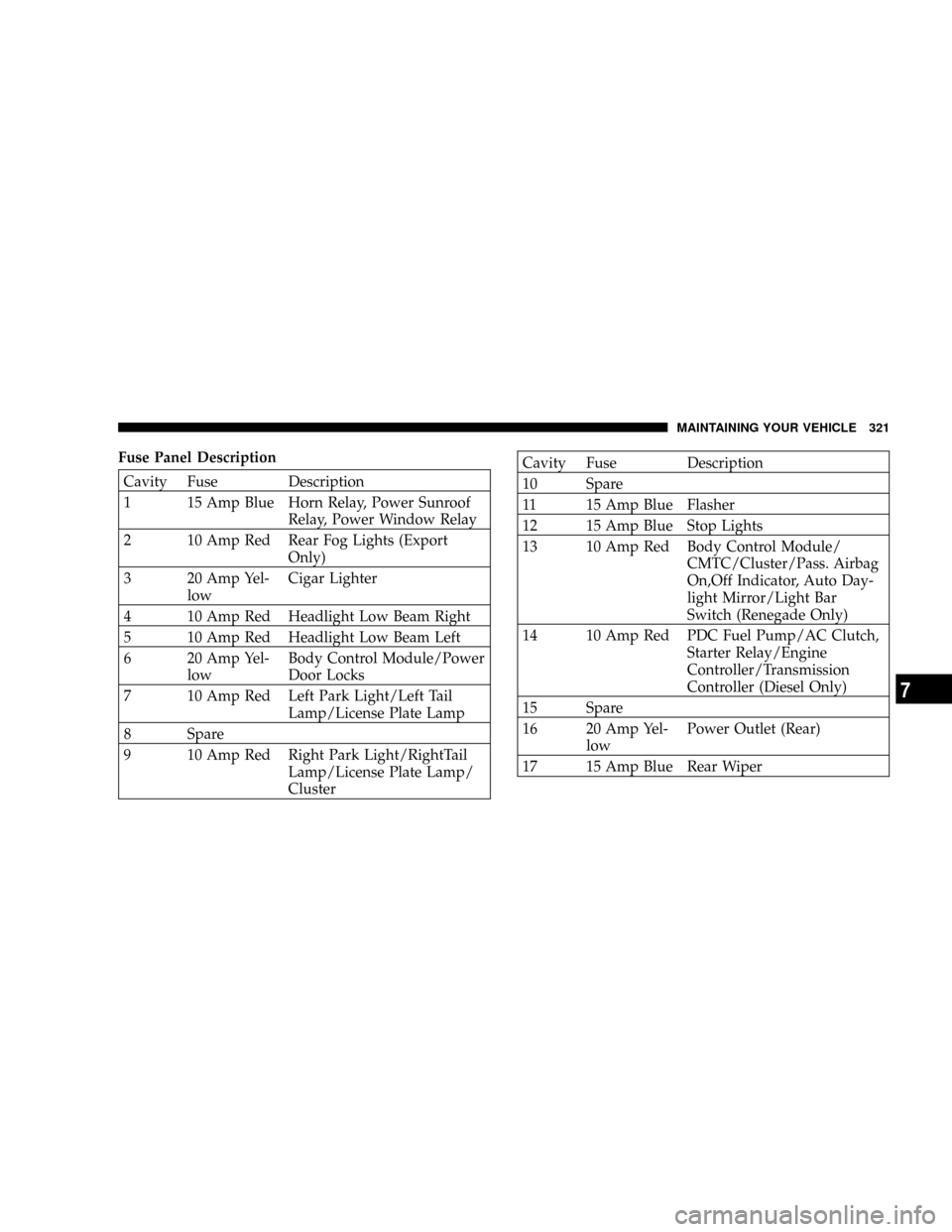
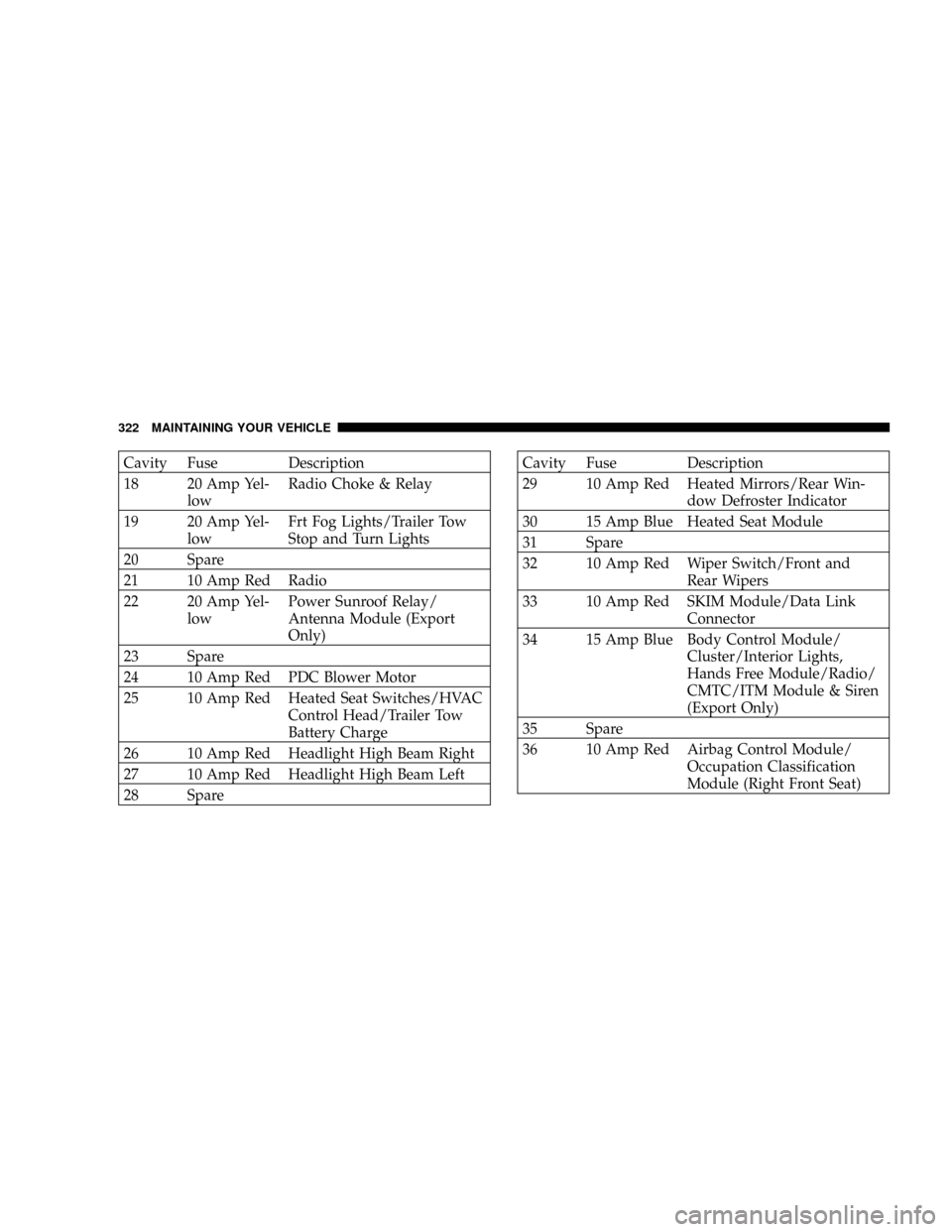
Fuse Panel Description
Cavity Fuse Description
1 15 Amp Blue Horn Relay, Power Sunroof
Relay, Power Window Relay
2 10 Amp Red Rear Fog Lights (Export
Only)
3 20 Amp Yel-
lowCigar Lighter
4 10 Amp Red Headlight Low Beam Right
5 10 Amp Red Headlight Low Beam Left
6 20 Amp Yel-
lowBody Control Module/Power
Door Locks
7 10 Amp Red Left Park Light/Left Tail
Lamp/License Plate Lamp
8 Spare
9 10 Amp Red Right Park Light/RightTail
Lamp/License Plate Lamp/
Cluster
Cavity Fuse Description
10 Spare
11 15 Amp Blue Flasher
12 15 Amp Blue Stop Lights
13 10 Amp Red Body Control Module/
CMTC/Cluster/Pass. Airbag
On,Off Indicator, Auto Day-
light Mirror/Light Bar
Switch (Renegade Only)
14 10 Amp Red PDC Fuel Pump/AC Clutch,
Starter Relay/Engine
Controller/Transmission
Controller (Diesel Only)
15 Spare
16 20 Amp Yel-
lowPower Outlet (Rear)
17 15 Amp Blue Rear Wiper
MAINTAINING YOUR VEHICLE 321
7
Page 322 of 374
Cavity Fuse Description
18 20 Amp Yel-
lowRadio Choke & Relay
19 20 Amp Yel-
lowFrt Fog Lights/Trailer Tow
Stop and Turn Lights
20 Spare
21 10 Amp Red Radio
22 20 Amp Yel-
lowPower Sunroof Relay/
Antenna Module (Export
Only)
23 Spare
24 10 Amp Red PDC Blower Motor
25 10 Amp Red Heated Seat Switches/HVAC
Control Head/Trailer Tow
Battery Charge
26 10 Amp Red Headlight High Beam Right
27 10 Amp Red Headlight High Beam Left
28 SpareCavity Fuse Description
29 10 Amp Red Heated Mirrors/Rear Win-
dow Defroster Indicator
30 15 Amp Blue Heated Seat Module
31 Spare
32 10 Amp Red Wiper Switch/Front and
Rear Wipers
33 10 Amp Red SKIM Module/Data Link
Connector
34 15 Amp Blue Body Control Module/
Cluster/Interior Lights,
Hands Free Module/Radio/
CMTC/ITM Module & Siren
(Export Only)
35 Spare
36 10 Amp Red Airbag Control Module/
Occupation Classification
Module (Right Front Seat)
322 MAINTAINING YOUR VEHICLE