2004 JAGUAR XJ Ett
[x] Cancel search: EttPage 93 of 227

4-22 On the Road
CRUISE NOT AVAILABLE Amber Adaptive cruise malfunction.
FORWARD ALERT ON (or OFF) None Forward alert feature has been switched ON or OFF. A warning will not be given
for objects detected in the vehicle path of travel if forward alert is switched OFF.
FORWARD ALERT None Forward alert feature has been switched ON or the setting changed. A warning will
be given for objects detected in the vehicle path of travel. A longer gap indicates
that the system will warn when detected objects are further away than the
previous setting.
Message
Warning
Light Priority
Indicator Meaning
Page 95 of 227

4-24 On the Road
At dawn, as light increases, the sidelights
and headlights switch OFF automatically.
Do not cover the sensor and keep the
windscreen clean. Obstructing the light in
this area of the sensor may lead to
unwanted operation of the sidelights and
headlights.
Note:If the windscreen wipers are
switched on in auto, slow or fast modes
for more than 20 seconds then the
exterior lights will be switched on,
if selected to autolamps mode. The lights
will switch off 2 minutes after the wipers
are switched off or will go off straight
away if autolamps is deselected or the
ignition is turned off.
Exit delay
When parking the car at night, if the
headlights were switched on then they
will remain on for a short period after the
key has been removed from the ignition
switch. This is to give a clearly lit area for
occupants leaving the vehicle.
If the light switch rotary collar is in the
AUTO position there will be no exit delay
and the headlights will turn off when the
light switch is turned off. Three settings on the rotary collar set the
time that the lights will remain on after
the key is removed from the ignition
switch;
•10seconds.
•30seconds.
•2minutes.
Note:
The key must not be in the ignition
switch for this feature to operate.
The message centre shows the delay
setting or when this feature is turned off.
Headlight convenience
When approaching the vehicle,
the sidelights and headlights can be
switched on by pressing the headlight
button on the re mote transmitter.
The lights will come on for 25 seconds or
can be switched off by pressing the
remote transmitte r headlight button
again. Daylight running lights
In certain countries it is a legal
requirement for the lights to be on during
the hours of daylight.
With the rotary co
llar in the OFF
position, dipped headlights, sidelights,
tail lights, number plate lights and side
marker lights will switch on automatically
with the following conditions:
• The ignition is turned to position ‘II’.
• The vehicle gear se lector out of park.
• The parkbrake is not applied (released).
Page 113 of 227

4-42 On the Road
Starting/Stopping the
Vehicle
When the vehicle is stationary the
automatic gear selector may be left in ‘D’,
‘ 2 ’, ‘ 3’, ‘ 4’ or ‘ 5’, unless the vehicle is to
be parked. When stopping for traffic
lights, junctions etc., either select ‘ P’ or
apply the parkbrake and select ‘ N’.
Before Starting
Before starting the engine, new owners/
drivers should familiarize themselves with
the layout and operation of the controls
and instruments.
!WARNING:
Before attempting to start the engine,
check parkbrake is ON and gear
selector lever is in position ‘P’ or ‘N’.
To Start the Engine
The engine cannot be started until the
gear selector is in ‘ N’ or ‘ P’.
Insert the key into the ignition switch and
turn clockwise to position ‘II’ to switch
on the ignition.
When the key is turned to position ‘III’
the starter motor will turn the engine
until:
• The key is released and automatically returns to position ‘II’.
• The ignition switch is turned to ‘0’ or ‘I’.
• The gear selector is moved out of ‘P’ or ‘N’.
• The engine starts.
If the engine fails to start, the key must be
turned to position ‘0’ before attempting
to restart.
Do not use the starter continuously for
longer than six seconds. Continued use of
the starter will disc harge the battery and
may damage the starter mechanism.
Wait until the engine stops turning before
re-using the starter.
When the engine starts, release the key. The red charge light and the oil pressure
light in the instrument cluster should go
out when the engine is running.
If the engine fails to start
If an ignition key is placed in the ignition
switch and turned to position ‘II’ and the
alarm security light is flashing, it is
possible that the engine will not start.
In any event, please contact a Jaguar
Retailer to investigate the cause of the
light flashing.
It is possible that the fuel system inertia
switch may have tripped, see page 6 - 3
for the resetting procedure.
If the engine persistent
ly fails to start and
flooding is suspected, depress the
accelerator pedal fully, hold it in this
position and turn the key to position ‘III’
for six seconds. Release the key, remove
your foot from the accelerator pedal and
then attempt to restart the engine.
Note: The engine cannot start whilst the
pedal is fully depressed, it must be
released to enable the engine to start.
If the engine still fail s to start, switch the
ignition OFF and contact a Jaguar
Retailer.
Page 116 of 227
On the Road 4 - 45
Limp-home mode
In the unlikely event of an electrical or
mechanical failure, transmission
operation will be impaired. The vehicle
gear selector ranges P, R, N, D can still be
used to enable the vehicle to be driven to
a safe area. In this event consult a Jaguar
Retailer immediately.
!WARNING:
The driver should be aware that the
vehicle’s performance will be
reduced and must take this into
account when driving.
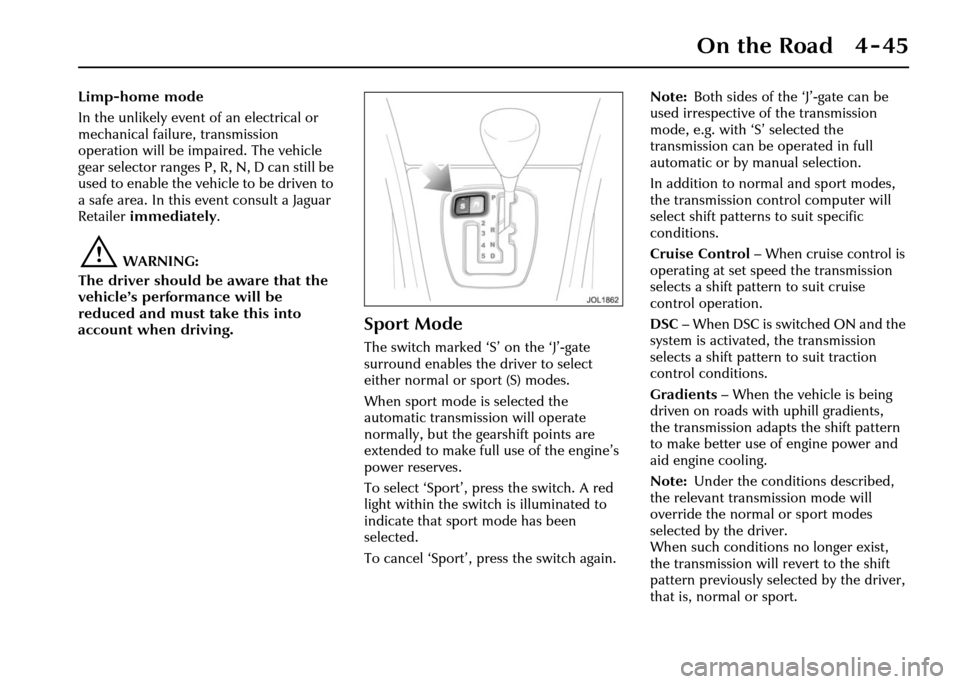
Sport Mode
The switch marked ‘S ’ on the ‘J’-gate
surround enables the driver to select
either normal or sport (S) modes.
When sport mode is selected the
automatic transmission will operate
normally, but the ge arshift points are
extended to make full use of the engine’s
power reserves.
To select ‘Sport’, press the switch. A red
light within the switch is illuminated to
indicate that sport mode has been
selected.
To cancel ‘Sport’, press the switch again. Note:
Both sides of the ‘J’-gate can be
used irrespective of the transmission
mode, e.g. with ‘S’ selected the
transmission can be operated in full
automatic or by manual selection.
In addition to norm al and sport modes,
the transmission control computer will
select shift patterns to suit specific
conditions.
Cruise Control – When cruise control is
operating at set speed the transmission
selects a shift pattern to suit cruise
control operation.
DSC – When DSC is switched ON and the
system is activated, the transmission
selects a shift pattern to suit traction
control conditions.
Gradients – When the vehicle is being
driven on roads with uphill gradients,
the transmission adapts the shift pattern
to make better use of engine power and
aid engine cooling.
Note: Under the conditions described,
the relevant transmission mode will
override the normal or sport modes
selected by the driver.
When such conditions no longer exist,
the transmission will revert to the shift
pattern previously selected by the driver,
that is, normal or sport.
Page 120 of 227

On the Road 4 - 49
Cruise (Speed) Control
The cruise (speed) control system can be
used by the driver to maintain a selected
vehicle speed above 17.5 mph (28 km/h)
without the driver having to use the
accelerator.
Switches on the steering wheel allow the
driver manual control of the system.
Brake operation also influences the cruise
control system. (
A ) – RESUME to resume the set speed
retained in memory.
( B ) – SET to set the speed or increase/
decrease the set speed when the speed
has been set.
( C ) – CANCEL cancels cruise control but
retains the set speed in memory.
Setting the Vehicle Speed
!WARNING:
Only use cruise control when
conditions are favourable,
for example, straight, dry, open roads
with light traffic.
When you are travelling at the speed you
require, which must be above 17.5 mph
(28 km/h), press the SET button.
Cruise control will engage and maintain
the set speed and you can remove your
foot from the accelerator pedal.
Note: Cruise control will automatically
disengage when the brake pedal is pressed
or when the vehicle speed falls below
16 mph (26 km/h).
Changing the Set Speed
There are three ways to change the set
speed:
1. Accelerate or decelerate to the desired speed then press the SET (+) button.
2. Increase or decrease the speed by pressing and holding either SET (+)
or (–) until the desired speed is
obtained, then release the switch.
3. Increase or decrease the speed in steps of 1 mph (2 km/h) by briefly
pressing either the SET (+) or (–) until
the desired speed is obtained.
Resuming the Set Speed
If the vehicle is accelerated above the set
speed, then the set speed will be resumed
when the accelerator pedal is released.
If CANCEL is pressed, or the brake pedal
is pressed, the cruise control will
disengage but the set speed memory will
be retained. Press RESUME and the
vehicle will return to the set speed.
Note: Cruise control will not resume at
speeds below 17.5 mph (28 km/h).
RESUME will not operate if the ignition
has been turned off.
Page 123 of 227

4-52 On the Road
• It is the drivers responsibility to stay alert, drive safely and be in control of
the vehicle at all times.
• Keep the front of the vehicle free from dirt, metal badges or objects,
including vehicle front protectors,
which may prevent the sensor from
operating.
• Do not use ACC when entering or leaving a motorway.
The system is operated by switches
mounted on the steering wheel.
The driver can also intervene at any time
by use of the brake or accelerator pedals.
The steering wheel switches operate as
follows:
(A ) – RESUME: Resume set speed.
( B )– SET+ or SET–: Setthe speed(+) or
increase (+) or decrease (–) the set speed.
( C ) – CANCEL: Cancels without erasing
memorised speed.
( D ) – Gap increase or decrease. Setting a speed
Accelerate as normal
until the required
speed is reached.
Press the SET + butto n briefly and the
vehicle speed will then be stored in the
memory and the system engaged. The set
speed will be displayed on the message
centre.
Entering the follow mode
!WARNING:
When in follow mode the vehicle will
not decelerate automatically to a
stop, nor will the vehicle always
decelerate quickly enough to avoid a
collision without driver intervention.
Once a set speed has been selected,
the driver can release the accelerator and
the set road speed will be maintained.
SETSPEED 50 MPH
Page 125 of 227

4-54 On the Road
Changing the set speed
There are three ways to change the set
speed:
1. Accelerate or brake to the required speed and press the ‘SET +’ button.
2. Increase or decrease the speed by pressing and holding either the
‘SET +’ or ‘–’ button until the required
set speed is shown on the message
centre. The vehicle speed will
gradually change to the selected
speed.
3. Increase or decrease the speed in steps of 1 mph (2 km/h) by briefly
pressing the ‘SET +’ or ‘–’ button.
ACC operates between approximately
20 mph and 110 mph (34 km/h and
180 km/h) dependent on the country
specification.
Set speeds outside this range will not be
captured.
The ACC may apply the brakes to slow
down the vehicle to the new set speed.
The new set speed will be displayed on
the message centre for four seconds after
it has been changed. Changing the gap
The gap from the vehicle ahead can be
decreased or increased by pressing the
gap setting rocker switch on the steering
wheel. Four gaps are available and the
selected gap setting will be displayed on
the message centre when the rocker
switch is pressed. After the ignition is
switched ON the default gap will be
automatically selected ready for ACC
operation.
Note:
It is the driver’s responsibility to
select a gap appropriate to the driving
conditions, and in accordance with
national driving regulations.
ACC automatic switch off
Adaptive cruise control will disengage,
but not clear the memory when:
• The CANCEL button is pressed.
• The brake pedal is pressed.
• The vehicle speed falls below 18 mph (30 km/h).
• Neutral, Park or Reverse gear positions are selected.
• The parkbrake is applied.
• DSC is activated. Adaptive cruise control will disengage,
and clear the memory when:
• The ignition switch is set to
position ‘0’.
• Maximum vehicle speed is reached.
• A fault occurs in the ACC system.
Resuming the set speed/follow mode
By pressing the RESUME button after ACC
has been cancelled, for example, after
braking, the ACC will become active
again provided that the set speed
memory has not been erased. The set
speed will be displayed for four seconds
and the original set speed will be
resumed, unless a vehicle ahead causes
the follow mode to become active.
Caution: ‘RESUME’ should only be
used if the driver is aware of the set
speed and intends to return to it.
Page 131 of 227

4-60 On the Road
Use of Headlamps In Daylight
When visibility is poor the headlamps
with dipped beam setting should be
switched on so that the vehicle may be
seen more easily by other road users.
The instrument illumination dimmer
control adjusts the brightness of the panel
lighting.
Engine Oil Consumption
A certain amount of oil consumption is
normal. The rate of consumption will
depend on the following:
• The quality and viscosity of the oil.
• The amount of oxidation and dilution of the oil.
• Climatic conditions.
• The speed at which the engine is being operated.
• Road conditions.
Drivers should expect above normal
consumption when the engine is new,
and after running-in if high speeds are
sustained.
Winter Driving
Freeing a frozen door lock
Caution: Do not ap ply a proprietary
lock de-icer through the keyhole.
Should the lock beco me frozen, warm the
end of the key before use.
Windscreen wiper blades
Before driving away, clear any ice from
the windscreen and check that the wiper
blades are free. Switching on the heated
screen will accelerate this process.
The heated wiper park, if fitted, will come
on automatically.
Frost precautions
The correct concentration of coolant
must be maintained at all times when
‘topping up’ or ‘refilling’ the cooling
system.
Parking the Vehicle
When leaving the vehicle, remember the
following:
• Whenever the vehicle is being parked, apply the parkbrake and move the
gear selector to Park ‘P’.
• Do not leave children or pets in the vehicle unattended.
• Do not leave luggage or valuables on view. Always take your valuables with
you or lock them in the luggage
compartment.
• Remove the ignition key and spare keys, even when the vehicle is in your
garage.
• When the vehicle is unoccupied, close
all windows and lock all doors
securely.
• Park the vehicle where it can be seen. At night, park in a well-lit area.
• Ensure that the keys and the key transmitters are removed from the
vehicle before locking the doors,
and that all doors, the luggage
compartment and the hood are
closed.