Page 4046 of 4449
REAR FINAL DRIVE ASSEMBLY
RFD-19
C
E
F
G
H
I
J
K
L
MA
B
RFD
Revision: 2004 November 2004 FX35/FX45
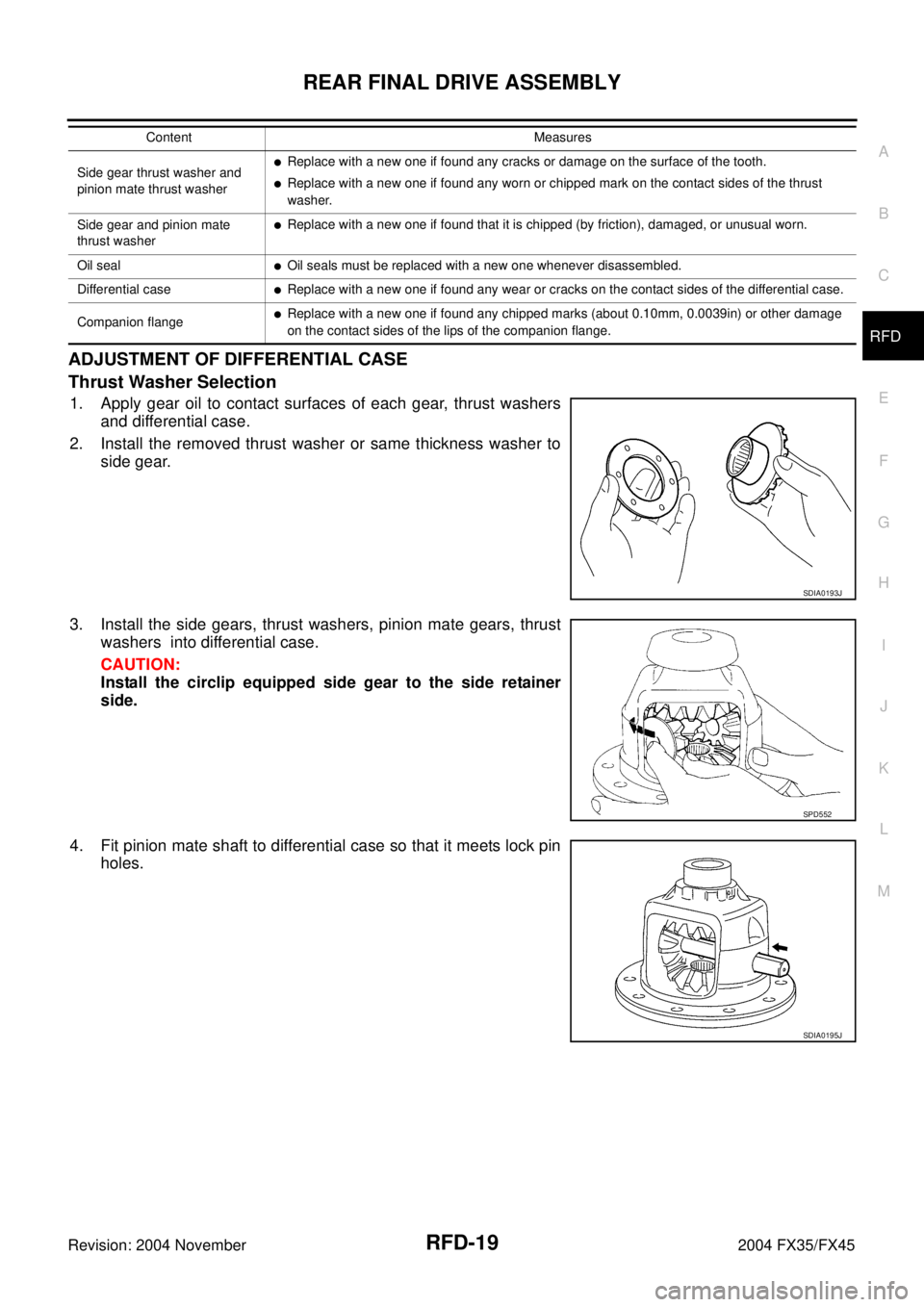
ADJUSTMENT OF DIFFERENTIAL CASE
Thrust Washer Selection
1. Apply gear oil to contact surfaces of each gear, thrust washers
and differential case.
2. Install the removed thrust washer or same thickness washer to
side gear.
3. Install the side gears, thrust washers, pinion mate gears, thrust
washers into differential case.
CAUTION:
Install the circlip equipped side gear to the side retainer
side.
4. Fit pinion mate shaft to differential case so that it meets lock pin
holes.
Side gear thrust washer and
pinion mate thrust washer�Replace with a new one if found any cracks or damage on the surface of the tooth.
�Replace with a new one if found any worn or chipped mark on the contact sides of the thrust
washer.
Side gear and pinion mate
thrust washer
�Replace with a new one if found that it is chipped (by friction), damaged, or unusual worn.
Oil seal
�Oil seals must be replaced with a new one whenever disassembled.
Differential case
�Replace with a new one if found any wear or cracks on the contact sides of the differential case.
Companion flange
�Replace with a new one if found any chipped marks (about 0.10mm, 0.0039in) or other damage
on the contact sides of the lips of the companion flange. Content Measures
SDIA0193J
SPD552
SDIA0195J
Page 4052 of 4449
REAR FINAL DRIVE ASSEMBLY
RFD-25
C
E
F
G
H
I
J
K
L
MA
B
RFD
Revision: 2004 November 2004 FX35/FX45
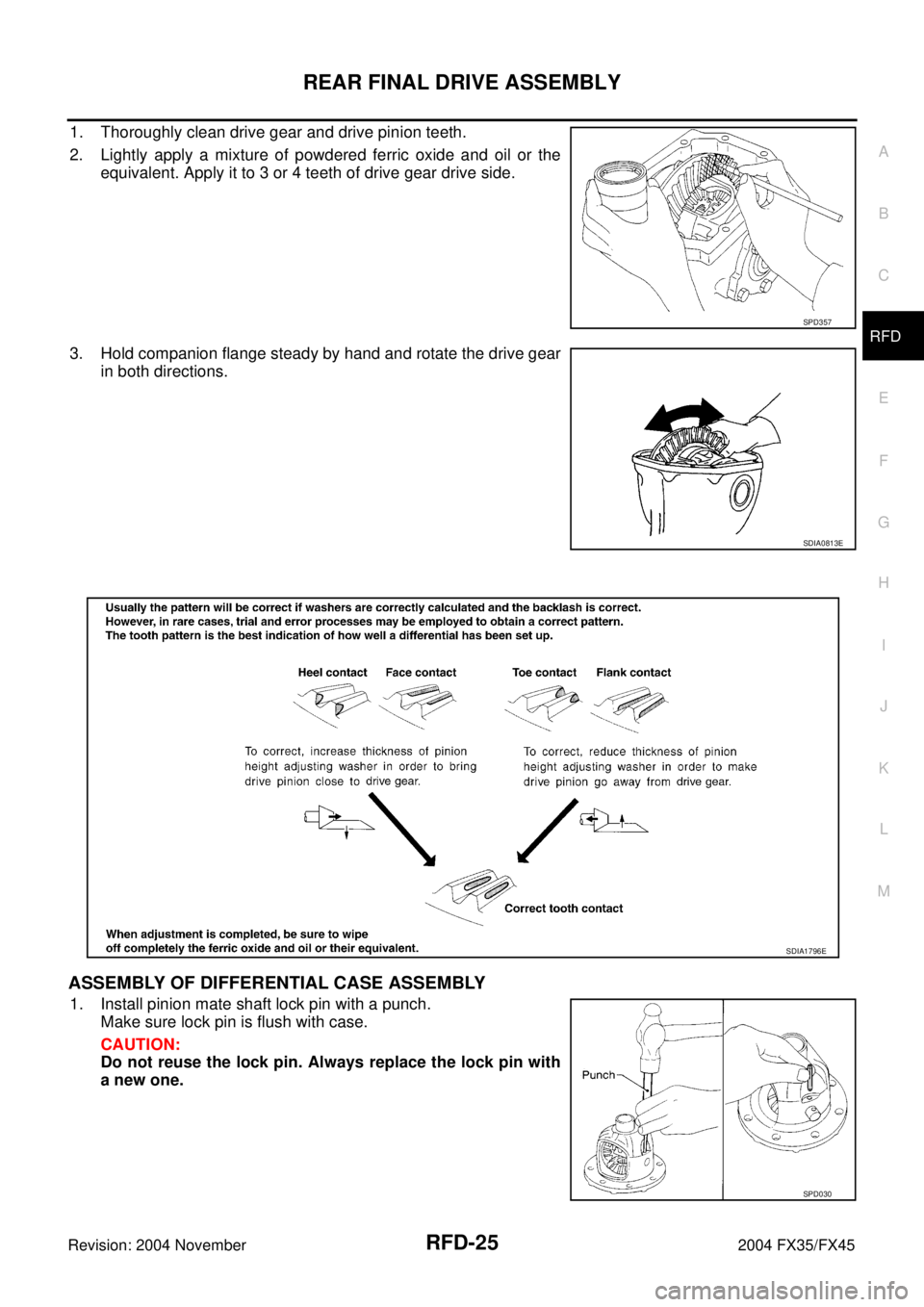
1. Thoroughly clean drive gear and drive pinion teeth.
2. Lightly apply a mixture of powdered ferric oxide and oil or the
equivalent. Apply it to 3 or 4 teeth of drive gear drive side.
3. Hold companion flange steady by hand and rotate the drive gear
in both directions.
ASSEMBLY OF DIFFERENTIAL CASE ASSEMBLY
1. Install pinion mate shaft lock pin with a punch.
Make sure lock pin is flush with case.
CAUTION:
Do not reuse the lock pin. Always replace the lock pin with
a new one.
SPD357
SDIA0813E
SDIA1796E
SPD030
Page 4063 of 4449
RSU-4
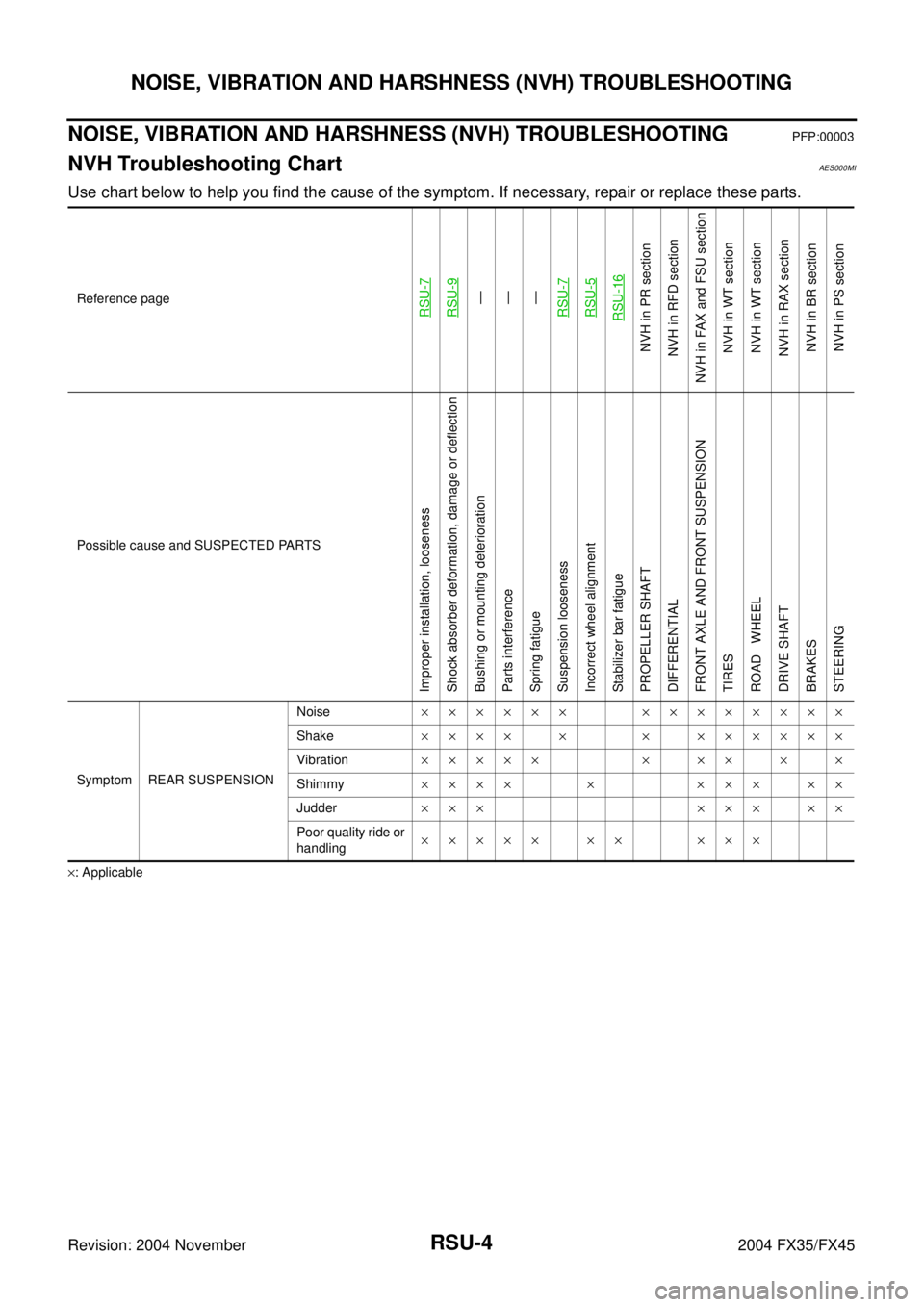
NOISE, VIBRATION AND HARSHNESS (NVH) TROUBLESHOOTING
Revision: 2004 November 2004 FX35/FX45
NOISE, VIBRATION AND HARSHNESS (NVH) TROUBLESHOOTINGPFP:00003
NVH Troubleshooting ChartAES000MI
Use chart below to help you find the cause of the symptom. If necessary, repair or replace these parts.
×: ApplicableReference page
RSU-7RSU-9—
—
—
RSU-7RSU-5RSU-16
NVH in PR section
NVH in RFD section
NVH in FAX and FSU section
NVH in WT section
NVH in WT section
NVH in RAX section
NVH in BR section
NVH in PS section
Possible cause and SUSPECTED PARTS
Improper installation, looseness
Shock absorber deformation, damage or deflection
Bushing or mounting deterioration
Parts interference
Spring fatigue
Suspension looseness
Incorrect wheel alignment
Stabilizer bar fatigue
PROPELLER SHAFT
DIFFERENTIAL
FRONT AXLE AND FRONT SUSPENSION
TIRES
ROAD WHEEL
DRIVE SHAFT
BRAKES
STEERING
Symptom REAR SUSPENSIONNoise×××××× ××××××××
Shake×××× × × ××××××
Vibration××××× × ×× × ×
Shimmy×××× × ××× ××
Judder ××× ××× ××
Poor quality ride or
handling××××× ×× ×××
Page 4067 of 4449
RSU-8
REAR SUSPENSION ASSEMBLY
Revision: 2004 November 2004 FX35/FX45
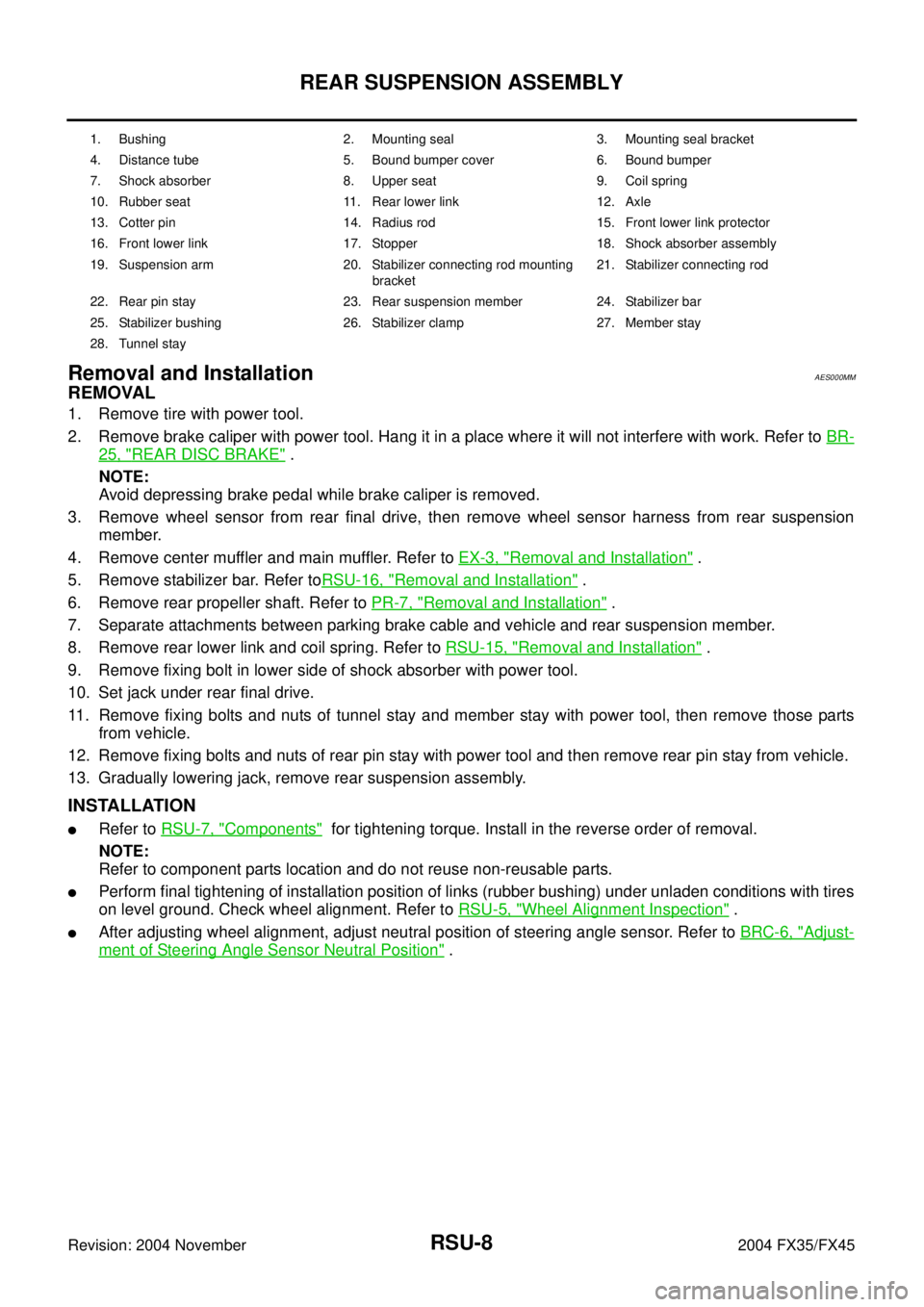
Removal and InstallationAES000MM
REMOVAL
1. Remove tire with power tool.
2. Remove brake caliper with power tool. Hang it in a place where it will not interfere with work. Refer to BR-
25, "REAR DISC BRAKE" .
NOTE:
Avoid depressing brake pedal while brake caliper is removed.
3. Remove wheel sensor from rear final drive, then remove wheel sensor harness from rear suspension
member.
4. Remove center muffler and main muffler. Refer to EX-3, "
Removal and Installation" .
5. Remove stabilizer bar. Refer toRSU-16, "
Removal and Installation" .
6. Remove rear propeller shaft. Refer to PR-7, "
Removal and Installation" .
7. Separate attachments between parking brake cable and vehicle and rear suspension member.
8. Remove rear lower link and coil spring. Refer to RSU-15, "
Removal and Installation" .
9. Remove fixing bolt in lower side of shock absorber with power tool.
10. Set jack under rear final drive.
11. Remove fixing bolts and nuts of tunnel stay and member stay with power tool, then remove those parts
from vehicle.
12. Remove fixing bolts and nuts of rear pin stay with power tool and then remove rear pin stay from vehicle.
13. Gradually lowering jack, remove rear suspension assembly.
INSTALLATION
�Refer to RSU-7, "Components" for tightening torque. Install in the reverse order of removal.
NOTE:
Refer to component parts location and do not reuse non-reusable parts.
�Perform final tightening of installation position of links (rubber bushing) under unladen conditions with tires
on level ground. Check wheel alignment. Refer to RSU-5, "
Wheel Alignment Inspection" .
�After adjusting wheel alignment, adjust neutral position of steering angle sensor. Refer to BRC-6, "Adjust-
ment of Steering Angle Sensor Neutral Position" .
1. Bushing 2. Mounting seal 3. Mounting seal bracket
4. Distance tube 5. Bound bumper cover 6. Bound bumper
7. Shock absorber 8. Upper seat 9. Coil spring
10. Rubber seat 11. Rear lower link 12. Axle
13. Cotter pin 14. Radius rod 15. Front lower link protector
16. Front lower link 17. Stopper 18. Shock absorber assembly
19. Suspension arm 20. Stabilizer connecting rod mounting
bracket21. Stabilizer connecting rod
22. Rear pin stay 23. Rear suspension member 24. Stabilizer bar
25. Stabilizer bushing 26. Stabilizer clamp 27. Member stay
28. Tunnel stay
Page 4070 of 4449
SUSPENSION ARM
RSU-11
C
D
F
G
H
I
J
K
L
MA
B
RSU
Revision: 2004 November 2004 FX35/FX45
SUSPENSION ARMPFP:55501
Removal and InstallationAES000MP
REMOVAL
1. Remove tire with power tool.
2. Remove stabilizer connecting rod mounting bracket from suspension arm with power tool.
3. Remove drive shaft from vehicle. (VK45DE models) Refer to RAX-9, "
Removal and Installation" .
4. Remove cotter pin of suspension arm ball joint, and loosen nut.
5. Use a ball joint remover (suitable tool) to remove suspension arm from axle. Be careful not to damage ball
joint boot.
CAUTION:
Tighten temporarily mounting nut to prevent damage to threads and to prevent ball joint remover
(suitable tool) from coming off.
6. Remove fixing nuts and bolts between suspension arm and rear suspension member with power tool.
7. Remove suspension arm from vehicle.
INSPECTION AFTER REMOVAL
Visual Inspection
�Check suspension arm and bushing for deformation, cracks, or damage. If any non-standard condition is
found, replace it.
�Check boot of ball joint for cracks, or damage, and also for grease leakage.
Ball Joint Inspection
Manually move ball stud to confirm it moves smoothly with no binding.
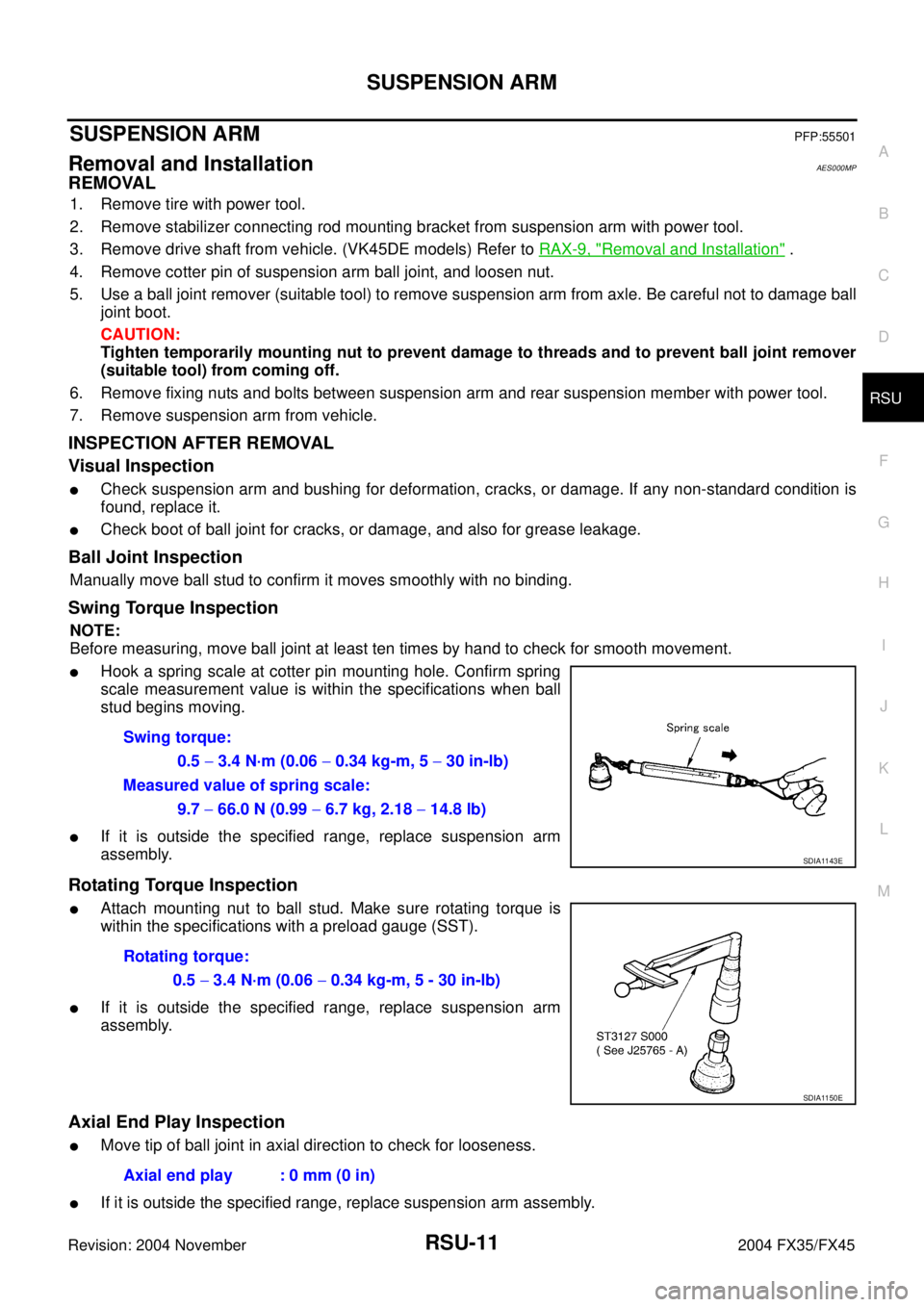
Swing Torque Inspection
NOTE:
Before measuring, move ball joint at least ten times by hand to check for smooth movement.
�Hook a spring scale at cotter pin mounting hole. Confirm spring
scale measurement value is within the specifications when ball
stud begins moving.
�If it is outside the specified range, replace suspension arm
assembly.
Rotating Torque Inspection
�Attach mounting nut to ball stud. Make sure rotating torque is
within the specifications with a preload gauge (SST).
�If it is outside the specified range, replace suspension arm
assembly.
Axial End Play Inspection
�Move tip of ball joint in axial direction to check for looseness.
�If it is outside the specified range, replace suspension arm assembly.Swing torque:
0.5 − 3.4 N·m (0.06 − 0.34 kg-m, 5 − 30 in-lb)
Measured value of spring scale:
9.7 − 66.0 N (0.99 − 6.7 kg, 2.18 − 14.8 lb)
SDIA1143E
Rotating torque:
0.5 − 3.4 N·m (0.06 − 0.34 kg-m, 5 - 30 in-lb)
SDIA1150E
Axial end play : 0 mm (0 in)
Page 4076 of 4449
REAR SUSPENSION MEMBER
RSU-17
C
D
F
G
H
I
J
K
L
MA
B
RSU
Revision: 2004 November 2004 FX35/FX45
REAR SUSPENSION MEMBERPFP:55501
Removal and InstallationAES000MU
REMOVAL
1. Remove tire with power tool.
2. Remove brake caliper with power tool. Hang it in a place where it will not interfere with work. Refer toBR-
25, "REAR DISC BRAKE" .
NOTE:
Avoid depressing brake pedal while brake caliper is removed.
3. Remove wheel sensor from rear final drive, then remove wheel sensor harness from rear suspension
member. Refer to BRC-57, "
WHEEL SENSORS" .
4. Remove center muffler and main muffler. Refer to EX-3, "
EXHAUST SYSTEM" .
5. Remove stabilizer bar. Refer to RSU-16, "
Removal and Installation" .
6. Remove rear drive shaft. Refer to RAX-9, "
REAR DRIVE SHAFT" .
7. Remove rear final drive. Refer to RFD-11, "
REAR FINAL DRIVE ASSEMBLY" .
8. Separate attachments between parking brake cable and vehicle and rear suspension member. Refer to
PB-3, "
PARKING BRAKE CONTROL" .
9. Remove rear lower link and coil spring. Refer to RSU-15, "
Removal and Installation" .
10. Remove fixing bolt in lower side of shock absorber with power tool.
11. Set jack under rear suspension member.
12. Remove fixing bolts and nuts of tunnel stay and member stay with power tool, then remove those parts
from vehicle.
13. Remove fixing bolts and nuts of rear pin stay with power tool and then remove rear pin stay from vehicle.
14. Slowly lowering jack, then remove rear suspension member, suspension arm, radius rod, front lower link
and axle from vehicle as a unit.
15. Remove fixing bolts and nuts with power tool, then remove suspension arm, front lower link, and radius
rod from rear suspension member.
INSPECTION AFTER REMOVAL
Check rear suspension member for deformation, cracks, and other damage and replace if necessary.
INSTALLATION
�Refer to RSU-7, "Components" , for tightening torque. Install in the reverse order of removal.
NOTE:
Refer to component parts location and do not reuse non-reusable parts.
�Perform final tightening of installation position of links (rubber bushing) under unladen conditions with tires
on level ground. Check wheel alignment. Refer to RSU-5, "
Wheel Alignment Inspection" .
�After adjusting wheel alignment, adjust neutral position of steering angle sensor. Refer to BRC-6, "Adjust-
ment of Steering Angle Sensor Neutral Position" .
Page 4109 of 4449
SC-20
STARTING SYSTEM
Revision: 2004 November 2004 FX35/FX45
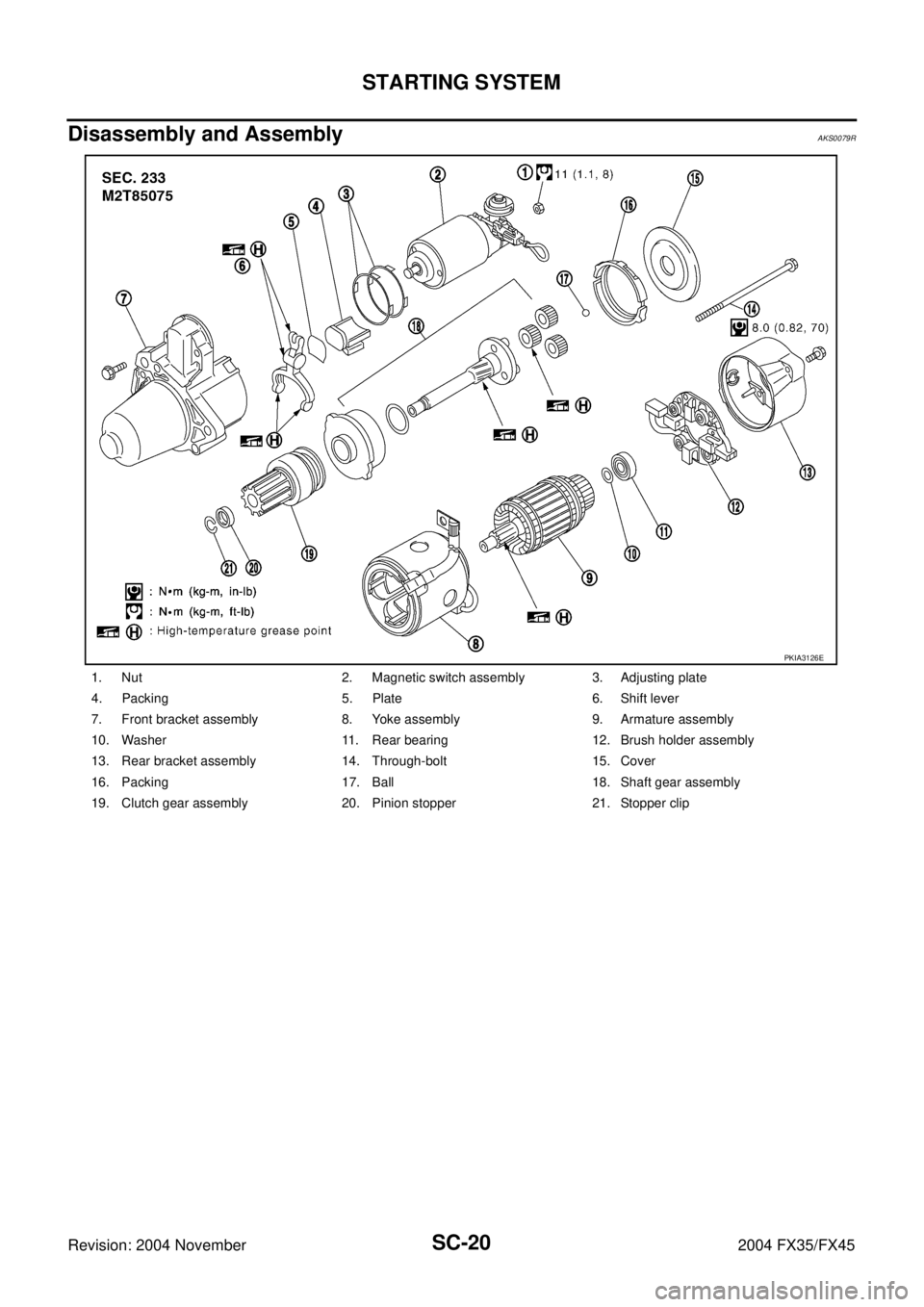
Disassembly and Assembly AKS0079R
1. Nut 2. Magnetic switch assembly 3. Adjusting plate
4. Packing 5. Plate 6. Shift lever
7. Front bracket assembly 8. Yoke assembly 9. Armature assembly
10. Washer 11. Rear bearing 12. Brush holder assembly
13. Rear bracket assembly 14. Through-bolt 15. Cover
16. Packing 17. Ball 18. Shaft gear assembly
19. Clutch gear assembly 20. Pinion stopper 21. Stopper clip
PKIA3126E
Page 4110 of 4449
STARTING SYSTEM
SC-21
C
D
E
F
G
H
I
J
L
MA
B
SC
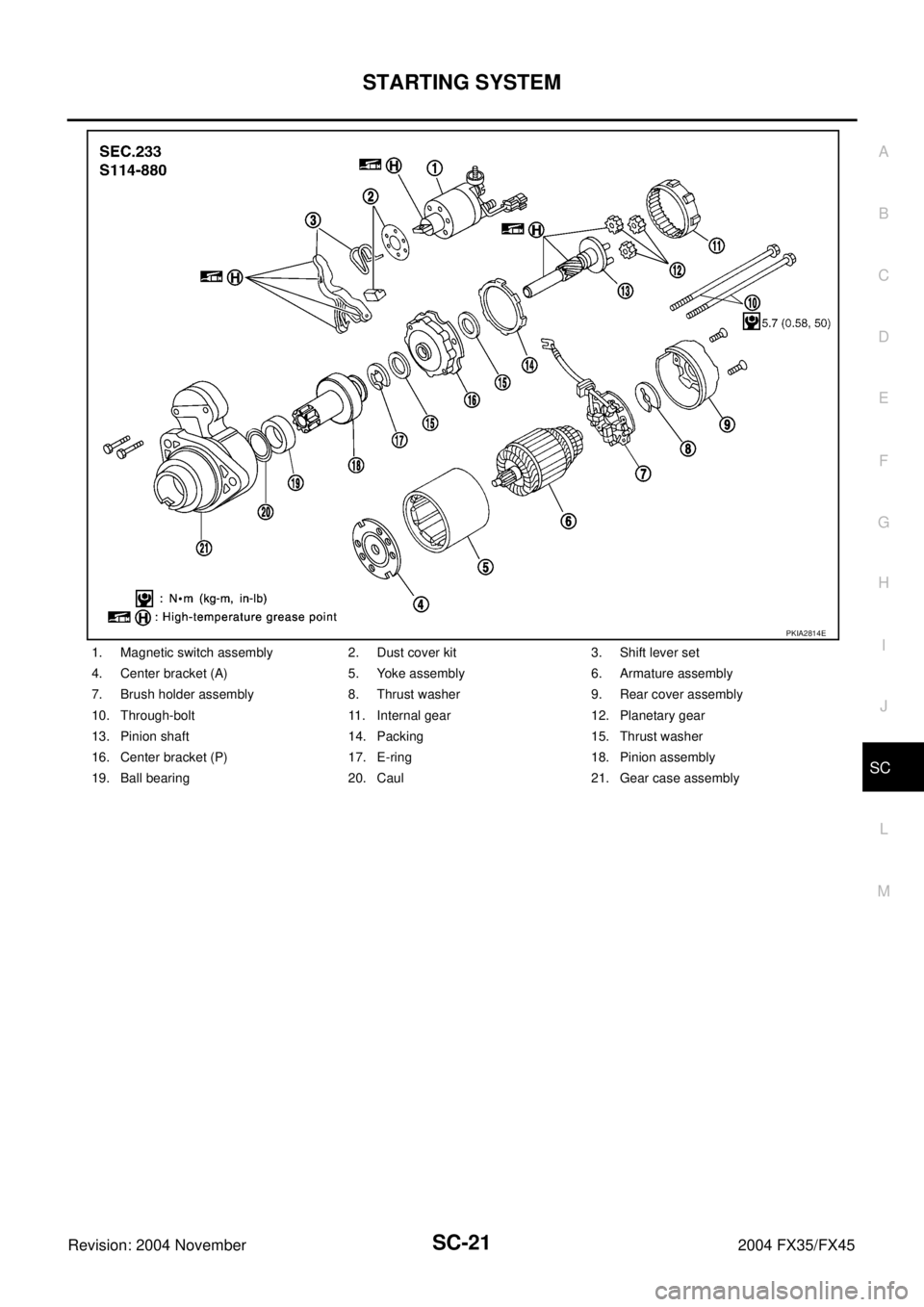
Revision: 2004 November 2004 FX35/FX45
1. Magnetic switch assembly 2. Dust cover kit 3. Shift lever set
4. Center bracket (A) 5. Yoke assembly 6. Armature assembly
7. Brush holder assembly 8. Thrust washer 9. Rear cover assembly
10. Through-bolt 11. Internal gear 12. Planetary gear
13. Pinion shaft 14. Packing 15. Thrust washer
16. Center bracket (P) 17. E-ring 18. Pinion assembly
19. Ball bearing 20. Caul 21. Gear case assembly
PKIA2814E