Page 3940 of 4449
NOISE, VIBRATION AND HARSHNESS (NVH) TROUBLESHOOTING
PS-7
C
D
E
F
H
I
J
K
L
MA
B
PS
Revision: 2004 November 2004 FX35/FX45
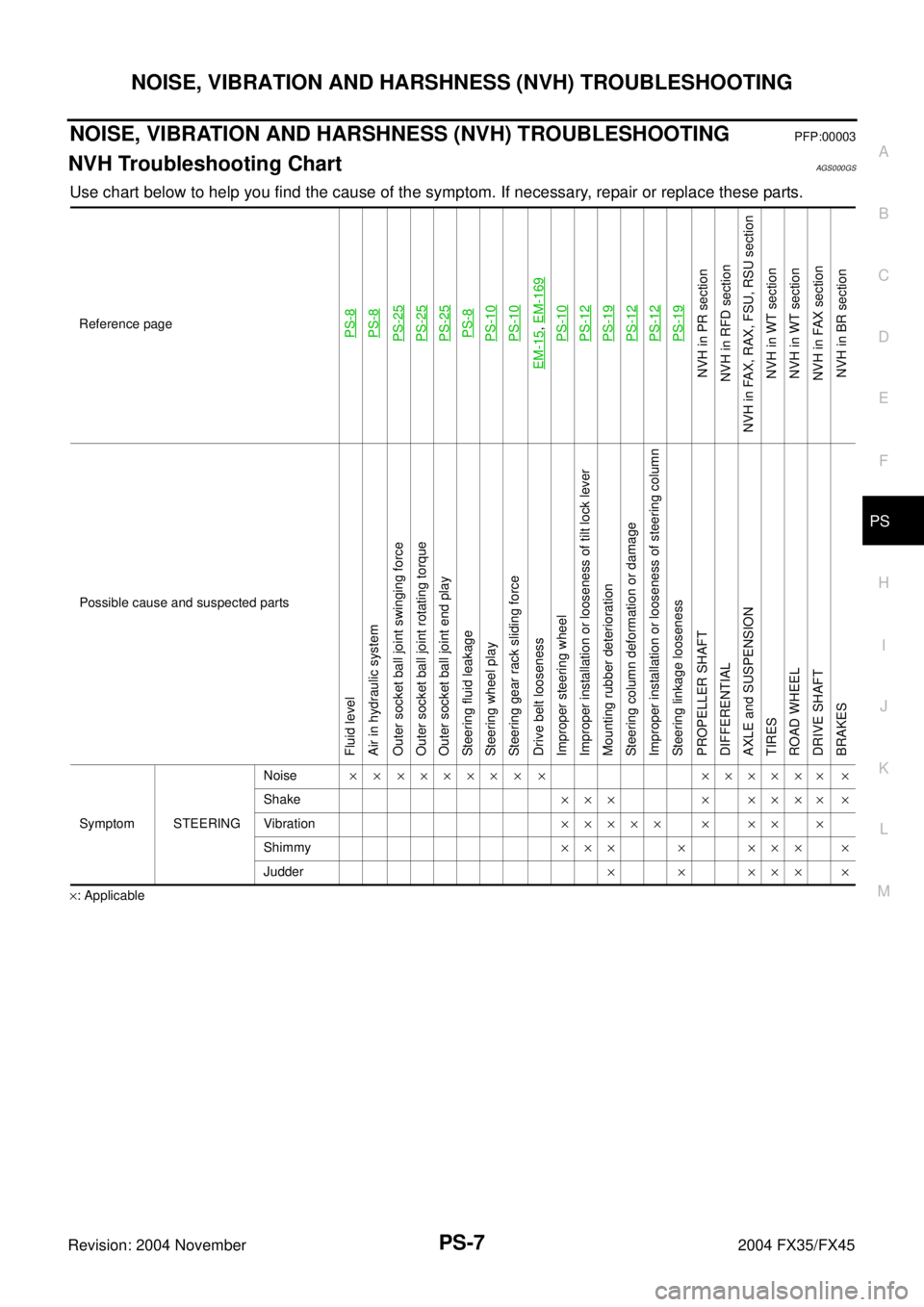
NOISE, VIBRATION AND HARSHNESS (NVH) TROUBLESHOOTINGPFP:00003
NVH Troubleshooting ChartAGS000GS
Use chart below to help you find the cause of the symptom. If necessary, repair or replace these parts.
×: ApplicableReference page
PS-8PS-8PS-25PS-25PS-25PS-8PS-10PS-10
EM-15
, EM-169PS-10PS-12PS-19PS-12PS-12PS-19
NVH in PR section
NVH in RFD section
NVH in FAX, RAX, FSU, RSU section
NVH in WT section
NVH in WT section
NVH in FAX section
NVH in BR section
Possible cause and suspected parts
Fluid level
Air in hydraulic system
Outer socket ball joint swinging force
Outer socket ball joint rotating torque
Outer socket ball joint end play
Steering fluid leakage
Steering wheel play
Steering gear rack sliding force
Drive belt looseness
Improper steering wheel
Improper installation or looseness of tilt lock lever
Mounting rubber deterioration
Steering column deformation or damage
Improper installation or looseness of steering column
Steering linkage looseness
PROPELLER SHAFT
DIFFERENTIAL
AXLE and SUSPENSION
TIRES
ROAD WHEEL
DRIVE SHAFT
BRAKES
Symptom STEERINGNoise× × ××××× × × ×××××× ×
Shake××× × ×××× ×
Vibration××××× × ×× ×
Shimmy××× × ××× ×
Judder××××××
Page 4076 of 4449
REAR SUSPENSION MEMBER
RSU-17
C
D
F
G
H
I
J
K
L
MA
B
RSU
Revision: 2004 November 2004 FX35/FX45
REAR SUSPENSION MEMBERPFP:55501
Removal and InstallationAES000MU
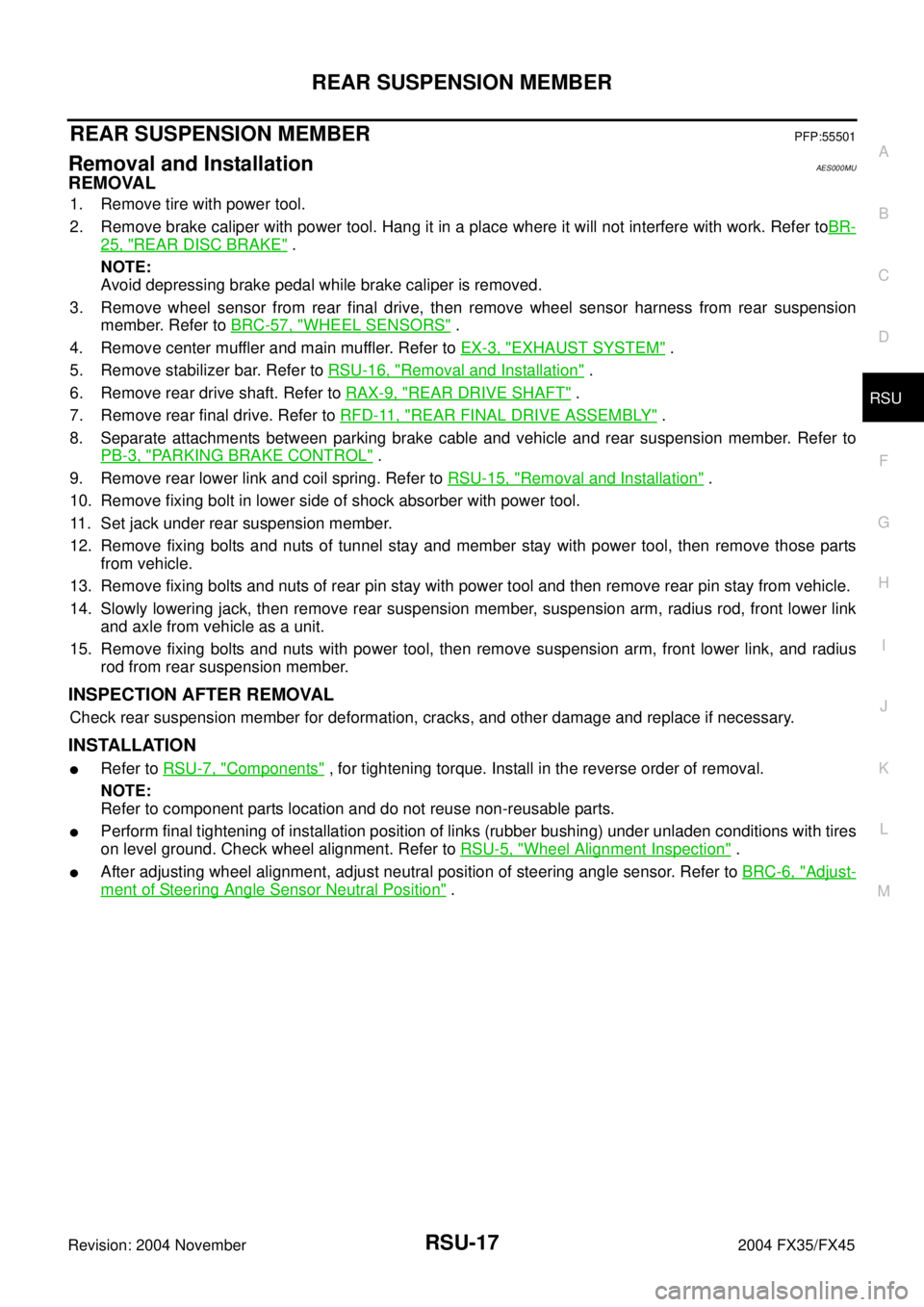
REMOVAL
1. Remove tire with power tool.
2. Remove brake caliper with power tool. Hang it in a place where it will not interfere with work. Refer toBR-
25, "REAR DISC BRAKE" .
NOTE:
Avoid depressing brake pedal while brake caliper is removed.
3. Remove wheel sensor from rear final drive, then remove wheel sensor harness from rear suspension
member. Refer to BRC-57, "
WHEEL SENSORS" .
4. Remove center muffler and main muffler. Refer to EX-3, "
EXHAUST SYSTEM" .
5. Remove stabilizer bar. Refer to RSU-16, "
Removal and Installation" .
6. Remove rear drive shaft. Refer to RAX-9, "
REAR DRIVE SHAFT" .
7. Remove rear final drive. Refer to RFD-11, "
REAR FINAL DRIVE ASSEMBLY" .
8. Separate attachments between parking brake cable and vehicle and rear suspension member. Refer to
PB-3, "
PARKING BRAKE CONTROL" .
9. Remove rear lower link and coil spring. Refer to RSU-15, "
Removal and Installation" .
10. Remove fixing bolt in lower side of shock absorber with power tool.
11. Set jack under rear suspension member.
12. Remove fixing bolts and nuts of tunnel stay and member stay with power tool, then remove those parts
from vehicle.
13. Remove fixing bolts and nuts of rear pin stay with power tool and then remove rear pin stay from vehicle.
14. Slowly lowering jack, then remove rear suspension member, suspension arm, radius rod, front lower link
and axle from vehicle as a unit.
15. Remove fixing bolts and nuts with power tool, then remove suspension arm, front lower link, and radius
rod from rear suspension member.
INSPECTION AFTER REMOVAL
Check rear suspension member for deformation, cracks, and other damage and replace if necessary.
INSTALLATION
�Refer to RSU-7, "Components" , for tightening torque. Install in the reverse order of removal.
NOTE:
Refer to component parts location and do not reuse non-reusable parts.
�Perform final tightening of installation position of links (rubber bushing) under unladen conditions with tires
on level ground. Check wheel alignment. Refer to RSU-5, "
Wheel Alignment Inspection" .
�After adjusting wheel alignment, adjust neutral position of steering angle sensor. Refer to BRC-6, "Adjust-
ment of Steering Angle Sensor Neutral Position" .
Page 4313 of 4449
TF-12
AWD SYSTEM
Revision: 2004 November 2004 FX35/FX45
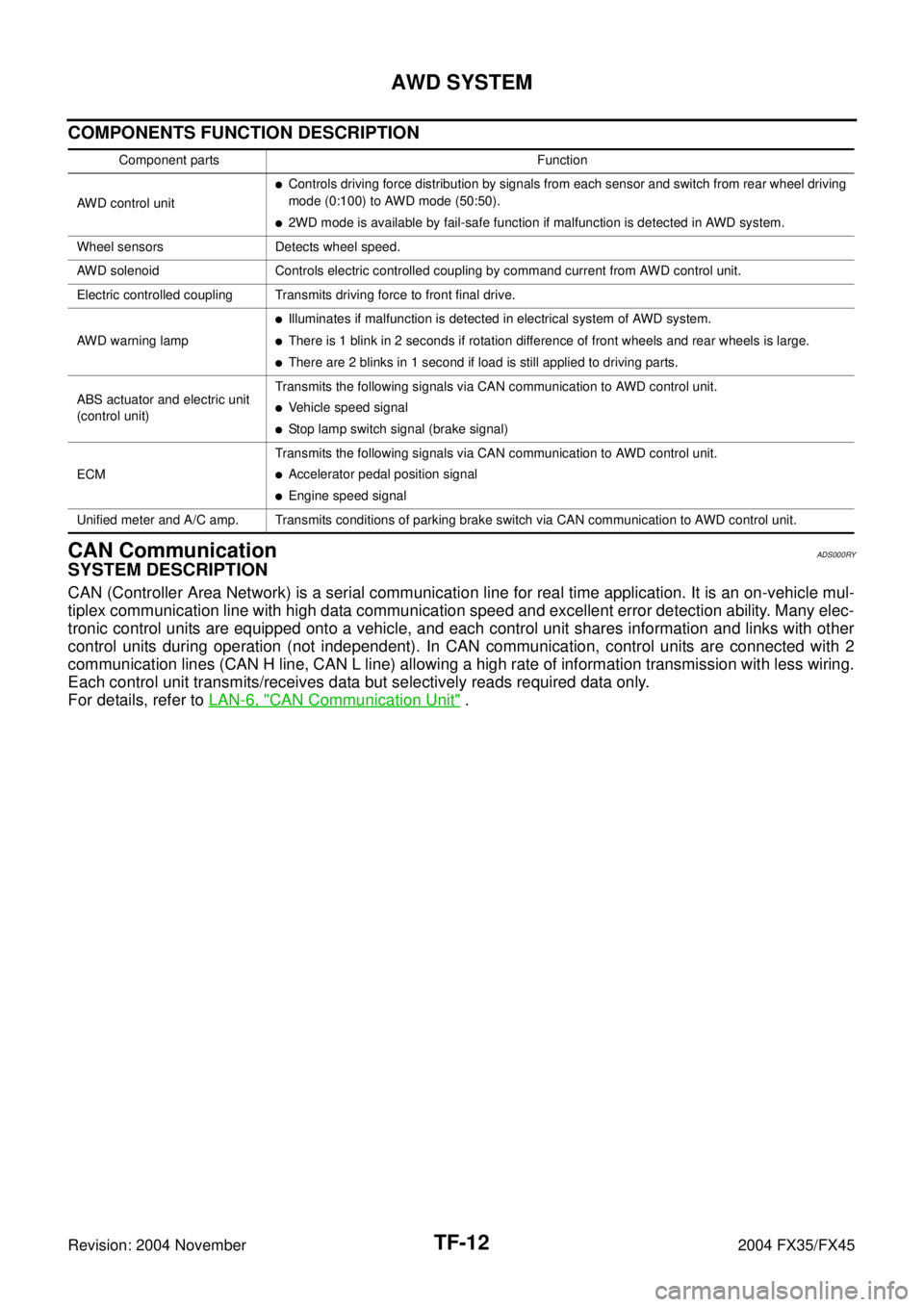
COMPONENTS FUNCTION DESCRIPTION
CAN CommunicationADS000RY
SYSTEM DESCRIPTION
CAN (Controller Area Network) is a serial communication line for real time application. It is an on-vehicle mul-
tiplex communication line with high data communication speed and excellent error detection ability. Many elec-
tronic control units are equipped onto a vehicle, and each control unit shares information and links with other
control units during operation (not independent). In CAN communication, control units are connected with 2
communication lines (CAN H line, CAN L line) allowing a high rate of information transmission with less wiring.
Each control unit transmits/receives data but selectively reads required data only.
For details, refer to LAN-6, "
CAN Communication Unit" .
Component parts Function
AWD control unit
�Controls driving force distribution by signals from each sensor and switch from rear wheel driving
mode (0:100) to AWD mode (50:50).
�2WD mode is available by fail-safe function if malfunction is detected in AWD system.
Wheel sensors Detects wheel speed.
AWD solenoid Controls electric controlled coupling by command current from AWD control unit.
Electric controlled coupling Transmits driving force to front final drive.
AWD warning lamp
�Illuminates if malfunction is detected in electrical system of AWD system.
�There is 1 blink in 2 seconds if rotation difference of front wheels and rear wheels is large.
�There are 2 blinks in 1 second if load is still applied to driving parts.
ABS actuator and electric unit
(control unit)Transmits the following signals via CAN communication to AWD control unit.
�Vehicle speed signal
�Stop lamp switch signal (brake signal)
ECMTransmits the following signals via CAN communication to AWD control unit.
�Accelerator pedal position signal
�Engine speed signal
Unified meter and A/C amp. Transmits conditions of parking brake switch via CAN communication to AWD control unit.
Page 4336 of 4449
TROUBLE DIAGNOSIS FOR SYMPTOMS
TF-35
C
E
F
G
H
I
J
K
L
MA
B
TF
Revision: 2004 November 2004 FX35/FX45
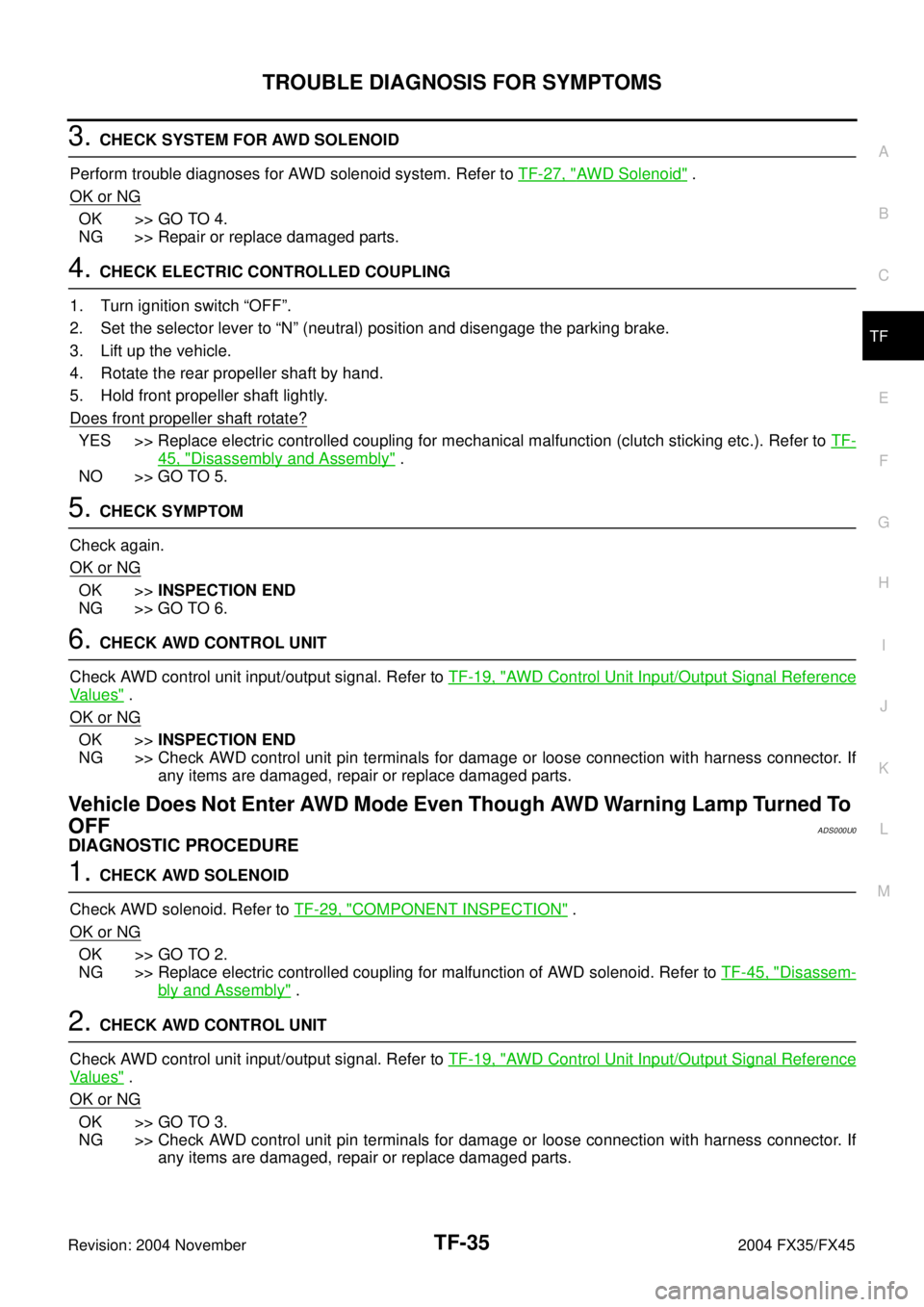
3. CHECK SYSTEM FOR AWD SOLENOID
Perform trouble diagnoses for AWD solenoid system. Refer to TF-27, "
AWD Solenoid" .
OK or NG
OK >> GO TO 4.
NG >> Repair or replace damaged parts.
4. CHECK ELECTRIC CONTROLLED COUPLING
1. Turn ignition switch “OFF”.
2. Set the selector lever to “N” (neutral) position and disengage the parking brake.
3. Lift up the vehicle.
4. Rotate the rear propeller shaft by hand.
5. Hold front propeller shaft lightly.
Does front propeller shaft rotate?
YES >> Replace electric controlled coupling for mechanical malfunction (clutch sticking etc.). Refer to TF-
45, "Disassembly and Assembly" .
NO >> GO TO 5.
5. CHECK SYMPTOM
Check again.
OK or NG
OK >>INSPECTION END
NG >> GO TO 6.
6. CHECK AWD CONTROL UNIT
Check AWD control unit input/output signal. Refer to TF-19, "
AWD Control Unit Input/Output Signal Reference
Va l u e s" .
OK or NG
OK >>INSPECTION END
NG >> Check AWD control unit pin terminals for damage or loose connection with harness connector. If
any items are damaged, repair or replace damaged parts.
Vehicle Does Not Enter AWD Mode Even Though AWD Warning Lamp Turned To
OFF
ADS000U0
DIAGNOSTIC PROCEDURE
1. CHECK AWD SOLENOID
Check AWD solenoid. Refer to TF-29, "
COMPONENT INSPECTION" .
OK or NG
OK >> GO TO 2.
NG >> Replace electric controlled coupling for malfunction of AWD solenoid. Refer to TF-45, "
Disassem-
bly and Assembly" .
2. CHECK AWD CONTROL UNIT
Check AWD control unit input/output signal. Refer to TF-19, "
AWD Control Unit Input/Output Signal Reference
Va l u e s" .
OK or NG
OK >> GO TO 3.
NG >> Check AWD control unit pin terminals for damage or loose connection with harness connector. If
any items are damaged, repair or replace damaged parts.